


In the high-stakes world of logistics and hazardous materials transport, the margin for error is non-existent. Regulatory bodies like the Department of Transportation (DOT) and international safety standards demand rigorous tracking of dangerous goods, carrier qualifications, vehicle safety, and driver certifications. When a shipment of UN1203 (Gasoline) or UN1263 (Paint) moves across state lines, the data architecture supporting that movement must be flawless. A single missing link in the compliance chain can lead to massive fines, safety hazards, or failed emergency responses. This is where visual modeling becomes not just a documentation exercise, but a critical operational necessity.
Building a relational database schema for this domain from scratch is prone to human error and inconsistency. Developers often struggle to visualize the complex cardinalities between entities like EmergencyResponsePlans, IncidentReports, and ShipmentItems. Diagramming-as-code offers a superior alternative. By using PlantUML, architects can define the entire data model in a text-based format, ensuring version consistency and clarity. This approach allows teams to instantly visualize how a Carrier relates to a Driver, how a HazardousMaterial dictates the required EmergencyResponsePlan, and how ComplianceDocuments are tied to specific shipments. VPasCode transforms this textual definition into a live, interactive diagram, enabling real-time validation of the data structure before a single line of SQL is written.
Understanding the Model: Purpose, Scope & Problem Framing
Diagram Abstraction & Representation
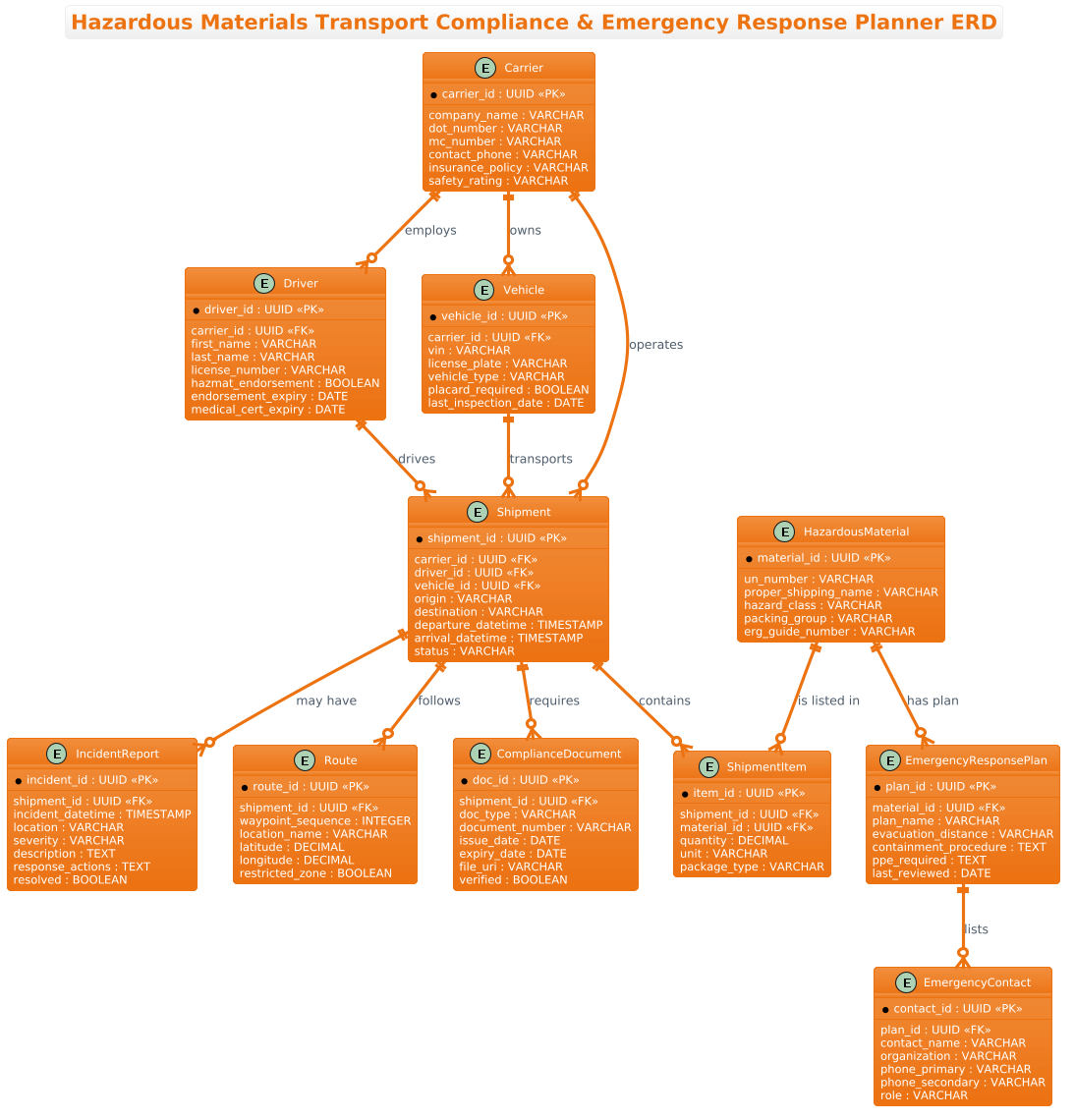
This Entity-Relationship Diagram (ERD) serves as the blueprint for a centralized logistics management system designed for hazardous materials. Unlike a standard shipping diagram, this model must enforce strict data integrity rules to satisfy regulatory compliance. The diagram abstracts the physical movement of goods into logical data entities. It maps the Carrier as the primary legal entity, linking them to Drivers and Vehicles via one-to-many relationships. Crucially, it models the HazardousMaterial as a distinct entity, ensuring that every ShipmentItem is explicitly tied to a specific UN number and hazard class. This separation allows the system to dynamically retrieve the correct EmergencyResponsePlan based on the material type, rather than hardcoding safety procedures.
Target Domain Scope & Scenario
The scope of this model covers the end-to-end lifecycle of a hazardous material shipment. It begins with the Carrier and Driver qualification (checking DOT numbers and hazmat endorsements), moves through the creation of a Shipment with specific ShipmentItems, and extends to the generation of ComplianceDocuments (manifests, permits). The diagram also explicitly includes the EmergencyResponsePlan and EmergencyContact entities, ensuring that in the event of an IncidentReport, the system can instantly pull the correct evacuation distance and containment procedures. It also tracks the Route to identify restricted zones, adding a layer of geographical compliance.
Key Takeaways & Educational Insights
By studying this model, readers will gain insight into how to structure a database for high-compliance industries. You will learn how to model many-to-many relationships (like a shipment containing multiple hazardous materials) using a junction entity (ShipmentItem). You will also see how to link safety protocols directly to data entities, ensuring that emergency response information is always context-aware. The use of UUIDs for primary keys and specific data types like BOOLEAN for flags (e.g., hazmat_endorsement) demonstrates best practices for modern schema design.
Complete Diagram & Full Source Code
@startuml
!theme aws-orange
title Hazardous Materials Transport Compliance & Emergency Response Planner ERD

/'
This ERD models the data structure required to manage hazardous materials
transportation in compliance with regulatory requirements while supporting
emergency response planning. The diagram captures the relationships between
shipments, hazardous materials, carriers, drivers, vehicles, compliance
documents, emergency contacts, response plans, and incident reports. It
addresses the need to track what dangerous goods are being moved, by whom,
in which vehicles, along which routes, and with what safety documentation
and emergency procedures in place. The central entities enable regulatory
auditing, real-time incident response coordination, and verification that
all mandatory permits, manifests, and training certifications remain valid.
The structure also supports linking specific emergency response plans to
the materials and routes involved so responders can act quickly.
'/

entity "Carrier" as carrier {
  *carrier_id : UUID <<PK>>
  --
  company_name : VARCHAR
  dot_number : VARCHAR
  mc_number : VARCHAR
  contact_phone : VARCHAR
  insurance_policy : VARCHAR
  safety_rating : VARCHAR
}

entity "Driver" as driver {
  *driver_id : UUID <<PK>>
  --
  carrier_id : UUID <<FK>>
  first_name : VARCHAR
  last_name : VARCHAR
  license_number : VARCHAR
  hazmat_endorsement : BOOLEAN
  endorsement_expiry : DATE
  medical_cert_expiry : DATE
}

entity "Vehicle" as vehicle {
  *vehicle_id : UUID <<PK>>
  --
  carrier_id : UUID <<FK>>
  vin : VARCHAR
  license_plate : VARCHAR
  vehicle_type : VARCHAR
  placard_required : BOOLEAN
  last_inspection_date : DATE
}

entity "Shipment" as shipment {
  *shipment_id : UUID <<PK>>
  --
  carrier_id : UUID <<FK>>
  driver_id : UUID <<FK>>
  vehicle_id : UUID <<FK>>
  origin : VARCHAR
  destination : VARCHAR
  departure_datetime : TIMESTAMP
  arrival_datetime : TIMESTAMP
  status : VARCHAR
}

entity "HazardousMaterial" as hazmat {
  *material_id : UUID <<PK>>
  --
  un_number : VARCHAR
  proper_shipping_name : VARCHAR
  hazard_class : VARCHAR
  packing_group : VARCHAR
  erg_guide_number : VARCHAR
}

entity "ShipmentItem" as shipment_item {
  *item_id : UUID <<PK>>
  --
  shipment_id : UUID <<FK>>
  material_id : UUID <<FK>>
  quantity : DECIMAL
  unit : VARCHAR
  package_type : VARCHAR
}

entity "ComplianceDocument" as compliance_doc {
  *doc_id : UUID <<PK>>
  --
  shipment_id : UUID <<FK>>
  doc_type : VARCHAR
  document_number : VARCHAR
  issue_date : DATE
  expiry_date : DATE
  file_uri : VARCHAR
  verified : BOOLEAN
}

entity "EmergencyResponsePlan" as erp {
  *plan_id : UUID <<PK>>
  --
  material_id : UUID <<FK>>
  plan_name : VARCHAR
  evacuation_distance : VARCHAR
  containment_procedure : TEXT
  ppe_required : TEXT
  last_reviewed : DATE
}

entity "EmergencyContact" as emergency_contact {
  *contact_id : UUID <<PK>>
  --
  plan_id : UUID <<FK>>
  contact_name : VARCHAR
  organization : VARCHAR
  phone_primary : VARCHAR
  phone_secondary : VARCHAR
  role : VARCHAR
}

entity "IncidentReport" as incident {
  *incident_id : UUID <<PK>>
  --
  shipment_id : UUID <<FK>>
  incident_datetime : TIMESTAMP
  location : VARCHAR
  severity : VARCHAR
  description : TEXT
  response_actions : TEXT
  resolved : BOOLEAN
}

entity "Route" as route {
  *route_id : UUID <<PK>>
  --
  shipment_id : UUID <<FK>>
  waypoint_sequence : INTEGER
  location_name : VARCHAR
  latitude : DECIMAL
  longitude : DECIMAL
  restricted_zone : BOOLEAN
}

carrier ||--o{ driver : employs
carrier ||--o{ vehicle : owns
carrier ||--o{ shipment : operates
driver ||--o{ shipment : drives
vehicle ||--o{ shipment : transports
shipment ||--o{ shipment_item : contains
hazmat ||--o{ shipment_item : "is listed in"
shipment ||--o{ compliance_doc : requires
hazmat ||--o{ erp : "has plan"
erp ||--o{ emergency_contact : lists
shipment ||--o{ incident : "may have"
shipment ||--o{ route : follows

@endumlStep-by-Step Architectural Walkthrough
Phase 1: Canvas Configuration & Layout Directives
The construction of a professional ERD begins with setting the stage. In PlantUML, we define the visual theme and the title to immediately establish context. For this logistics scenario, we utilize the aws-orange theme, which provides a clean, modern aesthetic suitable for enterprise documentation. We also include a comment block using the /' ... '/ syntax. This block is invisible in the final rendered diagram but serves as a crucial piece of metadata, explaining the diagram’s purpose to anyone reading the source code later.
@startuml
!theme aws-orange
title Hazardous Materials Transport Compliance & Emergency Response Planner ERD

/'
This ERD models the data structure...
'/
Phase 2: Declaring Core Entities, Actors, and Boundaries
Next, we define the core entities. In PlantUML, the entity keyword is used to create a table-like structure. Each entity is given a unique alias (e.g., as carrier) to simplify the relationship definitions later. Inside the entity block, we list attributes. Primary Keys are denoted with * and Foreign Keys with FK. We use specific data types like UUID for unique identifiers and BOOLEAN for flags like hazmat_endorsement. This phase establishes the atomic building blocks of our database schema.
entity "Carrier" as carrier {
  *carrier_id : UUID <>
  --
  company_name : VARCHAR
  dot_number : VARCHAR
  ...
Phase 3: Mapping Data Flows & Key Interactions
With entities defined, we map the relationships. This is the heart of the ERD. We use the ||--o{ syntax to denote a one-to-many relationship where the “o” represents the optional side (zero or more). For example, carrier ||--o{ driver : employs indicates that one carrier employs zero or more drivers. We also model the junction entity ShipmentItem to resolve the many-to-many relationship between Shipment and HazardousMaterial, ensuring that a single shipment can carry multiple types of dangerous goods.
shipment ||--o{ shipment_item : contains
hazmat ||--o{ shipment_item : "is listed in"
shipment ||--o{ route : follows
Phase 4: Grouping, Annotations & Visual Polish
Finally, we ensure the diagram is readable and informative. We use relationship labels (e.g., : employs, : has plan) to describe the nature of the connection. We also include specific attributes like file_uri for compliance documents and latitude/longitude for route tracking. The EmergencyResponsePlan entity is linked directly to the HazardousMaterial, visually reinforcing the critical safety requirement that every material type must have an associated response protocol.
Syntax & Keyword Deep Dive
To master this diagram, one must understand the specific PlantUML syntax elements used to convey complex data relationships.
entity: Defines a new table or entity. It accepts a label (e.g.,"Carrier") and an alias (e.g.,as carrier) for reference in relationships.attribute : type: Declares a column. Thetypecan be standard SQL types likeVARCHAR,DATE, or custom types likeUUID.*andFK: The asterisk*marks a Primary Key. The double angle brackets<and> <are stereotypes used to visually tag keys in the diagram.> ||--o{: This is the cardinality syntax.||means “one and only one” (mandatory), ando{means “zero or more” (optional). This creates the classic crow’s foot notation for one-to-many relationships./' ... '/: The comment block syntax. It allows you to write multi-line descriptions that are parsed by the editor but not rendered as visual elements, keeping the diagram clean while preserving documentation.!theme: A directive to apply a specific color scheme.aws-orangeprovides a professional, high-contrast look suitable for technical documentation.
Best Practices & Pitfalls to Avoid
When modeling complex logistics schemas, adherence to best practices ensures the diagram remains maintainable and accurate.
- Use Junction Entities for Many-to-Many: Never try to link two entities directly with a many-to-many relationship. Always create an intermediate entity (like
ShipmentItem) to hold the foreign keys and any specific attributes of that relationship (like quantity or package type). - Consistent Naming Conventions: Stick to lowercase aliases for relationships (e.g.,
as carrier) to avoid confusion when referencing them later in the relationship definitions. Use clear, descriptive attribute names likehazmat_endorsementrather thancert1. - Separate Data from Logic: The ERD should model the data structure, not the business logic. Do not try to diagram the workflow of “approving a shipment” unless it results in a data state change stored in a specific field (like
status). - Validate Cardinalities: Double-check your
||--o{syntax. A common mistake is using--o{(optional one) when you actually mean||--o{(mandatory one to many). In logistics, a Shipment must have a Driver, so the cardinality should reflect that constraint.
Start Building Hazardous Materials ERDs Faster with VPasCode
Design complex logistics schemas instantly with our free PlantUML editor, featuring real-time rendering and zero local installation.