


In the fast-paced world of modern logistics, cross-docking facilities serve as the critical arteries of supply chain efficiency. Unlike traditional warehousing, which relies on long-term storage, cross-docking is designed to minimize or eliminate storage time entirely. Goods are received from inbound trailers, sorted, and immediately loaded onto outbound trailers bound for their final destinations. The success of this operation hinges on the precise orchestration of data: tracking which trailer arrived, which dock door is available, where each shipment is staged, and which outbound trailer is ready to receive specific loads. Without a robust data model, this complex choreography collapses into chaos, leading to missed shipments, dock congestion, and costly delays.
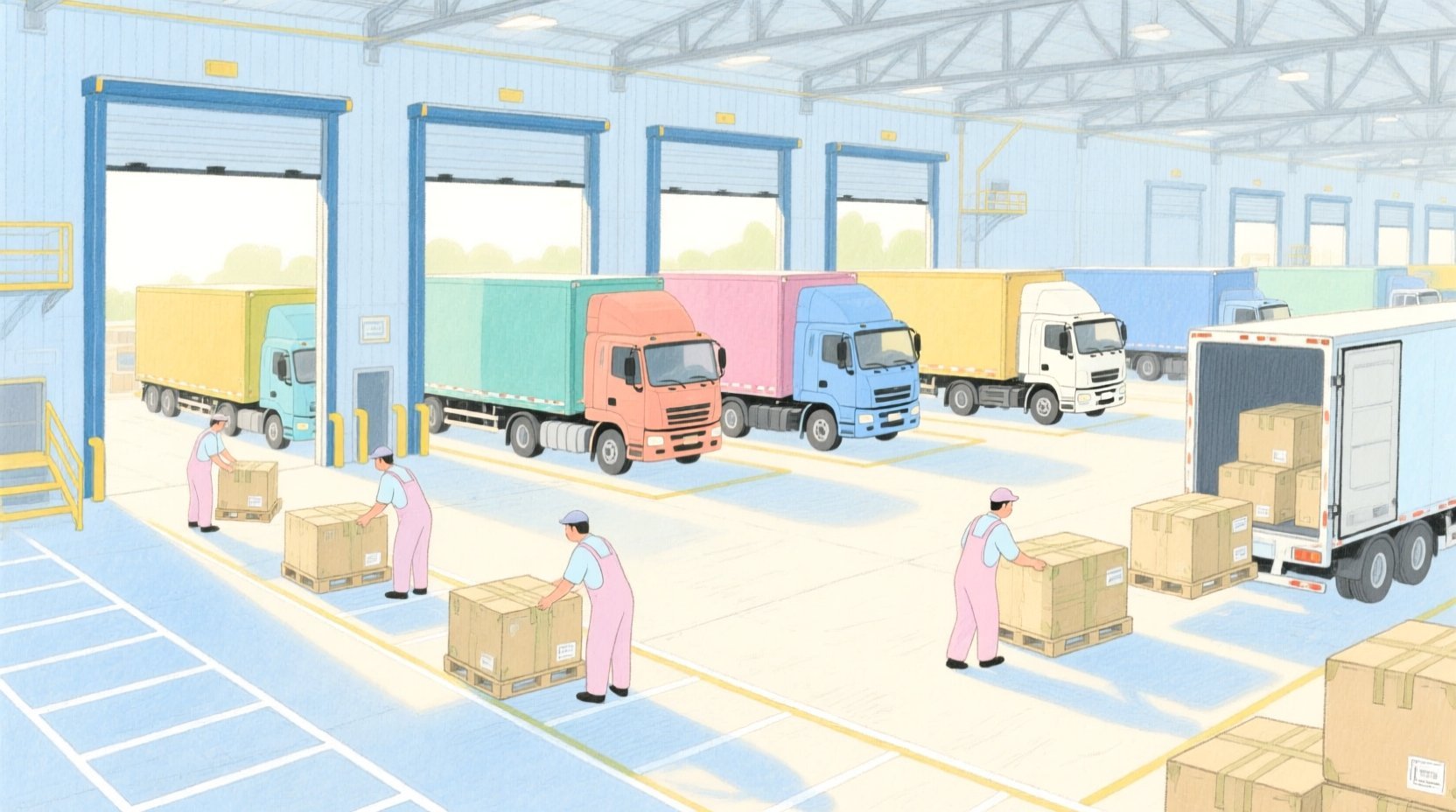
Designing the database schema for such a dynamic environment requires more than just listing tables; it demands a clear visualization of the relationships that drive the business logic. An Entity Relationship Diagram (ERD) becomes the blueprint for this complexity, mapping the flow of freight from the moment a truck pulls into a receiving dock to the moment it departs with a consolidated load. By using PlantUML, developers can define these intricate relationships using code, allowing for versionable, scalable, and instantly renderable documentation. In this tutorial, we will construct a comprehensive ERD for a Cross-Docking Facility, focusing on the core challenges of inbound/outbound trailer matching and staging area management.
Understanding the Model: Purpose, Scope & Problem Framing
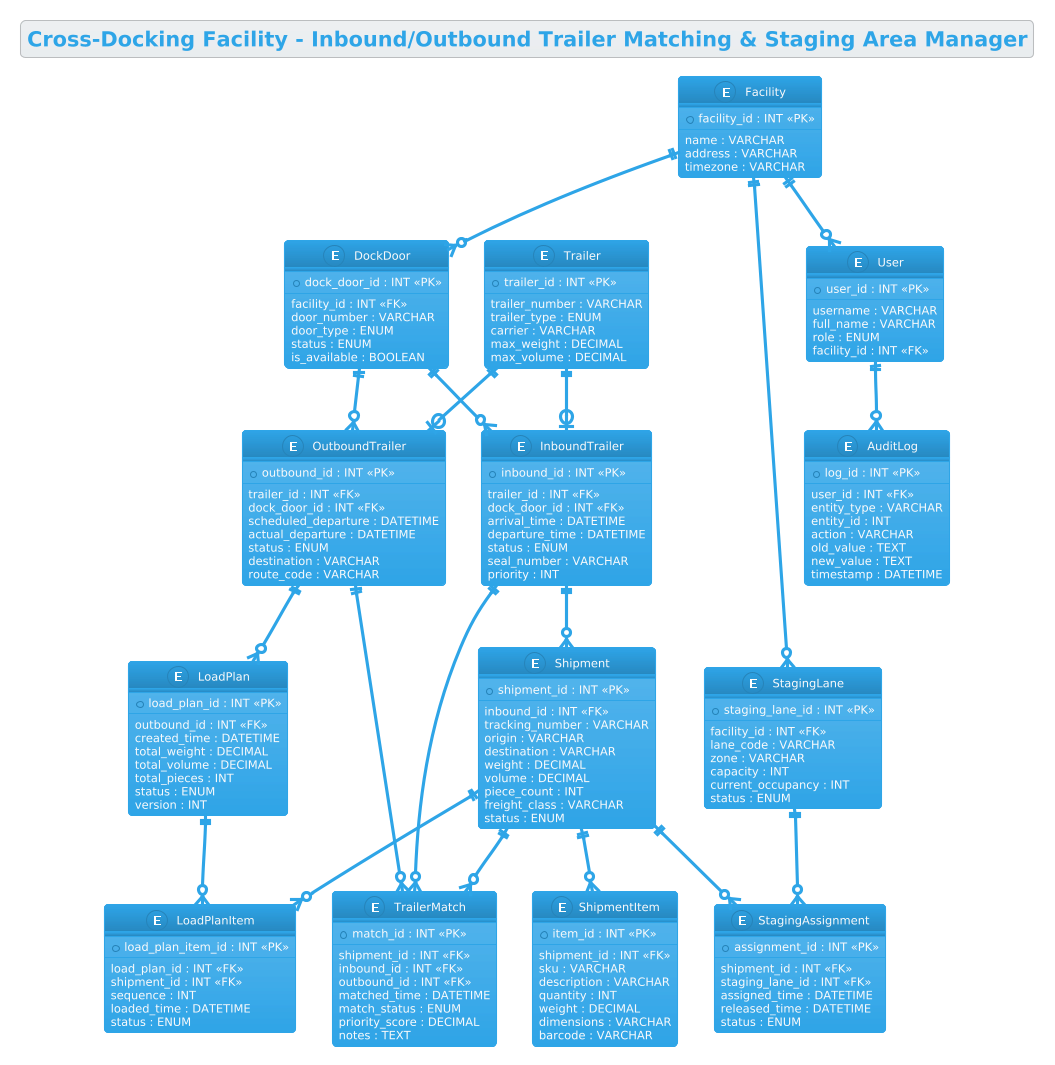
This ERD is not merely a list of database tables; it is a functional map of the cross-docking workflow. The primary abstraction here is the Flow of Goods. The diagram models the lifecycle of a shipment as it transitions from an Inbound Trailer to a Staging Lane, and finally to an Outbound Trailer. The core problem being solved is the Matching Logic: how to efficiently pair incoming freight with outgoing transport based on destination, priority, and capacity constraints.
The scope of this model covers the physical assets of the facility (Facility, DockDoors, StagingLanes), the transport assets (Trailers, Inbound, Outbound), and the transactional data (Shipments, Items, Load Plans). It deliberately excludes external systems like ERP or TMS, focusing strictly on the internal data structures required to manage the physical movement of freight within the facility boundaries. This ensures the diagram remains focused on the operational reality of the dock floor.
By the end of this guide, you will understand how to model many-to-many relationships (like shipments matching to multiple trailers via a junction table), handle one-to-many hierarchies (like a shipment containing multiple items), and structure audit trails for compliance. You will learn how to represent the state of the system (e.g., a trailer’s status or a staging lane’s occupancy) directly within the data model.
Complete Diagram & Full Source Code
Below is the finalized Entity Relationship Diagram for the Cross-Docking Facility. This blueprint visualizes the connections between the facility infrastructure, the trailers, and the complex web of shipments and load plans that move through the system.
@startuml
!theme cerulean
title Cross-Docking Facility - Inbound/Outbound Trailer Matching & Staging Area Manager

/'
This ERD models the core data structures of a cross-docking facility management system.
The diagram captures inbound trailers arriving with shipments, outbound trailers departing
with consolidated loads, and the matching process that links them through the staging area.
It tracks dock doors, staging lanes, shipment contents, and the assignment of freight to
outbound trailers, enabling efficient flow from receiving to shipping with minimal storage.
'/

entity "Facility" as facility {
  * facility_id : INT <<PK>>
  --
  name : VARCHAR
  address : VARCHAR
  timezone : VARCHAR
}

entity "DockDoor" as dockdoor {
  * dock_door_id : INT <<PK>>
  --
  facility_id : INT <<FK>>
  door_number : VARCHAR
  door_type : ENUM
  status : ENUM
  is_available : BOOLEAN
}

entity "StagingLane" as staginglane {
  * staging_lane_id : INT <<PK>>
  --
  facility_id : INT <<FK>>
  lane_code : VARCHAR
  zone : VARCHAR
  capacity : INT
  current_occupancy : INT
  status : ENUM
}

entity "Trailer" as trailer {
  * trailer_id : INT <<PK>>
  --
  trailer_number : VARCHAR
  trailer_type : ENUM
  carrier : VARCHAR
  max_weight : DECIMAL
  max_volume : DECIMAL
}

entity "InboundTrailer" as inbound {
  * inbound_id : INT <<PK>>
  --
  trailer_id : INT <<FK>>
  dock_door_id : INT <<FK>>
  arrival_time : DATETIME
  departure_time : DATETIME
  status : ENUM
  seal_number : VARCHAR
  priority : INT
}

entity "OutboundTrailer" as outbound {
  * outbound_id : INT <<PK>>
  --
  trailer_id : INT <<FK>>
  dock_door_id : INT <<FK>>
  scheduled_departure : DATETIME
  actual_departure : DATETIME
  status : ENUM
  destination : VARCHAR
  route_code : VARCHAR
}

entity "Shipment" as shipment {
  * shipment_id : INT <<PK>>
  --
  inbound_id : INT <<FK>>
  tracking_number : VARCHAR
  origin : VARCHAR
  destination : VARCHAR
  weight : DECIMAL
  volume : DECIMAL
  piece_count : INT
  freight_class : VARCHAR
  status : ENUM
}

entity "ShipmentItem" as shipmentitem {
  * item_id : INT <<PK>>
  --
  shipment_id : INT <<FK>>
  sku : VARCHAR
  description : VARCHAR
  quantity : INT
  weight : DECIMAL
  dimensions : VARCHAR
  barcode : VARCHAR
}

entity "StagingAssignment" as stagingassign {
  * assignment_id : INT <<PK>>
  --
  shipment_id : INT <<FK>>
  staging_lane_id : INT <<FK>>
  assigned_time : DATETIME
  released_time : DATETIME
  status : ENUM
}

entity "TrailerMatch" as trailermatch {
  * match_id : INT <<PK>>
  --
  shipment_id : INT <<FK>>
  inbound_id : INT <<FK>>
  outbound_id : INT <<FK>>
  matched_time : DATETIME
  match_status : ENUM
  priority_score : DECIMAL
  notes : TEXT
}

entity "LoadPlan" as loadplan {
  * load_plan_id : INT <<PK>>
  --
  outbound_id : INT <<FK>>
  created_time : DATETIME
  total_weight : DECIMAL
  total_volume : DECIMAL
  total_pieces : INT
  status : ENUM
  version : INT
}

entity "LoadPlanItem" as loadplanitem {
  * load_plan_item_id : INT <<PK>>
  --
  load_plan_id : INT <<FK>>
  shipment_id : INT <<FK>>
  sequence : INT
  loaded_time : DATETIME
  status : ENUM
}

entity "User" as user {
  * user_id : INT <<PK>>
  --
  username : VARCHAR
  full_name : VARCHAR
  role : ENUM
  facility_id : INT <<FK>>
}

entity "AuditLog" as auditlog {
  * log_id : INT <<PK>>
  --
  user_id : INT <<FK>>
  entity_type : VARCHAR
  entity_id : INT
  action : VARCHAR
  old_value : TEXT
  new_value : TEXT
  timestamp : DATETIME
}

facility ||--o{ dockdoor
facility ||--o{ staginglane
facility ||--o{ user

trailer ||--o| inbound
trailer ||--o| outbound
dockdoor ||--o{ inbound
dockdoor ||--o{ outbound

inbound ||--o{ shipment
outbound ||--o{ loadplan

shipment ||--o{ shipmentitem
shipment ||--o{ stagingassign
shipment ||--o{ trailermatch
shipment ||--o{ loadplanitem

staginglane ||--o{ stagingassign

inbound ||--o{ trailermatch
outbound ||--o{ trailermatch

loadplan ||--o{ loadplanitem

user ||--o{ auditlog

@endumlStep-by-Step Architectural Walkthrough
Building a complex ERD requires a systematic approach. We will deconstruct the diagram into four logical phases: setting the stage, defining the core entities, establishing the relationships, and adding the operational details.
Phase 1: Canvas Configuration & Layout Directives
Before defining any entities, we must set the visual and structural context for the diagram. In PlantUML, this is done using directives at the very top of the code. We start by declaring the start of the diagram and selecting a theme that ensures readability and professional aesthetics.
@startuml
!theme cerulean
title Cross-Docking Facility - Inbound/Outbound Trailer Matching & Staging Area Manager
The @startuml directive initializes the PlantUML engine. The !theme cerulean directive applies a clean, blue-toned color scheme that is ideal for technical documentation. The title directive provides a clear header for the diagram. Immediately following the title, we include a comment block using /' and '/ to describe the diagram’s purpose, ensuring that anyone reading the code understands the business context without needing to parse the syntax.
Phase 2: Declaring Core Entities, Actors, and Boundaries
The next step is to define the static entities that make up the system. We group these logically: Infrastructure, Transport, and Transactions.
Infrastructure Entities: We begin with Facility, which acts as the root. It has a one-to-many relationship with DockDoor and StagingLane. Each door and lane belongs to a specific facility.
entity "Facility" as facility {
* facility_id : INT <>
--
name : VARCHAR
address : VARCHAR
timezone : VARCHAR
}
entity "DockDoor" as dockdoor {
* dock_door_id : INT < >
--
facility_id : INT <>
door_number : VARCHAR
door_type : ENUM
status : ENUM
is_available : BOOLEAN
} Transport Entities: We define a generic Trailer entity to store static trailer details (carrier, max weight). We then create specialized entities, InboundTrailer and OutboundTrailer, which link back to the generic trailer but add specific operational attributes like arrival times, dock door assignments, and status.
Transaction Entities: The heart of the system is the Shipment entity. It links to an inbound trailer and holds details about the goods. We also define ShipmentItem to handle the granular data of individual SKUs within a shipment, creating a parent-child relationship.
Phase 3: Mapping Data Flows & Key Interactions
Once the entities are defined, we map the relationships that drive the cross-docking workflow. This is where the diagram becomes a functional model of the business logic.
The Matching Logic: The most complex relationship is the TrailerMatch entity. This is a junction table that connects an InboundTrailer, an OutboundTrailer, and a Shipment. It represents the decision-making process of assigning a specific load to a specific outbound truck.
entity "TrailerMatch" as trailermatch {
* match_id : INT <>
--
shipment_id : INT <>
inbound_id : INT < >
outbound_id : INT < >
matched_time : DATETIME
match_status : ENUM
priority_score : DECIMAL
notes : TEXT
} The Staging Process: We define StagingAssignment to link a Shipment to a StagingLane. This tracks where a shipment is physically located while waiting to be loaded.
entity "StagingAssignment" as stagingassign {
* assignment_id : INT <>
--
shipment_id : INT <>
staging_lane_id : INT < >
assigned_time : DATETIME
released_time : DATETIME
status : ENUM
} Load Planning: Finally, we model the outbound process with LoadPlan and LoadPlanItem. This defines the sequence in which items are loaded onto the outbound trailer, ensuring the truck is packed efficiently.
Phase 4: Grouping, Annotations & Visual Polish
The final phase involves drawing the relationships between the entities using PlantUML’s relationship syntax. We use the ||--o{ notation to indicate a one-to-many relationship, where the circle represents the “zero or one” side (the parent) and the crow’s foot represents the “many” side (the child).
facility ||--o{ dockdoor
facility ||--o{ staginglane
trailer ||--o| inbound
trailer ||--o| outbound
inbound ||--o{ shipment
shipment ||--o{ trailermatch
outbound ||--o{ trailermatch
We also include User and AuditLog entities to ensure the system is secure and traceable. Every action taken by a user (like changing a trailer status) is logged in the AuditLog, providing a complete history of facility operations.
Syntax & Keyword Deep Dive
To build this ERD effectively, it is crucial to understand the specific PlantUML keywords and syntax used to represent database structures.
entity: This keyword defines a database table. It is followed by a label (e.g.,"Facility") and an alias (e.g.,as facility). The alias is used later to draw relationships.PKandFK: Inside an entity block, we use <> to mark a Primary Key (the unique identifier for a row) and < > to mark a Foreign Key (a reference to a row in another table). ||--o{: This is the relationship arrow syntax. The double vertical bar||indicates “one” (mandatory), the circleoindicates “zero or one” (optional), and the crow’s foot{indicates “many”. For example,facility ||--o{ dockdoormeans one facility has zero or many dock doors.!theme: A directive that changes the visual style of the entire diagram.ceruleanis a specific built-in theme in PlantUML that uses a blue color palette.entity_type/entity_id: In theAuditLogentity, we use generic columns to log changes to any entity type, a common pattern for flexible auditing systems.
Best Practices & Pitfalls to Avoid
When designing ERDs for complex logistics systems, adhering to best practices ensures your diagram remains maintainable and your database performs well.
- Normalize Your Data: Notice how we separated
TrailerfromInboundTrailerandOutboundTrailer. This follows normalization principles, keeping static trailer data separate from dynamic operational data. Avoid putting all attributes in a single massive table. - Use Junction Tables for Many-to-Many: The
TrailerMatchentity is a classic example of a junction table. Never try to represent a many-to-many relationship directly between two tables; always introduce an intermediate table to hold the relationship data. - Keep Attributes Atomic: In
ShipmentItem, we keptweightanddimensionsas separate fields rather than a single string. This allows the database to perform calculations (like summing total weight) efficiently. - Document with Comments: Always use the
/'comment block to describe the diagram’s scope. As the system grows, the code itself can become dense; the comment block serves as the high-level documentation.
Start Building Cross-Docking ERDs Faster with VPasCode
Instantly render, edit, and customize your PlantUML database schemas online with zero local installation required.