


In the complex ecosystem of global logistics, the efficiency of rail freight intermodal operations often hinges on the seamless coordination between rail terminals, motor carriers, and physical assets like containers and chassis. Dispatchers face a relentless challenge: ensuring that a chassis is available and compatible with a specific container exactly when a driver arrives to pick it up, while simultaneously tracking the movement of these assets across multiple terminals and customer locations. Without a unified data model, visibility into asset utilization plummets, leading to costly delays, equipment shortages, and missed appointment windows.
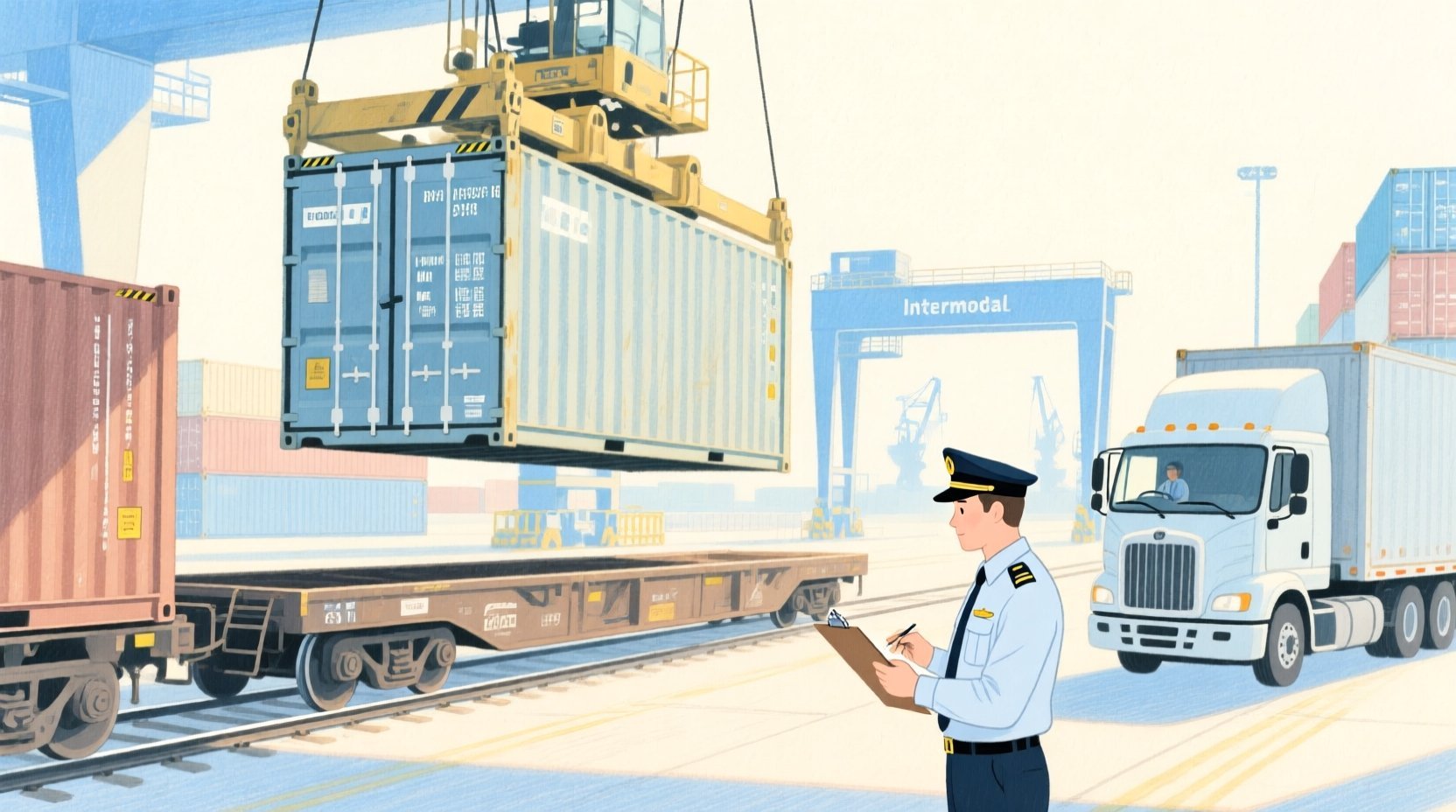
To solve this operational complexity, data architects rely on precise Entity Relationship Diagrams (ERDs) that map the intricate dependencies between carriers, drivers, terminals, and equipment. By modeling these relationships explicitly, organizations can build robust software systems that automate availability checks, optimize drayage moves, and provide real-time status updates. Using diagram-as-code tools like VPasCode, engineers can rapidly prototype these schemas, validate their logic, and generate living documentation that evolves alongside the system.
Understanding the Model: Purpose, Scope & Problem Framing
This tutorial focuses on constructing an ERD specifically designed for a Rail Freight Intermodal Container Drayage and Chassis Availability Tracking System. Unlike generic database schemas, this model addresses the unique temporal and physical constraints of intermodal logistics, where the movement of goods is a multi-step process involving rail, truck, and terminal handoffs.
Diagram Abstraction & Representation
An Entity Relationship Diagram serves as the blueprint for the underlying database structure. In this context, it abstracts the physical world into logical entities. Containers and Chassis are treated as distinct assets with their own lifecycle statuses (e.g., available, in-transit, out-of-service). The DrayageMove entity acts as the critical transactional bridge, linking a specific container and chassis to a specific carrier, driver, and time window. This separation allows the system to track the history of every move while maintaining the current location and status of every asset.
Target Domain Scope & Scenario
The scope of this model covers the end-to-end drayage lifecycle, from the moment a container is discharged from a railcar at a terminal to its final delivery at a customer site. It explicitly models the relationships between:
- Assets: Containers, Chassis, and Equipment Status.
- Personnel: Motor Carriers and Drivers.
- Locations: Rail Terminals and Customer Locations.
- Transactions: Drayage Moves and Gate Events.
It intentionally excludes upstream rail operations (like train scheduling) and downstream port customs clearance, focusing strictly on the drayage and intermodal handoff phase.
Key Takeaways & Educational Insights
By following this guide, you will learn how to structure a relational schema that handles one-to-many relationships (e.g., one carrier employs many drivers) and many-to-many resolutions (e.g., a move involves one container and one chassis). You will gain insights into how to model time-sensitive events like gate entries and how to link equipment status changes to specific assets for audit trails.
Complete Diagram & Full Source Code
Below is the visual representation of the completed ERD. This diagram illustrates the entities, their attributes, and the cardinality relationships that govern the logistics workflow.
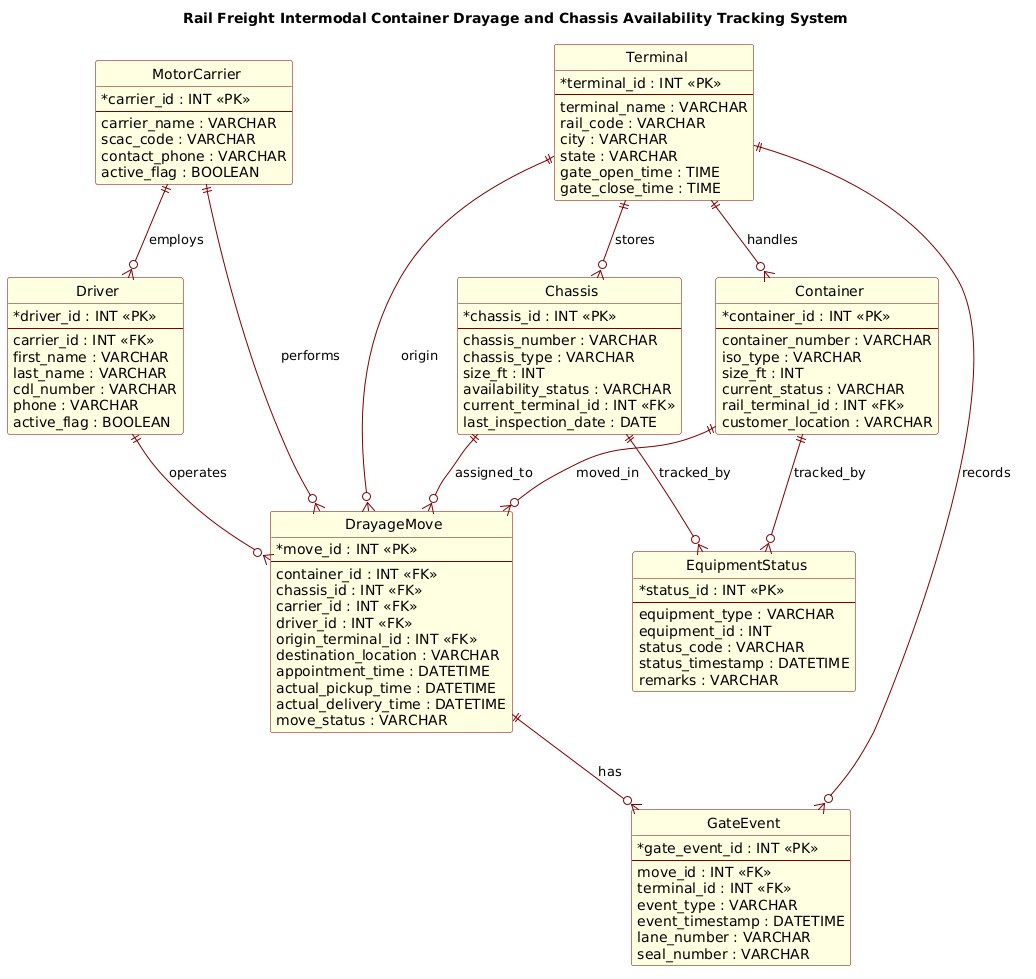
Here is the complete PlantUML source code. You can copy this directly into the VPasCode editor to render the diagram instantly.
@startuml
!include https://static.visual-paradigm.com/web/resources/plantuml-stdlib/themes/rose.puml

title Rail Freight Intermodal Container Drayage and Chassis Availability Tracking System

/'
Diagram Context:
This ERD models the operational data needed to coordinate rail freight intermodal drayage and chassis availability.
It captures the relationships between containers, chassis, drayage moves, rail terminals, motor carriers, and drivers.
The diagram supports tracking which chassis are available, assigned, or out of service, and how they are paired with containers during pickup, transport, and return.
It also records terminal gate events, appointment windows, and equipment status changes so dispatchers can reduce delays and improve asset utilization.
The central entities are Container, Chassis, DrayageMove, and Terminal; supporting entities include MotorCarrier, Driver, and EquipmentStatus.
Key relationships show that a drayage move links one container and one chassis, is performed by a motor carrier and driver, and occurs between rail and customer locations.
The model is intended to support availability checks, dispatch planning, and exception tracking for intermodal drayage operations.
'/

entity "MotorCarrier" as carrier {
  * carrier_id : INT <<PK>>
  --
  carrier_name : VARCHAR
  scac_code : VARCHAR
  contact_phone : VARCHAR
  active_flag : BOOLEAN
}

entity "Driver" as driver {
  * driver_id : INT <<PK>>
  --
  carrier_id : INT <<FK>>
  first_name : VARCHAR
  last_name : VARCHAR
  cdl_number : VARCHAR
  phone : VARCHAR
  active_flag : BOOLEAN
}

entity "Terminal" as terminal {
  * terminal_id : INT <<PK>>
  --
  terminal_name : VARCHAR
  rail_code : VARCHAR
  city : VARCHAR
  state : VARCHAR
  gate_open_time : TIME
  gate_close_time : TIME
}

entity "Container" as container {
  * container_id : INT <<PK>>
  --
  container_number : VARCHAR
  iso_type : VARCHAR
  size_ft : INT
  current_status : VARCHAR
  rail_terminal_id : INT <<FK>>
  customer_location : VARCHAR
}

entity "Chassis" as chassis {
  * chassis_id : INT <<PK>>
  --
  chassis_number : VARCHAR
  chassis_type : VARCHAR
  size_ft : INT
  availability_status : VARCHAR
  current_terminal_id : INT <<FK>>
  last_inspection_date : DATE
}

entity "EquipmentStatus" as status {
  * status_id : INT <<PK>>
  --
  equipment_type : VARCHAR
  equipment_id : INT
  status_code : VARCHAR
  status_timestamp : DATETIME
  remarks : VARCHAR
}

entity "DrayageMove" as move {
  * move_id : INT <<PK>>
  --
  container_id : INT <<FK>>
  chassis_id : INT <<FK>>
  carrier_id : INT <<FK>>
  driver_id : INT <<FK>>
  origin_terminal_id : INT <<FK>>
  destination_location : VARCHAR
  appointment_time : DATETIME
  actual_pickup_time : DATETIME
  actual_delivery_time : DATETIME
  move_status : VARCHAR
}

entity "GateEvent" as gate {
  * gate_event_id : INT <<PK>>
  --
  move_id : INT <<FK>>
  terminal_id : INT <<FK>>
  event_type : VARCHAR
  event_timestamp : DATETIME
  lane_number : VARCHAR
  seal_number : VARCHAR
}

carrier ||--o{ driver : employs
carrier ||--o{ move : performs
driver ||--o{ move : operates
terminal ||--o{ container : handles
terminal ||--o{ chassis : stores
terminal ||--o{ move : origin
terminal ||--o{ gate : records
container ||--o{ move : moved_in
chassis ||--o{ move : assigned_to
move ||--o{ gate : has
container ||--o{ status : tracked_by
chassis ||--o{ status : tracked_by

@endumlStep-by-Step Architectural Walkthrough
Building a robust logistics ERD requires a structured approach. We will break down the construction of this diagram into four logical phases, starting with the visual setup and moving through entity declaration, relationship mapping, and final polish.
Phase 1: Canvas Configuration & Layout Directives
Every professional PlantUML diagram begins with global configuration. This sets the visual theme and defines the title that appears at the top of the rendering. In this case, we include the rose.puml theme to give the diagram a polished, professional appearance suitable for technical documentation.
We also define the diagram title, which serves as the primary identifier for the schema. This is done using the title directive, followed by a comment block that provides context for stakeholders.
!include https://static.visual-paradigm.com/web/resources/plantuml-stdlib/themes/rose.puml

title Rail Freight Intermodal Container Drayage and Chassis Availability Tracking System

/'
Diagram Context: [Context text here]
'/
Phase 2: Declaring Core Entities, Actors, and Boundaries
The foundation of any ERD is the entity definition. In PlantUML, we use the entity keyword to define a table. Each entity is given a logical name (e.g., carrier) and a display name (e.g., "MotorCarrier"). Inside the entity block, we define the primary key (*), foreign keys (FK), and standard attributes.
For example, the MotorCarrier entity defines the company performing the transport, while the Driver entity links an individual to that carrier. Notice how carrier_id is defined as a Foreign Key in the Driver entity to establish the relationship.
entity "MotorCarrier" as carrier {
* carrier_id : INT <>
--
carrier_name : VARCHAR
scac_code : VARCHAR
active_flag : BOOLEAN
}
entity "Driver" as driver {
* driver_id : INT < >
--
carrier_id : INT <>
first_name : VARCHAR
last_name : VARCHAR
active_flag : BOOLEAN
}
Phase 3: Mapping Data Flows & Key Interactions
Once entities are defined, we must visualize how they interact. The core of the drayage system is the DrayageMove entity. This table acts as the central hub, linking the Container, Chassis, MotorCarrier, and Driver to a specific movement event.
We define relationships using the double-bar syntax (||--o{) to indicate cardinality. For instance, a MotorCarrier performs many moves, but a move is performed by only one carrier. We also map the GateEvent to the DrayageMove to record specific terminal interactions like entry or exit.
carrier ||--o{ move : performs
driver ||--o{ move : operates
container ||--o{ move : moved_in
chassis ||--o{ move : assigned_to
move ||--o{ gate : has
Phase 4: Grouping, Annotations & Visual Polish
The final phase involves adding supporting entities that track the state of assets over time. The EquipmentStatus entity is crucial for auditing; it records every status change (e.g., “Available” to “In Transit”) for any equipment type. By linking this entity to both Container and Chassis, we create a complete history log without cluttering the main asset tables.
We also ensure that the Terminal entity captures operational constraints like gate_open_time and gate_close_time, which are critical for scheduling drayage appointments.
equipment "EquipmentStatus" as status {
  * status_id : INT <>
  --
  equipment_type : VARCHAR
  equipment_id : INT
  status_code : VARCHAR
  status_timestamp : DATETIME
}

container ||--o{ status : tracked_by
chassis ||--o{ status : tracked_by
Syntax & Keyword Deep Dive
Understanding the specific PlantUML syntax used in this ERD is essential for maintaining and extending the diagram. Here are the key keywords and conventions employed:
entity: Defines a database table. The syntax isentity "Display Name" as alias { ... }. The alias is used for drawing relationships, while the display name is shown in the diagram.*(Primary Key): Placed before an attribute name to denote it as the Primary Key (e.g.,* carrier_id). PlantUML automatically renders this with a key icon.FK(Foreign Key): Defined using the stereotype<to indicate that an attribute references the primary key of another entity. This helps visualize referential integrity.> ||--o{(Cardinality): This arrow notation represents a “One-to-Many” relationship. The double bar||means “one and only one” on the source side, and the circle/arrowo{means “zero or many” on the target side. For example,carrier ||--o{ drivermeans one carrier employs zero or many drivers.label(Relationship Name): The text after the arrow (e.g.,: employs) defines the semantic name of the relationship, clarifying the nature of the connection.title: Sets the main heading of the diagram./' ... '/(Comment Block): Allows for multi-line text comments within the diagram code, often used for documentation or context summaries that do not render as visual elements.
Best Practices & Pitfalls to Avoid
When modeling complex logistics systems, adherence to best practices ensures your ERD remains a useful tool rather than a confusing mess.
- Normalize Data Types: Always use appropriate data types. For timestamps, use
DATETIME; for codes like SCAC, useVARCHAR; and for flags, useBOOLEAN. Avoid generic types likeTEXTunless necessary. - Keep Relationships Explicit: Avoid implicit relationships. If a
Driverbelongs to aMotorCarrier, explicitly definecarrier_idas a Foreign Key in theDriverentity. Do not rely on the visual arrow alone to imply data integrity. - Separate Static and Dynamic Data: Keep entity definitions (like
Containerattributes) separate from transactional history (likeEquipmentStatus). Mixing current status with historical logs in a single table makes queries inefficient and the diagram harder to read. - Use Descriptive Aliases: When defining entities, use short, unique aliases (e.g.,
as carrier) for drawing relationships. This prevents long entity names from cluttering the relationship lines.
Start Building Logistics ERDs Faster with VPasCode
Design complex rail freight and drayage schemas instantly in your browser with VPasCode’s free PlantUML editor—no installation required.