


In the fast-paced logistics industry, the transition from a simple customer inquiry to a finalized moving quote relies heavily on accurate data modeling. A moving company’s operational backbone is not just about trucks and drivers; it is a complex web of customer profiles, property surveys, room-by-room inventory tracking, and dynamic cost calculations. When a customer requests a move, the system must seamlessly link their contact details to a specific move request, which triggers a physical survey. This survey then populates a detailed inventory list, categorizing items by room and type, while simultaneously calculating the necessary packing materials and volume estimates. Without a robust data structure, these workflows become fragmented, leading to inaccurate quotes, lost inventory items, and operational bottlenecks.

Visualizing this complexity through an Entity Relationship Diagram (ERD) is essential for architects and developers building such systems. By modeling the relationships between customers, move requests, surveys, and inventory items, teams can ensure data integrity and scalability from day one. Using diagram-as-code with PlantUML allows these models to be versioned, reviewed, and updated alongside the application code, ensuring that the documentation never drifts from the actual implementation. This tutorial demonstrates how to construct a professional ERD for a household goods inventory and relocation quote generator, providing a clear blueprint for managing the entire lifecycle of a move.
Understanding the Model: Purpose, Scope & Problem Framing
Diagram Abstraction & Representation
An Entity Relationship Diagram (ERD) is the foundational blueprint for relational databases. In this specific context, the ERD abstracts the physical world of a moving job into logical data entities. It defines how a Customer relates to a MoveRequest, how a Survey acts as the bridge between the request and the physical items, and how InventoryItems are categorized and linked to specific rooms. The diagram also captures the financial logic through the Quote and QuoteLineItem entities, showing how the physical inventory translates into a monetary estimate. This abstraction allows developers to focus on the rules of data association—such as one-to-many or one-to-one relationships—without getting bogged down in SQL syntax immediately.
Target Domain Scope & Scenario
The scope of this model covers the core operational workflow of a moving company. It begins with the Customer entity, capturing personal and contact details. It extends to the MoveRequest, which defines the logistics (origin, destination, date). The critical link is the Survey, representing the on-site assessment. From the survey, the model branches into InventoryItem entities, which are further refined by Room definitions and ItemCategory classifications. Finally, it includes the PackingMaterial and Quote entities to handle the commercial side of the operation. The model intentionally excludes external billing gateways or driver scheduling systems to keep the focus on the inventory and quote generation logic.
Key Takeaways & Educational Insights
By studying this diagram, readers will gain insights into how to structure a database for complex, multi-step business processes. Key takeaways include understanding the necessity of a Survey entity to decouple the initial request from the final inventory list, the use of junction tables (like ItemPackingRequirement) to handle many-to-many relationships between items and packing materials, and the strategy for generating dynamic quotes through QuoteLineItem records. This model demonstrates best practices for handling optional data (like survey notes) and mandatory constraints (like required customer details).
Complete Diagram & Full Source Code
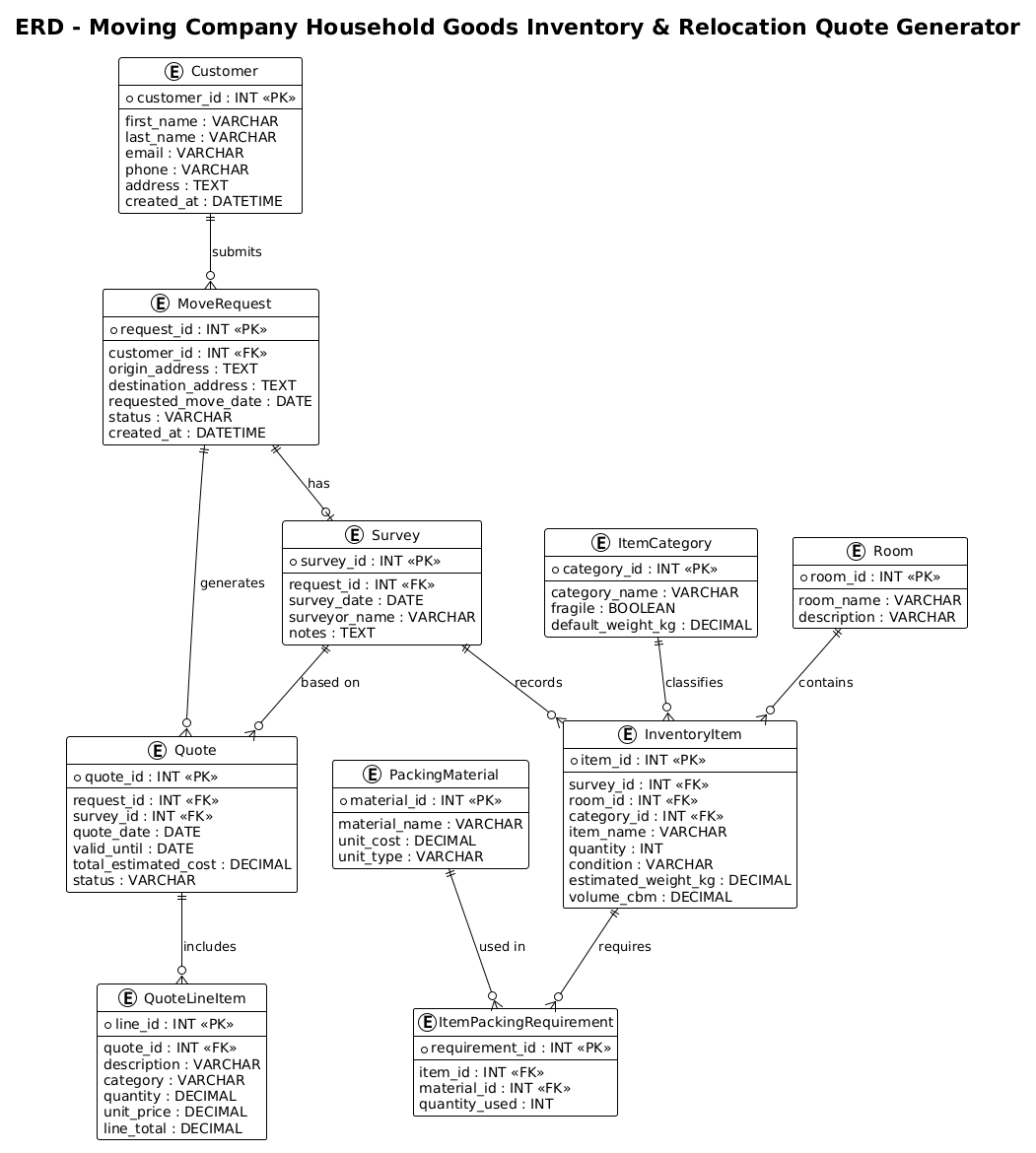
@startuml
!theme plain
title ERD - Moving Company Household Goods Inventory & Relocation Quote Generator

/'
Diagram Context:
This ERD models the core data structures for a moving company's system that manages
household goods inventory and generates relocation quotes. The system tracks customers,
their move requests, detailed inventory items categorized by room and type, packing
requirements, and the resulting cost estimates. It supports the workflow from initial
customer inquiry through on-site survey, inventory recording, quote generation, and
final move execution. Key entities include Customer, MoveRequest, Survey, InventoryItem,
Room, ItemCategory, PackingMaterial, Quote, and QuoteLineItem. The relationships
capture how a customer's move request leads to a survey, which produces an inventory
list used to generate a detailed quote.
'/

entity "Customer" as customer {
  * customer_id : INT <<PK>>
  --
  first_name : VARCHAR
  last_name : VARCHAR
  email : VARCHAR
  phone : VARCHAR
  address : TEXT
  created_at : DATETIME
}

entity "MoveRequest" as move_request {
  * request_id : INT <<PK>>
  --
  customer_id : INT <<FK>>
  origin_address : TEXT
  destination_address : TEXT
  requested_move_date : DATE
  status : VARCHAR
  created_at : DATETIME
}

entity "Survey" as survey {
  * survey_id : INT <<PK>>
  --
  request_id : INT <<FK>>
  survey_date : DATE
  surveyor_name : VARCHAR
  notes : TEXT
}

entity "Room" as room {
  * room_id : INT <<PK>>
  --
  room_name : VARCHAR
  description : VARCHAR
}

entity "ItemCategory" as item_category {
  * category_id : INT <<PK>>
  --
  category_name : VARCHAR
  fragile : BOOLEAN
  default_weight_kg : DECIMAL
}

entity "InventoryItem" as inventory_item {
  * item_id : INT <<PK>>
  --
  survey_id : INT <<FK>>
  room_id : INT <<FK>>
  category_id : INT <<FK>>
  item_name : VARCHAR
  quantity : INT
  condition : VARCHAR
  estimated_weight_kg : DECIMAL
  volume_cbm : DECIMAL
}

entity "PackingMaterial" as packing_material {
  * material_id : INT <<PK>>
  --
  material_name : VARCHAR
  unit_cost : DECIMAL
  unit_type : VARCHAR
}

entity "ItemPackingRequirement" as item_packing {
  * requirement_id : INT <<PK>>
  --
  item_id : INT <<FK>>
  material_id : INT <<FK>>
  quantity_used : INT
}

entity "Quote" as quote {
  * quote_id : INT <<PK>>
  --
  request_id : INT <<FK>>
  survey_id : INT <<FK>>
  quote_date : DATE
  valid_until : DATE
  total_estimated_cost : DECIMAL
  status : VARCHAR
}

entity "QuoteLineItem" as quote_line {
  * line_id : INT <<PK>>
  --
  quote_id : INT <<FK>>
  description : VARCHAR
  category : VARCHAR
  quantity : DECIMAL
  unit_price : DECIMAL
  line_total : DECIMAL
}

' Relationships
customer ||--o{ move_request : "submits"
move_request ||--o| survey : "has"
survey ||--o{ inventory_item : "records"
room ||--o{ inventory_item : "contains"
item_category ||--o{ inventory_item : "classifies"
inventory_item ||--o{ item_packing : "requires"
packing_material ||--o{ item_packing : "used in"
move_request ||--o{ quote : "generates"
survey ||--o{ quote : "based on"
quote ||--o{ quote_line : "includes"

@endumlStep-by-Step Architectural Walkthrough
Phase 1: Canvas Configuration & Layout Directives
The first step in building a professional PlantUML ERD is setting the stage. We begin by defining the theme to ensure the diagram looks clean and consistent with enterprise standards. In this case, we use the !theme plain directive to remove decorative elements and focus on the data structure. We also add a title directive to provide immediate context for anyone viewing the diagram. Crucially, we insert a comment block using the / syntax to document the business logic and scope of the diagram, ensuring that the visual model is self-documenting.
@startuml
!theme plain
title ERD - Moving Company Household Goods Inventory & Relocation Quote Generator

/'
Diagram Context: [Context description here]
'/
Phase 2: Declaring Core Entities, Actors, and Boundaries
With the canvas ready, we define the core entities. In PlantUML, we use the entity keyword. Each entity is defined with a display name (e.g., “Customer”) and an alias (e.g., customer) for use in relationship definitions. Inside the curly braces {}, we list the attributes. We distinguish Primary Keys (PK) using the * symbol and Foreign Keys (FK) using <. For example, the Customer entity holds personal data, while the MoveRequest entity links back to the customer via customer_id. We also define the Survey entity, which acts as the pivotal link between the initial request and the detailed inventory.
entity "Customer" as customer {
* customer_id : INT <>
--
first_name : VARCHAR
last_name : VARCHAR
...
}
entity "MoveRequest" as move_request {
* request_id : INT < >
--
customer_id : INT <>
...
} Phase 3: Mapping Data Flows & Key Interactions
The heart of the ERD lies in the relationships. We use the double-bar syntax || for mandatory participation (e.g., a move request must belong to a customer) and the crow’s foot { for one-to-many relationships. For instance, customer ||--o{ move_request indicates that one customer can submit zero or many move requests. We also model the complex relationship between InventoryItem, Room, and ItemCategory. The InventoryItem is linked to a Survey (the specific move instance), a Room (the location), and a ItemCategory (the type of item). This ensures that every item in the inventory is fully contextualized.
' Relationships
customer ||--o{ move_request : "submits"
survey ||--o{ inventory_item : "records"
room ||--o{ inventory_item : "contains"
item_category ||--o{ inventory_item : "classifies"
Phase 4: Grouping, Annotations & Visual Polish
Finally, we handle the commercial aspects of the model. The Quote entity is linked to both the MoveRequest and the Survey, capturing the state of the quote at a specific point in time. The QuoteLineItem entity breaks down the total cost into individual line items, allowing for granular pricing of labor, materials, or specific goods. We also introduce the ItemPackingRequirement entity, which is a junction table. This allows a single inventory item to require multiple packing materials (e.g., a piano might need both a blanket and a box), resolving a many-to-many relationship between items and materials. The diagram is then finalized with relationship labels like “submits”, “has”, and “generates” to make the flow intuitive.
entity "ItemPackingRequirement" as item_packing {
* requirement_id : INT <>
--
item_id : INT <>
material_id : INT < >
quantity_used : INT
}
inventory_item ||--o{ item_packing : "requires"
packing_material ||--o{ item_packing : "used in" Syntax & Keyword Deep Dive
To effectively model this logistics system in PlantUML, it is crucial to understand the specific syntax features used:
entity "Name" as alias: Defines a new table. The string in quotes is the display name, and theaskeyword assigns a short alias for use in relationship definitions.* attribute : Type: The asterisk*before an attribute denotes it as a Primary Key. TheTypespecifies the data type (e.g.,INT,VARCHAR,DECIMAL).<: This stereotype explicitly marks an attribute as a Foreign Key, linking it to a primary key in another entity.> ||--o{: This relationship connector defines a mandatory one-to-many relationship. The||means “one and only one” (mandatory), and the{means “many” (zero or more).--o|: This connector defines an optional one-to-one or one-to-many relationship. Theoindicates optional (zero), and|indicates exactly one.!theme plain: A directive that applies a minimal, clean visual style to the entire diagram, removing default borders and colors for a professional look.
Best Practices & Pitfalls to Avoid
When designing ERDs for logistics and inventory systems, adhering to best practices ensures your model remains maintainable and scalable.
- Normalize Your Data: Avoid storing redundant data. For example, do not store the
room_namedirectly inside the InventoryItem table if it is better represented by a separate Room entity linked via a Foreign Key. This allows you to update room names in one place without affecting thousands of inventory records. - Use Junction Tables for Many-to-Many: Never try to link two entities directly if the relationship is many-to-many. As seen with ItemPackingRequirement, using an intermediate table allows you to store additional attributes (like
quantity_used) that describe the relationship itself. - Consistent Naming Conventions: Use clear, singular nouns for entity names (e.g.,
CustomernotCustomers) and consistent camelCase or snake_case for attributes. This reduces ambiguity when writing SQL queries later. - Document the Flow: Use the comment block and relationship labels to explain why entities are connected. A relationship labeled “generates” tells a story about the business process that a simple line cannot convey.
Start Building Logistics ERDs Faster with VPasCode
Design, test, and refine your moving company database schema instantly in your browser with VPasCode’s free PlantUML editor—no installation required.