


In the high-stakes environment of automotive logistics, operational efficiency hinges on precise data modeling. A distribution center managing thousands of spare parts must seamlessly coordinate the flow of inventory from suppliers to specific bin locations, and then assemble those parts into kits for service orders. Without a clear visual blueprint of these relationships, warehouses struggle with misplaced inventory, inefficient kitting processes, and delayed order fulfillment. The complexity arises not just from the sheer volume of parts, but from the intricate web of dependencies: a single part might be sourced from multiple suppliers, stored across different warehouse bins, and required in various assembly kits.

This is where diagram-as-code becomes indispensable. By defining the data architecture of an automotive spare parts distribution center using PlantUML, architects can create a living documentation that evolves with the business. The goal is to model the core entities—Parts, Suppliers, Warehouses, and Bins—alongside the operational logic of Inventory, Kitting, and Customer Orders. Using VPasCode, a free web-based editor, you can instantly render these complex relationships, validate your schema logic, and export a professional ERD that serves as the single source of truth for your logistics software development.
Understanding the Model: Purpose, Scope & Problem Framing
Diagram Abstraction & Representation
This Entity-Relationship Diagram (ERD) serves as the structural backbone for a warehouse management system (WMS) tailored to the automotive industry. Unlike a simple inventory list, this model captures the hierarchical nature of storage and the compositional nature of assembly. It abstracts the physical reality of a distribution center into logical data entities. For instance, the Bin_Location entity does not just represent a shelf; it encodes the spatial logic (aisle, rack, shelf) required for robotic retrieval systems. The Kit and Kit_Component entities model the assembly process, linking individual parts to a final service kit, a critical workflow for just-in-time manufacturing.
Target Domain Scope & Scenario
The scope of this diagram is strictly limited to the internal data flows of a distribution center. It covers the lifecycle of a part from its sourcing via a Supplier, its reception and storage in a Warehouse, its tracking in Inventory at a specific Bin, and its eventual consumption in a Kit or a Customer_Order. It intentionally excludes external customer relationship management (CRM) details or shipping carrier integrations, focusing purely on the internal logistics data structure that enables the “bin-to-kit” workflow.
Key Takeaways & Educational Insights
By constructing this model, you will learn how to handle many-to-many relationships (e.g., a part belonging to multiple kits, or a kit containing multiple parts) using associative entities like Kit_Component and Order_Line. You will also gain insight into how to model physical constraints, such as bin capacity and utilization, directly within the database schema. The result is a robust blueprint that ensures data integrity for high-volume spare parts operations.
Complete Diagram & Full Source Code
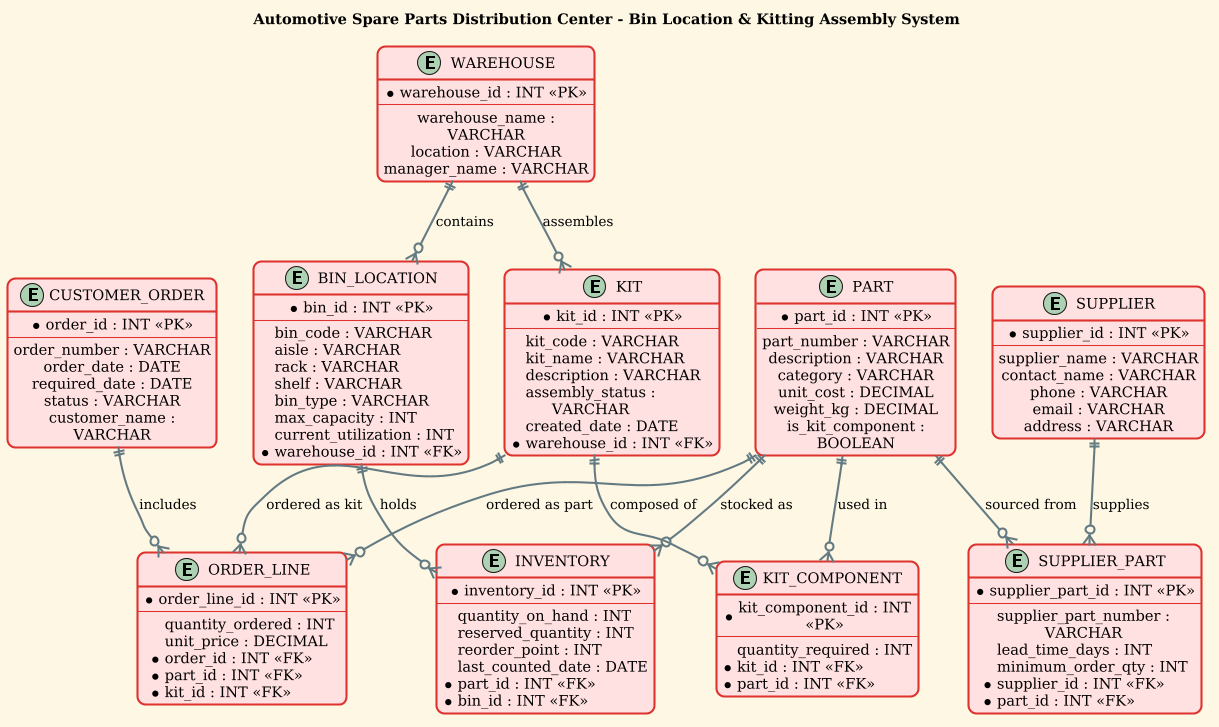
@startuml
!theme sunlust
title Automotive Spare Parts Distribution Center - Bin Location & Kitting Assembly System

/'
Diagram Context:
This ERD models the core data structures of an automotive spare parts distribution center.
It captures how spare parts are received, stored in bin locations within warehouses, and
assembled into kits for production or service orders. The diagram illustrates the relationships
between parts, suppliers, warehouses, bins, inventory records, kits, kit components, and orders.
The goal is to support efficient storage, retrieval, and kitting of automotive spare parts.
'/

entity "PART" as part {
  * part_id : INT <<PK>>
  --
  part_number : VARCHAR
  description : VARCHAR
  category : VARCHAR
  unit_cost : DECIMAL
  weight_kg : DECIMAL
  is_kit_component : BOOLEAN
}

entity "SUPPLIER" as supplier {
  * supplier_id : INT <<PK>>
  --
  supplier_name : VARCHAR
  contact_name : VARCHAR
  phone : VARCHAR
  email : VARCHAR
  address : VARCHAR
}

entity "WAREHOUSE" as warehouse {
  * warehouse_id : INT <<PK>>
  --
  warehouse_name : VARCHAR
  location : VARCHAR
  manager_name : VARCHAR
}

entity "BIN_LOCATION" as bin {
  * bin_id : INT <<PK>>
  --
  bin_code : VARCHAR
  aisle : VARCHAR
  rack : VARCHAR
  shelf : VARCHAR
  bin_type : VARCHAR
  max_capacity : INT
  current_utilization : INT
  * warehouse_id : INT <<FK>>
}

entity "INVENTORY" as inventory {
  * inventory_id : INT <<PK>>
  --
  quantity_on_hand : INT
  reserved_quantity : INT
  reorder_point : INT
  last_counted_date : DATE
  * part_id : INT <<FK>>
  * bin_id : INT <<FK>>
}

entity "KIT" as kit {
  * kit_id : INT <<PK>>
  --
  kit_code : VARCHAR
  kit_name : VARCHAR
  description : VARCHAR
  assembly_status : VARCHAR
  created_date : DATE
  * warehouse_id : INT <<FK>>
}

entity "KIT_COMPONENT" as kit_component {
  * kit_component_id : INT <<PK>>
  --
  quantity_required : INT
  * kit_id : INT <<FK>>
  * part_id : INT <<FK>>
}

entity "CUSTOMER_ORDER" as order {
  * order_id : INT <<PK>>
  --
  order_number : VARCHAR
  order_date : DATE
  required_date : DATE
  status : VARCHAR
  customer_name : VARCHAR
}

entity "ORDER_LINE" as order_line {
  * order_line_id : INT <<PK>>
  --
  quantity_ordered : INT
  unit_price : DECIMAL
  * order_id : INT <<FK>>
  * part_id : INT <<FK>>
  * kit_id : INT <<FK>>
}

entity "SUPPLIER_PART" as supplier_part {
  * supplier_part_id : INT <<PK>>
  --
  supplier_part_number : VARCHAR
  lead_time_days : INT
  minimum_order_qty : INT
  * supplier_id : INT <<FK>>
  * part_id : INT <<FK>>
}

' Relationships
supplier ||--o{ supplier_part : "supplies"
part ||--o{ supplier_part : "sourced from"

warehouse ||--o{ bin : "contains"
warehouse ||--o{ kit : "assembles"

part ||--o{ inventory : "stocked as"
bin ||--o{ inventory : "holds"

kit ||--o{ kit_component : "composed of"
part ||--o{ kit_component : "used in"

order ||--o{ order_line : "includes"
part ||--o{ order_line : "ordered as part"
kit ||--o{ order_line : "ordered as kit"

@endumlStep-by-Step Architectural Walkthrough
Phase 1: Canvas Configuration & Layout Directives
The foundation of a professional diagram lies in its setup. Before defining any entities, we establish the visual theme and the structural title. In this section, we use the !theme sunlust directive. This directive applies a pre-configured set of colors and styling rules that give the diagram a cohesive, modern look, reducing the need for manual color coding. We also define a title block to provide immediate context. Crucially, we insert a comment block using the /' and '/ syntax. This block allows us to embed a detailed description of the diagram’s business context directly within the code, serving as documentation for future developers without cluttering the visual output.
!theme sunlust
title Automotive Spare Parts Distribution Center - Bin Location & Kitting Assembly System

/'
Diagram Context:
This ERD models the core data structures of an automotive spare parts distribution center.
It captures how spare parts are received, stored in bin locations within warehouses, and
assembled into kits for production or service orders.
The goal is to support efficient storage, retrieval, and kitting of automotive spare parts.
'/
Phase 2: Declaring Core Entities, Actors, and Boundaries
With the canvas ready, we define the core entities. In PlantUML, the entity keyword is used to create database tables. Each entity is given a display name (e.g., “PART”) and an internal alias (e.g., part) which is used for referencing in relationships. Inside the curly braces {}, we define the attributes. We use * to denote Primary Keys (PK) and FK to denote Foreign Keys. For example, the WAREHOUSE entity defines the physical locations, while the BIN_LOCATION entity breaks these down into specific storage slots. Notice how bin has a * warehouse_id : INT < attribute, establishing the parent-child relationship where a bin belongs to a warehouse.
entity "WAREHOUSE" as warehouse {
* warehouse_id : INT <>
--
warehouse_name : VARCHAR
location : VARCHAR
manager_name : VARCHAR
}
entity "BIN_LOCATION" as bin {
* bin_id : INT < >
--
bin_code : VARCHAR
aisle : VARCHAR
rack : VARCHAR
shelf : VARCHAR
bin_type : VARCHAR
max_capacity : INT
current_utilization : INT
* warehouse_id : INT <>
} Phase 3: Mapping Data Flows & Key Interactions
The power of an ERD lies in the relationships. We map these using the ||--o{ syntax, which represents a one-to-many relationship (one warehouse contains many bins). We define the associative entities SUPPLIER_PART, INVENTORY, KIT_COMPONENT, and ORDER_LINE to resolve many-to-many relationships. For instance, a PART can be supplied by multiple SUPPLIERs, and a SUPPLIER can supply multiple parts. The SUPPLIER_PART entity acts as the bridge, storing specific details like lead_time_days for that specific supplier-part combination. Similarly, the INVENTORY entity links a PART to a BIN, tracking the quantity_on_hand at that specific location.
' Relationships
supplier ||--o{ supplier_part : "supplies"
part ||--o{ supplier_part : "sourced from"

warehouse ||--o{ bin : "contains"
warehouse ||--o{ kit : "assembles"

part ||--o{ inventory : "stocked as"
bin ||--o{ inventory : "holds"
Phase 4: Grouping, Annotations & Visual Polish
The final phase involves refining the relationships to ensure the diagram is readable and logically sound. We explicitly label the relationships using the : "label" syntax (e.g., "supplies", "contains") to make the diagram self-explanatory. We also ensure that the KIT and ORDER_LINE entities are properly linked. The ORDER_LINE is a complex entity that can reference either a specific PART or a complete KIT, allowing the system to handle both single-item orders and bulk kit orders. This flexibility is crucial for automotive spare parts where a service order might require a full brake kit or just a single rotor.
kit ||--o{ kit_component : "composed of"
part ||--o{ kit_component : "used in"

order ||--o{ order_line : "includes"
part ||--o{ order_line : "ordered as part"
kit ||--o{ order_line : "ordered as kit"
Syntax & Keyword Deep Dive
To master PlantUML ERDs, you must understand the specific keywords and symbols that define the data model. Here is a breakdown of the syntax used in this automotive logistics diagram:
entity: The primary keyword used to define a database table or entity. It is followed by the display name in quotes and the internal alias.as: Used to assign a short alias (e.g.,as part) to an entity, which is then used in relationship definitions to avoid repetition.*: Placed before an attribute name to indicate it is a Primary Key (PK). This ensures the entity has a unique identifier.<and <> > : These stereotypes explicitly mark Primary Keys and Foreign Keys in the visual representation, making the schema self-documenting.||--o{: This is the crow’s foot notation for a one-to-many relationship. The double bar||indicates “one and only one” (mandatory), and the crow’s footo{indicates “zero or many” (optional)./' ... '/: This syntax block is used for multi-line comments. It is perfect for embedding business context, design rationales, or diagram descriptions that should not appear as visual elements but are valuable for documentation.!theme: A directive that applies a global visual style to the entire diagram, ensuring consistency in colors, fonts, and borders.
Best Practices & Pitfalls to Avoid
Creating a robust ERD for a logistics system requires attention to detail. Here are three best practices to ensure your PlantUML diagrams are production-ready:
- Use Descriptive Aliases: While the display name (e.g., “CUSTOMER_ORDER”) is for humans, the alias (e.g.,
order) is for the code. Keep aliases short but meaningful to make relationship lines readable, likeorder ||--o{ order_line : "includes". - Normalize Complex Relationships: Never try to link three entities directly in a single relationship line. If a relationship has attributes (like
quantity_orderedinORDER_LINE), you must create a separate associative entity to hold those attributes. - Consistent Naming Conventions: Stick to a consistent casing style. In this guide, we used
snake_casefor internal aliases (bin_location) andUPPER_CASEfor display names. This distinction helps developers quickly differentiate between the visual label and the code variable.
Try It Yourself with VPasCode
Start Building Automotive ERDs Faster with VPasCode
Instantly visualize and edit your PlantUML ERD code in the browser with zero setup, testing your logistics schemas live before deployment.