


In the fast-paced world of food logistics, the efficiency of a distribution center (DC) hinges on two critical, often competing, priorities: optimizing where products are stored to minimize travel time and ensuring that perishable goods are rotated correctly to prevent spoilage. A warehouse managing thousands of SKUs with varying shelf lives cannot rely on static spreadsheets; it requires a dynamic, data-driven architecture that enforces “First Expired, First Out” (FEFO) logic while simultaneously adapting to product velocity trends. This is where the Entity Relationship Diagram (ERD) becomes indispensable, serving as the blueprint for the database systems that power modern warehouse management systems (WMS).
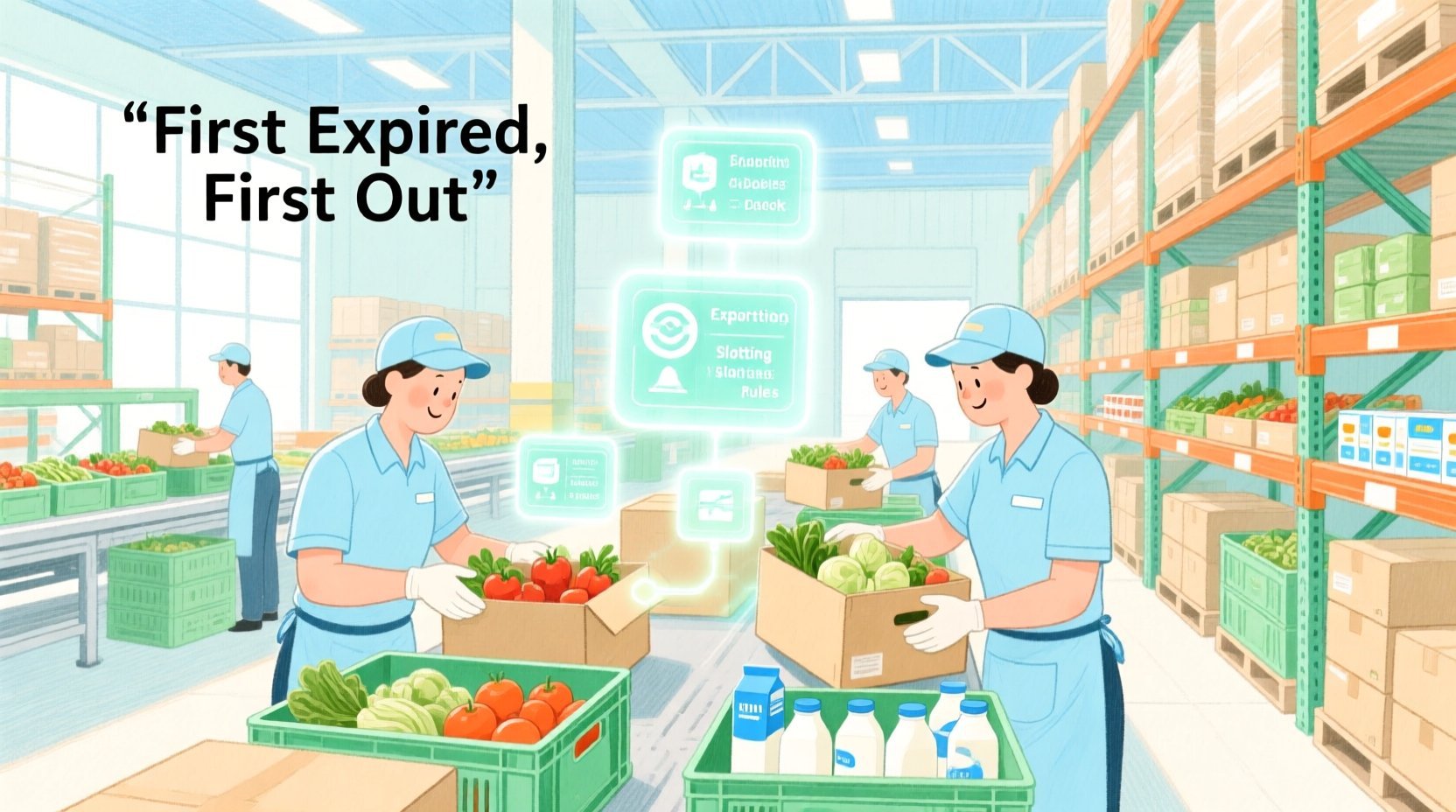
Designing an ERD for a food distribution center involves more than just linking tables; it requires a deep understanding of the physical constraints of the warehouse (temperature zones, weight limits, aisle layouts) and the temporal constraints of the inventory (expiration dates, lot numbers, movement history). By using a diagram-as-code approach with PlantUML, architects can diagram-as-code modeling their data models, collaborate on complex relationships like slotting rules and rotation alerts, and instantly visualize how data flows from a product’s definition to its final movement. This tutorial demonstrates how to construct a robust ERD that models the intricate dance between slotting optimization and expiration date rotation, providing a clear, executable specification for developers.
Understanding the Model: Purpose, Scope & Problem Framing
This diagram addresses a specific domain challenge in logistics: the dual optimization of physical storage efficiency and product lifecycle management. Unlike a generic inventory system, a food distribution model must account for the perishability of goods and the physical reality of the warehouse environment.
Diagram Abstraction & Representation
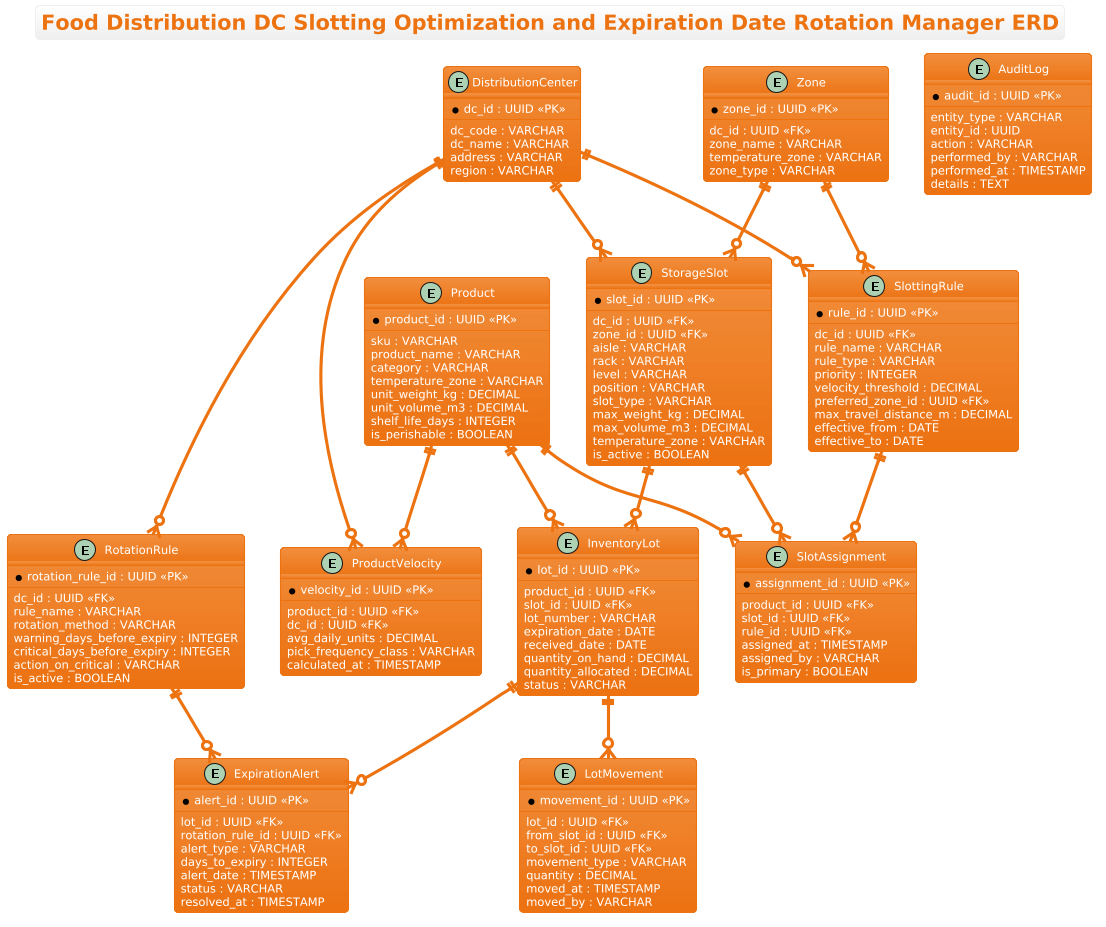
The Entity Relationship Diagram (ERD) serves as the structural backbone for the database schema. In this context, it models:
- Static Attributes: Properties of products (weight, volume, temperature requirements) and physical locations (aisles, racks, zones) that define the “rules of the warehouse.”
- Dynamic States: The lifecycle of an
InventoryLot, which tracks a specific batch of goods from receipt through storage, movement, and eventual expiration. - Optimization Logic: Entities like
ProductVelocityandSlottingRulerepresent the algorithmic inputs used to decide where items should live, whileRotationRuleandExpirationAlertrepresent the logic for managing stock rotation.
Target Domain Scope & Scenario
The scope of this model is strictly limited to the operational data layer of a food distribution center. It covers the relationship between the physical facility (Distribution Centers and Zones), the inventory items (Products and Lots), and the operational logic (Slotting and Rotation). It intentionally excludes external systems like ERP ordering or transportation management, focusing solely on the internal warehouse data integrity required for slotting and expiration management.
Key Takeaways & Educational Insights
By building this model, you will learn how to:
- Model one-to-many relationships between facilities and their internal zones and slots.
- Implement a “Lot” pattern to track specific batches of perishable goods, a critical requirement for food safety.
- Design audit trails and alert systems directly within the schema to support compliance and operational efficiency.
- Separate static product definitions from dynamic lot-level data to allow for flexible inventory management.
Complete Diagram & Full Source Code
Below is the complete, rendered diagram representing the Food Distribution DC Slotting Optimization and Expiration Date Rotation Manager. This visual blueprint connects product attributes, storage constraints, and lot movement history into a cohesive data model.
@startuml
!theme aws-orange
title Food Distribution DC Slotting Optimization and Expiration Date Rotation Manager ERD

/'
Diagram Context:
This ERD models a food distribution center that manages grocery inventory with two connected priorities:
1) Slotting optimization: assigning products to storage locations (slots) based on
   velocity, temperature zone, dimensions, and handling constraints to reduce travel
   and improve pick efficiency.
2) Expiration date rotation: tracking lot-level expiration dates for perishable and
   shelf-stable goods so that older stock is picked first (FEFO - First Expired, First Out).

The core of the model is the InventoryLot entity, which links a specific product lot
to a physical slot and carries expiration and quantity data. Slotting rules and slot
attributes determine where products should be stored, while lot movement and audit
records provide traceability for rotation decisions and warehouse operations.
'/

entity "Product" as product {
  * product_id : UUID <<PK>>
  --
  sku : VARCHAR
  product_name : VARCHAR
  category : VARCHAR
  temperature_zone : VARCHAR
  unit_weight_kg : DECIMAL
  unit_volume_m3 : DECIMAL
  shelf_life_days : INTEGER
  is_perishable : BOOLEAN
}

entity "ProductVelocity" as velocity {
  * velocity_id : UUID <<PK>>
  --
  product_id : UUID <<FK>>
  dc_id : UUID <<FK>>
  avg_daily_units : DECIMAL
  pick_frequency_class : VARCHAR
  calculated_at : TIMESTAMP
}

entity "StorageSlot" as slot {
  * slot_id : UUID <<PK>>
  --
  dc_id : UUID <<FK>>
  zone_id : UUID <<FK>>
  aisle : VARCHAR
  rack : VARCHAR
  level : VARCHAR
  position : VARCHAR
  slot_type : VARCHAR
  max_weight_kg : DECIMAL
  max_volume_m3 : DECIMAL
  temperature_zone : VARCHAR
  is_active : BOOLEAN
}

entity "SlottingRule" as rule {
  * rule_id : UUID <<PK>>
  --
  dc_id : UUID <<FK>>
  rule_name : VARCHAR
  rule_type : VARCHAR
  priority : INTEGER
  velocity_threshold : DECIMAL
  preferred_zone_id : UUID <<FK>>
  max_travel_distance_m : DECIMAL
  effective_from : DATE
  effective_to : DATE
}

entity "SlotAssignment" as assignment {
  * assignment_id : UUID <<PK>>
  --
  product_id : UUID <<FK>>
  slot_id : UUID <<FK>>
  rule_id : UUID <<FK>>
  assigned_at : TIMESTAMP
  assigned_by : VARCHAR
  is_primary : BOOLEAN
}

entity "InventoryLot" as lot {
  * lot_id : UUID <<PK>>
  --
  product_id : UUID <<FK>>
  slot_id : UUID <<FK>>
  lot_number : VARCHAR
  expiration_date : DATE
  received_date : DATE
  quantity_on_hand : DECIMAL
  quantity_allocated : DECIMAL
  status : VARCHAR
}

entity "LotMovement" as movement {
  * movement_id : UUID <<PK>>
  --
  lot_id : UUID <<FK>>
  from_slot_id : UUID <<FK>>
  to_slot_id : UUID <<FK>>
  movement_type : VARCHAR
  quantity : DECIMAL
  moved_at : TIMESTAMP
  moved_by : VARCHAR
}

entity "RotationRule" as rotation {
  * rotation_rule_id : UUID <<PK>>
  --
  dc_id : UUID <<FK>>
  rule_name : VARCHAR
  rotation_method : VARCHAR
  warning_days_before_expiry : INTEGER
  critical_days_before_expiry : INTEGER
  action_on_critical : VARCHAR
  is_active : BOOLEAN
}

entity "ExpirationAlert" as alert {
  * alert_id : UUID <<PK>>
  --
  lot_id : UUID <<FK>>
  rotation_rule_id : UUID <<FK>>
  alert_type : VARCHAR
  days_to_expiry : INTEGER
  alert_date : TIMESTAMP
  status : VARCHAR
  resolved_at : TIMESTAMP
}

entity "DistributionCenter" as dc {
  * dc_id : UUID <<PK>>
  --
  dc_code : VARCHAR
  dc_name : VARCHAR
  address : VARCHAR
  region : VARCHAR
}

entity "Zone" as zone {
  * zone_id : UUID <<PK>>
  --
  dc_id : UUID <<FK>>
  zone_name : VARCHAR
  temperature_zone : VARCHAR
  zone_type : VARCHAR
}

entity "AuditLog" as audit {
  * audit_id : UUID <<PK>>
  --
  entity_type : VARCHAR
  entity_id : UUID
  action : VARCHAR
  performed_by : VARCHAR
  performed_at : TIMESTAMP
  details : TEXT
}

product ||--o{ velocity
product ||--o{ assignment
product ||--o{ lot
dc ||--o{ velocity
dc ||--o{ slot
dc ||--o{ rule
dc ||--o{ rotation
zone ||--o{ slot
zone ||--o{ rule
slot ||--o{ assignment
slot ||--o{ lot
rule ||--o{ assignment
lot ||--o{ movement
lot ||--o{ alert
rotation ||--o{ alert

@endumlStep-by-Step Architectural Walkthrough
Constructing this complex ERD requires a phased approach. We will build the model by first establishing the physical infrastructure, then defining the product master data, and finally linking the dynamic operational logic for slotting and rotation.
Phase 1: Canvas Configuration & Layout Directives
Before defining entities, we set the stage for the diagram. In PlantUML, the @startuml directive initiates the diagram, and we immediately apply a theme to ensure visual consistency. The !theme aws-orange directive provides a professional, high-contrast color palette suitable for enterprise documentation.
We also define the title of the diagram to provide immediate context. Crucially, we include a comment block using the /' and '/ syntax to document the business context. This is not just code; it is living documentation that explains the “why” behind the model.
@startuml
!theme aws-orange
title Food Distribution DC Slotting Optimization and Expiration Date Rotation Manager ERD

/'
Diagram Context:
This ERD models a food distribution center that manages grocery inventory...
'/
Phase 2: Declaring Core Entities, Actors, and Boundaries
The foundation of the model lies in the static entities. We start with the DistributionCenter and Zone entities to define the physical hierarchy. A Distribution Center (DC) contains multiple Zones, which are further subdivided into StorageSlot entities. Each slot has physical constraints like max_weight_kg and temperature_zone, which are critical for slotting logic.
Next, we define the Product entity. This is the master data for all items. Notice the inclusion of shelf_life_days and is_perishable, which are the triggers for the rotation logic. We also define ProductVelocity to track how fast an item sells, which is a key input for slotting optimization algorithms.
entity "Product" as product {
  * product_id : UUID <>
  --
  sku : VARCHAR
  product_name : VARCHAR
  category : VARCHAR
  temperature_zone : VARCHAR
  unit_weight_kg : DECIMAL
  unit_volume_m3 : DECIMAL
  shelf_life_days : INTEGER
  is_perishable : BOOLEAN
}
Phase 3: Mapping Data Flows & Key Interactions
With the static entities defined, we introduce the dynamic entities that drive the warehouse operations. The InventoryLot entity is the heart of the model. Unlike a simple inventory count, a “Lot” tracks a specific batch with a unique lot_number, expiration_date, and quantity_on_hand. This allows the system to distinguish between two batches of the same product that have different expiration dates.
We then link the SlottingRule and SlotAssignment entities. Rules define the logic (e.g., “High velocity items go to Zone A”), and Assignments record the actual placement of a product into a slot. This separation allows rules to change without losing historical assignment data.
entity "InventoryLot" as lot {
* lot_id : UUID <>
--
product_id : UUID <>
slot_id : UUID < >
lot_number : VARCHAR
expiration_date : DATE
received_date : DATE
quantity_on_hand : DECIMAL
quantity_allocated : DECIMAL
status : VARCHAR
}
Phase 4: Grouping, Annotations & Visual Polish
The final phase involves defining the relationships that bind these entities together. We use PlantUML’s cardinality notation to show how data flows. For instance, a Product can have many InventoryLot instances (one-to-many), and a Lot can have many LotMovement records (traceability).
We also implement the RotationRule and ExpirationAlert entities. These are triggered by the InventoryLot entity when the expiration_date approaches. The AuditLog entity provides a universal trace for all actions, ensuring that every slot change or lot movement is recorded for compliance.
product ||--o{ lot
dc ||--o{ slot
slot ||--o{ lot
lot ||--o{ movement
lot ||--o{ alert
Syntax & Keyword Deep Dive
PlantUML provides powerful syntax for defining Entity Relationship Diagrams. Here is a breakdown of the specific keywords and conventions used in this logistics model:
entity "Name" as alias { ... }: This defines a new table or entity. The"Name"is the display label, andas aliasprovides a short reference for relationship lines (e.g.,productinstead ofProduct).* attribute : TYPE <: The asterisk> *indicates a primary key. The<stereotype explicitly marks the primary key, and> TYPEdefines the data type (e.g.,UUID,VARCHAR,DECIMAL).--: This separator line visually divides the Primary Key from the other attributes within the entity box, improving readability.||--o{: This is the cardinality notation.||means “one and only one” (mandatory), ando{means “zero or many” (optional). For example,product ||--o{ lotmeans one product can have zero or many lots.!theme: A directive to apply a predefined color theme to the entire diagram, ensuring a consistent visual identity./' ... '/: This block comment syntax allows you to include multi-line text descriptions directly in the code, which are rendered as a text block in the diagram (or can be used for documentation purposes depending on the renderer).
Best Practices & Pitfalls to Avoid
When modeling complex logistics systems like food distribution, adherence to best practices ensures your diagram remains maintainable and useful over time.
- Separate Static from Dynamic Data: Never mix product definitions (e.g.,
Product) with transactional lot data (e.g.,InventoryLot) in the same table. This separation allows you to update product attributes without affecting historical lot records. - Use UUIDs for Scalability: In distributed warehouse systems,
UUIDis preferred over auto-incrementing integers to avoid collision issues when merging data from multiple DCs or cloud regions. - Explicitly Model Time: Always include timestamps (
received_date,moved_at,calculated_at) in your entities. For expiration management, the time dimension is as critical as the physical location. - Avoid Over-Normalization in Logic: While normalization is good for data integrity, ensure that entities like
SlottingRuleare easy to query. Sometimes denormalizing specific fields (likepreferred_zone_id) can simplify complex slotting algorithms.
Start Building Logistics ERDs Faster with VPasCode
Design complex warehouse data models instantly in your browser with VPasCode’s free PlantUML editor, featuring live rendering and zero local setup.