


In the high-stakes environment of modern construction, the coordination between material deliveries and heavy machinery operations is the linchpin of project success. A single mismanaged crane lift or a delayed delivery can cascade into costly site congestion, idle labor, and safety hazards. Traditional static documentation often fails to capture the dynamic interdependencies between suppliers, site logistics, and crane assets, leading to communication gaps that stall progress. To bridge this gap, software architects and project managers increasingly rely on visual modeling to pre-emptively map these complex workflows before they occur in the field.
Diagramming-as-code offers a unique advantage here: it transforms abstract logistical challenges into precise, executable schemas that can be versioned, tested, and shared instantly. By using PlantUML within the VPasCode editor, you can define the rigorous relationships between projects, sites, suppliers, and lift schedules with mathematical precision. This approach ensures that every entity—from the hazardous material flags to the operator certifications—is explicitly defined, creating a “living” blueprint that aligns the physical reality of the construction site with the digital planning tools used to manage it.
Understanding the Model: Purpose, Scope & Problem Framing
Diagram Abstraction & Representation
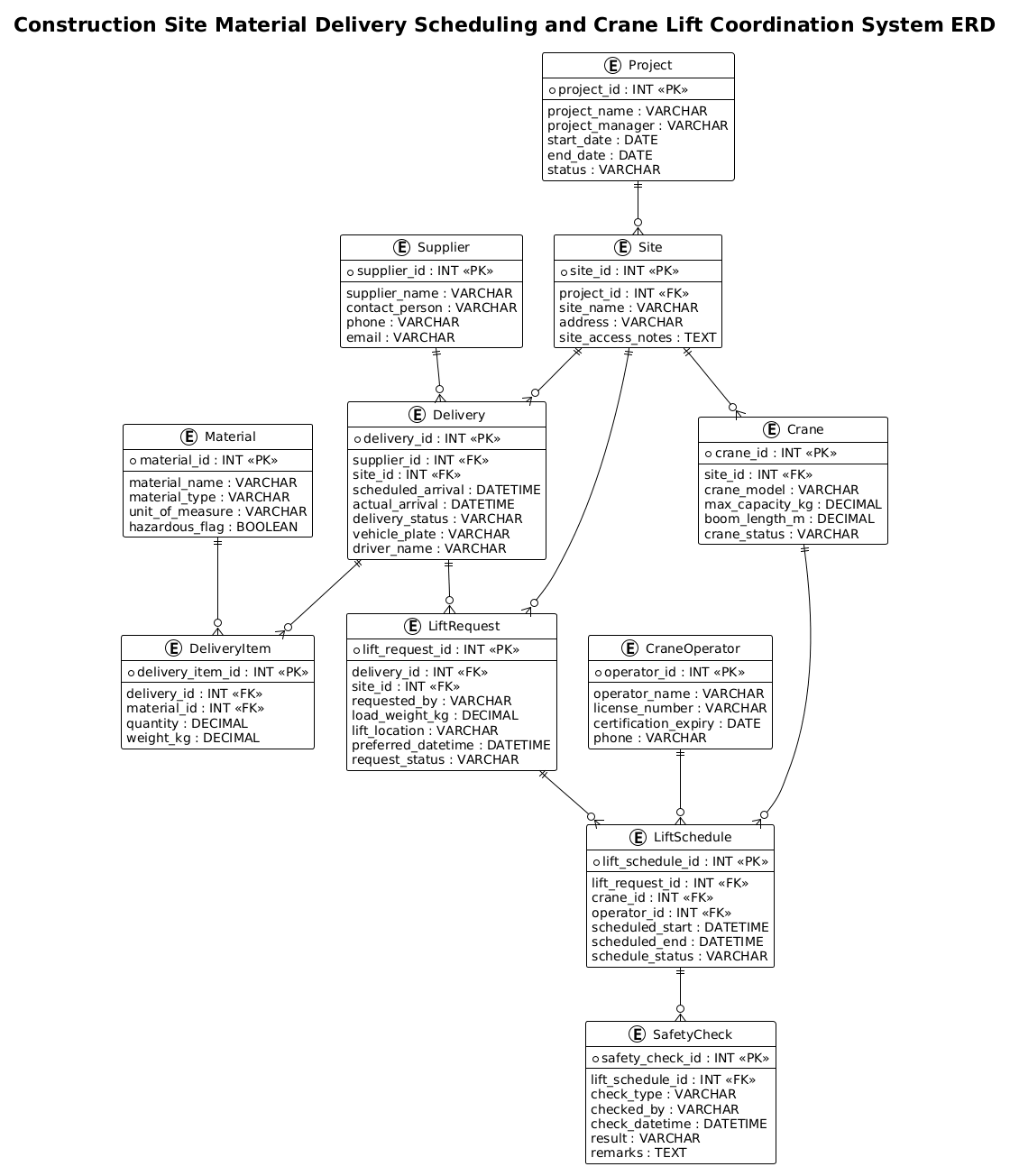
This Entity Relationship Diagram (ERD) serves as the logical backbone for a Construction Site Material Delivery and Crane Lift Coordination System. Unlike a simple list of items, this model abstracts the operational reality into discrete entities and their cardinalities. It distinguishes between static data (like supplier details or crane specifications) and dynamic transactional data (like delivery schedules or lift requests). The diagram specifically addresses the critical bottleneck in construction logistics: the synchronization of incoming goods with available lifting capacity. By visualizing the foreign key relationships, the model enforces business rules such as ensuring every lift request is tied to a specific delivery or site task, and that every crane operation is validated by a certified operator and a completed safety check.
Target Domain Scope & Scenario
The scope of this model covers the end-to-end lifecycle of material handling on a construction site. It begins with the Project level, which contains multiple Sites. From there, it branches into the supply chain (Supplier and Material) and the operational assets (Crane and CraneOperator). The core complexity lies in the intersection of these domains: the Delivery entity acts as the bridge bringing materials to the site, while the LiftRequest and LiftSchedule entities orchestrate the physical movement of those materials. The inclusion of the SafetyCheck entity highlights a critical domain constraint: no lift schedule is valid without a corresponding safety verification, ensuring compliance with industry safety standards.
Key Takeaways & Educational Insights
By constructing this diagram, you will gain insights into:
- Normalization Strategies: How to separate material definitions from specific delivery instances to avoid data redundancy.
- Constraint Modeling: How to enforce mandatory relationships (e.g., a lift cannot happen without a crane and operator) using primary and foreign keys.
- Temporal Logic: How to model time-bound events like scheduled arrivals and lift windows using datetime attributes.
- Safety & Compliance: How to embed regulatory requirements (safety checks) directly into the data structure.
Complete Diagram & Full Source Code
Below is the complete architectural blueprint for the Construction Site Logistics system. You can view the rendered output immediately and then explore the code structure in the following sections.
@startuml
!theme plain
title Construction Site Material Delivery Scheduling and Crane Lift Coordination System ERD

/'
Diagram Context:
This ERD models the coordination between material deliveries and crane lift operations on a construction site.
It captures projects, sites, suppliers, materials, delivery schedules, crane assets, crane operators,
lift requests, and lift schedules. The central idea is that incoming material deliveries must be aligned
with available crane capacity and qualified operators to avoid site congestion, idle equipment, and delays.
Relationships show how projects own sites, deliveries supply materials to sites, lift requests are raised
for deliveries or site tasks, and lift schedules assign cranes and operators to approved lift requests.
'/

entity "Project" as project {
  * project_id : INT <<PK>>
  --
  project_name : VARCHAR
  project_manager : VARCHAR
  start_date : DATE
  end_date : DATE
  status : VARCHAR
}

entity "Site" as site {
  * site_id : INT <<PK>>
  --
  project_id : INT <<FK>>
  site_name : VARCHAR
  address : VARCHAR
  site_access_notes : TEXT
}

entity "Supplier" as supplier {
  * supplier_id : INT <<PK>>
  --
  supplier_name : VARCHAR
  contact_person : VARCHAR
  phone : VARCHAR
  email : VARCHAR
}

entity "Material" as material {
  * material_id : INT <<PK>>
  --
  material_name : VARCHAR
  material_type : VARCHAR
  unit_of_measure : VARCHAR
  hazardous_flag : BOOLEAN
}

entity "Delivery" as delivery {
  * delivery_id : INT <<PK>>
  --
  supplier_id : INT <<FK>>
  site_id : INT <<FK>>
  scheduled_arrival : DATETIME
  actual_arrival : DATETIME
  delivery_status : VARCHAR
  vehicle_plate : VARCHAR
  driver_name : VARCHAR
}

entity "DeliveryItem" as delivery_item {
  * delivery_item_id : INT <<PK>>
  --
  delivery_id : INT <<FK>>
  material_id : INT <<FK>>
  quantity : DECIMAL
  weight_kg : DECIMAL
}

entity "Crane" as crane {
  * crane_id : INT <<PK>>
  --
  site_id : INT <<FK>>
  crane_model : VARCHAR
  max_capacity_kg : DECIMAL
  boom_length_m : DECIMAL
  crane_status : VARCHAR
}

entity "CraneOperator" as crane_operator {
  * operator_id : INT <<PK>>
  --
  operator_name : VARCHAR
  license_number : VARCHAR
  certification_expiry : DATE
  phone : VARCHAR
}

entity "LiftRequest" as lift_request {
  * lift_request_id : INT <<PK>>
  --
  delivery_id : INT <<FK>>
  site_id : INT <<FK>>
  requested_by : VARCHAR
  load_weight_kg : DECIMAL
  lift_location : VARCHAR
  preferred_datetime : DATETIME
  request_status : VARCHAR
}

entity "LiftSchedule" as lift_schedule {
  * lift_schedule_id : INT <<PK>>
  --
  lift_request_id : INT <<FK>>
  crane_id : INT <<FK>>
  operator_id : INT <<FK>>
  scheduled_start : DATETIME
  scheduled_end : DATETIME
  schedule_status : VARCHAR
}

entity "SafetyCheck" as safety_check {
  * safety_check_id : INT <<PK>>
  --
  lift_schedule_id : INT <<FK>>
  check_type : VARCHAR
  checked_by : VARCHAR
  check_datetime : DATETIME
  result : VARCHAR
  remarks : TEXT
}

project ||--o{ site
site ||--o{ delivery
site ||--o{ crane
site ||--o{ lift_request
supplier ||--o{ delivery
delivery ||--o{ delivery_item
material ||--o{ delivery_item
delivery ||--o{ lift_request
lift_request ||--o{ lift_schedule
crane ||--o{ lift_schedule
crane_operator ||--o{ lift_schedule
lift_schedule ||--o{ safety_check

@endumlStep-by-Step Architectural Walkthrough
Building a complex ERD requires a structured approach. We will deconstruct this diagram into four logical phases, moving from the high-level project structure down to the granular safety compliance checks.
Phase 1: Canvas Configuration & Layout Directives
The foundation of any PlantUML ERD is the canvas setup. We begin by declaring the theme and the title. In this case, we use !theme plain to ensure a clean, professional look that is easy to read in documentation. The title directive provides immediate context for anyone viewing the diagram, clearly stating the system’s purpose.
!theme plain
title Construction Site Material Delivery Scheduling and Crane Lift Coordination System ERD
Following the title, we insert a comment block using the /' and '/ syntax. This is crucial for documentation; it allows you to explain the business context and scope without cluttering the visual diagram itself. This text is ignored by the renderer but is invaluable for human readers and AI parsers.
Phase 2: Declaring Core Entities, Actors, and Boundaries
Next, we define the core entities. In PlantUML, the entity keyword creates a database table-like box. We use the as keyword to assign a short alias (e.g., project) which is used for drawing relationships, keeping the code concise.
Inside each entity block, we define attributes. The * symbol denotes a Primary Key (PK), and INT or VARCHAR defines the data type. For example, the Project entity captures the high-level container, while the Site entity represents a specific location within that project.
entity "Project" as project {
  * project_id : INT <>
  --
  project_name : VARCHAR
  project_manager : VARCHAR
  start_date : DATE
  end_date : DATE
  status : VARCHAR
}
Note the -- separator. This is a PlantUML ERD convention that visually separates the Primary Key from the rest of the attributes in the rendered diagram, improving readability.
Phase 3: Mapping Data Flows & Key Interactions
The heart of the logistics system lies in the relationships between entities. We use the ||--o{ syntax to define cardinality. || represents “one and only one” (mandatory), and o{ represents “zero or many” (optional). For instance, a Project must have at least one Site, but a Site can exist without any Deliveries yet.
We also model the many-to-many relationships through junction tables. The DeliveryItem entity acts as a bridge between Delivery and Material. A single delivery can contain many materials, and a single material type can be part of many deliveries. This is reflected by the foreign keys delivery_id and material_id.
delivery ||--o{ delivery_item
material ||--o{ delivery_item
Phase 4: Grouping, Annotations & Visual Polish
Finally, we ensure the diagram is complete by adding the safety and operational constraints. The SafetyCheck entity is linked to LiftSchedule, enforcing the rule that a lift cannot be scheduled without a safety verification. This creates a strict workflow dependency. We use the TEXT data type for fields like remarks or site_access_notes to accommodate longer descriptions that don’t fit in standard string fields.
Syntax & Keyword Deep Dive
To master this diagram, it is essential to understand the specific PlantUML ERD syntax elements used:
entity "Name" as alias: Defines a new entity table with a display name and a short alias for relationship drawing.* attribute : TYPE: The asterisk*marks the attribute as the Primary Key (PK).<and> <: Stereotypes used to explicitly label Primary Keys and Foreign Keys in the diagram legend and visual representation.> --: A separator line inside an entity block that visually divides the primary key from other attributes.||--o{: The cardinality notation.||means mandatory one, ando{means optional many. This defines the “One-to-Many” relationship./' ... '/: Multi-line comment syntax. Anything between these delimiters is treated as a comment and does not affect the rendering.!theme plain: A directive to apply a specific visual theme to the entire diagram, ensuring a consistent look.
Best Practices & Pitfalls to Avoid
When building ERDs for complex logistics systems, keep these best practices in mind to ensure your diagrams remain maintainable and accurate:
- Use Junction Tables for Many-to-Many: Never try to draw a direct line between two entities if they have a many-to-many relationship (like Delivery and Material). Always create an intermediate entity (like DeliveryItem) to hold the foreign keys and any specific attributes of that relationship (like quantity).
- Consistent Naming Conventions: Use consistent casing for entity names and attributes. In this guide, we used PascalCase for entity names (e.g.,
CraneOperator) and snake_case for attributes (e.g.,operator_name), which is a common industry standard. - Separate Static from Dynamic: Keep reference data (like Material types) separate from transactional data (like Delivery instances). This normalization prevents data duplication and makes updates easier.
- Validate Cardinality: Double-check your
||--o{relationships. Ensure that a mandatory relationship (like a lift requiring a crane) is marked as mandatory on the correct side of the line to reflect real-world business rules.
Try It Yourself with VPasCode
Ready to architect your own construction logistics system? Use VPasCode to instantly render, edit, and refine this PlantUML ERD. With zero setup required, you can test different entity relationships, tweak the visual theme, and export your diagram for your team—all directly in your browser.
Start Building PlantUML ERDs Faster with VPasCode
Experience instant live preview and interactive syntax testing for your logistics diagrams without installing any tools.