


In the high-stakes environment of healthcare logistics, the integrity of a medical specimen is paramount. From the moment a sample is drawn in a clinic to its final analysis in a laboratory, every handoff must be meticulously tracked to ensure chain of custody compliance. A single break in this chain can invalidate test results, delay critical diagnoses, and expose healthcare providers to legal liability. Traditional static documentation often fails to capture the dynamic complexity of these workflows, where couriers, collection sites, and labs interact in real-time.

Diagramming-as-code offers a superior approach to modeling these complex systems. By using PlantUML to define an Entity-Relationship Diagram (ERD), architects can create living documentation that is version-friendly, easy to update, and instantly renderable. This tutorial guides you through building a comprehensive ERD for a Medical Specimen Transport Chain of Custody and Lab Delivery Confirmation platform. Using VPasCode, you will learn to structure entities like Specimen, Courier, and TransportEvent to model the rigorous data requirements of modern healthcare logistics.
Understanding the Model: Purpose, Scope & Problem Framing
This ERD is designed to solve a specific data integrity challenge: tracking the lifecycle of a biological sample across multiple physical locations and human actors. The model abstracts the real-world chaos of specimen transport into a structured set of entities and relationships that enforce referential integrity and audit trails.
Diagram Abstraction & Representation
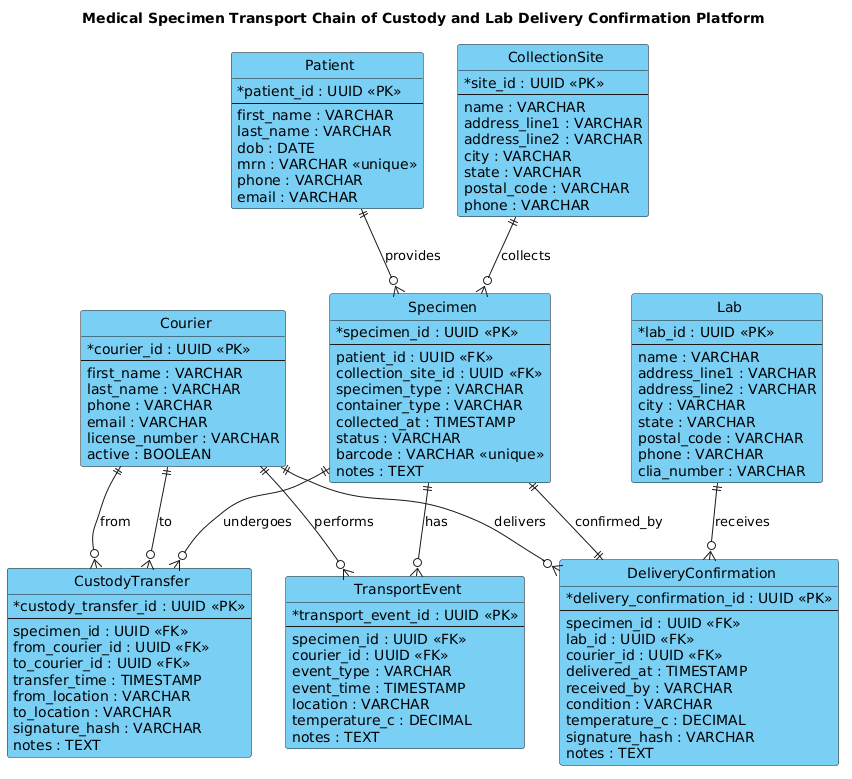
In the context of logistics and healthcare compliance, an ERD serves as the blueprint for the underlying database schema. It defines the “nouns” of the system—such as Patients, Specimens, and Couriers—and the “verbs” that connect them, such as collects, transports, and confirms. The diagram specifically models the Chain of Custody by introducing associative entities like CustodyTransfer and TransportEvent, which are critical for recording who held the specimen, when, and under what conditions (e.g., temperature).
Target Domain Scope & Scenario
The scope of this model covers the end-to-end journey of a specimen. It begins at the CollectionSite where a Patient is identified, moves through the Specimen creation process, and tracks every handoff via Courier interactions. The model extends to the final destination, the Lab, where a DeliveryConfirmation is recorded. This scope intentionally excludes the internal laboratory analysis workflow, focusing strictly on the physical transport and custody verification phases.
Key Takeaways & Educational Insights
By constructing this diagram, you will gain insights into how to model one-to-many relationships for event logs (e.g., a single specimen having multiple transport events) and how to handle complex many-to-many scenarios (e.g., a courier performing multiple custody transfers). You will also learn how to enforce strict data constraints, such as unique barcodes and mandatory timestamps, which are essential for regulatory compliance in medical logistics.
Complete Diagram & Full Source Code
Before diving into the construction steps, review the final architecture. This diagram visualizes the relationships between the core entities, ensuring that every piece of data required for a compliant chain of custody is accounted for.
@startuml
!include https://static.visual-paradigm.com/web/resources/plantuml-stdlib/themes/vp.puml

title Medical Specimen Transport Chain of Custody and Lab Delivery Confirmation Platform
/'
Diagram Context:
This ERD models the core data structure for a medical specimen transport chain of custody
and lab delivery confirmation platform. The system tracks specimen collection, handoffs
between couriers and facilities, and final delivery to the laboratory. Key entities include
Specimen, Patient, CollectionSite, Courier, TransportEvent, CustodyTransfer, Lab, and
DeliveryConfirmation. The diagram supports auditability by recording who had custody at
each step, timestamps, locations, and delivery outcomes.
'/

entity "Patient" as patient {
  * patient_id : UUID <<PK>>
  --
  first_name : VARCHAR
  last_name : VARCHAR
  dob : DATE
  mrn : VARCHAR <<unique>>
  phone : VARCHAR
  email : VARCHAR
}

entity "CollectionSite" as site {
  * site_id : UUID <<PK>>
  --
  name : VARCHAR
  address_line1 : VARCHAR
  address_line2 : VARCHAR
  city : VARCHAR
  state : VARCHAR
  postal_code : VARCHAR
  phone : VARCHAR
}

entity "Specimen" as specimen {
  * specimen_id : UUID <<PK>>
  --
  patient_id : UUID <<FK>>
  collection_site_id : UUID <<FK>>
  specimen_type : VARCHAR
  container_type : VARCHAR
  collected_at : TIMESTAMP
  status : VARCHAR
  barcode : VARCHAR <<unique>>
  notes : TEXT
}

entity "Courier" as courier {
  * courier_id : UUID <<PK>>
  --
  first_name : VARCHAR
  last_name : VARCHAR
  phone : VARCHAR
  email : VARCHAR
  license_number : VARCHAR
  active : BOOLEAN
}

entity "TransportEvent" as transport_event {
  * transport_event_id : UUID <<PK>>
  --
  specimen_id : UUID <<FK>>
  courier_id : UUID <<FK>>
  event_type : VARCHAR
  event_time : TIMESTAMP
  location : VARCHAR
  temperature_c : DECIMAL
  notes : TEXT
}

entity "CustodyTransfer" as custody_transfer {
  * custody_transfer_id : UUID <<PK>>
  --
  specimen_id : UUID <<FK>>
  from_courier_id : UUID <<FK>>
  to_courier_id : UUID <<FK>>
  transfer_time : TIMESTAMP
  from_location : VARCHAR
  to_location : VARCHAR
  signature_hash : VARCHAR
  notes : TEXT
}

entity "Lab" as lab {
  * lab_id : UUID <<PK>>
  --
  name : VARCHAR
  address_line1 : VARCHAR
  address_line2 : VARCHAR
  city : VARCHAR
  state : VARCHAR
  postal_code : VARCHAR
  phone : VARCHAR
  clia_number : VARCHAR
}

entity "DeliveryConfirmation" as delivery_confirmation {
  * delivery_confirmation_id : UUID <<PK>>
  --
  specimen_id : UUID <<FK>>
  lab_id : UUID <<FK>>
  courier_id : UUID <<FK>>
  delivered_at : TIMESTAMP
  received_by : VARCHAR
  condition : VARCHAR
  temperature_c : DECIMAL
  signature_hash : VARCHAR
  notes : TEXT
}

patient ||--o{ specimen : "provides"
site ||--o{ specimen : "collects"
specimen ||--o{ transport_event : "has"
courier ||--o{ transport_event : "performs"
specimen ||--o{ custody_transfer : "undergoes"
courier ||--o{ custody_transfer : "from"
courier ||--o{ custody_transfer : "to"
specimen ||--|| delivery_confirmation : "confirmed_by"
lab ||--o{ delivery_confirmation : "receives"
courier ||--o{ delivery_confirmation : "delivers"

@endumlStep-by-Step Architectural Walkthrough
Building a complex ERD requires a structured approach. We will construct this diagram in four distinct phases, moving from high-level configuration to detailed entity relationships.
Phase 1: Canvas Configuration & Layout Directives
Every professional PlantUML diagram starts with a clean canvas. We begin by including the Visual Paradigm standard library theme, which ensures consistent styling, typography, and entity box rendering. This eliminates the need to manually define colors and fonts for every box.
@startuml
!include https://static.visual-paradigm.com/web/resources/plantuml-stdlib/themes/vp.puml
Next, we define a descriptive title. In PlantUML, the title directive acts as a header for the entire diagram, providing immediate context for anyone viewing the output. We then add a comment block using the /' ... '/ syntax. This is crucial for documentation; it allows us to explain the diagram’s purpose without cluttering the rendering engine or the visual output.
title Medical Specimen Transport Chain of Custody and Lab Delivery Confirmation Platform
/'
Diagram Context:
This ERD models the core data structure...
'/
Phase 2: Declaring Core Entities, Actors, and Boundaries
With the canvas ready, we define the core entities. In PlantUML ERD syntax, the entity keyword creates a box representing a database table. We use the as keyword to assign a short alias (e.g., as patient) which simplifies the relationship declarations later.
Inside each entity, we define attributes. The * prefix indicates a Primary Key (PK), while FK denotes a Foreign Key. We also use stereotypes like UUID for unique identifiers and BOOLEAN for status flags. The -- separator visually divides the key attributes from the rest of the fields.
entity "Patient" as patient {
  * patient_id : UUID <>
  --
  first_name : VARCHAR
  last_name : VARCHAR
  dob : DATE
  mrn : VARCHAR <>
  phone : VARCHAR
  email : VARCHAR
}
We repeat this pattern for CollectionSite, Specimen, Courier, TransportEvent, CustodyTransfer, Lab, and DeliveryConfirmation. Notice how Specimen links back to Patient and CollectionSite via Foreign Keys, establishing the foundational hierarchy.
Phase 3: Mapping Data Flows & Key Interactions
The power of an ERD lies in its relationships. We use the ||--o{ syntax to define cardinality. The || represents a mandatory one (the entity on the left must exist), and the o{ represents zero or many (the entity on the right can have multiple instances). For example, a Patient must provide at least one Specimen, but can provide many over time.
patient ||--o{ specimen : "provides"
site ||--o{ specimen : "collects"
We also model complex scenarios like the TransportEvent. A single Specimen can have many TransportEvents (tracking temperature, location, and status over time), and a Courier can perform many events. This creates a many-to-many relationship resolved through the event entity.
specimen ||--o{ transport_event : "has"
courier ||--o{ transport_event : "performs"
Phase 4: Grouping, Annotations & Visual Polish
The final phase involves modeling the specific custody chain. The CustodyTransfer entity is a classic associative entity used to resolve a many-to-many relationship between Courier and Specimen (or more accurately, between two couriers holding the same specimen). We define relationships from Courier to CustodyTransfer with labels like "from" and "to" to clarify the direction of the handoff.
courier ||--o{ custody_transfer : "from"
courier ||--o{ custody_transfer : "to"
specimen ||--o{ custody_transfer : "undergoes"
Finally, we close the loop with DeliveryConfirmation. This entity links the Specimen, the Lab, and the Courier to record the final state. The relationship specimen ||--|| delivery_confirmation uses a double bar (mandatory) to indicate that every specimen must have a delivery confirmation, a critical requirement for chain of custody compliance.
Syntax & Keyword Deep Dive
To master PlantUML ERD modeling, it is essential to understand the specific syntax features used in this logistics diagram.
entity: Defines a rectangular box representing a database table or entity. It is the fundamental building block of the ERD.as: An aliasing keyword used to assign a short identifier to an entity for use in relationship lines (e.g.,as patient).PKandFK: Stereotypes used to mark Primary Keys and Foreign Keys. These are rendered visually in the diagram to highlight database constraints.||--o{: The cardinality notation.||means “one and only one” (mandatory), whileo{means “zero or more” (optional). This defines the minimum and maximum number of related records."label": A string literal placed after the relationship line to describe the nature of the connection (e.g.,: "provides")./' ... '/: The multi-line comment syntax. Content inside these markers is ignored by the renderer but remains visible in the source code for documentation purposes.UUID,VARCHAR,TIMESTAMP: Data type keywords used to specify the expected data format for each attribute.
Best Practices & Pitfalls to Avoid
When modeling complex logistics systems like specimen transport, adherence to best practices ensures your diagram remains maintainable and accurate.
- Use Descriptive Aliases: Always use the
askeyword to create short, meaningful aliases (e.g.,as labinstead ofas laboratory). This makes relationship lines much cleaner and easier to read. - Separate Keys from Attributes: Use the
--separator within entities to visually distinguish Primary Keys from other attributes. This improves readability and helps database architects quickly identify the schema structure. - Model Associative Entities Explicitly: For complex many-to-many relationships (like a courier handing off a specimen), create a dedicated entity (like
CustodyTransfer) rather than trying to force a direct relationship. This allows you to store extra data about the relationship, such as timestamps and signatures. - Document with Comments: Use the
/' ... '/comment block to explain the diagram’s scope. This is invaluable for future maintainers who may not remember the business logic behind the schema.
Start Building Medical ERDs Faster with VPasCode
Instantly prototype and refine your logistics data models with VPasCode, the free PlantUML editor that renders your Chain of Custody diagrams in the browser.