


In the complex ecosystem of agricultural logistics, data integrity is not just a technical requirement; it is a regulatory and operational necessity. Livestock auction markets serve as critical hubs where animals change hands, health records must be verified, and transport chains are documented for food safety compliance. Without a unified data model, tracking an animal from its origin farm through auction, transport, and final sale becomes a fragmented nightmare of spreadsheets and paper trails. A well-structured Entity Relationship Diagram (ERD) provides the architectural blueprint to synchronize these disparate data points, ensuring that every tag number, health certificate, and transport event is linked to the correct entity.
Visualizing this data structure before implementation is crucial for database architects and logistics managers. By using diagram-as-code with PlantUML, teams can define these relationships with precision, version the schema logic, and instantly render the model to validate cardinality and foreign key constraints. This approach eliminates the ambiguity of hand-drawn sketches and allows for rapid iteration as business rules evolve—such as adding new transport regulations or changing how auction lots are categorized. In this masterclass, we will construct a comprehensive ERD that captures the full lifecycle of a market animal, including its producer, auction lot assignment, transport logistics, and health certification requirements.
Understanding the Model: Purpose, Scope & Problem Framing
Diagram Abstraction & Representation
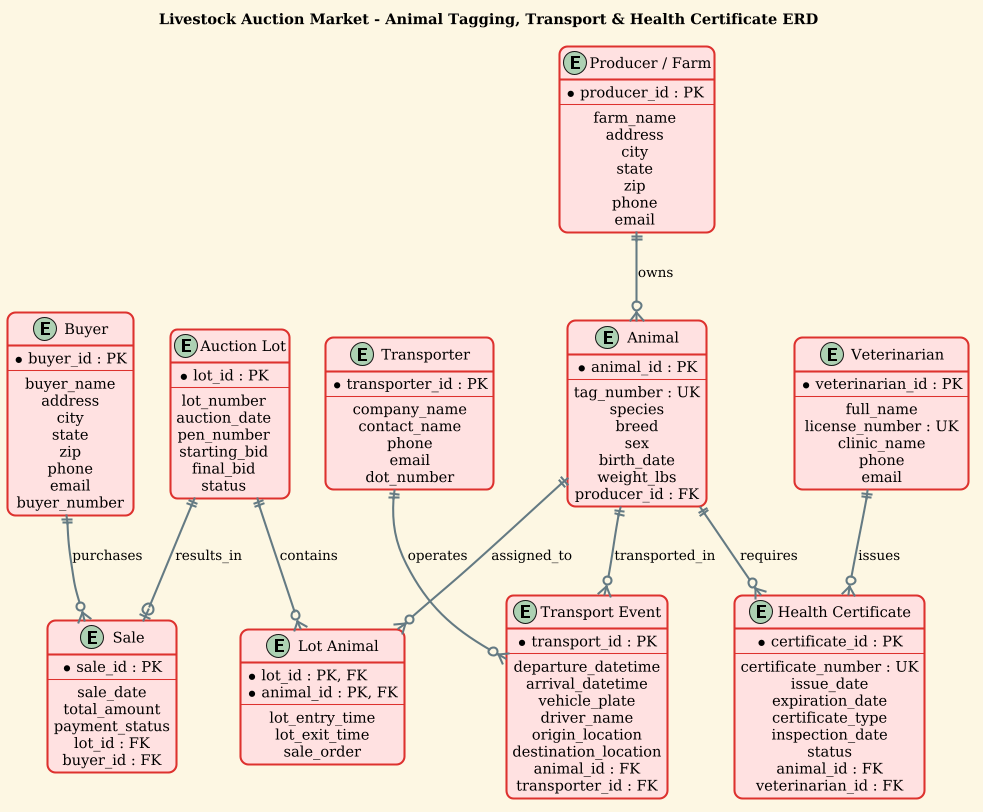
An Entity Relationship Diagram (ERD) is the foundational tool for designing relational databases. In this specific context, the ERD abstracts the physical and administrative realities of a livestock auction into logical data structures. Each entity represents a real-world object or concept (e.g., an Animal, a Transport Event, a Producer), while the relationships define how these objects interact. For instance, the relationship between Producer and Animal captures ownership, while the Transport entity acts as a bridge linking an animal to a specific vehicle and driver. This abstraction allows developers to map database tables and constraints directly from the visual model.
Target Domain Scope & Scenario
This diagram specifically targets the operational workflow of a livestock auction market. The scope is bounded by the lifecycle of an animal within the market’s ecosystem: from its registration at the Producer farm, through its assignment to an Auction Lot, its sale to a Buyer, and its subsequent movement via Transport events. Crucially, the model enforces regulatory compliance by mandating the linkage of every animal to a Health Certificate issued by a Veterinarian. The diagram excludes external supply chain details beyond the point of transport destination to maintain focus on the market’s internal data governance.
Key Takeaways & Educational Insights
By studying this model, you will gain insights into handling associative entities (like LotAnimal), which are essential for resolving many-to-many relationships between auctions and animals. You will also learn how to model temporal data (departure/arrival times) and regulatory constraints (unique health certificate numbers). Finally, the use of the sunlust theme demonstrates how to apply professional styling to make complex schemas readable for stakeholders.
Complete Diagram & Full Source Code
Below is the final architectural blueprint for the Livestock Auction Market database. This diagram encapsulates all core entities, their attributes, and the strict relationships required for operational integrity.
@startuml
!theme sunlust

/'
Diagram Context:
This ERD models a livestock auction market database that tracks animals, their tagging,
transport movements, and health certificates. It supports auction operations by linking
each animal to its origin farm, auction lot, transport events, and required health
documents for regulatory compliance. The design captures the relationships between
animals, owners, facilities, transporters, veterinarians, and certificate records.
'/

title Livestock Auction Market - Animal Tagging, Transport & Health Certificate ERD

entity "Producer / Farm" as Producer {
  * producer_id : PK
  --
  farm_name
  address
  city
  state
  zip
  phone
  email
}

entity "Animal" as Animal {
  * animal_id : PK
  --
  tag_number : UK
  species
  breed
  sex
  birth_date
  weight_lbs
  producer_id : FK
}

entity "Auction Lot" as Lot {
  * lot_id : PK
  --
  lot_number
  auction_date
  pen_number
  starting_bid
  final_bid
  status
}

entity "Lot Animal" as LotAnimal {
  * lot_id : PK, FK
  * animal_id : PK, FK
  --
  lot_entry_time
  lot_exit_time
  sale_order
}

entity "Buyer" as Buyer {
  * buyer_id : PK
  --
  buyer_name
  address
  city
  state
  zip
  phone
  email
  buyer_number
}

entity "Sale" as Sale {
  * sale_id : PK
  --
  sale_date
  total_amount
  payment_status
  lot_id : FK
  buyer_id : FK
}

entity "Transport Event" as Transport {
  * transport_id : PK
  --
  departure_datetime
  arrival_datetime
  vehicle_plate
  driver_name
  origin_location
  destination_location
  animal_id : FK
  transporter_id : FK
}

entity "Transporter" as Transporter {
  * transporter_id : PK
  --
  company_name
  contact_name
  phone
  email
  dot_number
}

entity "Health Certificate" as HealthCert {
  * certificate_id : PK
  --
  certificate_number : UK
  issue_date
  expiration_date
  certificate_type
  inspection_date
  status
  animal_id : FK
  veterinarian_id : FK
}

entity "Veterinarian" as Vet {
  * veterinarian_id : PK
  --
  full_name
  license_number : UK
  clinic_name
  phone
  email
}

Producer ||--o{ Animal : owns
Animal ||--o{ LotAnimal : assigned_to
Lot ||--o{ LotAnimal : contains
Lot ||--o| Sale : results_in
Buyer ||--o{ Sale : purchases
Animal ||--o{ Transport : transported_in
Transporter ||--o{ Transport : operates
Animal ||--o{ HealthCert : requires
Vet ||--o{ HealthCert : issues

@endumlStep-by-Step Architectural Walkthrough
Building a complex ERD requires a methodical approach. We will deconstruct the diagram into four logical phases: layout configuration, entity declaration, relationship mapping, and visual refinement.
Phase 1: Canvas Configuration & Layout Directives
The first step in any PlantUML ERD is setting the stage. We begin by declaring the diagram type and applying a specific visual theme to ensure professional readability. In this model, we use the !theme sunlust directive. This applies a warm, earthy color palette that fits the agricultural context while maintaining high contrast for text readability.
@startuml
!theme sunlust
Immediately following the theme, we define the diagram context using a comment block. This is a critical best practice for documentation. The comment block, wrapped in /' and '/, provides a narrative summary of the diagram’s purpose without cluttering the code logic. This ensures that anyone reviewing the source code later understands the business domain immediately.
/'
Diagram Context:
This ERD models a livestock auction market database...
'/

title Livestock Auction Market - Animal Tagging, Transport & Health Certificate ERD
Phase 2: Declaring Core Entities, Actors, and Boundaries
Next, we define the core entities. In PlantUML, we use the entity keyword followed by a display name and an internal alias. Inside the curly braces {}, we list the attributes. We use specific notation to define keys:
* attribute_name : PKmarks a Primary Key (e.g.,producer_id).attribute_name : UKmarks a Unique Key (e.g.,tag_number), ensuring no two animals have the same tag.attribute_name : FKmarks a Foreign Key, indicating a link to another table.
entity "Producer / Farm" as Producer {
  * producer_id : PK
  --
  farm_name
  address
  ...
}

entity "Animal" as Animal {
  * animal_id : PK
  --
  tag_number : UK
  ...
}
Notice the -- separator line. This is a visual cue in the ERD that separates the keys from the regular attributes, improving readability. We also define composite entities like LotAnimal, which serves as a junction table to resolve the many-to-many relationship between Lots and Animals.
Phase 3: Mapping Data Flows & Key Interactions
Once entities are declared, we define the relationships. PlantUML ERD uses specific arrow syntax to denote cardinality and direction. The notation EntityA ||--o{ EntityB : label is used here. The || indicates “one and only one” (mandatory) on the left side, while o{ indicates “zero or many” (optional) on the right side.
For example, Producer ||--o{ Animal : owns means a Producer must exist to own an Animal, but a Producer can own zero or many Animals. Conversely, Lot ||--o| Sale : results_in uses o| to indicate that a Lot must result in exactly one Sale (mandatory one), but a Sale must belong to exactly one Lot.
Producer ||--o{ Animal : owns
Animal ||--o{ LotAnimal : assigned_to
Lot ||--o{ LotAnimal : contains
Lot ||--o| Sale : results_in
Phase 4: Grouping, Annotations & Visual Polish
The final phase involves ensuring the diagram flows logically. While PlantUML auto-layouts the diagram, we can influence readability by grouping related entities conceptually in our mind (e.g., Auction entities vs. Logistics entities). The title directive provides a clear header. The !theme sunlust directive ensures that all entities share a consistent color scheme, reducing visual noise and allowing the viewer to focus on the structural connections.
Syntax & Keyword Deep Dive
To fully leverage PlantUML for ERD modeling, it is essential to understand the specific syntax keywords used in this livestock model:
entity: Defines a database table or object. The syntaxentity "Display Name" as Aliasallows for a user-friendly label while maintaining a concise internal reference.* attribute : PK: The asterisk*combined with: PKexplicitly marks an attribute as the Primary Key. This is the unique identifier for every row in the table.: UK: Stands for Unique Key. This ensures data integrity by preventing duplicate values (e.g., a duplicate animal tag number).: FK: Stands for Foreign Key. This indicates that the attribute references the Primary Key of another entity, establishing the relational link.||--o{: This is the cardinality notation.||means “mandatory one” ando{means “optional many”. This is critical for defining business rules like “A Transport Event must have one Animal but can be operated by one Transporter.”/' ... '/: The multi-line comment syntax. This allows for extensive documentation within the code file without affecting the rendering engine.
Best Practices & Pitfalls to Avoid
When modeling complex logistics databases like this, adherence to best practices ensures the diagram remains a reliable source of truth.
- Use Descriptive Aliases: While
entity "Producer / Farm" as Produceris clear, avoid overly generic names likeEntity1. Use aliases that match your database schema conventions to facilitate code generation. - Separate Keys with
--: Always use the--separator line between Primary Keys and other attributes. This visual separation is a standard convention that makes the diagram easier to scan and understand. - Validate Cardinality Logic: Double-check your arrow notation. A common pitfall is confusing
o{(optional many) witho|(optional one). In a logistics context, getting this wrong could lead to a database design that allows an animal to have no transport record, which is a compliance violation. - Keep Comments Contextual: Use the comment block to explain the why and what of the model, not the how of the syntax. This keeps the code clean and the documentation focused on business logic.
Start Building Your Logistics ERD with VPasCode
Design, test, and refine your livestock database schema instantly in the browser with our free PlantUML editor—no installation required.