


In the high-stakes world of live event production, the margin for error during stage equipment load-in is virtually non-existent. A single miscommunication regarding where a lighting truss belongs, which crew member is responsible for its installation, or the precise timing of a truck arrival can cascade into costly delays and safety hazards. To mitigate these risks, production managers and logistics coordinators rely on rigorous data modeling to synchronize physical venue constraints with dynamic operational schedules. This synchronization is the backbone of successful event execution, transforming chaotic logistical requirements into a structured, actionable plan.
Visualizing these complex relationships through an Entity Relationship Diagram (ERD) provides the architectural clarity needed to manage thousands of data points simultaneously. By modeling the interplay between venue floor plans, equipment inventory, and crew assignments, stakeholders can detect conflicts before they occur on-site. Using diagram-as-code with PlantUML in VPasCode allows teams to maintain this documentation as a living artifact, ensuring that database schemas, operational workflows, and physical layouts remain perfectly aligned throughout the planning lifecycle.
Understanding the Model: Purpose, Scope & Problem Framing
At its core, this Entity Relationship Diagram (ERD) addresses the fundamental challenge of spatial and temporal coordination in event logistics. Unlike standard database schemas that simply store data, this model is designed to represent a dynamic workflow where physical objects (equipment) must be placed in specific spatial zones (floor plan) by specific human resources (crew) within strict temporal windows (schedules).
Diagram Abstraction & Representation
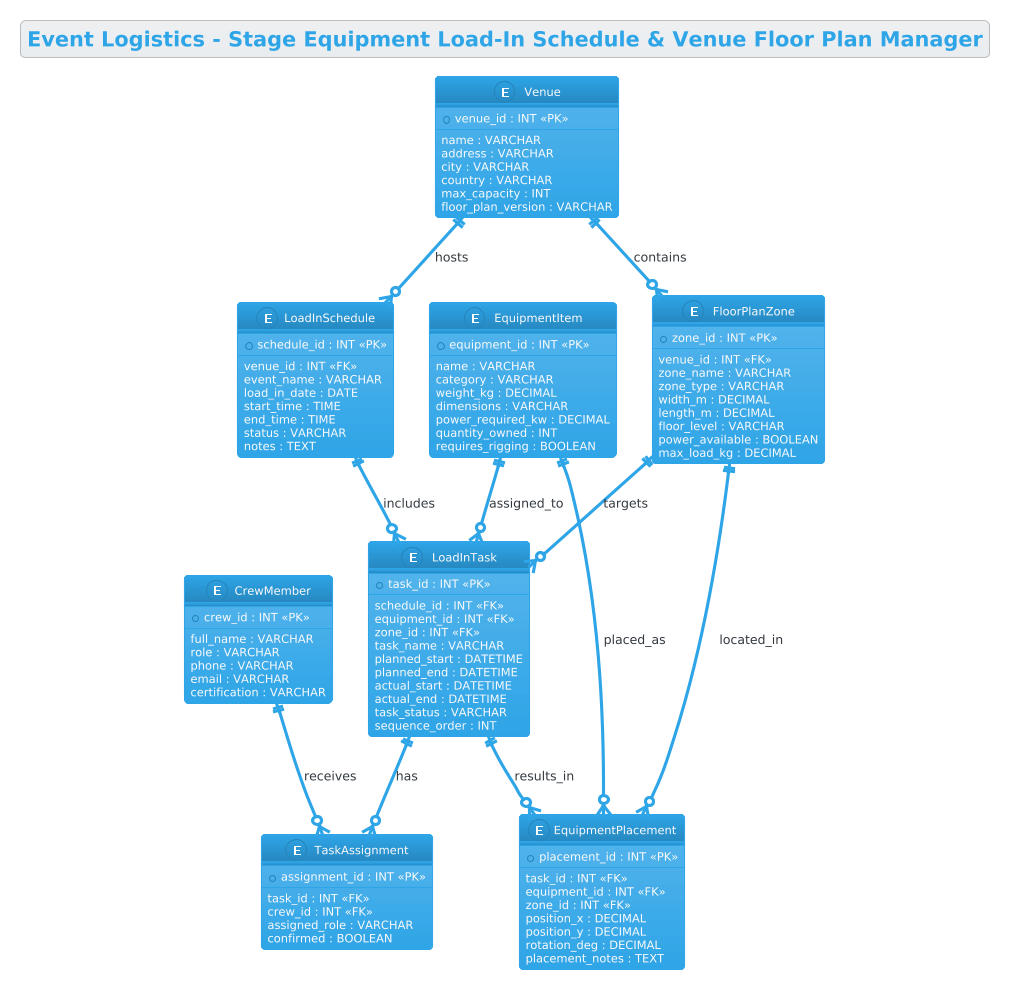
The diagram utilizes the Entity Relationship notation to define the structural integrity of the logistics system. It abstracts the physical world into manageable data entities: Venues define the container, FloorPlanZones define the specific locations within that container, and EquipmentItems define the assets moving through the system. The critical innovation in this model is the introduction of LoadInTasks, which act as the bridge connecting static resources (equipment, zones) with dynamic events (schedules, crew). This allows the system to track not just what exists, but what is happening to it and when.
Target Domain Scope & Scenario
The scope of this model is strictly focused on the pre-event load-in phase of a live production. It covers the entire chain of custody from the moment a venue is booked to the final placement of equipment on the stage floor. It intentionally excludes post-event strike (teardown) and ticketing data to maintain a focused scope on the logistical execution of the setup. The model assumes a multi-event environment where a single venue hosts multiple schedules, each requiring distinct floor plan configurations.
Key Takeaways & Educational Insights
By constructing this diagram, you will gain a deep understanding of how to model many-to-many relationships in a normalized database schema. You will learn how to use associative entities (like TaskAssignment and EquipmentPlacement) to resolve complex relationships between tasks, crew, and physical locations. Furthermore, the diagram demonstrates how to structure data to support real-time tracking, enabling planners to query exactly which crew member is responsible for a specific piece of equipment in a specific zone at a specific time.
Complete Diagram & Full Source Code
Below is the final, fully rendered Entity Relationship Diagram for the Event Logistics system. This blueprint illustrates the complete data architecture required to manage stage equipment load-ins, from venue definition to final crew assignment.
@startuml
!theme cerulean
title Event Logistics - Stage Equipment Load-In Schedule & Venue Floor Plan Manager

/'
Diagram Context:
This ERD models the core data structures needed to coordinate stage equipment load-in schedules
with venue floor plan layouts for live events. It connects venues, floor plan zones, equipment items,
logistics schedules, assigned crew, and load-in tasks so that planners can track what equipment
arrives, where it must be placed, who handles it, and when each step occurs. The diagram supports
operational planning, conflict detection, and venue layout validation during event setup.
'/

entity "Venue" as venue {
  * venue_id : INT <<PK>>
  --
  name : VARCHAR
  address : VARCHAR
  city : VARCHAR
  country : VARCHAR
  max_capacity : INT
  floor_plan_version : VARCHAR
}

entity "FloorPlanZone" as zone {
  * zone_id : INT <<PK>>
  --
  venue_id : INT <<FK>>
  zone_name : VARCHAR
  zone_type : VARCHAR
  width_m : DECIMAL
  length_m : DECIMAL
  floor_level : VARCHAR
  power_available : BOOLEAN
  max_load_kg : DECIMAL
}

entity "EquipmentItem" as equipment {
  * equipment_id : INT <<PK>>
  --
  name : VARCHAR
  category : VARCHAR
  weight_kg : DECIMAL
  dimensions : VARCHAR
  power_required_kw : DECIMAL
  quantity_owned : INT
  requires_rigging : BOOLEAN
}

entity "LoadInSchedule" as schedule {
  * schedule_id : INT <<PK>>
  --
  venue_id : INT <<FK>>
  event_name : VARCHAR
  load_in_date : DATE
  start_time : TIME
  end_time : TIME
  status : VARCHAR
  notes : TEXT
}

entity "LoadInTask" as task {
  * task_id : INT <<PK>>
  --
  schedule_id : INT <<FK>>
  equipment_id : INT <<FK>>
  zone_id : INT <<FK>>
  task_name : VARCHAR
  planned_start : DATETIME
  planned_end : DATETIME
  actual_start : DATETIME
  actual_end : DATETIME
  task_status : VARCHAR
  sequence_order : INT
}

entity "CrewMember" as crew {
  * crew_id : INT <<PK>>
  --
  full_name : VARCHAR
  role : VARCHAR
  phone : VARCHAR
  email : VARCHAR
  certification : VARCHAR
}

entity "TaskAssignment" as assignment {
  * assignment_id : INT <<PK>>
  --
  task_id : INT <<FK>>
  crew_id : INT <<FK>>
  assigned_role : VARCHAR
  confirmed : BOOLEAN
}

entity "EquipmentPlacement" as placement {
  * placement_id : INT <<PK>>
  --
  task_id : INT <<FK>>
  equipment_id : INT <<FK>>
  zone_id : INT <<FK>>
  position_x : DECIMAL
  position_y : DECIMAL
  rotation_deg : DECIMAL
  placement_notes : TEXT
}

venue ||--o{ zone : contains
venue ||--o{ schedule : hosts
schedule ||--o{ task : includes
equipment ||--o{ task : assigned_to
zone ||--o{ task : targets
task ||--o{ assignment : has
crew ||--o{ assignment : receives
task ||--o{ placement : results_in
equipment ||--o{ placement : placed_as
zone ||--o{ placement : located_in

@endumlStep-by-Step Architectural Walkthrough
Building a robust logistics ERD requires a methodical approach, moving from high-level container definitions down to granular task execution details. Here is how we construct this diagram in VPasCode.
Phase 1: Canvas Configuration & Layout Directives
Before defining any entities, we must establish the visual theme and structural context. We start by importing the cerulean theme to ensure a professional, clean aesthetic that is easy to read in documentation. We also define the diagram title to immediately orient the viewer.
!theme cerulean
title Event Logistics - Stage Equipment Load-In Schedule & Venue Floor Plan Manager
Immediately following the title, we add a comment block to document the diagram’s purpose. This is crucial for team collaboration, as it explains the “why” behind the data model without cluttering the visual syntax.
/'
Diagram Context:
This ERD models the core data structures needed to coordinate stage equipment load-in schedules
with venue floor plan layouts for live events...
'/
Phase 2: Declaring Core Entities, Actors, and Boundaries
The foundation of the logistics system lies in the static entities: Venue, FloorPlanZone, and EquipmentItem. These represent the physical reality of the event space and the assets involved.
The Venue Entity: This is the root container. It holds metadata about the location, including capacity and address. The floor_plan_version field is critical for tracking changes to the physical layout over time.
entity "Venue" as venue {
  * venue_id : INT <>
  --
  name : VARCHAR
  address : VARCHAR
  ...
}
The FloorPlanZone Entity: Venues are too large to manage as a single block. We decompose them into zones (e.g., “Stage Left”, “Green Room”, “Load-in Dock”). This entity includes physical constraints like max_load_kg and power_available, which are vital for safety checks.
The EquipmentItem Entity: This tracks the inventory. Attributes like weight_kg and requires_rigging allow the system to automatically filter equipment based on zone capabilities.
Phase 3: Mapping Data Flows & Key Interactions
With the static world defined, we introduce the dynamic workflow through LoadInSchedule and LoadInTask. The LoadInSchedule acts as a header for a specific event’s setup, grouping all tasks for that day.
The LoadInTask Entity: This is the most critical entity in the diagram. It is an associative entity that links a schedule, an equipment item, and a zone. By creating a task, we define a specific action: “Move Truss A to Zone B by 10:00 AM.” The inclusion of planned_start, actual_start, and sequence_order allows for precise timeline tracking and bottleneck analysis.
Phase 4: Grouping, Annotations & Visual Polish
Finally, we resolve the human element and the precise physical placement. The CrewMember entity stores personnel data, while the TaskAssignment entity links a crew member to a specific task, handling the many-to-many relationship between people and jobs.
Similarly, EquipmentPlacement captures the final coordinate data (X, Y, Rotation) for where the equipment actually sits on the floor plan. This bridges the gap between the logical task and the physical reality. We conclude by drawing the relationships, ensuring every entity is connected logically.
Syntax & Keyword Deep Dive
PlantUML’s ERD syntax provides powerful tools for defining database structures. Here are the key keywords and conventions used in this logistics model:
entity: The primary directive to define a table or object. It takes a display name (e.g.,"Venue") and an internal alias (e.g.,as venue) for use in relationships.PKandFK: Stereotypes used to denote Primary Keys and Foreign Keys.<identifies the unique identifier for a row, while> <indicates a column that references a primary key in another table.> ||--o{: This is the cardinality notation.||means “one and only one” (mandatory one), ando{means “zero or many” (optional many). For example,venue ||--o{ zonemeans one venue must contain zero or more zones.entity { ... }: The block syntax used to define the attributes of an entity. Attributes are listed with their data types (e.g.,INT,VARCHAR,BOOLEAN)./' ... '/: The comment syntax. Unlike standard code comments, this block is rendered as a text box within the diagram, perfect for adding context or business rules without affecting the schema logic.
Best Practices & Pitfalls to Avoid
When modeling complex logistics systems, maintaining clarity is paramount. Here are three best practices to ensure your PlantUML ERD remains effective:
- Normalize Associative Entities: Never try to link three entities directly in a single relationship (e.g., directly linking Schedule, Equipment, and Zone). Always create an intermediate entity like
LoadInTask. This allows you to store specific attributes about the relationship, such assequence_orderortask_status, which would be impossible to store in a direct link. - Use Consistent Naming Conventions: Always use an internal alias (e.g.,
as venue) that matches the relationship keyword. This reduces visual clutter and makes the relationship lines easier to read, preventing confusion between display names and internal identifiers. - Group Related Attributes: When defining entities, keep related attributes together. For example, in
FloorPlanZone, keep all spatial dimensions (width, length, floor_level) together, followed by capacity constraints (max_load_kg). This logical grouping makes the schema easier to audit and modify.
Start Building Logistics ERDs Faster with VPasCode
Design complex event logistics schemas instantly in your browser with VPasCode, the free PlantUML editor that renders your ERDs live without any installation.