


In the high-stakes environment of military logistics, the ability to model complex data relationships is not just an academic exercise—it is a critical operational necessity. When coordinating troop deployments across vast distances, commanders and logistics officers must visualize how personnel, vehicles, routes, and fuel resupply points interact in real-time. A single misstep in data modeling can lead to fragmented supply chains, delayed deployments, or critical fuel shortages in the field. This is where Entity Relationship Diagrams (ERD) become the backbone of digital infrastructure planning, transforming abstract logistical requirements into a structured, queryable data blueprint.
Using a diagram-as-code approach with PlantUML allows architects to define these intricate relationships with precision and versionability, ensuring that the data model evolves alongside the mission requirements. In this masterclass, we will construct a comprehensive ERD for a Military Troop Deployment Convoy Routing and Fuel Resupply Point Coordinator. This model addresses the specific challenge of linking troop units to specific convoys, tracking vehicle assignments, mapping multi-segment routes with resupply stops, and managing fuel inventory levels at each node. By leveraging VPasCode, we can instantly render this complex schema, validate the cardinality of relationships, and refine the visual hierarchy without the overhead of installing local database tools or drawing software.
Understanding the Model: Purpose, Scope & Problem Framing
Diagram Abstraction & Representation
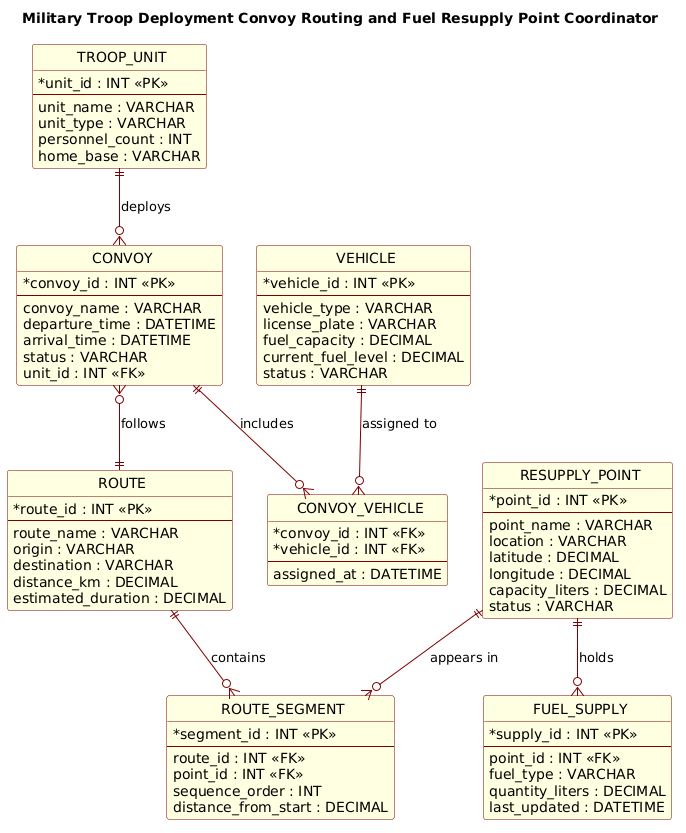
This ERD serves as the logical schema for a logistics management system. Unlike a flowchart that depicts process steps, an ERD focuses on data persistence and associations. It defines the “nouns” of the system (Troop Units, Vehicles, Routes) and the “verbs” that connect them (Deploys, Assigns, Follows, Holds). The model is designed to handle many-to-many relationships, such as a single convoy containing multiple vehicles or a single route passing through multiple fuel resupply points, while maintaining data integrity through foreign keys.
Target Domain Scope & Scenario
The scope of this diagram is strictly limited to the deployment and resupply phase of military operations. It does not cover tactical combat data or personnel health records. Instead, it focuses on the logistical backbone:
– CONVOY: The central organizing entity that groups units and vehicles for a specific mission.
– ROUTE: The path taken, broken down into ROUTE_SEGMENT entities to track specific waypoints.
– FUEL_SUPPLY: The inventory management system ensuring vehicles can refuel at designated RESUPPLY_POINTs.
This scope ensures the data model remains focused on the operational constraints of movement and resource availability.
Key Takeaways & Educational Insights
By studying this diagram, readers will learn how to model complex hierarchical data where a parent entity (like a Route) is composed of multiple child segments. You will also see how to handle associative entities (like CONVOY_VEHICLE) to resolve many-to-many relationships between Convoys and Vehicles, a common pattern in logistics systems where resources are shared across multiple missions.
Complete Diagram & Full Source Code
Below is the final, rendered Entity Relationship Diagram. This visual representation clearly delineates the entities, their attributes, and the cardinality of their relationships, providing a clear roadmap for database implementation.
@startuml
!include https://static.visual-paradigm.com/web/resources/plantuml-stdlib/themes/rose.puml

title Military Troop Deployment Convoy Routing and Fuel Resupply Point Coordinator

/'
Diagram Context:
This ERD models the core data structures needed to coordinate military convoy routes and fuel resupply points.
It captures how troops, vehicles, convoys, routes, and fuel points relate to one another during deployment.
The central entity is CONVOY, which links assigned personnel and vehicles to a planned ROUTE.
ROUTE connects to RESUPPLY_POINT through a routing sequence, allowing multiple fuel stops along a path.
FUEL_SUPPLY tracks the fuel inventory and transactions at each resupply point, ensuring convoys can refuel.
This structure supports operational planning by showing which units move together, where they stop, and whether fuel is available.
'/

entity "TROOP_UNIT" as TU {
  * unit_id : INT <<PK>>
  --
  unit_name : VARCHAR
  unit_type : VARCHAR
  personnel_count : INT
  home_base : VARCHAR
}

entity "VEHICLE" as V {
  * vehicle_id : INT <<PK>>
  --
  vehicle_type : VARCHAR
  license_plate : VARCHAR
  fuel_capacity : DECIMAL
  current_fuel_level : DECIMAL
  status : VARCHAR
}

entity "CONVOY" as C {
  * convoy_id : INT <<PK>>
  --
  convoy_name : VARCHAR
  departure_time : DATETIME
  arrival_time : DATETIME
  status : VARCHAR
  unit_id : INT <<FK>>
}

entity "ROUTE" as R {
  * route_id : INT <<PK>>
  --
  route_name : VARCHAR
  origin : VARCHAR
  destination : VARCHAR
  distance_km : DECIMAL
  estimated_duration : DECIMAL
}

entity "RESUPPLY_POINT" as RP {
  * point_id : INT <<PK>>
  --
  point_name : VARCHAR
  location : VARCHAR
  latitude : DECIMAL
  longitude : DECIMAL
  capacity_liters : DECIMAL
  status : VARCHAR
}

entity "ROUTE_SEGMENT" as RS {
  * segment_id : INT <<PK>>
  --
  route_id : INT <<FK>>
  point_id : INT <<FK>>
  sequence_order : INT
  distance_from_start : DECIMAL
}

entity "FUEL_SUPPLY" as FS {
  * supply_id : INT <<PK>>
  --
  point_id : INT <<FK>>
  fuel_type : VARCHAR
  quantity_liters : DECIMAL
  last_updated : DATETIME
}

entity "CONVOY_VEHICLE" as CV {
  * convoy_id : INT <<FK>>
  * vehicle_id : INT <<FK>>
  --
  assigned_at : DATETIME
}

TU ||--o{ C : "deploys"
C ||--o{ CV : "includes"
V ||--o{ CV : "assigned to"
C }o--|| R : "follows"
R ||--o{ RS : "contains"
RP ||--o{ RS : "appears in"
RP ||--o{ FS : "holds"
@endumlStep-by-Step Architectural Walkthrough
Constructing a robust ERD requires a methodical approach, moving from high-level entity definition to complex relationship mapping. Here is how we built this logistics model in VPasCode.
Phase 1: Canvas Configuration & Layout Directives
Before defining any data, we set the stage for the diagram’s appearance. We begin by including the rose.puml theme to give the diagram a professional, polished look suitable for military documentation. We also define a global title to clearly identify the system context.
!include https://static.visual-paradigm.com/web/resources/plantuml-stdlib/themes/rose.puml
title Military Troop Deployment Convoy Routing and Fuel Resupply Point Coordinator

/'
Diagram Context:
This ERD models the core data structures needed to coordinate military convoy routes and fuel resupply points.
It captures how troops, vehicles, convoys, routes, and fuel points relate to one another during deployment.
The central entity is CONVOY, which links assigned personnel and vehicles to a planned ROUTE.
ROUTE connects to RESUPPLY_POINT through a routing sequence, allowing multiple fuel stops along a path.
FUEL_SUPPLY tracks the fuel inventory and transactions at each resupply point, ensuring convoys can refuel.
This structure supports operational planning by showing which units move together, where they stop, and whether fuel is available.
'/
Phase 2: Declaring Core Entities, Actors, and Boundaries
Next, we define the core entities that represent the physical and logical components of the system. We use the entity keyword followed by the entity name and an alias for concise referencing. Inside the entity block, we define the Primary Key (PK) using the asterisk (*) and list other attributes with their data types.
entity "TROOP_UNIT" as TU {
* unit_id : INT <>
--
unit_name : VARCHAR
unit_type : VARCHAR
personnel_count : INT
home_base : VARCHAR
}
entity "VEHICLE" as V {
* vehicle_id : INT < >
--
vehicle_type : VARCHAR
license_plate : VARCHAR
fuel_capacity : DECIMAL
current_fuel_level : DECIMAL
status : VARCHAR
} Notice the use of the double dash (--) to separate the primary key from the remaining attributes, a common convention for readability. We also define CONVOY, ROUTE, and RESUPPLY_POINT similarly, ensuring that critical fields like latitude and longitude are captured for geospatial tracking.
Phase 3: Mapping Data Flows & Key Interactions
The most complex part of this ERD involves handling relationships that are not simple one-to-one. For instance, a CONVOY contains multiple VEHICLEs, and a VEHICLE can be part of multiple CONVOYs over time. This is a classic many-to-many relationship. We resolve this by creating an associative entity called CONVOY_VEHICLE.
entity "CONVOY_VEHICLE" as CV {
* convoy_id : INT <>
* vehicle_id : INT < >
--
assigned_at : DATETIME
}
C ||--o{ CV : "includes"
V ||--o{ CV : "assigned to" Here, we define CONVOY_VEHICLE with two foreign keys (indicated by FK). The relationship lines show that a CONVOY (C) includes zero or many CV records, and a VEHICLE (V) is assigned to zero or many CV records. This effectively breaks the many-to-many relationship into two one-to-many relationships, a standard normalization technique.
Phase 4: Grouping, Annotations & Visual Polish
Finally, we model the routing logic. A ROUTE is not just a line; it is composed of segments that include specific RESUPPLY_POINTs. We model this using the ROUTE_SEGMENT entity, which acts as a junction between the Route and the Resupply Point.
R ||--o{ RS : "contains"
RP ||--o{ RS : "appears in"
entity "ROUTE_SEGMENT" as RS {
* segment_id : INT <>
--
route_id : INT <>
point_id : INT < >
sequence_order : INT
distance_from_start : DECIMAL
} We also link RESUPPLY_POINT to FUEL_SUPPLY to track inventory levels. The visual polish is achieved by the rose.puml theme, which automatically styles the entities with distinct headers and clean lines, making the complex web of relationships easy to parse visually.
Syntax & Keyword Deep Dive
Understanding the specific PlantUML syntax is crucial for extending this diagram in the future. Here are the key keywords and conventions used in this logistics ERD:
entity: The fundamental keyword used to define a database table or object. It takes the formentity "Name" as Alias { ... }.entity "Name" as Alias: Allows you to give a short abbreviation (e.g.,TU,C,RS) to reference the entity in relationship lines, keeping the diagram clean.* attribute_name : TYPE: The asterisk denotes a Primary Key. The colon separates the attribute name from its data type (e.g.,INT,VARCHAR,DECIMAL).<<PK>>and<<FK>>: Stereotypes used to visually annotate keys.<<PK>>marks a Primary Key, and<<FK>>marks a Foreign Key that links to another entity.||--o{and}o--||: These are Crow’s Foot notation connectors.||means “one and only one” (mandatory), ando{means “zero or many” (optional). This visual syntax precisely defines the cardinality of the relationship.--: A separator line inside an entity block used to visually distinguish the primary key from the rest of the attributes.
Best Practices & Pitfalls to Avoid
When designing ERDs for complex systems like military logistics, adhering to best practices ensures your model remains maintainable and scalable.
- Normalize Many-to-Many Relationships: Never try to draw a direct many-to-many line between two entities (e.g., Convoys and Vehicles) without an associative entity. Always introduce a junction table (like
CONVOY_VEHICLE) to store the relationship attributes (likeassigned_at). - Use Consistent Naming Conventions: Stick to a clear naming strategy. Using abbreviations (Aliases) like
TUforTROOP_UNITin relationship lines keeps the diagram readable, but ensure the full names are used in the entity definitions for clarity. - Define Cardinality Explicitly: Don’t leave relationships ambiguous. Use the Crow’s Foot notation (
||--o{) to clearly indicate if a relationship is mandatory (one) or optional (zero or many). In logistics, knowing if a convoy must have a route is critical. - Keep Attributes Atomic: Ensure each attribute holds a single value. For example, store
latitudeandlongitudeas separate decimal fields rather than a single “Location” string, to enable geospatial querying.
Start Building Military Logistics ERDs Faster with VPasCode
Instantly render, test, and customize your complex Entity Relationship Diagrams online in VPasCode without installing any database tools or drawing software.