


In the high-stakes environment of industrial automation, the integrity of data is the backbone of operational efficiency and safety. A SCADA (Supervisory Control and Data Acquisition) system serves as the central nervous system for manufacturing plants, continuously ingesting terabytes of time-series sensor data from the plant floor. However, raw data is useless without a structured architecture that can efficiently store, retrieve, and correlate this information with critical alarm events. Architects face the challenge of designing a database schema that not only handles the high write-throughput of sensor readings but also maintains a rigorous audit trail of alarm lifecycles, from initial threshold breach to final resolution.
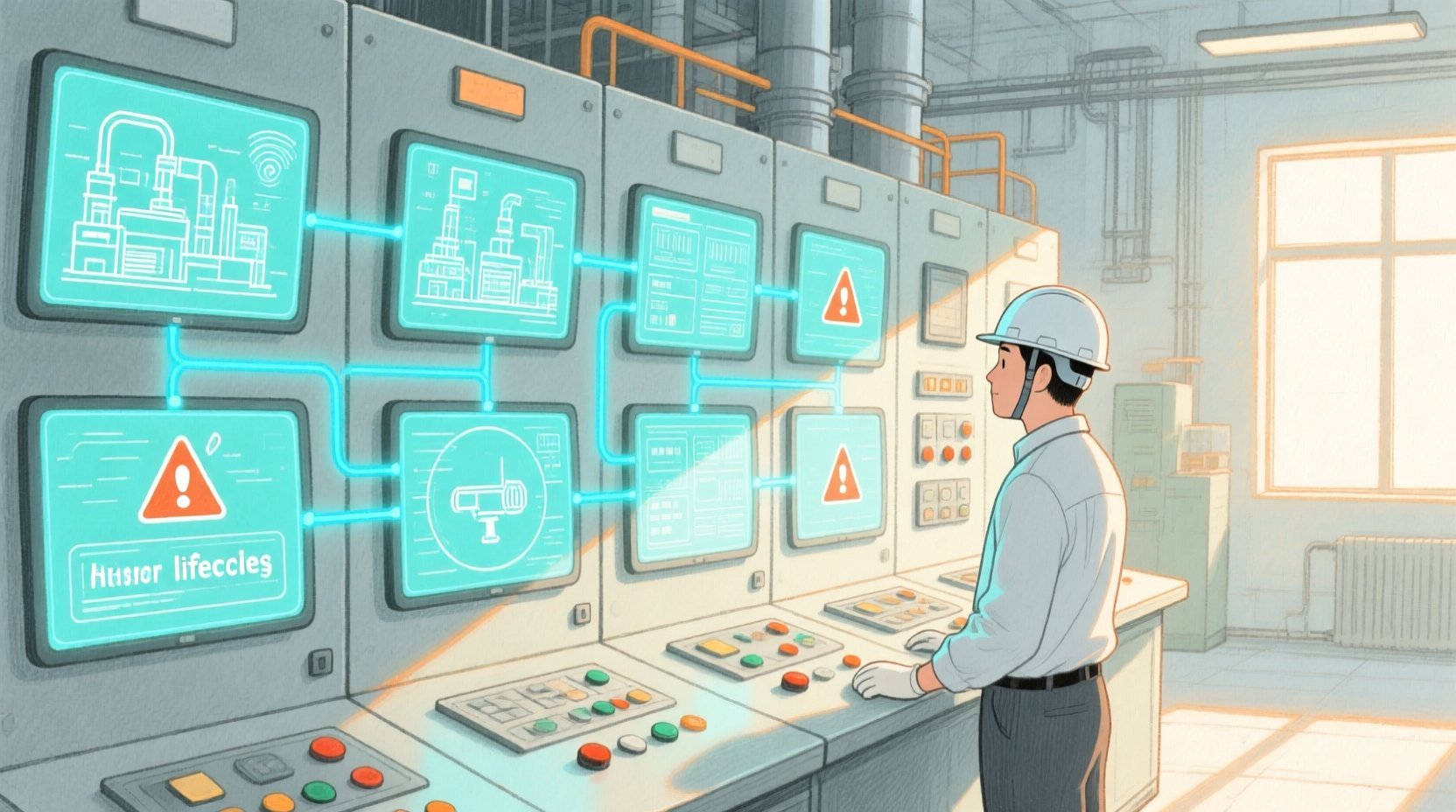
Visual modeling becomes the bridge between abstract requirements and concrete implementation. By using diagram-as-code with PlantUML, engineers can define the relationships between physical assets, measurement points, and operational alerts in a version-friendly, text-based format. This approach eliminates the ambiguity often found in hand-drawn diagrams and allows for rapid iteration. In this tutorial, we will leverage VPasCode to build a comprehensive Entity Relationship Diagram (ERD) that models the core data architecture of a SCADA historian and alarm management system, ensuring your documentation evolves as fast as your system.
Understanding the Model: Purpose, Scope & Problem Framing
Diagram Abstraction & Representation
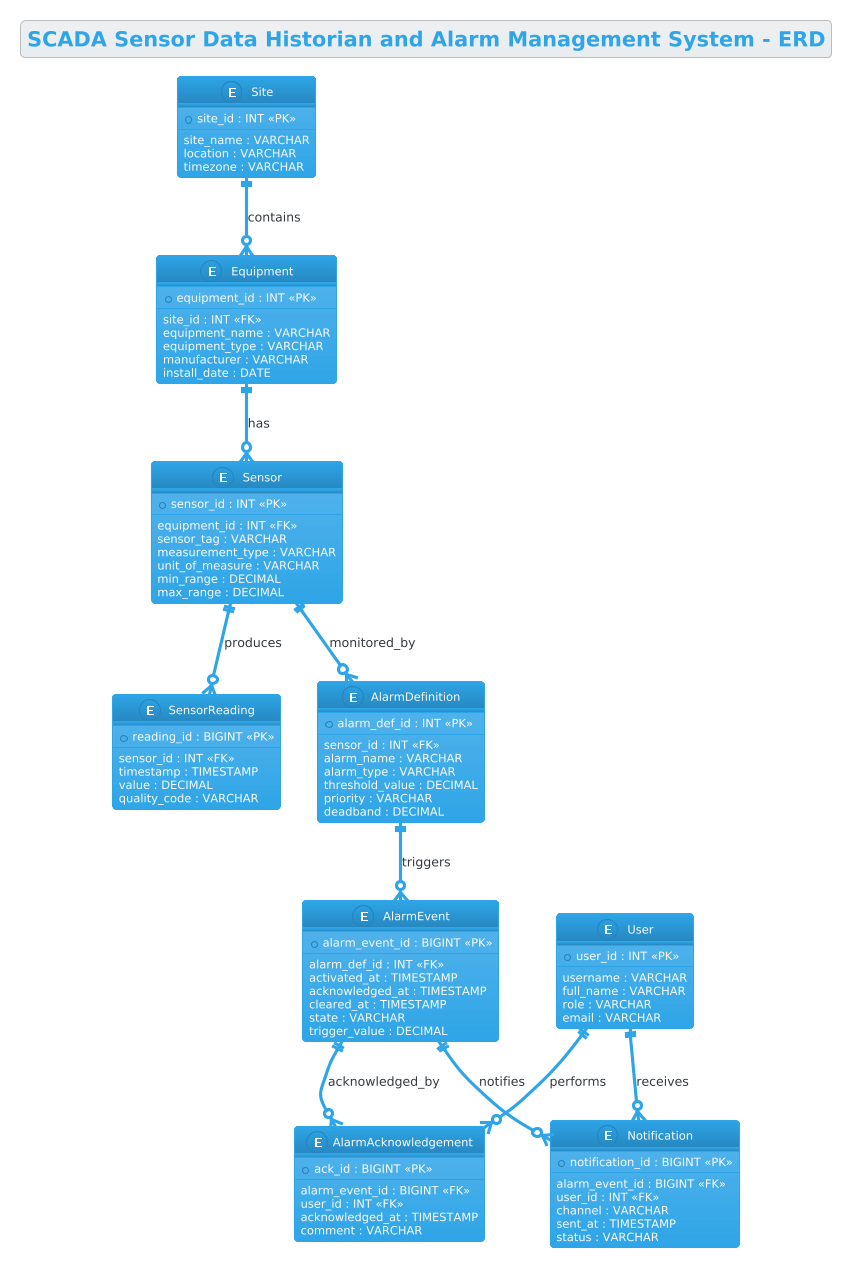
Entity Relationship Diagrams (ERDs) are the blueprint for relational databases. In the context of industrial automation, this diagram type is critical for visualizing the hierarchy of assets and the flow of data. It defines how a physical location (Site) contains equipment, which in turn hosts sensors. Crucially, it maps the relationship between these static assets and the dynamic data they produce (SensorReadings) and the anomalies they trigger (AlarmEvents). The diagram abstracts the complex reality of industrial IoT into manageable entities and cardinalities, clarifying how data is normalized to prevent redundancy while maintaining referential integrity.
Target Domain Scope & Scenario
This guide focuses on the data architecture for an industrial SCADA historian. The scope is strictly limited to the core entities required for data collection and alarm management. We model the hierarchy of Sites, Equipment, and Sensors to establish the physical context. We then define the data structures for SensorReadings (time-series data) and AlarmEvents (stateful incidents). Finally, we incorporate the human element through Users, AlarmAcknowledgements, and Notifications to ensure the system supports operational workflows.
Key Takeaways & Educational Insights
By constructing this diagram, you will gain a clear understanding of how to model one-to-many relationships in a manufacturing context, how to structure tables for high-volume time-series data, and how to link operational events to user actions. You will learn to use PlantUML’s entity syntax to define primary keys (PK) and foreign keys (FK) explicitly, ensuring your database design is robust and ready for implementation.
Complete Diagram & Full Source Code
Below is the finalized Entity Relationship Diagram. This visual representation captures the entire data lifecycle of the SCADA system, from the physical site down to the specific sensor reading and alarm notification.
@startuml
!theme cerulean
title SCADA Sensor Data Historian and Alarm Management System - ERD

/'
Diagram Context:
This ERD models the core data architecture for an industrial automation SCADA system
responsible for collecting time-series sensor data from plant-floor devices and managing
alarm events generated when process values exceed configured thresholds. The central
entities capture physical assets (sites, equipment, sensors), their measured process
values stored in a historian, and the alarm lifecycle from activation through
acknowledgement and resolution. Supporting entities track users, alarm definitions,
and notification delivery for operational response.
'/

entity "Site" as site {
  * site_id : INT <<PK>>
  --
  site_name : VARCHAR
  location : VARCHAR
  timezone : VARCHAR
}

entity "Equipment" as equipment {
  * equipment_id : INT <<PK>>
  --
  site_id : INT <<FK>>
  equipment_name : VARCHAR
  equipment_type : VARCHAR
  manufacturer : VARCHAR
  install_date : DATE
}

entity "Sensor" as sensor {
  * sensor_id : INT <<PK>>
  --
  equipment_id : INT <<FK>>
  sensor_tag : VARCHAR
  measurement_type : VARCHAR
  unit_of_measure : VARCHAR
  min_range : DECIMAL
  max_range : DECIMAL
}

entity "SensorReading" as reading {
  * reading_id : BIGINT <<PK>>
  --
  sensor_id : INT <<FK>>
  timestamp : TIMESTAMP
  value : DECIMAL
  quality_code : VARCHAR
}

entity "AlarmDefinition" as alarmdef {
  * alarm_def_id : INT <<PK>>
  --
  sensor_id : INT <<FK>>
  alarm_name : VARCHAR
  alarm_type : VARCHAR
  threshold_value : DECIMAL
  priority : VARCHAR
  deadband : DECIMAL
}

entity "AlarmEvent" as alarmevent {
  * alarm_event_id : BIGINT <<PK>>
  --
  alarm_def_id : INT <<FK>>
  activated_at : TIMESTAMP
  acknowledged_at : TIMESTAMP
  cleared_at : TIMESTAMP
  state : VARCHAR
  trigger_value : DECIMAL
}

entity "User" as user {
  * user_id : INT <<PK>>
  --
  username : VARCHAR
  full_name : VARCHAR
  role : VARCHAR
  email : VARCHAR
}

entity "AlarmAcknowledgement" as ack {
  * ack_id : BIGINT <<PK>>
  --
  alarm_event_id : BIGINT <<FK>>
  user_id : INT <<FK>>
  acknowledged_at : TIMESTAMP
  comment : VARCHAR
}

entity "Notification" as notification {
  * notification_id : BIGINT <<PK>>
  --
  alarm_event_id : BIGINT <<FK>>
  user_id : INT <<FK>>
  channel : VARCHAR
  sent_at : TIMESTAMP
  status : VARCHAR
}

site ||--o{ equipment : contains
equipment ||--o{ sensor : has
sensor ||--o{ reading : produces
sensor ||--o{ alarmdef : monitored_by
alarmdef ||--o{ alarmevent : triggers
alarmevent ||--o{ ack : acknowledged_by
alarmevent ||--o{ notification : notifies
user ||--o{ ack : performs
user ||--o{ notification : receives

@endumlStep-by-Step Architectural Walkthrough
Building a complex ERD requires a structured approach. We will deconstruct the diagram into four logical phases: configuration, entity declaration, relationship mapping, and visual refinement.
Phase 1: Canvas Configuration & Layout Directives
Before defining any data structures, we set the stage for the diagram. In PlantUML, the @startuml directive begins the diagram, and @enduml closes it. We apply the !theme cerulean directive to give the diagram a professional, blue-toned aesthetic suitable for industrial documentation. The title directive provides a clear header for the diagram, which is essential for documentation repositories.
@startuml !theme cerulean title SCADA Sensor Data Historian and Alarm Management System - ERDWe also include a comment block using /' ... '/ to document the diagram’s context directly within the code. This ensures that future maintainers understand the purpose of the schema without needing to open the diagram in a renderer.
Phase 2: Declaring Core Entities, Actors, and Boundaries
The foundation of the ERD lies in the entity definitions. We start with the physical hierarchy. The Site entity represents a physical location, using * to denote the Primary Key (PK) and INT for the data type. The -- separator visually divides the key attributes from the descriptive ones.
entity "Site" as site { * site_id : INT <> -- site_name : VARCHAR location : VARCHAR timezone : VARCHAR } Next, we define Equipment and Sensor. Notice the use of site_id : INT < and equipment_id : INT <. This explicitly declares the Foreign Keys, establishing the parent-child relationship where a Site contains Equipment, and Equipment contains Sensors. The Sensor entity includes specific fields like min_range and max_range, which are critical for industrial data validation.
Phase 3: Mapping Data Flows & Key Interactions
Once the static assets are defined, we model the dynamic data. The SensorReading entity is designed for high-volume time-series data, utilizing BIGINT for the primary key to handle massive datasets over time. The AlarmDefinition entity sets the rules (thresholds, deadbands) for generating alerts, while the AlarmEvent entity captures the actual occurrence of an alarm, including timestamps for activation and clearance.
entity "SensorReading" as reading { * reading_id : BIGINT <> -- sensor_id : INT <> timestamp : TIMESTAMP value : DECIMAL quality_code : VARCHAR } We also model the human interaction layer with User, AlarmAcknowledgement, and Notification. The AlarmAcknowledgement acts as a junction table linking a specific alarm event to a specific user, capturing the comment and acknowledged_at time, which is vital for compliance audits.
Phase 4: Grouping, Annotations & Visual Polish
The final phase involves drawing the relationships between these entities. In PlantUML, we use the ||--o{ syntax to denote a one-to-many relationship. The double bar || indicates mandatory participation (the child must exist), and the crow’s foot { indicates the many side. For example, site ||--o{ equipment : contains means a Site must contain at least zero or more Equipment items (the specific cardinality depends on business rules, here interpreted as optional containment for legacy sites, but the visual notation is clear).
site ||--o{ equipment : contains equipment ||--o{ sensor : has sensor ||--o{ reading : producesWe continue this pattern for the alarm lifecycle, linking AlarmDefinition to AlarmEvent and then to the user actions. This visual flow makes it immediately obvious how a sensor reading triggers a definition, which creates an event, which is then acknowledged by a user.
Syntax & Keyword Deep Dive
To master PlantUML for ERDs, you must understand the specific keywords and symbols used in this diagram.
entity: The keyword used to define a database table or entity. It is followed by the entity name and an alias (e.g.,entity "Site" as site).*: A prefix used before an attribute to denote it as the Primary Key (PK). This is a PlantUML shorthand for thePKstereotype.<and> <: These are stereotypes used to explicitly label Primary Keys and Foreign Keys in the diagram, improving readability.> --: A separator line used within an entity block to visually distinguish key attributes from regular attributes.||--o{: This is the cardinality notation.||means "one" (mandatory), ando{means "zero or many" (optional many). This creates a crow's foot relationship pointing to the child entity./' ... '/: The syntax for multi-line comments in PlantUML, allowing you to embed documentation directly in the code file.!theme: A directive to apply a specific color theme (likecerulean) to the entire diagram for consistent styling.
Best Practices & Pitfalls to Avoid
When modeling industrial data architectures, adherence to best practices ensures your diagram remains a useful tool rather than a confusing artifact.
- Consistent Naming Conventions: Always use clear, descriptive names for entities and attributes. Avoid abbreviations like
idorval; usesensor_idortrigger_valueinstead. This is crucial for large-scale systems where clarity is paramount. - Explicit Data Types: Never leave data types implicit. Explicitly define
INT,BIGINT,TIMESTAMP, andVARCHAR. This helps database engineers immediately understand storage requirements and constraints. - Logical Grouping: Group related entities together in the code (e.g., all sensor-related entities together, all alarm-related entities together). PlantUML's layout engine usually handles this well, but logical ordering in the source code helps maintainability.
- Avoid Over-Normalization: While normalization is good, ensure your diagram reflects the actual query patterns. For example, storing
sensor_tagin theSensorentity is correct, but if you frequently joinSensorandAlarmDefinition, ensure the relationship is clearly defined to avoid performance bottlenecks in the mental model.
Start Building SCADA ERDs Faster with VPasCode
Design and visualize complex industrial data models instantly in your browser with VPasCode, the free PlantUML editor for architects.