


In the fast-paced world of modern manufacturing, the efficiency of an enterprise resource planning (ERP) system hinges on the precision of its underlying data architecture. Production scheduling and Material Requirements Planning (MRP) are not merely administrative tasks; they are the central nervous system that synchronizes raw material procurement, work center capacity, and customer delivery deadlines. When these data models are fragmented or unclear, the ripple effects are costly: stockouts, production bottlenecks, and missed delivery windows. A robust Entity Relationship Diagram (ERD) serves as the definitive blueprint for these complex interactions, ensuring that every sales order is traceable to a specific production order, which in turn consumes the correct materials from the right inventory locations.

Transitioning from static documentation to living, executable models is where the diagram-as-code methodology shines. By using PlantUML, architects can define these intricate manufacturing relationships in a version-friendly, text-based format that is easy to read, review, and maintain. This tutorial leverages VPasCode, the free web-based diagram-as-code editor, to build a comprehensive ERD for an ERP production module. Unlike traditional drag-and-drop tools that can become cumbersome with hundreds of entities, VPasCode allows you to write clean syntax and instantly render a professional-grade diagram, making it the ideal environment for visualizing the logic that drives manufacturing operations.
Understanding the Model: Purpose, Scope & Problem Framing
This ERD is designed to solve a specific architectural challenge: mapping the end-to-end flow of material and information from the moment a customer places an order to the final production of goods. The model focuses on the critical intersection of sales, production, and logistics, abstracting away user interface details to focus purely on data integrity and relational logic.
Diagram Abstraction & Representation
In this context, an ERD acts as the structural backbone of the manufacturing data warehouse. Entities such as Sales Order and Production Order represent the transactional records of business events. Relationships (lines connecting entities) define the cardinality and dependency rules—for instance, a single Production Order cannot exist without a linked Sales Order Line or a valid Product definition. The diagram explicitly models the Many-to-One relationships (e.g., many Production Orders for one Product) and One-to-Many relationships (e.g., one Product having many Bill of Materials entries), which are crucial for database normalization and query performance.
Target Domain Scope & Scenario
The scope of this diagram covers the core planning logic within a discrete manufacturing environment. It includes:
- Order Management: How customer demands (Sales Orders) trigger internal production needs.
- Product Definition: The master data for items, including their components (BOM) and manufacturing steps (Routing).
- Resource Planning: The allocation of Work Centers and the management of Inventory levels.
- Supply Chain: The external dependencies on Suppliers and Purchase Orders.
It intentionally excludes lower-level shop floor execution details (like individual machine status) to maintain a high-level architectural view suitable for system design and database schema generation.
Key Takeaways & Educational Insights
By constructing this diagram, you will gain a clear understanding of how ERP systems maintain data consistency across departments. You will learn how to model complex hierarchies (like a Product having a BOM which has Components) and how to enforce referential integrity using Foreign Keys. The visual output will provide immediate clarity on how MRP logic calculates required dates and quantities based on lead times and current stock levels.
Complete Diagram & Full Source Code
Before diving into the construction steps, visualize the final result. The diagram below represents the complete logical structure of the ERP production module, rendered directly from the PlantUML code using the aws-orange theme for a modern, professional look.
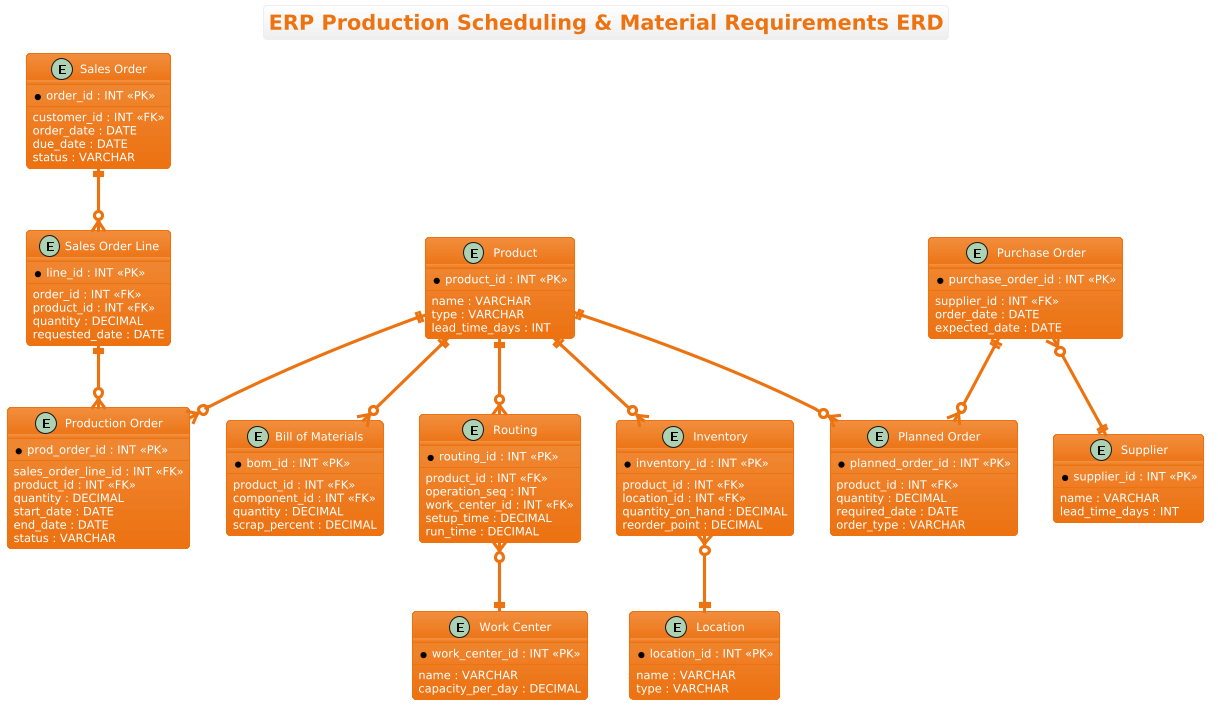
Here is the complete, full source code for the diagram. You can copy this entire block and paste it into the VPasCode editor to see the live rendering.
@startuml
/'
This ERD models the core data structures for an ERP production scheduling and material requirements planning (MRP) module.
It shows how sales orders drive production orders, which consume materials based on bills of materials (BOM),
while work centers and routings define the manufacturing process. Inventory levels and planned orders
support material requirements planning to ensure timely availability of components and raw materials.
'/
!theme aws-orange

title ERP Production Scheduling & Material Requirements ERD

entity "Sales Order" as SO {
  * order_id : INT <<PK>>
  --
  customer_id : INT <<FK>>
  order_date : DATE
  due_date : DATE
  status : VARCHAR
}

entity "Sales Order Line" as SOL {
  * line_id : INT <<PK>>
  --
  order_id : INT <<FK>>
  product_id : INT <<FK>>
  quantity : DECIMAL
  requested_date : DATE
}

entity "Production Order" as PO {
  * prod_order_id : INT <<PK>>
  --
  sales_order_line_id : INT <<FK>>
  product_id : INT <<FK>>
  quantity : DECIMAL
  start_date : DATE
  end_date : DATE
  status : VARCHAR
}

entity "Product" as PROD {
  * product_id : INT <<PK>>
  --
  name : VARCHAR
  type : VARCHAR
  lead_time_days : INT
}

entity "Bill of Materials" as BOM {
  * bom_id : INT <<PK>>
  --
  product_id : INT <<FK>>
  component_id : INT <<FK>>
  quantity : DECIMAL
  scrap_percent : DECIMAL
}

entity "Routing" as ROUT {
  * routing_id : INT <<PK>>
  --
  product_id : INT <<FK>>
  operation_seq : INT
  work_center_id : INT <<FK>>
  setup_time : DECIMAL
  run_time : DECIMAL
}

entity "Work Center" as WC {
  * work_center_id : INT <<PK>>
  --
  name : VARCHAR
  capacity_per_day : DECIMAL
}

entity "Inventory" as INV {
  * inventory_id : INT <<PK>>
  --
  product_id : INT <<FK>>
  location_id : INT <<FK>>
  quantity_on_hand : DECIMAL
  reorder_point : DECIMAL
}

entity "Location" as LOC {
  * location_id : INT <<PK>>
  --
  name : VARCHAR
  type : VARCHAR
}

entity "Planned Order" as PLNO {
  * planned_order_id : INT <<PK>>
  --
  product_id : INT <<FK>>
  quantity : DECIMAL
  required_date : DATE
  order_type : VARCHAR
}

entity "Purchase Order" as PURO {
  * purchase_order_id : INT <<PK>>
  --
  supplier_id : INT <<FK>>
  order_date : DATE
  expected_date : DATE
}

entity "Supplier" as SUP {
  * supplier_id : INT <<PK>>
  --
  name : VARCHAR
  lead_time_days : INT
}

SO ||--o{ SOL
SOL ||--o{ PO
PROD ||--o{ PO
PROD ||--o{ BOM
PROD ||--o{ ROUT
PROD ||--o{ INV
PROD ||--o{ PLNO
ROUT }o--|| WC
INV }o--|| LOC
PURO }o--|| SUP
PURO ||--o{ PLNO
@endumlStep-by-Step Architectural Walkthrough
Phase 1: Canvas Configuration & Layout Directives
Every professional diagram begins with setting the stage. In PlantUML, this involves defining the theme and the diagram type. We start by declaring the diagram as an ERD and applying a specific visual theme to match the corporate identity or aesthetic preference. In this case, we use the aws-orange theme to give the diagram a warm, industrial, and modern feel.
Additionally, a comment block is essential for documentation. We wrap the context description in /' ... '/ so that it appears as a note in the diagram but does not interfere with the rendering logic. This ensures that anyone viewing the diagram understands its purpose immediately.
/'
This ERD models the core data structures for an ERP production scheduling and material requirements planning (MRP) module.
It shows how sales orders drive production orders, which consume materials based on bills of materials (BOM),
while work centers and routings define the manufacturing process. Inventory levels and planned orders
support material requirements planning to ensure timely availability of components and raw materials.
'/
!theme aws-orange

title ERP Production Scheduling & Material Requirements ERD
Phase 2: Declaring Core Entities, Actors, and Boundaries
The heart of an ERD is the definition of entities. In PlantUML, we use the entity keyword followed by the entity name and an alias (e.g., SO for Sales Order). Inside the curly braces, we define the attributes (columns) of the table.
For manufacturing data, data types are critical. We use INT for identifiers, DECIMAL for quantities and times, and DATE for scheduling. To clearly denote the database schema, we use stereotypes:
<indicates a Primary Key, the unique identifier for the record.> <indicates a Foreign Key, linking back to another entity.>
entity "Sales Order" as SO {
  * order_id : INT <>
  --
  customer_id : INT <>
  order_date : DATE
  due_date : DATE
  status : VARCHAR
}
Note the use of -- to separate the Primary Key from the other attributes, creating a visual horizontal line that improves readability.
Phase 3: Mapping Data Flows & Key Interactions
Once entities are defined, we must establish the relationships that govern the business logic. PlantUML uses specific line styles to denote cardinality (One-to-One, One-to-Many, etc.).
For example, a Sales Order can have multiple Sales Order Lines, but a line belongs to only one order. This is a One-to-Many relationship, represented by the ||--o{ syntax (crow’s foot notation). Similarly, a Product can have many Bill of Materials entries, but a BOM entry is specific to one product.
SO ||--o{ SOL
PROD ||--o{ BOM
PROD ||--o{ ROUT
ROUT }o--|| WC
The last example shows a Many-to-One relationship: many Routing operations can belong to one Work Center, but a routing operation is executed at only one work center. The }o--|| syntax visually represents this constraint.
Phase 4: Grouping, Annotations & Visual Polish
While this ERD relies on clear naming and standard relationships, the title directive and the !theme command provide the final polish. The title is centered at the top, providing a clear summary of the diagram’s scope. The theme application ensures that the colors, fonts, and border styles are consistent across all entities, making the diagram look like a cohesive system document rather than a collection of disparate boxes.
Syntax & Keyword Deep Dive
To master this diagram, you must understand the specific PlantUML syntax used for Entity Relationship Diagrams.
entity "Name" as Alias { ... }: Defines a new entity. The alias (e.g.,SO) is used later to reference this entity in relationship definitions.* attribute : TYPE <: Defines a field. The asterisk> *indicates this is the Primary Key. The double angle brackets<< >>are used for stereotypes likePKandFK.--: A separator line within an entity block that visually divides the Primary Key from other attributes.||--o{: Represents a One-to-Many relationship. The double bar||means “one and only one,” and the crow’s footo{means “many.”}o--||: Represents a Many-to-One relationship. The crow’s foot}omeans “many,” and the double bar||means “one and only one.”/' ... '/: The syntax for a comment block that renders as a note on the diagram canvas.
Best Practices & Pitfalls to Avoid
When designing ERDs for complex systems like ERP manufacturing modules, following best practices ensures your diagram remains a valuable asset rather than a confusing mess.
- Use Meaningful Aliases: While full names like
"Sales Order"are good for labels, using short aliases likeSOorSOLfor relationship lines makes the code much more readable and easier to maintain. - Consistent Naming Conventions: Stick to a standard for entity names (e.g., always plural for collections like
Ordersor singular for master data likeProduct). In this diagram, we used singular for master entities and singular for transactional entities, which is a common pattern. - Separate Primary Keys: Always use the
--separator to visually distinguish the Primary Key. This helps database architects quickly identify the unique identifiers for each table. - Validate Cardinality: Double-check your relationship lines. A common pitfall is accidentally creating a Many-to-Many relationship (using
o{--o{) where a One-to-Many is intended, which can lead to database design issues if not resolved with a junction table.
Start Building ERP ERDs Faster with VPasCode
Create professional manufacturing data models instantly in your browser with VPasCode, the free PlantUML editor that requires zero installation.