


In the fast-paced world of logistics and supply chain management, operational efficiency hinges on precise data modeling. For a fleet of vending machines spread across a city or region, the challenge is not just delivering products but doing so with optimized routes and timely coin collection. Without a robust data structure, dispatchers struggle to track which machines are running low on stock, which drivers are available, and how to group stops to minimize fuel and time costs. A well-designed Entity-Relationship Diagram (ERD) serves as the architectural blueprint for the database that powers these critical operational decisions.
By visualizing the relationships between vending machines, locations, inventory levels, route plans, and service schedules, architects can ensure that the underlying database supports real-time restocking requirements and efficient fleet management. This tutorial guides you through constructing a professional ERD using PlantUML, a powerful diagram-as-code language. We will focus on the specific entities required to manage a restock route optimization system, including the logic for assigning drivers, tracking coin collections, and scheduling future services. Using VPasCode, you can write this code directly in the browser and see the diagram render instantly, allowing for rapid iteration and refinement of your logistics data model.
Understanding the Model: Purpose, Scope & Problem Framing
Before diving into the syntax, it is crucial to understand the domain abstraction we are modeling. An Entity-Relationship Diagram is the standard method for visualizing the logical structure of a database. In this specific logistics scenario, the diagram must capture static data (like machine locations and product definitions) and dynamic operational data (like active routes and coin collection records).
Diagram Abstraction & Representation
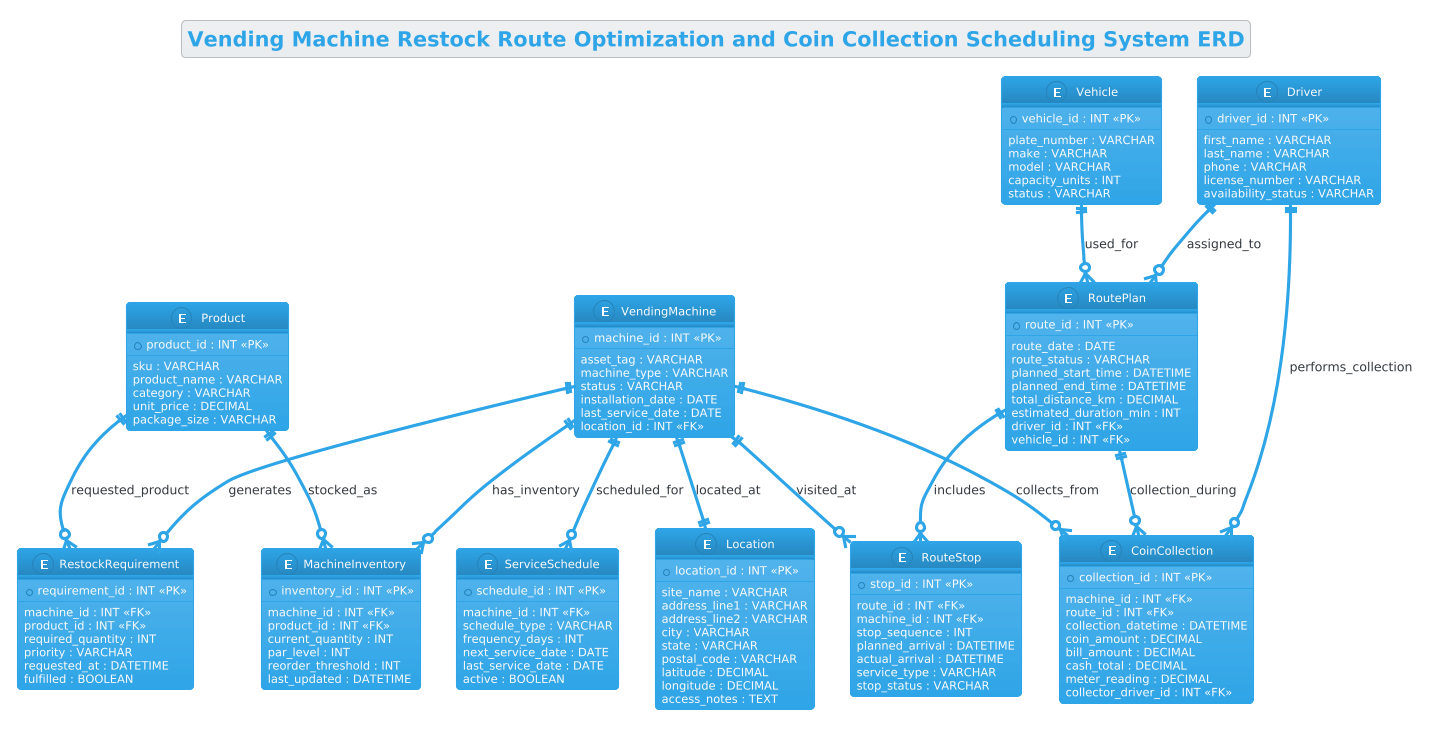
The core of this model revolves around the VendingMachine as the central entity. Every other entity relates back to a machine or a route involving machines. We represent Locations to geospatially map the fleet, Products to define inventory, and RoutePlans to organize the daily workflow. The diagram uses crow’s foot notation to clearly indicate cardinality: one-to-one relationships for unique identifiers, and one-to-many relationships for things like a single machine having multiple inventory items or a single route containing multiple stops.
Target Domain Scope & Scenario
The scope of this ERD is strictly limited to the operational layer of a vending logistics system. It does not model customer billing or e-commerce transactions. Instead, it focuses on the “last mile” of the supply chain: the physical movement of goods and cash. The diagram covers the lifecycle of a restock event, from identifying a low stock level (generating a RestockRequirement) to executing the trip (creating a RoutePlan with RouteStops) and finally collecting the revenue (CoinCollection).
Key Takeaways & Educational Insights
By building this diagram, you will learn how to normalize data to avoid redundancy (e.g., separating Product definitions from MachineInventory counts). You will also see how to handle temporal data, such as planned_arrival vs. actual_arrival, which is critical for performance analytics. The model demonstrates how to link a Driver and a Vehicle to a specific Route, ensuring that resource allocation is traceable.
Complete Diagram & Full Source Code
Below is the complete, rendered visualization of the Vending Machine Restock Route Optimization and Coin Collection Scheduling System ERD. This diagram encapsulates all the entities and relationships discussed, providing a clear overview of the data architecture.
@startuml
!theme cerulean
title Vending Machine Restock Route Optimization and Coin Collection Scheduling System ERD

/'
Diagram Context:
This ERD models the core data structures needed to manage a vending machine
fleet, plan efficient restock routes, and schedule coin collection visits.
It captures machines, their locations, product inventory levels, restock
requirements, route plans, route stops, drivers, vehicles, coin collection
records, and service schedules. The diagram supports operational decisions
such as which machines need restocking, how to group stops into optimized
routes, when coin boxes should be collected, and which staff or vehicles
are assigned to execute the work.
'/

entity "VendingMachine" as VM {
  * machine_id : INT <<PK>>
  --
  asset_tag : VARCHAR
  machine_type : VARCHAR
  status : VARCHAR
  installation_date : DATE
  last_service_date : DATE
  location_id : INT <<FK>>
}

entity "Location" as LOC {
  * location_id : INT <<PK>>
  --
  site_name : VARCHAR
  address_line1 : VARCHAR
  address_line2 : VARCHAR
  city : VARCHAR
  state : VARCHAR
  postal_code : VARCHAR
  latitude : DECIMAL
  longitude : DECIMAL
  access_notes : TEXT
}

entity "Product" as PROD {
  * product_id : INT <<PK>>
  --
  sku : VARCHAR
  product_name : VARCHAR
  category : VARCHAR
  unit_price : DECIMAL
  package_size : VARCHAR
}

entity "MachineInventory" as INV {
  * inventory_id : INT <<PK>>
  --
  machine_id : INT <<FK>>
  product_id : INT <<FK>>
  current_quantity : INT
  par_level : INT
  reorder_threshold : INT
  last_updated : DATETIME
}

entity "RestockRequirement" as REQ {
  * requirement_id : INT <<PK>>
  --
  machine_id : INT <<FK>>
  product_id : INT <<FK>>
  required_quantity : INT
  priority : VARCHAR
  requested_at : DATETIME
  fulfilled : BOOLEAN
}

entity "RoutePlan" as ROUTE {
  * route_id : INT <<PK>>
  --
  route_date : DATE
  route_status : VARCHAR
  planned_start_time : DATETIME
  planned_end_time : DATETIME
  total_distance_km : DECIMAL
  estimated_duration_min : INT
  driver_id : INT <<FK>>
  vehicle_id : INT <<FK>>
}

entity "RouteStop" as STOP {
  * stop_id : INT <<PK>>
  --
  route_id : INT <<FK>>
  machine_id : INT <<FK>>
  stop_sequence : INT
  planned_arrival : DATETIME
  actual_arrival : DATETIME
  service_type : VARCHAR
  stop_status : VARCHAR
}

entity "Driver" as DRIVER {
  * driver_id : INT <<PK>>
  --
  first_name : VARCHAR
  last_name : VARCHAR
  phone : VARCHAR
  license_number : VARCHAR
  availability_status : VARCHAR
}

entity "Vehicle" as VEH {
  * vehicle_id : INT <<PK>>
  --
  plate_number : VARCHAR
  make : VARCHAR
  model : VARCHAR
  capacity_units : INT
  status : VARCHAR
}

entity "CoinCollection" as COIN {
  * collection_id : INT <<PK>>
  --
  machine_id : INT <<FK>>
  route_id : INT <<FK>>
  collection_datetime : DATETIME
  coin_amount : DECIMAL
  bill_amount : DECIMAL
  cash_total : DECIMAL
  meter_reading : DECIMAL
  collector_driver_id : INT <<FK>>
}

entity "ServiceSchedule" as SCHED {
  * schedule_id : INT <<PK>>
  --
  machine_id : INT <<FK>>
  schedule_type : VARCHAR
  frequency_days : INT
  next_service_date : DATE
  last_service_date : DATE
  active : BOOLEAN
}

VM ||--|| LOC : located_at
VM ||--o{ INV : has_inventory
PROD ||--o{ INV : stocked_as
VM ||--o{ REQ : generates
PROD ||--o{ REQ : requested_product
ROUTE ||--o{ STOP : includes
VM ||--o{ STOP : visited_at
DRIVER ||--o{ ROUTE : assigned_to
VEH ||--o{ ROUTE : used_for
VM ||--o{ COIN : collects_from
ROUTE ||--o{ COIN : collection_during
DRIVER ||--o{ COIN : performs_collection
VM ||--o{ SCHED : scheduled_for

@endumlStep-by-Step Architectural Walkthrough
Building a complex ERD requires a structured approach. We will break down the construction of this diagram into four logical phases, moving from the canvas setup to the final relationships.
Phase 1: Canvas Configuration & Layout Directives
Every PlantUML diagram begins with configuration directives that set the visual tone and layout. In this logistics model, we want a clean, professional look that is easy to read. We start by declaring the diagram type and applying a specific theme.
@startuml
!theme cerulean
The @startuml directive signals the beginning of the diagram code. The !theme cerulean directive applies the “Cerulean” theme, which uses a blue-and-white color scheme suitable for enterprise and logistics applications. This ensures the diagram looks polished immediately without needing manual styling of every element.
Phase 2: Declaring Core Entities, Actors, and Boundaries
Next, we define the core entities. In PlantUML ERD, we use the entity keyword followed by the entity name in quotes and an alias for brevity. Inside the curly braces, we define the attributes, data types, and keys.
entity "VendingMachine" as VM {
  * machine_id : INT <>
  --
  asset_tag : VARCHAR
  location_id : INT <>
}
Notice the use of * before the primary key attribute (machine_id) to indicate it is the Primary Key. The <<PK>> stereotype further reinforces this in the rendered diagram. The double dash -- acts as a separator, visually grouping the key attributes from the optional or descriptive attributes (like asset_tag and location_id). We repeat this pattern for Location, Product, Driver, and Vehicle, ensuring each has a unique identifier.
Phase 3: Mapping Data Flows & Key Interactions
With the static entities defined, we now model the dynamic relationships. In a logistics system, the flow of information is critical. We use the ||--o{ syntax to represent relationships. The || indicates a mandatory one-to-one or one-to-many relationship, while o{ indicates an optional one-to-many relationship.
VM ||--o{ INV : has_inventory
PROD ||--o{ INV : stocked_as
Here, we establish that a VendingMachine (VM) can have zero or many MachineInventory (INV) records (a machine might be empty, or stocked with many products). Similarly, a Product (PROD) can be stocked in many inventory records. We also define the operational links: a Driver is assigned to a Route, and a Route includes multiple RouteStops.
Phase 4: Grouping, Annotations & Visual Polish
The final phase involves adding context and ensuring the diagram tells a complete story. We add a title to the diagram and use a comment block to provide a high-level summary for anyone reading the code or the rendered image. The comment block is wrapped in /' and '/ to keep it hidden from the renderer but visible in the source code for documentation purposes.
title Vending Machine Restock Route Optimization and Coin Collection Scheduling System ERD

/'
Diagram Context:
This ERD models the core data structures needed to manage a vending machine
fleet...
'/
This section also ensures that all foreign keys (marked with <<FK>>) are explicitly declared in the entity definitions, which helps developers understand the database schema constraints at a glance.
Syntax & Keyword Deep Dive
To master PlantUML ERD, you need to understand the specific syntax used to define structure and relationships. Here is a breakdown of the key elements used in this logistics diagram:
entity: The keyword used to define a new table or entity. It takes a display name (e.g.,"VendingMachine") and an alias (e.g.,as VM).*(Asterisk): Placed before an attribute name (e.g.,* machine_id) to denote the Primary Key (PK) visually in the diagram.<<PK>>and<<FK>>: These are stereotypes used to explicitly label Primary Keys and Foreign Keys in the rendered output, ensuring clarity for database architects.--(Double Dash): A visual separator line within an entity block, used to distinguish key attributes from regular attributes.||--o{: A relationship connector.||means “mandatory one” ando{means “zero or many”. For example, a VendingMachine||--o{RouteStop means a machine must be part of a stop logic but a stop can exist for a machine (depending on logic) or a machine can have many stops over time. In this specific model, it represents a one-to-many relationship where the cardinality is enforced.title: Sets the main title of the diagram, which appears at the top of the rendered output.!theme: A directive to apply a predefined color scheme and font style to the entire diagram.
Best Practices & Pitfalls to Avoid
When modeling complex logistics systems like this, adherence to best practices ensures your diagram remains maintainable and useful.
- Use Consistent Naming Conventions: Always use the same naming style for entities and aliases. In this diagram, we used uppercase for entity names (e.g.,
VendingMachine) and uppercase aliases (e.g.,VM). This consistency makes the diagram easier to scan and the code easier to read. - Separate Static and Dynamic Data: Notice how we separated Product (static catalog) from MachineInventory (dynamic state). A common pitfall is combining these into one table, which leads to data redundancy and update anomalies. Keep your reference data separate from transactional data.
- Define Cardinality Clearly: Use the correct relationship symbols. Using
--o{(optional) when a relationship is mandatory (like a Stop belonging to a Route) can lead to database integrity issues later. Ensure the diagram reflects the actual business rules. - Document with Comments: Use the
/' ... '/comment block to explain the scope of the diagram. As the system grows, new developers will appreciate a high-level summary of what the model represents.
Start Building Logistics ERDs Faster with VPasCode
Instantly visualize and refine your vending machine fleet data models in your browser with zero setup, no local installation, and free access to our interactive PlantUML editor.