


In the high-stakes world of liquid bulk haulage, the margin for error regarding sanitation and contamination is non-existent. A tanker truck carrying food-grade liquids or pharmaceutical products must undergo rigorous washing, sanitization, and inspection protocols before every new load. Regulatory bodies and clients demand immutable proof that the vessel is clean, certified, and safe. Without a structured data model to track the lifecycle of a compartment—from its previous cargo to its current wash event, inspection results, and final certification—logistics companies face severe compliance risks, operational bottlenecks, and potential safety hazards.
This complexity requires more than simple spreadsheets; it demands a robust relational database schema that captures the intricate dependencies between vehicles, cleaning procedures, chemical usage, and inspector credentials. By modeling this domain using an Entity-Relationship Diagram (ERD), architects can visualize the strict constraints required to ensure traceability. PlantUML, a powerful diagram-as-code tool, allows us to define these relationships in text, ensuring that the schema evolves alongside the business logic without the visual clutter of manual drawing tools.
Understanding the Model: Purpose, Scope & Problem Framing
Diagram Abstraction & Representation
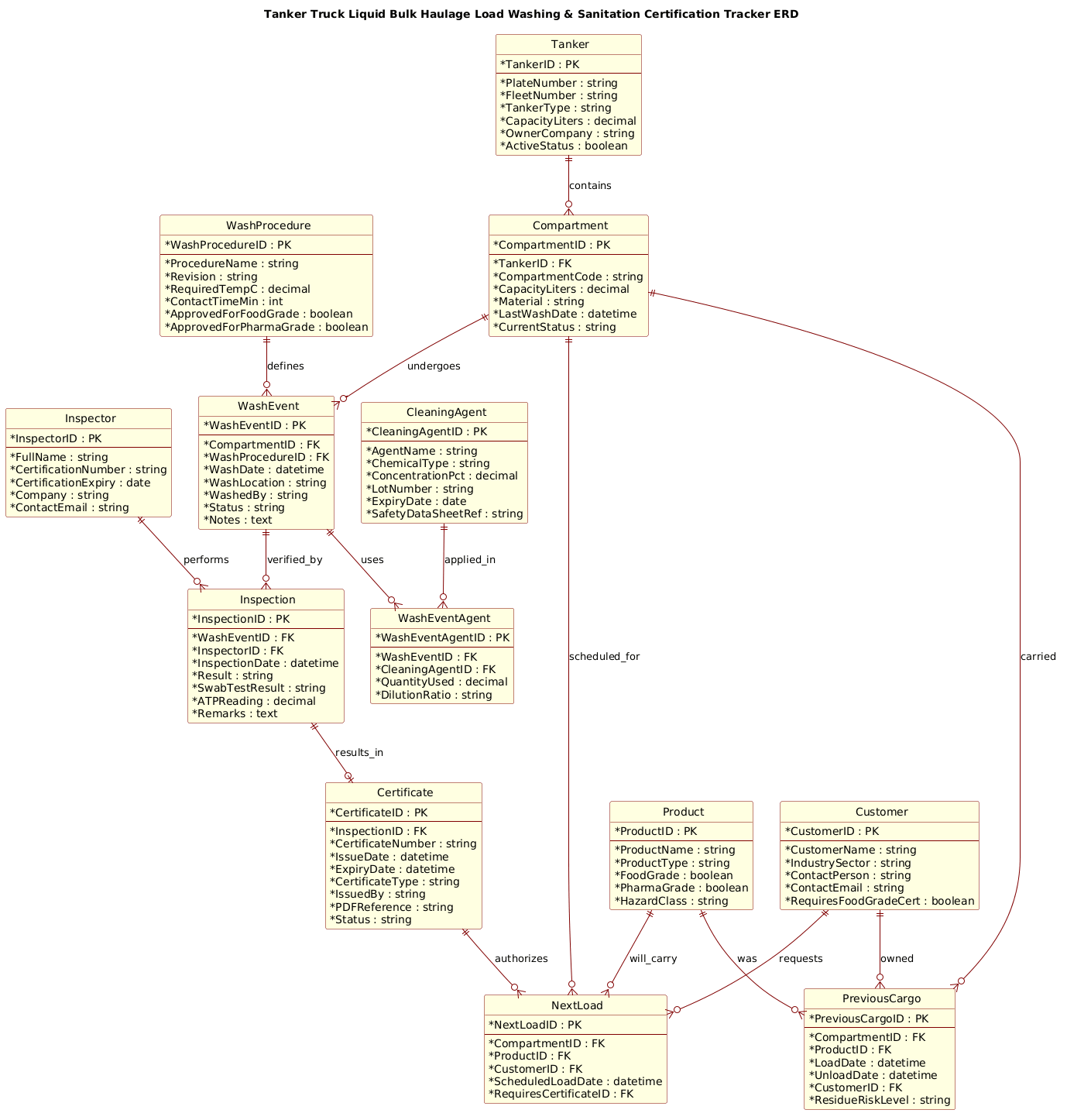
This ERD serves as the architectural blueprint for a compliance tracking system. Unlike a general logistics diagram, this model focuses specifically on the “sanitation lifecycle.” It represents the critical path where a physical asset (the tanker compartment) transitions from a “dirty” state to a “certified” state. The diagram abstracts complex real-world processes into data entities: Tanker and Compartment represent the physical assets; WashEvent and Inspection represent the operational actions; and Certificate represents the legal validation of the process.
Target Domain Scope & Scenario
The scope of this model is strictly limited to the post-haulage and pre-load sanitation workflow. It covers the entire chain of custody for a specific compartment, including the history of the last load (PreviousCargo), the specific cleaning procedure applied (WashProcedure), the chemicals used (CleaningAgent), and the final authorization for the next load (NextLoad). It intentionally excludes broader fleet management features like fuel tracking or driver scheduling to maintain focus on the critical hygiene and certification requirements.
Key Takeaways & Educational Insights
By constructing this diagram, you will gain insights into how to model one-to-many relationships (a tanker has many compartments), many-to-many relationships (wash events use many chemicals), and the critical role of associative entities (like WashEventAgent) to resolve these relationships. You will also learn how to structure data to support audit trails, ensuring that every certification can be traced back to a specific inspector, a specific wash event, and a specific chemical batch.
Complete Diagram & Full Source Code
@startuml
!include https://static.visual-paradigm.com/web/resources/plantuml-stdlib/themes/rose.puml

title Tanker Truck Liquid Bulk Haulage Load Washing & Sanitation Certification Tracker ERD
/'
This ERD captures the core operational and compliance entities for tracking tanker truck
load washing and sanitation certifications. It is designed for a liquid bulk haulage
context where each tanker compartment must be washed, sanitized, inspected, and certified
before carrying food-grade, pharma-grade, or other sensitive liquid cargoes.

The diagram connects vehicle assets (Tanker, Compartment) to wash events (WashEvent),
chemical and process records (CleaningAgent, WashProcedure), and certification artifacts
(Certificate, Inspection). It also links customers, products, and previous cargoes to
support traceability, wash validation, and audit-ready compliance reporting.
Key concerns include compartment-level wash status, certificate validity, inspector
qualification, and chain-of-custody evidence for sanitation release.
'/

' Entities and attributes
entity "Tanker" as tanker {
  * TankerID : PK
  --
  * PlateNumber : string
  * FleetNumber : string
  * TankerType : string
  * CapacityLiters : decimal
  * OwnerCompany : string
  * ActiveStatus : boolean
}

entity "Compartment" as compartment {
  * CompartmentID : PK
  --
  * TankerID : FK
  * CompartmentCode : string
  * CapacityLiters : decimal
  * Material : string
  * LastWashDate : datetime
  * CurrentStatus : string
}

entity "WashEvent" as washevent {
  * WashEventID : PK
  --
  * CompartmentID : FK
  * WashProcedureID : FK
  * WashDate : datetime
  * WashLocation : string
  * WashedBy : string
  * Status : string
  * Notes : text
}

entity "WashProcedure" as washprocedure {
  * WashProcedureID : PK
  --
  * ProcedureName : string
  * Revision : string
  * RequiredTempC : decimal
  * ContactTimeMin : int
  * ApprovedForFoodGrade : boolean
  * ApprovedForPharmaGrade : boolean
}

entity "CleaningAgent" as cleaningagent {
  * CleaningAgentID : PK
  --
  * AgentName : string
  * ChemicalType : string
  * ConcentrationPct : decimal
  * LotNumber : string
  * ExpiryDate : date
  * SafetyDataSheetRef : string
}

entity "WashEventAgent" as washeventagent {
  * WashEventAgentID : PK
  --
  * WashEventID : FK
  * CleaningAgentID : FK
  * QuantityUsed : decimal
  * DilutionRatio : string
}

entity "Inspection" as inspection {
  * InspectionID : PK
  --
  * WashEventID : FK
  * InspectorID : FK
  * InspectionDate : datetime
  * Result : string
  * SwabTestResult : string
  * ATPReading : decimal
  * Remarks : text
}

entity "Inspector" as inspector {
  * InspectorID : PK
  --
  * FullName : string
  * CertificationNumber : string
  * CertificationExpiry : date
  * Company : string
  * ContactEmail : string
}

entity "Certificate" as certificate {
  * CertificateID : PK
  --
  * InspectionID : FK
  * CertificateNumber : string
  * IssueDate : datetime
  * ExpiryDate : datetime
  * CertificateType : string
  * IssuedBy : string
  * PDFReference : string
  * Status : string
}

entity "Customer" as customer {
  * CustomerID : PK
  --
  * CustomerName : string
  * IndustrySector : string
  * ContactPerson : string
  * ContactEmail : string
  * RequiresFoodGradeCert : boolean
}

entity "Product" as product {
  * ProductID : PK
  --
  * ProductName : string
  * ProductType : string
  * FoodGrade : boolean
  * PharmaGrade : boolean
  * HazardClass : string
}

entity "PreviousCargo" as previouscargo {
  * PreviousCargoID : PK
  --
  * CompartmentID : FK
  * ProductID : FK
  * LoadDate : datetime
  * UnloadDate : datetime
  * CustomerID : FK
  * ResidueRiskLevel : string
}

entity "NextLoad" as nextload {
  * NextLoadID : PK
  --
  * CompartmentID : FK
  * ProductID : FK
  * CustomerID : FK
  * ScheduledLoadDate : datetime
  * RequiresCertificateID : FK
}

' Relationships
tanker ||--o{ compartment : contains
compartment ||--o{ washevent : undergoes
washprocedure ||--o{ washevent : defines
washevent ||--o{ washeventagent : uses
cleaningagent ||--o{ washeventagent : applied_in
washevent ||--o{ inspection : verified_by
inspector ||--o{ inspection : performs
inspection ||--o| certificate : results_in
compartment ||--o{ previouscargo : carried
product ||--o{ previouscargo : was
customer ||--o{ previouscargo : owned
compartment ||--o{ nextload : scheduled_for
product ||--o{ nextload : will_carry
customer ||--o{ nextload : requests
certificate ||--o{ nextload : authorizes

@endumlStep-by-Step Architectural Walkthrough
Phase 1: Canvas Configuration & Layout Directives
The first step in building a professional PlantUML ERD is setting the stage. We begin by including a specific theme to ensure the diagram is visually appealing and consistent with industry standards. In the code, we see the directive !include https://static.visual-paradigm.com/web/resources/plantuml-stdlib/themes/rose.puml. This loads the “Rose” theme, which provides a clean, modern look with distinct entity shapes and clear relationship lines.
Immediately after the theme, we define the diagram title using the title keyword. This is crucial for documentation, as it provides an immediate context for anyone viewing the rendered image. We also include a multi-line comment block wrapped in /' ... '/. This block serves as a narrative description of the diagram’s purpose, explaining the domain context without cluttering the structural code. This practice is essential for maintaining living documentation where the diagram and its description evolve together.
Phase 2: Declaring Core Entities, Actors, and Boundaries
The heart of the ERD lies in the entity definitions. We start with the physical assets: Tanker and Compartment. A tanker is a vehicle that can hold multiple compartments (e.g., separate tanks for different liquids). In the code, we define these using the entity keyword. Each entity contains a list of attributes, marked with * to denote primary keys (PK) or foreign keys (FK).
For example, the Tanker entity includes attributes like PlateNumber and FleetNumber, which are essential for physical identification. The Compartment entity links back to the Tanker via the TankerID foreign key, establishing the parent-child relationship. We also define critical compliance attributes like Material (what the tank is made of) and LastWashDate, which are the starting points for the sanitation workflow.
We then introduce the operational entities: WashEvent, WashProcedure, and CleaningAgent. These represent the actions taken to clean the tank. The WashEvent is the central transaction record, linking the specific compartment being cleaned to the procedure followed and the chemicals used.
Phase 3: Mapping Data Flows & Key Interactions
Once the entities are declared, we define the relationships using the ||--o{ syntax. This notation represents a one-to-many relationship. For instance, tanker ||--o{ compartment : contains indicates that one tanker contains zero or many compartments.
A critical part of this model is the handling of many-to-many relationships, which are resolved using associative entities. Consider the relationship between WashEvent and CleaningAgent. A single wash event might use multiple chemicals, and a specific chemical might be used in many wash events. To model this, we created the WashEventAgent entity. It acts as a bridge, holding foreign keys to both WashEvent and CleaningAgent, along with specific details like QuantityUsed and DilutionRatio. This ensures we can trace exactly how much of which chemical was used in a specific cleaning process.
We also model the verification flow: WashEvent leads to Inspection, which leads to Certificate. The relationship inspection ||--o| certificate : results_in uses a specific arrow notation to indicate that an inspection results in exactly one certificate (or potentially none if it fails), highlighting the strict dependency of certification on successful inspection.
Phase 4: Grouping, Annotations & Visual Polish
To complete the diagram, we ensure that all necessary business entities are included for traceability. The Customer, Product, PreviousCargo, and NextLoad entities close the loop. They allow the system to answer questions like: “What was in this tank last?” and “Is this tank certified for the next load?”.
The relationships connecting these entities, such as compartment ||--o{ nextload : scheduled_for, establish the forward-looking planning capabilities of the system. By explicitly defining these links, the diagram communicates that a new load cannot be scheduled without a valid certificate and a clean compartment status. The use of the rose.puml theme ensures that these relationships are rendered with distinct colors and line styles, making the complex web of dependencies easy to read at a glance.
Syntax & Keyword Deep Dive
PlantUML’s ERD syntax is concise yet powerful. Here is a breakdown of the specific keywords and conventions used in this tutorial:
entity: Defines a table or entity. The syntax isentity "Name" as alias { attributes }. The alias (e.g.,as tanker) is used to reference the entity in relationship definitions, keeping the code readable.PKandFK: These are custom tags used within the attribute list to denote Primary Keys and Foreign Keys. While PlantUML doesn’t enforce database constraints, these tags serve as documentation for developers and database architects.||--o{: This is the standard ERD relationship arrow.||represents “one and only one” (mandatory one), ando{represents “zero or many” (optional many). For example,tanker ||--o{ compartmentmeans a tanker must have at least one compartment (in this model’s logic) or can have many.||--o|: A variation where the right side is “one or many” (mandatory one or many). Used ininspection ||--o| certificateto imply that a successful inspection must result in a certificate./' ... '/: This syntax creates a multi-line comment block. Unlike standard single-line comments ('), this allows for detailed paragraphs of text that are rendered as a diagram description but do not affect the diagram structure.!include: A directive to load external files. Here, it loads therose.pumltheme file, allowing us to reuse standard styling without defining every skin parameter manually.
Best Practices & Pitfalls to Avoid
When designing complex ERDs for compliance systems like this, adhering to best practices ensures the model remains maintainable and understandable.
- Use Aliases for Readability: Always assign a short alias to entities (e.g.,
as tanker). Without aliases, you would have to type the full entity name"Tanker"in every relationship line, making the code verbose and harder to edit. - Separate Operational and Master Data: Distinguish clearly between static data (like
CustomerorCleaningAgent) and transactional data (likeWashEventorInspection). This separation helps in understanding the data volume and indexing strategies later. - Model Many-to-Many with Associative Entities: Never try to link two entities directly if they have a many-to-many relationship (like Wash Events and Cleaning Agents). Always create an intermediate entity (like
WashEventAgent) to store the specific attributes of that relationship, such as quantity used. - Document with Comments: Use the
/' ... '/block to explain the business rules. Code describes structure, but comments describe intent. This is vital for audits where the “why” is just as important as the “what”.
Start Building Tanker Compliance ERDs Faster with VPasCode
Design and test your logistics database schemas instantly in your browser with VPasCode, the free PlantUML editor for software architects.