


In the high-velocity world of e-commerce logistics, the difference between a profitable operation and a logistical nightmare often lies in the precision of data modeling. Fulfillment centers must orchestrate complex workflows where thousands of customer orders converge, are grouped into efficient “waves,” and are assigned to pickers in real-time. Without a clear, unified data model, the synchronization between inventory availability, order status, and human labor becomes chaotic, leading to delayed shipments and increased operational costs.
Visualizing this intricate ecosystem through an Entity Relationship Diagram (ERD) is not just a documentation exercise; it is a strategic necessity. By defining how orders map to waves, how inventory is allocated to specific locations, and how pickers are assigned tasks, architects can ensure data integrity across the supply chain. Using PlantUML within the VPasCode editor allows teams to define these complex relationships as code, enabling version-friendly, readable, and instantly renderable documentation that evolves with the business.
Understanding the Model: Purpose, Scope & Problem Framing
Diagram Abstraction & Representation
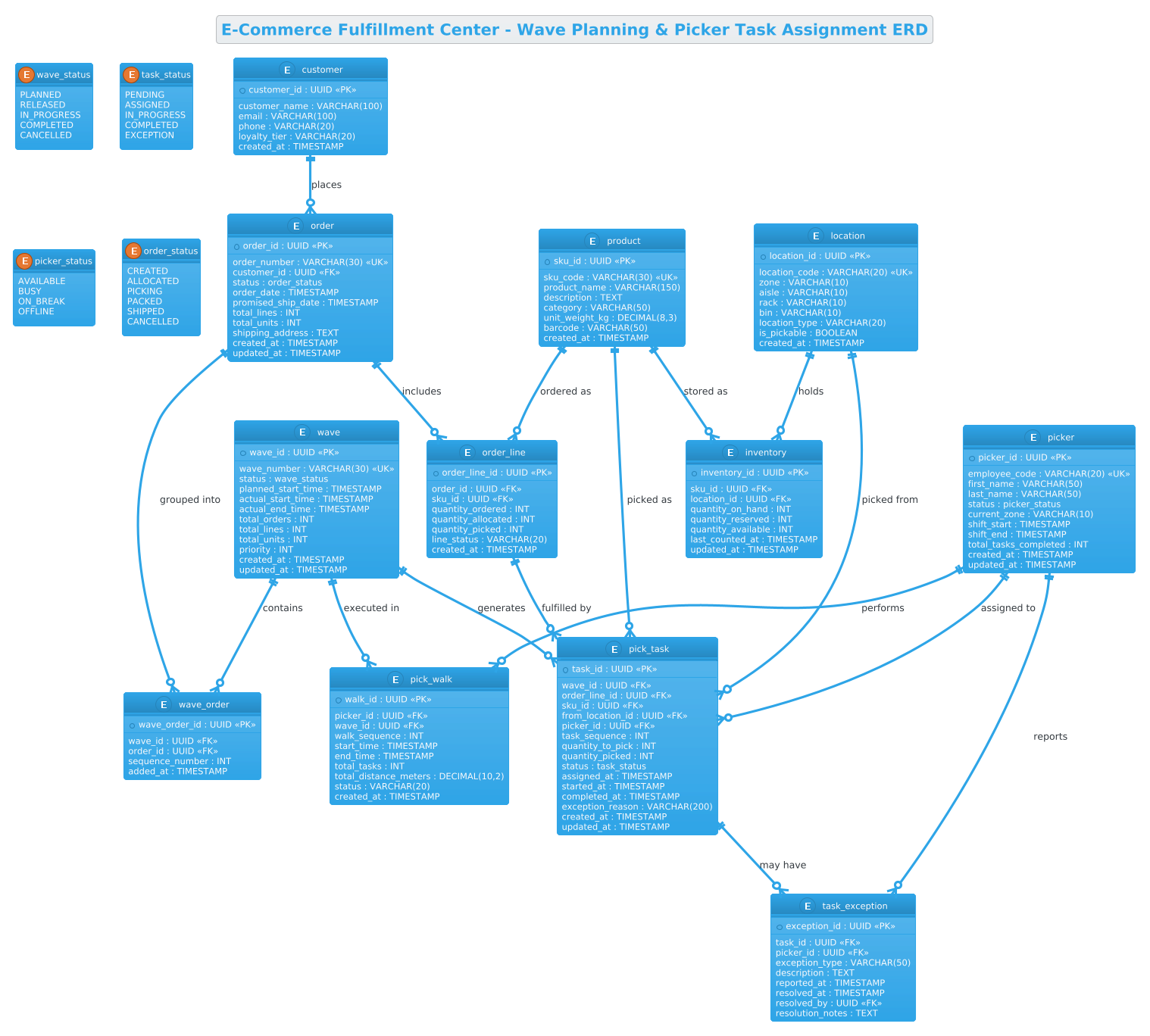
This ERD serves as the architectural blueprint for a wave-based fulfillment system. Unlike simple transactional logs, this model captures the state of operations. It abstracts the physical reality of a warehouse into logical entities: Waves represent batches of orders grouped for efficiency, while Pick Tasks break these orders down into granular actions for workers. The diagram explicitly models the lifecycle of an item from the moment it is ordered to the moment it is picked, including the critical intermediate states like “Allocated” and “In Progress.”
Target Domain Scope & Scenario
The scope of this model is strictly limited to the internal fulfillment logic of an e-commerce center. It covers the intersection of customer data, product cataloging, inventory management, and labor assignment. It deliberately excludes external integrations like payment gateways or carrier shipping APIs, focusing instead on the internal data flow required to move goods from storage bins to shipping docks. The diagram handles the complexity of one-to-many relationships (e.g., one wave containing many orders) and the many-to-many resolution via junction entities like wave_order.
Key Takeaways & Educational Insights
By studying this model, readers will gain insight into how to handle temporal data (timestamps for planning vs. execution), how to manage enumeration types for state tracking (e.g., wave_status), and how to structure foreign keys to support real-time analytics. The model demonstrates best practices for scalable warehouse systems, such as separating location metadata from inventory quantities to allow for flexible warehouse reconfiguration without breaking data integrity.
Complete Diagram & Full Source Code
Below is the fully rendered Entity Relationship Diagram for the E-Commerce Fulfillment Center. This visual representation clearly delineates the relationships between waves, orders, inventory, and personnel, providing a high-level overview of the system’s data architecture.
@startuml
!theme cerulean

title E-Commerce Fulfillment Center - Wave Planning & Picker Task Assignment ERD

/'
Diagram Context:
This ERD models the core data structures for an e-commerce fulfillment center's
wave planning and picker task assignment system. It captures how customer orders
are grouped into waves for efficient picking, how inventory is allocated from
storage locations, and how pickers are assigned to execute tasks. The schema
supports real-time tracking of pick progress, wave lifecycle states, and
operational metrics needed to optimize warehouse throughput.
'/

' ===== ENUMS =====
enum wave_status {
  PLANNED
  RELEASED
  IN_PROGRESS
  COMPLETED
  CANCELLED
}

enum task_status {
  PENDING
  ASSIGNED
  IN_PROGRESS
  COMPLETED
  EXCEPTION
}

enum picker_status {
  AVAILABLE
  BUSY
  ON_BREAK
  OFFLINE
}

enum order_status {
  CREATED
  ALLOCATED
  PICKING
  PACKED
  SHIPPED
  CANCELLED
}

' ===== ENTITIES =====
entity "wave" as wave {
  * wave_id : UUID <<PK>>
  --
  wave_number : VARCHAR(30) <<UK>>
  status : wave_status
  planned_start_time : TIMESTAMP
  actual_start_time : TIMESTAMP
  actual_end_time : TIMESTAMP
  total_orders : INT
  total_lines : INT
  total_units : INT
  priority : INT
  created_at : TIMESTAMP
  updated_at : TIMESTAMP
}

entity "wave_order" as wave_order {
  * wave_order_id : UUID <<PK>>
  --
  wave_id : UUID <<FK>>
  order_id : UUID <<FK>>
  sequence_number : INT
  added_at : TIMESTAMP
}

entity "order" as ord {
  * order_id : UUID <<PK>>
  --
  order_number : VARCHAR(30) <<UK>>
  customer_id : UUID <<FK>>
  status : order_status
  order_date : TIMESTAMP
  promised_ship_date : TIMESTAMP
  total_lines : INT
  total_units : INT
  shipping_address : TEXT
  created_at : TIMESTAMP
  updated_at : TIMESTAMP
}

entity "order_line" as order_line {
  * order_line_id : UUID <<PK>>
  --
  order_id : UUID <<FK>>
  sku_id : UUID <<FK>>
  quantity_ordered : INT
  quantity_allocated : INT
  quantity_picked : INT
  line_status : VARCHAR(20)
  created_at : TIMESTAMP
}

entity "customer" as customer {
  * customer_id : UUID <<PK>>
  --
  customer_name : VARCHAR(100)
  email : VARCHAR(100)
  phone : VARCHAR(20)
  loyalty_tier : VARCHAR(20)
  created_at : TIMESTAMP
}

entity "product" as product {
  * sku_id : UUID <<PK>>
  --
  sku_code : VARCHAR(30) <<UK>>
  product_name : VARCHAR(150)
  description : TEXT
  category : VARCHAR(50)
  unit_weight_kg : DECIMAL(8,3)
  barcode : VARCHAR(50)
  created_at : TIMESTAMP
}

entity "inventory" as inventory {
  * inventory_id : UUID <<PK>>
  --
  sku_id : UUID <<FK>>
  location_id : UUID <<FK>>
  quantity_on_hand : INT
  quantity_reserved : INT
  quantity_available : INT
  last_counted_at : TIMESTAMP
  updated_at : TIMESTAMP
}

entity "location" as location {
  * location_id : UUID <<PK>>
  --
  location_code : VARCHAR(20) <<UK>>
  zone : VARCHAR(10)
  aisle : VARCHAR(10)
  rack : VARCHAR(10)
  bin : VARCHAR(10)
  location_type : VARCHAR(20)
  is_pickable : BOOLEAN
  created_at : TIMESTAMP
}

entity "pick_task" as pick_task {
  * task_id : UUID <<PK>>
  --
  wave_id : UUID <<FK>>
  order_line_id : UUID <<FK>>
  sku_id : UUID <<FK>>
  from_location_id : UUID <<FK>>
  picker_id : UUID <<FK>>
  task_sequence : INT
  quantity_to_pick : INT
  quantity_picked : INT
  status : task_status
  assigned_at : TIMESTAMP
  started_at : TIMESTAMP
  completed_at : TIMESTAMP
  exception_reason : VARCHAR(200)
  created_at : TIMESTAMP
  updated_at : TIMESTAMP
}

entity "picker" as picker {
  * picker_id : UUID <<PK>>
  --
  employee_code : VARCHAR(20) <<UK>>
  first_name : VARCHAR(50)
  last_name : VARCHAR(50)
  status : picker_status
  current_zone : VARCHAR(10)
  shift_start : TIMESTAMP
  shift_end : TIMESTAMP
  total_tasks_completed : INT
  created_at : TIMESTAMP
  updated_at : TIMESTAMP
}

entity "pick_walk" as pick_walk {
  * walk_id : UUID <<PK>>
  --
  picker_id : UUID <<FK>>
  wave_id : UUID <<FK>>
  walk_sequence : INT
  start_time : TIMESTAMP
  end_time : TIMESTAMP
  total_tasks : INT
  total_distance_meters : DECIMAL(10,2)
  status : VARCHAR(20)
  created_at : TIMESTAMP
}

entity "task_exception" as task_exception {
  * exception_id : UUID <<PK>>
  --
  task_id : UUID <<FK>>
  picker_id : UUID <<FK>>
  exception_type : VARCHAR(50)
  description : TEXT
  reported_at : TIMESTAMP
  resolved_at : TIMESTAMP
  resolved_by : UUID <<FK>>
  resolution_notes : TEXT
}

' ===== RELATIONSHIPS =====
wave ||--o{ wave_order : "contains"
ord ||--o{ wave_order : "grouped into"
customer ||--o{ ord : "places"
ord ||--o{ order_line : "includes"
product ||--o{ order_line : "ordered as"
product ||--o{ inventory : "stored as"
location ||--o{ inventory : "holds"
wave ||--o{ pick_task : "generates"
order_line ||--o{ pick_task : "fulfilled by"
product ||--o{ pick_task : "picked as"
location ||--o{ pick_task : "picked from"
picker ||--o{ pick_task : "assigned to"
picker ||--o{ pick_walk : "performs"
wave ||--o{ pick_walk : "executed in"
pick_task ||--o{ task_exception : "may have"
picker ||--o{ task_exception : "reports"

@endumlStep-by-Step Architectural Walkthrough
Phase 1: Canvas Configuration & Layout Directives
The first step in building a professional diagram in VPasCode is setting the stage. We begin by defining the rendering engine and the visual theme. In this logistics scenario, the !theme cerulean directive is used to apply a clean, professional blue-toned aesthetic that is easy on the eyes for technical documentation. We also include a comment block immediately after the title to provide context for anyone reading the raw code or the rendered diagram.
@startuml
!theme cerulean

title E-Commerce Fulfillment Center - Wave Planning & Picker Task Assignment ERD

/'
Diagram Context:
This ERD models the core data structures...
'/
Phase 2: Declaring Core Entities, Actors, and Boundaries
Next, we establish the data types and entities. In logistics, state management is critical. We start by defining Enumerations (enums) for statuses like wave_status and task_status. This ensures that the diagram enforces a strict set of valid states (e.g., a wave cannot be “IN_PROGRESS” without being “RELEASED” first). Following the enums, we declare the core entities using the entity keyword. For example, the wave entity is defined with a primary key wave_id and attributes like planned_start_time and total_units. We use the UUID type for primary keys to ensure global uniqueness across distributed warehouse systems.
enum wave_status {
  PLANNED
  RELEASED
  IN_PROGRESS
  COMPLETED
  CANCELLED
}

entity "wave" as wave {
  * wave_id : UUID <>
  --
  wave_number : VARCHAR(30) <>
  status : wave_status
  ...
}
Phase 3: Mapping Data Flows & Key Interactions
The heart of this ERD lies in the relationships that connect the entities. We use the ||--o{ syntax to represent one-to-many relationships. For instance, a wave can contain zero or many wave_order entries. This is crucial for the “Wave Planning” logic where multiple orders are bundled. We also define the junction entity wave_order to resolve the many-to-many relationship between waves and orders, adding a sequence_number to optimize picker routes.
wave ||--o{ wave_order : "contains"
ord ||--o{ wave_order : "grouped into"
Phase 4: Grouping, Annotations & Visual Polish
To complete the diagram, we ensure all critical operational data is captured. We include the task_exception entity to handle edge cases where a picker cannot complete a task (e.g., missing inventory). This entity links back to the pick_task and the picker, creating a feedback loop for quality control. The use of TEXT fields for descriptions and DECIMAL for weights and distances ensures the model is robust enough for real-world data entry.
pick_task ||--o{ task_exception : "may have"
picker ||--o{ task_exception : "reports"
Syntax & Keyword Deep Dive
Understanding the specific PlantUML syntax used in this logistics ERD is essential for customization and extension.
entity "Name" as alias: Defines a database table or object. The alias (e.g.,as wave) is used to shorten references in relationship lines, keeping the diagram clean.enum Name { VAL1, VAL2 }: Creates a custom data type for constrained values. This is vital for status tracking (e.g.,order_status) to ensure data consistency.PKandFKStereotypes:<<PK>>marks a Primary Key, while<<FK>>marks a Foreign Key. These are rendered visually to help developers quickly identify data constraints.||--o{Relationship Syntax: The||indicates “one and only one” (mandatory) on the left, ando{indicates “zero or many” (optional) on the right. This accurately reflects that a Wave must exist to contain a WaveOrder, but a WaveOrder can exist independently in some designs (though here it is linked).labelon Relationships: The text after the colon (e.g.,: "contains") adds semantic meaning to the line, explaining the business logic of the connection rather than just the database constraint.
Best Practices & Pitfalls to Avoid
When modeling complex logistics systems like this, adherence to best practices ensures the diagram remains maintainable and useful.
- Modularize Status Enums: Never hardcode status strings (e.g., “PENDING”) directly in entity attributes. Always define them as
enumtypes first. This makes it easier to update logic later without breaking the diagram structure. - Use Junction Entities for Many-to-Many: The relationship between
waveandorderis many-to-many. A proper ERD requires a junction entity (likewave_order) to store the specific attributes of that relationship, such as thesequence_numberfor picking order. - Consistent Naming Conventions: Use singular nouns for entities (e.g.,
wave, notwaves) and consistent abbreviations (e.g.,sku_idvsproduct_id). This reduces cognitive load when reading the code. - Separate Metadata from Data: Notice how
location(the physical place) is separated frominventory(the quantity of goods). This is a critical pattern in warehouse management; a location can exist without inventory, and inventory can move between locations, but the location definition itself should be stable.
Start Building Logistics ERDs Faster with VPasCode
Design complex warehouse schemas instantly in your browser with VPasCode’s free PlantUML editor—no installations, no setup, just code and results.