


In the high-stakes environment of food manufacturing, maintaining strict adherence to Hazard Analysis and Critical Control Point (HACCP) protocols is not just a regulatory requirement but a fundamental pillar of consumer safety. Modern food processing facilities generate vast amounts of data regarding production batches, critical limits, sanitation schedules, and corrective actions. Without a structured data model, tracking the lineage of a specific batch from raw material to finished product, ensuring every critical control point (CCP) was monitored, and documenting sanitation verification becomes a logistical nightmare prone to human error and audit failures.

Visualizing this complex web of relationships is essential for database architects and quality assurance engineers. By adopting a diagram-as-code approach with PlantUML, teams can create living documentation that evolves alongside their systems. This method allows for precise definition of entity cardinalities, foreign key constraints, and data flow dependencies, ensuring that the digital infrastructure supporting food safety is as rigorous as the physical processes it monitors. In this masterclass, we leverage VPasCode to build a comprehensive ERD that captures the entire lifecycle of HACCP verification and sanitation record-keeping.
Understanding the Model: Purpose, Scope & Problem Framing
This Entity Relationship Diagram (ERD) serves as the architectural blueprint for a specialized database system designed to manage food safety compliance. Unlike generic inventory systems, this model is deeply specialized for the regulatory demands of HACCP, focusing on the rigorous tracking of Critical Control Points (CCPs) and the immutable record-keeping required for sanitation and verification.
Diagram Abstraction & Representation
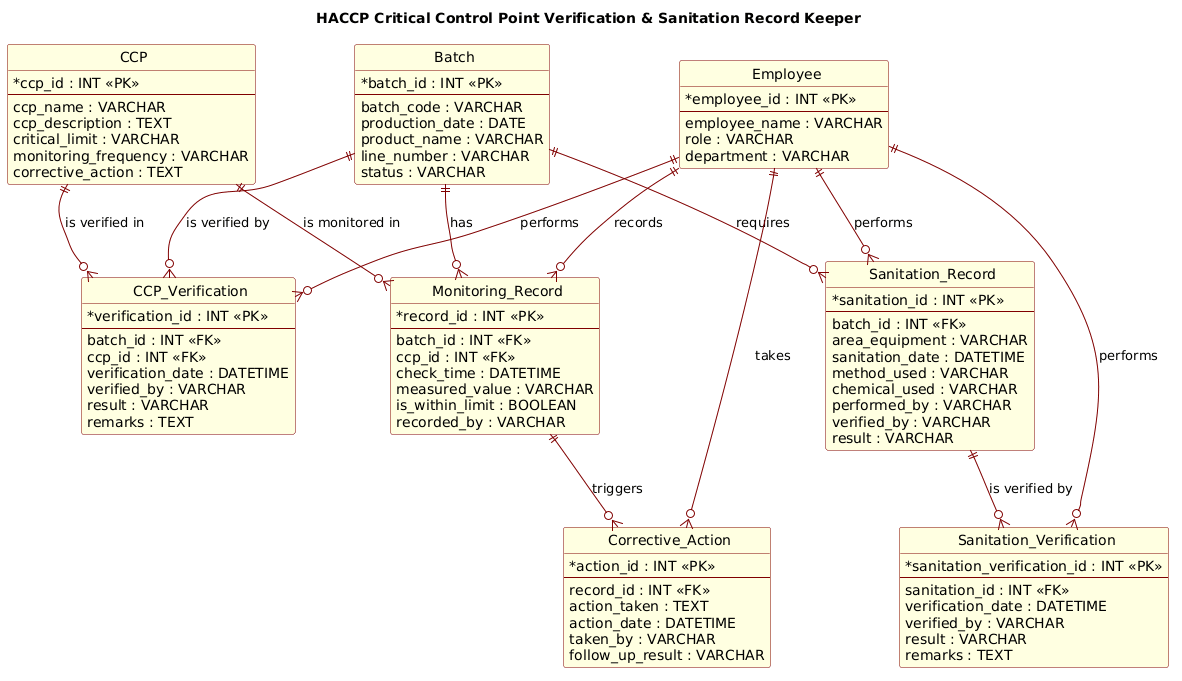
The diagram utilizes standard Entity-Relationship modeling to define the structural integrity of the data. It distinguishes between static definitions (e.g., the definition of a CCP, the list of employees) and dynamic transactional records (e.g., a specific monitoring event, a corrective action log). The cardinality relationships (one-to-many) are critical here: a single production batch may trigger multiple monitoring records, but each monitoring record must be traceable back to exactly one batch and one specific CCP. This ensures data integrity and prevents orphaned records that could compromise an audit.
Target Domain Scope & Scenario
The scope covers the entire operational loop of a food processing line. It begins with the Batch entity, which initiates the production cycle. From there, it branches into three critical tracks: Monitoring (tracking real-time CCP values), Corrective Actions (logging deviations), and Sanitation (verifying hygiene protocols). The model explicitly links these operational records to the Employee entity, ensuring that every action, verification, and correction is attributable to a specific, trained individual within a defined department.
Key Takeaways & Educational Insights
By studying this model, readers will understand how to structure a database for high-compliance industries. Key insights include the necessity of separating definitions (CCP rules) from instances (Monitoring Records), the importance of linking corrective actions to specific monitoring failures, and the requirement for a dual-layer verification process for sanitation (execution and verification) to satisfy regulatory standards.
Complete Diagram & Full Source Code
Below is the fully rendered Entity Relationship Diagram. It showcases the interconnected entities that form the backbone of a HACCP-compliant food safety system. The diagram visualizes the flow from batch creation to final verification, highlighting the critical links between production, monitoring, and sanitation.
@startuml
!include https://static.visual-paradigm.com/web/resources/plantuml-stdlib/themes/rose.puml

/'
This ERD models a food processing HACCP (Hazard Analysis and Critical Control Point)
verification and sanitation record-keeping system. It captures the core entities needed
to track critical control points (CCPs), their limits, monitoring activities,
corrective actions, verification tasks, and sanitation records. The diagram supports
traceability from a production batch to its CCP checks, sanitation events, and
verification outcomes, helping ensure food safety compliance and audit readiness.
'/

title HACCP Critical Control Point Verification & Sanitation Record Keeper

entity "Batch" as batch {
  * batch_id : INT <<PK>>
  --
  batch_code : VARCHAR
  production_date : DATE
  product_name : VARCHAR
  line_number : VARCHAR
  status : VARCHAR
}

entity "CCP" as ccp {
  * ccp_id : INT <<PK>>
  --
  ccp_name : VARCHAR
  ccp_description : TEXT
  critical_limit : VARCHAR
  monitoring_frequency : VARCHAR
  corrective_action : TEXT
}

entity "CCP_Verification" as ccp_verification {
  * verification_id : INT <<PK>>
  --
  batch_id : INT <<FK>>
  ccp_id : INT <<FK>>
  verification_date : DATETIME
  verified_by : VARCHAR
  result : VARCHAR
  remarks : TEXT
}

entity "Monitoring_Record" as monitoring_record {
  * record_id : INT <<PK>>
  --
  batch_id : INT <<FK>>
  ccp_id : INT <<FK>>
  check_time : DATETIME
  measured_value : VARCHAR
  is_within_limit : BOOLEAN
  recorded_by : VARCHAR
}

entity "Corrective_Action" as corrective_action {
  * action_id : INT <<PK>>
  --
  record_id : INT <<FK>>
  action_taken : TEXT
  action_date : DATETIME
  taken_by : VARCHAR
  follow_up_result : VARCHAR
}

entity "Sanitation_Record" as sanitation_record {
  * sanitation_id : INT <<PK>>
  --
  batch_id : INT <<FK>>
  area_equipment : VARCHAR
  sanitation_date : DATETIME
  method_used : VARCHAR
  chemical_used : VARCHAR
  performed_by : VARCHAR
  verified_by : VARCHAR
  result : VARCHAR
}

entity "Sanitation_Verification" as sanitation_verification {
  * sanitation_verification_id : INT <<PK>>
  --
  sanitation_id : INT <<FK>>
  verification_date : DATETIME
  verified_by : VARCHAR
  result : VARCHAR
  remarks : TEXT
}

entity "Employee" as employee {
  * employee_id : INT <<PK>>
  --
  employee_name : VARCHAR
  role : VARCHAR
  department : VARCHAR
}

batch ||--o{ monitoring_record : "has"
ccp ||--o{ monitoring_record : "is monitored in"
monitoring_record ||--o{ corrective_action : "triggers"
batch ||--o{ ccp_verification : "is verified by"
ccp ||--o{ ccp_verification : "is verified in"
batch ||--o{ sanitation_record : "requires"
sanitation_record ||--o{ sanitation_verification : "is verified by"
employee ||--o{ ccp_verification : "performs"
employee ||--o{ monitoring_record : "records"
employee ||--o{ corrective_action : "takes"
employee ||--o{ sanitation_record : "performs"
employee ||--o{ sanitation_verification : "performs"

@endumlStep-by-Step Architectural Walkthrough
Phase 1: Canvas Configuration & Layout Directives
Before defining the data structure, we set the stage for the diagram’s visual identity. In PlantUML, this is done using directives at the very beginning of the file. We include the rose.puml theme, which provides a professional, reddish-rose color palette suitable for industrial and manufacturing documentation. This theme automatically styles the entity boxes with rounded corners and a distinct header, improving readability without manual CSS configuration.
!include https://static.visual-paradigm.com/web/resources/plantuml-stdlib/themes/rose.puml
Immediately following the theme, we define a comment block using /' ... '/. This is a crucial best practice for documentation. Unlike code comments that might be ignored by some parsers, this specific block is rendered as a visible note at the top of the diagram, providing immediate context for auditors or developers viewing the ERD.
Phase 2: Declaring Core Entities, Actors, and Boundaries
The foundation of any ERD is the entity definition. We use the entity keyword followed by the display name and an alias for the relationship syntax. Each entity is enclosed in curly braces, where we define the Primary Key (PK) and other attributes.
For the Batch entity, we establish the primary key batch_id using the * notation, which is the PlantUML shorthand for a Primary Key. We also define attributes like batch_code and production_date with their data types (e.g., INT, VARCHAR, DATE). The -- separator is used to visually separate the key from the non-key attributes, a standard convention that aids in quick visual scanning.
entity "Batch" as batch {
  * batch_id : INT <>
  --
  batch_code : VARCHAR
  production_date : DATE
  status : VARCHAR
}
We repeat this pattern for CCP (Critical Control Point), Monitoring_Record, and Employee. Note the use of the <batch_id : INT <) to explicitly mark foreign keys. While PlantUML infers relationships from the arrows, marking FKs in the attribute list provides a clear data dictionary view within the diagram itself.
Phase 3: Mapping Data Flows & Key Interactions
Once entities are defined, we map the relationships using the ||--o{ syntax. This represents a One-to-Many relationship where the entity on the left (the parent) must exist for the entities on the right (the children) to exist. The || indicates mandatory participation (the child cannot exist without the parent), and o{ indicates the optional side (though in this specific schema, the cardinality implies the child is required for the parent’s integrity).
We map the relationship between Batch and Monitoring_Record. A single batch can have many monitoring records, but a monitoring record belongs to exactly one batch. This is critical for traceability: if a food safety issue arises, we must be able to query all monitoring records for that specific batch ID.
batch ||--o{ monitoring_record : "has"
ccp ||--o{ monitoring_record : "is monitored in"
We also establish the link between Monitoring_Record and Corrective_Action. This is a cascading relationship: a deviation in a monitoring record (indicated by is_within_limit = false) triggers a corrective action. The diagram explicitly links them via the record_id foreign key in the Corrective Action entity.
Phase 4: Grouping, Annotations & Visual Polish
The final phase involves ensuring the diagram is readable and semantically complete. We include the Employee entity as a central actor. In a real-world database, this would link to an HR system, but in this ERD, it serves as the source of truth for accountability. Every action—whether recording a temperature, performing a sanitation check, or verifying a CCP—is linked to an employee via a foreign key.
We use the relationship label syntax (e.g., : "performs") to add semantic meaning to the lines. Instead of just a line connecting Employee to Monitoring_Record, the label “records” clarifies the nature of the interaction. This makes the diagram self-documenting, allowing stakeholders to understand the workflow without needing to read the database schema documentation.
Syntax & Keyword Deep Dive
To master PlantUML for ERD creation, one must understand the specific keywords and notation styles used in this diagram. Here is a breakdown of the core syntax elements:
entity: The primary keyword for defining a table or entity. It is followed by the display name in quotes and an alias (e.g.,entity "Name" as alias) used for referencing in relationships.*(Asterisk):** Placed before an attribute name (e.g.,* batch_id) to denote a Primary Key. This is the standard PlantUML notation for PKs in ERD diagrams.<(Stereotype):** Used to mark Foreign Key attributes. While not always strictly required for the visual rendering, it is highly recommended for clarity in complex schemas to distinguish keys from regular columns.> ||--o{(Cardinality):** This arrow notation defines a One-to-Many relationship. The||represents the “One” side (mandatory), ando{represents the “Many” side (optional or mandatory depending on implementation). It visually indicates that one parent can have many children.--(Separator):** Used inside an entity block to visually separate the Primary Key attributes from the regular attributes, improving the diagram’s layout and readability./' ... '/(Comment Block):** A special comment syntax that renders as a visible note box at the top of the diagram, perfect for adding context or descriptions without cluttering the code logic.
Best Practices & Pitfalls to Avoid
When constructing ERDs for critical systems like HACCP record-keeping, adherence to modeling best practices ensures the diagram remains a reliable reference over time.
- Consistent Naming Conventions: Always use clear, descriptive names for entities (e.g.,
Monitoring_Recordinstead of justRecord) and aliases. Ambiguous names likeTable1make the diagram impossible to read for new team members. - Explicit Foreign Keys: Even if the relationship arrow implies the link, explicitly marking attributes as
<in the entity definition helps database administrators generate accurate SQL scripts later.> - Separate Definitions from Instances: Do not mix the definition of a CCP (the rule) with the instance of a CCP check (the record). Keep
CCPas a static configuration table andMonitoring_Recordas the transactional log. - Use Contextual Comments: Always include the
/' ... '/comment block at the top. In regulated industries, the diagram itself often serves as part of the audit trail, and context is vital.
Start Building HACCP ERDs Faster with VPasCode
Design and visualize your food safety database schemas instantly in your browser with VPasCode, the free PlantUML editor for manufacturing professionals.