


In the modern craft brewing industry, the transition from artisanal intuition to data-driven precision is reshaping how quality is controlled. Fermentation is the most critical phase of beer production, where yeast converts sugars into alcohol and flavor compounds. To maintain consistency and optimize yield, breweries must rigorously track two primary variables: temperature and specific gravity. These measurements, taken periodically over days or weeks, create complex time-series data that must be structured, stored, and analyzed efficiently.

Architecting a database schema for this scenario requires more than just listing fields; it demands a clear understanding of the relationships between physical assets (the tanks), production events (the batches), and the resulting data points (the readings). A well-designed Entity Relationship Diagram (ERD) serves as the blueprint for this system, ensuring that every temperature spike or gravity drop is correctly linked to a specific batch and tank. By using PlantUML, developers can define this data model in a text-based format, version it alongside their application code, and visualize the architecture instantly without leaving the browser.
Understanding the Model: Purpose, Scope & Problem Framing
The core challenge in brewery fermentation monitoring is managing the one-to-many relationships inherent in the production process. A single physical tank can hold multiple batches sequentially over time, and each batch generates hundreds of individual sensor readings. The goal of this ERD is to normalize this data structure to prevent redundancy while ensuring referential integrity.
Diagram Abstraction & Representation
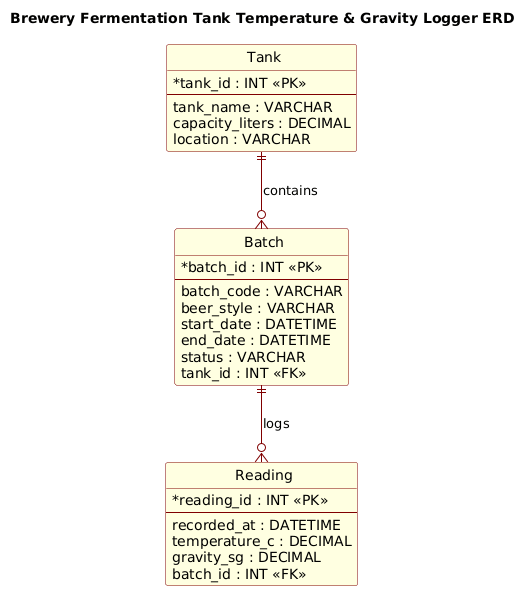
This ERD models the static data structure required to support the dynamic fermentation process. The Tank entity represents the physical hardware, acting as the container. The Batch entity represents a specific production run, linking a recipe and timeline to a physical location. The Reading entity captures the temporal data stream, recording the state of the fermentation at specific moments. By visualizing these as entities with defined attributes and foreign keys, we create a clear map of how data flows from the sensor to the database.
Target Domain Scope & Scenario
This model focuses specifically on the fermentation stage of brewing. It intentionally excludes downstream processes like packaging, distribution, or sales to maintain a focused scope. The boundaries are set to include:
- Hardware Management: Tracking tank capacity and location.
- Production Tracking: Identifying batches by code, style, and status.
- Sensor Logging: Capturing temperature and gravity metrics with precise timestamps.
Key Takeaways & Educational Insights
By constructing this diagram, you will learn how to implement a classic hierarchical data model using PlantUML. You will gain insights into:
- How to define Primary Keys (PK) and Foreign Keys (FK) to establish parent-child relationships.
- The importance of separating static entity definitions (Tank) from transactional data (Reading).
- How to use PlantUML’s
entitysyntax to create professional, database-ready schemas.
Complete Diagram & Full Source Code
Before diving into the syntax, here is the complete visual output of the Brewery Fermentation ERD. This diagram clearly illustrates the one-to-many relationship where a Tank contains many Batches, and a Batch logs many Readings.
@startuml
!include https://static.visual-paradigm.com/web/resources/plantuml-stdlib/themes/rose.puml

title Brewery Fermentation Tank Temperature & Gravity Logger ERD

/'
Diagram Context:
This ERD models a brewery fermentation monitoring system.
It captures fermentation batches, the tanks they occupy,
and the periodic sensor readings of temperature and specific gravity
logged throughout the fermentation process.
The schema links batches to tanks and readings to batches,
enabling historical tracking and profile analysis.
'/

entity "Tank" as tank {
  *tank_id : INT <<PK>>
  --
  tank_name : VARCHAR
  capacity_liters : DECIMAL
  location : VARCHAR
}

entity "Batch" as batch {
  *batch_id : INT <<PK>>
  --
  batch_code : VARCHAR
  beer_style : VARCHAR
  start_date : DATETIME
  end_date : DATETIME
  status : VARCHAR
  tank_id : INT <<FK>>
}

entity "Reading" as reading {
  *reading_id : INT <<PK>>
  --
  recorded_at : DATETIME
  temperature_c : DECIMAL
  gravity_sg : DECIMAL
  batch_id : INT <<FK>>
}

tank ||--o{ batch : "contains"
batch ||--o{ reading : "logs"

@endumlStep-by-Step Architectural Walkthrough
Let’s deconstruct how to build this ERD from scratch using VPasCode. We will follow a logical progression from setup to final relationship mapping.
Phase 1: Canvas Configuration & Layout Directives
Every PlantUML diagram begins with a preamble that sets the rules for rendering. In this manufacturing scenario, we want a clean, professional look that highlights the database structure. We start by including the rose.puml theme, which provides a distinct, elegant style for entity diagrams.
@startuml
!include https://static.visual-paradigm.com/web/resources/plantuml-stdlib/themes/rose.puml
Next, we define the diagram title. This is crucial for documentation, as it immediately tells the viewer what system is being modeled. We also include a comment block using the /' ... '/ syntax to describe the business context without cluttering the visual diagram.
title Brewery Fermentation Tank Temperature & Gravity Logger ERD

/'
Diagram Context:
This ERD models a brewery fermentation monitoring system...
'/
Phase 2: Declaring Core Entities, Actors, and Boundaries
The heart of an ERD is the entity definition. In PlantUML, we use the entity keyword followed by the entity name, an alias, and a block of attributes. We separate the primary key from other attributes using a horizontal line (--), a standard convention in database modeling.
For the Tank entity, we define the primary key tank_id using the * symbol and mark it as INT. The <<PK>> stereotype visually reinforces this in the diagram. Other attributes like capacity_liters and location are defined as DECIMAL and VARCHAR respectively.
entity "Tank" as tank {
  *tank_id : INT <>
  --
  tank_name : VARCHAR
  capacity_liters : DECIMAL
  location : VARCHAR
}
We repeat this pattern for Batch and Reading. Note how the Batch entity includes a tank_id marked as <<FK>>. This indicates that this field is not a primary key for the batch itself but a reference to the parent Tank entity, establishing the link between the production run and the physical container.
Phase 3: Mapping Data Flows & Key Interactions
Once entities are defined, we must visualize their relationships. In manufacturing, a Tank is the parent, and Batches are children. A Batch is the parent, and Readings are children. We use the ||--o{ syntax to denote a mandatory one to optional many relationship.
The || on the left means a Batch must be associated with a Tank. The o{ on the right means a Tank can contain zero or many Batches. We label these relationships with the "contains" and "logs" keywords to make the diagram self-explanatory.
tank ||--o{ batch : "contains"
batch ||--o{ reading : "logs"
Phase 4: Grouping, Annotations & Visual Polish
While this specific ERD is relatively flat, the rose theme automatically applies consistent styling to all entities, ensuring that the font sizes, border colors, and background gradients are uniform. This visual consistency is vital for large-scale manufacturing diagrams where clarity is as important as accuracy.
Syntax & Keyword Deep Dive
To master PlantUML for database modeling, you must understand the specific keywords used in this tutorial. Here is a breakdown of the essential syntax elements:
entity: The primary keyword to define a database table or entity. It takes the formentity "Name" as alias { ... }.*(Asterisk): Placed before an attribute (e.g.,*id) to indicate that this field is the Primary Key.<<PK>>&<<FK>>: Stereotypes used to visually label Primary Keys and Foreign Keys within the entity block.--(Double Dash): A separator line used inside an entity block to visually divide the Primary Key from the rest of the attributes.||--o{: A relationship connector.||represents mandatory one (the child must exist), ando{represents optional many (the parent can have none or many children)./' ... '/: The syntax for a block comment. Text inside these delimiters is rendered as a description in the diagram but is not part of the entity structure.
Best Practices & Pitfalls to Avoid
When modeling manufacturing data with PlantUML, adherence to best practices ensures your diagrams remain maintainable and scalable.
- Use Aliases for Relationships: Always define an alias for your entities (e.g.,
as tank) rather than using the full name in relationship lines. This keeps the relationship syntax clean and readable:tank ||--o{ batchis better thanTank ||--o{ Batch. - Consistent Data Types: Stick to standard SQL data types like
INT,VARCHAR, andDATETIME. Avoid mixing SQL types with specific programming language types (likeStringvsString) to ensure the diagram accurately reflects the target database schema. - Separate Static from Dynamic Data: As seen in the Tank vs. Reading distinction, ensure your ERD separates configuration data (tank details) from high-frequency transactional data (sensor readings). This separation is critical for database normalization.
- Document the Context: Always use the
titleand/' ... '/comment blocks to explain the business logic. A diagram without context is just a list of tables; a diagram with context is a powerful architectural document.
Start Building Brewery ERDs Faster with VPasCode
Design complex manufacturing data models instantly in your browser with VPasCode’s free PlantUML editor—no installation required.