


In the high-stakes environment of paper manufacturing, the transition from raw wood chips to finished bleached pulp is a delicate balance of chemistry, thermodynamics, and precise automation. A single deviation in the pulp digester cook cycle—whether it be a temperature spike or a Kappa number drift—can compromise the entire batch, leading to significant financial loss and material waste. Similarly, the bleach plant’s chemical dosage controller must react instantly to pulp properties, adjusting dosages of chlorine dioxide, caustic, and peroxide to meet strict brightness standards. To manage this complexity, engineers rely on robust data modeling that captures not just the static entities, but the dynamic relationships between recipes, batches, sensor readings, and control setpoints.
Visualizing these intricate dependencies through a standard text editor or a static drawing tool is often insufficient for modern DevOps and manufacturing engineering teams. Diagrams-as-code, specifically using PlantUML, offer a superior approach by treating the database schema and process logic as versionable, testable, and instantly renderable source code. By leveraging VPasCode, architects can define the Entity Relationship Diagram (ERD) for a pulp digester and bleach plant system directly in the browser, ensuring that the data model evolves in lockstep with the control logic. This tutorial walks you through constructing a professional-grade ERD that traces the lifecycle of a pulp batch from the digester through the bleach stages, capturing every critical data point required for traceability and quality control.
Understanding the Model: Purpose, Scope & Problem Framing
This tutorial focuses on constructing an Entity Relationship Diagram (ERD) that models the core data architecture for a specific manufacturing scenario: the integration of a pulp digester cook cycle with a bleach plant chemical dosage controller. Unlike generic database schemas, this model is designed to answer specific operational questions: How do we link a specific recipe to a batch execution? How do we track sensor deviations in real-time? How do we correlate chemical dosages with final pulp quality?
Diagram Abstraction & Representation
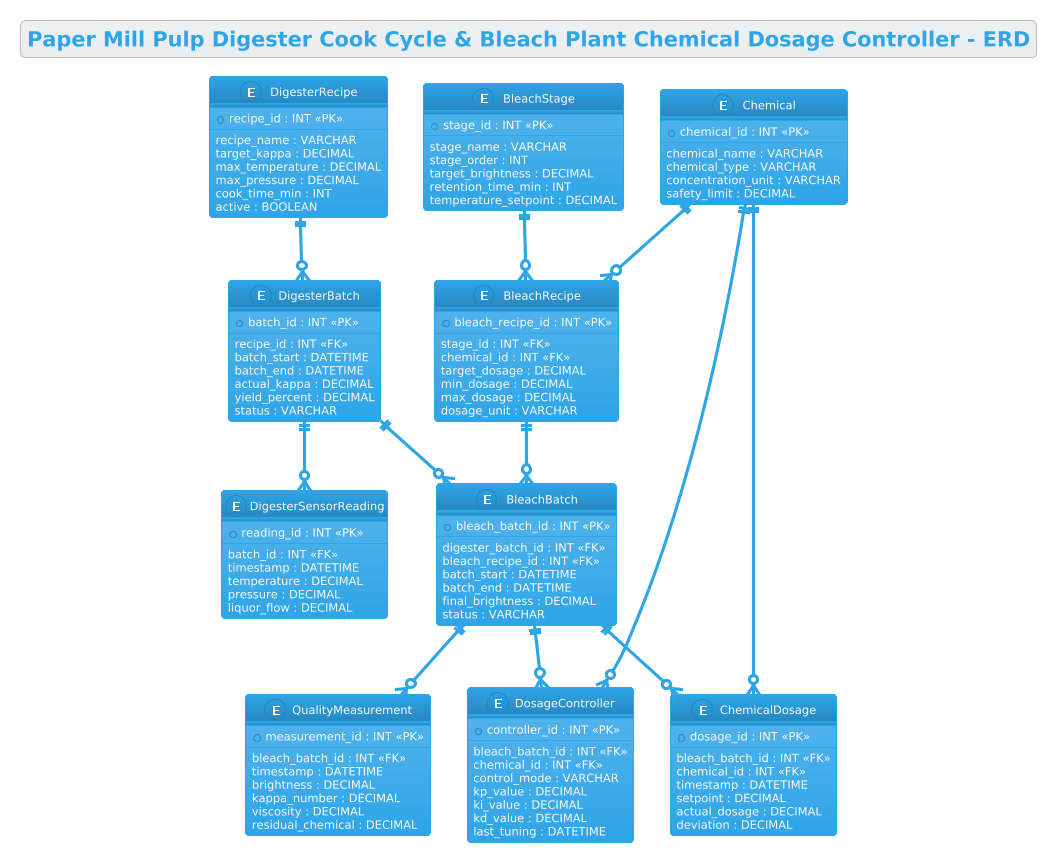
The ERD abstraction here serves as the backbone for the Manufacturing Execution System (MES) or Supervisory Control and Data Acquisition (SCADA) database. It separates the “definitions” (recipes, chemicals, stages) from the “executions” (batches, readings, dosages). This separation is critical in manufacturing. A DigesterRecipe defines the ideal parameters, while DigesterBatch records what actually happened. The diagram uses strong entity relationships to enforce data integrity, ensuring that every sensor reading is tied to a specific batch and that every chemical dosage is linked to a specific bleach recipe stage.
Target Domain Scope & Scenario
The scope of this model covers two primary domains: Thermal Processing (the digester) and Chemical Treatment (the bleach plant). It intentionally excludes upstream chip handling or downstream paper machine processes to focus on the critical conversion steps. The model addresses the traceability requirement, linking a final QualityMeasurement back to the original DigesterRecipe and the specific Chemical dosages used. This allows engineers to perform root cause analysis if a batch fails quality checks.
Key Takeaways & Educational Insights
- Recipe vs. Execution Pattern: Learn how to model the distinction between a static configuration (Recipe) and a dynamic instance (Batch) using Foreign Keys.
- Time-Series Data Modeling: Understand how to structure entities like
DigesterSensorReadingandChemicalDosageto handle high-frequency industrial data. - Multi-Stage Process Linking: See how to link the output of the digester (as a batch) directly to the input of the bleach plant, creating a continuous chain of custody.
Complete Diagram & Full Source Code
Before diving into the step-by-step construction, here is the complete visual representation of the final Entity Relationship Diagram. This diagram illustrates the relationships between the core manufacturing entities, including the digester, bleach stages, and chemical controllers.
The following source code is the complete PlantUML script used to generate this diagram. You can copy this directly into the VPasCode editor to render it instantly.
@startuml
!theme cerulean
title Paper Mill Pulp Digester Cook Cycle & Bleach Plant Chemical Dosage Controller - ERD

/'
This ERD models the core entities for controlling a pulp digester cook cycle and a bleach plant chemical dosage system.
The digester cook cycle tracks batch cooking parameters such as temperature, pressure, and Kappa number target.
The bleach plant stage manages chemical dosages (e.g., chlorine dioxide, caustic, peroxide) based on pulp properties and target brightness.
The diagram links recipe definitions, batch execution records, sensor readings, chemical dosage setpoints, and actual consumption.
It supports traceability from raw pulp batch to final bleached pulp quality.
'/

entity "DigesterRecipe" as digester_recipe {
  * recipe_id : INT <<PK>>
  --
  recipe_name : VARCHAR
  target_kappa : DECIMAL
  max_temperature : DECIMAL
  max_pressure : DECIMAL
  cook_time_min : INT
  active : BOOLEAN
}

entity "DigesterBatch" as digester_batch {
  * batch_id : INT <<PK>>
  --
  recipe_id : INT <<FK>>
  batch_start : DATETIME
  batch_end : DATETIME
  actual_kappa : DECIMAL
  yield_percent : DECIMAL
  status : VARCHAR
}

entity "DigesterSensorReading" as digester_reading {
  * reading_id : INT <<PK>>
  --
  batch_id : INT <<FK>>
  timestamp : DATETIME
  temperature : DECIMAL
  pressure : DECIMAL
  liquor_flow : DECIMAL
}

entity "BleachStage" as bleach_stage {
  * stage_id : INT <<PK>>
  --
  stage_name : VARCHAR
  stage_order : INT
  target_brightness : DECIMAL
  retention_time_min : INT
  temperature_setpoint : DECIMAL
}

entity "Chemical" as chemical {
  * chemical_id : INT <<PK>>
  --
  chemical_name : VARCHAR
  chemical_type : VARCHAR
  concentration_unit : VARCHAR
  safety_limit : DECIMAL
}

entity "BleachRecipe" as bleach_recipe {
  * bleach_recipe_id : INT <<PK>>
  --
  stage_id : INT <<FK>>
  chemical_id : INT <<FK>>
  target_dosage : DECIMAL
  min_dosage : DECIMAL
  max_dosage : DECIMAL
  dosage_unit : VARCHAR
}

entity "BleachBatch" as bleach_batch {
  * bleach_batch_id : INT <<PK>>
  --
  digester_batch_id : INT <<FK>>
  bleach_recipe_id : INT <<FK>>
  batch_start : DATETIME
  batch_end : DATETIME
  final_brightness : DECIMAL
  status : VARCHAR
}

entity "ChemicalDosage" as chemical_dosage {
  * dosage_id : INT <<PK>>
  --
  bleach_batch_id : INT <<FK>>
  chemical_id : INT <<FK>>
  timestamp : DATETIME
  setpoint : DECIMAL
  actual_dosage : DECIMAL
  deviation : DECIMAL
}

entity "DosageController" as dosage_controller {
  * controller_id : INT <<PK>>
  --
  bleach_batch_id : INT <<FK>>
  chemical_id : INT <<FK>>
  control_mode : VARCHAR
  kp_value : DECIMAL
  ki_value : DECIMAL
  kd_value : DECIMAL
  last_tuning : DATETIME
}

entity "QualityMeasurement" as quality_measurement {
  * measurement_id : INT <<PK>>
  --
  bleach_batch_id : INT <<FK>>
  timestamp : DATETIME
  brightness : DECIMAL
  kappa_number : DECIMAL
  viscosity : DECIMAL
  residual_chemical : DECIMAL
}

digester_recipe ||--o{ digester_batch
digester_batch ||--o{ digester_reading
digester_batch ||--o{ bleach_batch
bleach_stage ||--o{ bleach_recipe
chemical ||--o{ bleach_recipe
bleach_recipe ||--o{ bleach_batch
bleach_batch ||--o{ chemical_dosage
bleach_batch ||--o{ dosage_controller
bleach_batch ||--o{ quality_measurement
chemical ||--o{ chemical_dosage
chemical ||--o{ dosage_controller

@endumlStep-by-Step Architectural Walkthrough
Phase 1: Canvas Configuration & Layout Directives
Every PlantUML diagram begins with configuration directives that set the stage for rendering. In this manufacturing ERD, we prioritize a clean, professional look that suits technical documentation. We start by applying the !theme cerulean directive. This theme provides a crisp, blue-toned aesthetic that is highly readable in technical reports and aligns well with industrial software interfaces.
Next, we define the diagram title using the title directive. This provides immediate context for anyone viewing the diagram, explicitly stating that it covers the “Pulp Digester Cook Cycle & Bleach Plant Chemical Dosage Controller.” Finally, we add a comment block using the /' and '/ syntax. This block serves as a living documentation piece, describing the business logic and data flow without cluttering the visual diagram itself.
Phase 2: Declaring Core Entities, Actors, and Boundaries
The heart of an ERD is the entity definition. In PlantUML, we use the entity keyword to define tables. We structure these entities to reflect the manufacturing hierarchy. For instance, DigesterRecipe represents the master data—the “ideal” cooking parameters. It includes fields like target_kappa and max_temperature.
We then define DigesterBatch, which represents a single execution of that recipe. Notice the use of recipe_id : INT <. This explicitly marks the relationship between the batch and the recipe. We repeat this pattern for the bleach plant, defining BleachStage (the equipment configuration) and Chemical (the raw materials). Each entity block contains a primary key (marked with *) and a separator -- to distinguish keys from attributes, ensuring the generated diagram is easy to read.
Phase 3: Mapping Data Flows & Key Interactions
Once entities are defined, we must establish how they relate. In a paper mill, the process is sequential. The output of the digester becomes the input of the bleach plant. We model this by linking DigesterBatch to BleachBatch. The relationship digester_batch ||--o{ bleach_batch indicates that one digester batch can result in zero or more bleach batches (though in reality, it’s usually one-to-one, the optional cardinality allows for flexibility in edge cases).
We also model the control loop. The ChemicalDosage entity acts as a transactional record, linking a specific BleachBatch to a specific Chemical. It captures the setpoint (what the controller wanted) and the actual_dosage (what happened), allowing engineers to calculate the deviation. This is crucial for monitoring the health of the control valves and pumps.
Phase 4: Grouping, Annotations & Visual Polish
The final phase involves refining the visual output to ensure clarity. PlantUML automatically groups related entities based on the relationships defined. However, we can influence the layout by the order of entity definitions and relationship lines. We ensure that the Digester entities are on one side and the Bleach entities on the other, with the connecting BleachBatch in the middle, visually representing the flow of materials.
We also ensure that data types like DECIMAL and DATETIME are used consistently. This not only helps in database schema generation but also serves as a visual cue for the type of data being stored (e.g., a time-series reading vs. a configuration value). The ||--o{ notation (One-to-Many optional) is used extensively to show that while a recipe is mandatory for a batch, a batch might have multiple sensor readings over time.
Syntax & Keyword Deep Dive
Understanding the specific PlantUML syntax used in this manufacturing ERD is essential for customization and extension. Here are the key keywords and conventions employed:
entity: The fundamental building block. It defines a table-like structure with a name and a list of attributes. The syntax isentity "Name" as alias { attributes }.*(Primary Key Marker): Placed before an attribute name (e.g.,* recipe_id) to denote that this field is the Primary Key. PlantUML visually underlines this field in the diagram.<(Foreign Key Marker): Used to explicitly mark a field as a Foreign Key (e.g.,> recipe_id : INT <). This adds visual clarity to the diagram, showing the link to another entity.> ||--o{(Relationship Cardinality): This defines the relationship between two entities.||means “mandatory one” ando{means “optional many”. For example,digester_recipe ||--o{ digester_batchmeans one recipe is required for a batch, and one recipe can be used for many batches.!(Directive): Commands starting with!(like!theme) apply global settings to the diagram, such as styling or layout direction./'and'/(Comment Block): These delimiters create a multi-line comment. Unlike single-line comments ('), this block is rendered as a text box within the diagram (or hidden depending on settings), perfect for adding context without affecting the visual layout of the entities.
Best Practices & Pitfalls to Avoid
When modeling complex manufacturing systems like a pulp digester, adhering to best practices ensures your diagram remains a useful asset rather than a confusing mess.
- Separate Configuration from Execution: Never mix recipe definitions with batch data in a single table. Always use a
Recipeentity and aBatchentity linked by a Foreign Key. This allows you to update the recipe parameters without deleting historical batch records. - Use Descriptive Aliases: PlantUML allows you to define a long entity name (e.g.,
DigesterSensorReading) but assign a shorter alias (e.g.,digester_reading) for the relationship lines. This keeps the diagram clean and prevents overlapping lines. - Consistent Data Typing: Even if you don’t generate SQL, using explicit types like
DECIMALfor measurements andDATETIMEfor timestamps helps readers quickly understand the nature of the data. - Modularize Complex Diagrams: If the ERD becomes too large (e.g., adding upstream chip storage or downstream paper machine data), consider splitting the diagram into multiple PlantUML files and using
!includeto assemble them. This keeps the source code maintainable.
Start Building Manufacturing ERDs Faster with VPasCode
Design and visualize complex pulp mill data models instantly in your browser with VPasCode, the free PlantUML editor that brings your manufacturing architecture to life.