


In the high-stakes environment of pharmaceutical manufacturing, ensuring the safety and efficacy of every tablet is a non-negotiable mandate. Quality Control (QC) laboratories are the guardians of this process, managing complex workflows where raw materials are transformed into finished products that undergo rigorous physical and chemical testing. For a manufacturing facility, the integrity of this process relies on a robust data architecture that can trace a single tablet back to its specific compression batch, the analyst who tested it, the instrument used, and the environmental conditions during dissolution testing. Without a unified data model, ensuring regulatory compliance and investigating Out-of-Specification (OOS) results becomes a fragmented and error-prone endeavor.

This tutorial demonstrates how to model a critical subset of that data environment: the data structure for tablet compression weight variation and dissolution testing. By leveraging PlantUML, a powerful diagram-as-code tool, we can define the relationships between product formulations, compression batches, sampling plans, and analytical results in a single, versionable source file. This approach not only streamlines database design but also serves as living documentation that evolves alongside the laboratory’s operational requirements.
Understanding the Model: Purpose, Scope & Problem Framing
Entity-Relationship Diagrams (ERDs) are the blueprint for relational databases, defining how data entities relate to one another. In this specific domain, the challenge is to capture the hierarchical nature of pharmaceutical production while maintaining the granular traceability required for regulatory audits.
Diagram Abstraction & Representation
This diagram models a relational schema where the central entity is the Compression_Batch. Every testing event (weight variation or dissolution) is a child of a specific batch, ensuring that results are always tied to the manufacturing context. The model introduces intermediate entities like Tablet_Sample to bridge the gap between a macro-level batch and micro-level analytical results. This abstraction allows the database to handle scenarios where a single batch is tested multiple times, or where individual tablets from a sampling plan are used for different types of tests.
Target Domain Scope & Scenario
The scope is strictly limited to the Quality Control laboratory’s operational data. It covers:
- Product Definition: Defining the drug product, strength, and dosage form.
- Batch Traceability: Linking manufacturing batches to specific formulations.
- Sampling Logic: Recording how many tablets are taken and from where.
- Testing Execution: Capturing the parameters of weight variation (average, min, max) and dissolution (medium, RPM, temperature).
- Result Analysis: Storing the specific % released at various timepoints and linking them to the specific tablets tested.
Key Takeaways & Educational Insights
By building this model, you will learn how to handle one-to-many relationships (e.g., one batch has many tests), how to link multiple entities to a single result (e.g., a dissolution result depends on both a test run and a specific tablet), and how to structure audit trails for deviations. The resulting diagram provides a clear visual contract for database engineers and a clear operational map for lab managers.
Complete Diagram & Full Source Code
Below is the finished Entity-Relationship Diagram, rendered in the aws-orange theme, followed by the complete source code you can copy and edit.
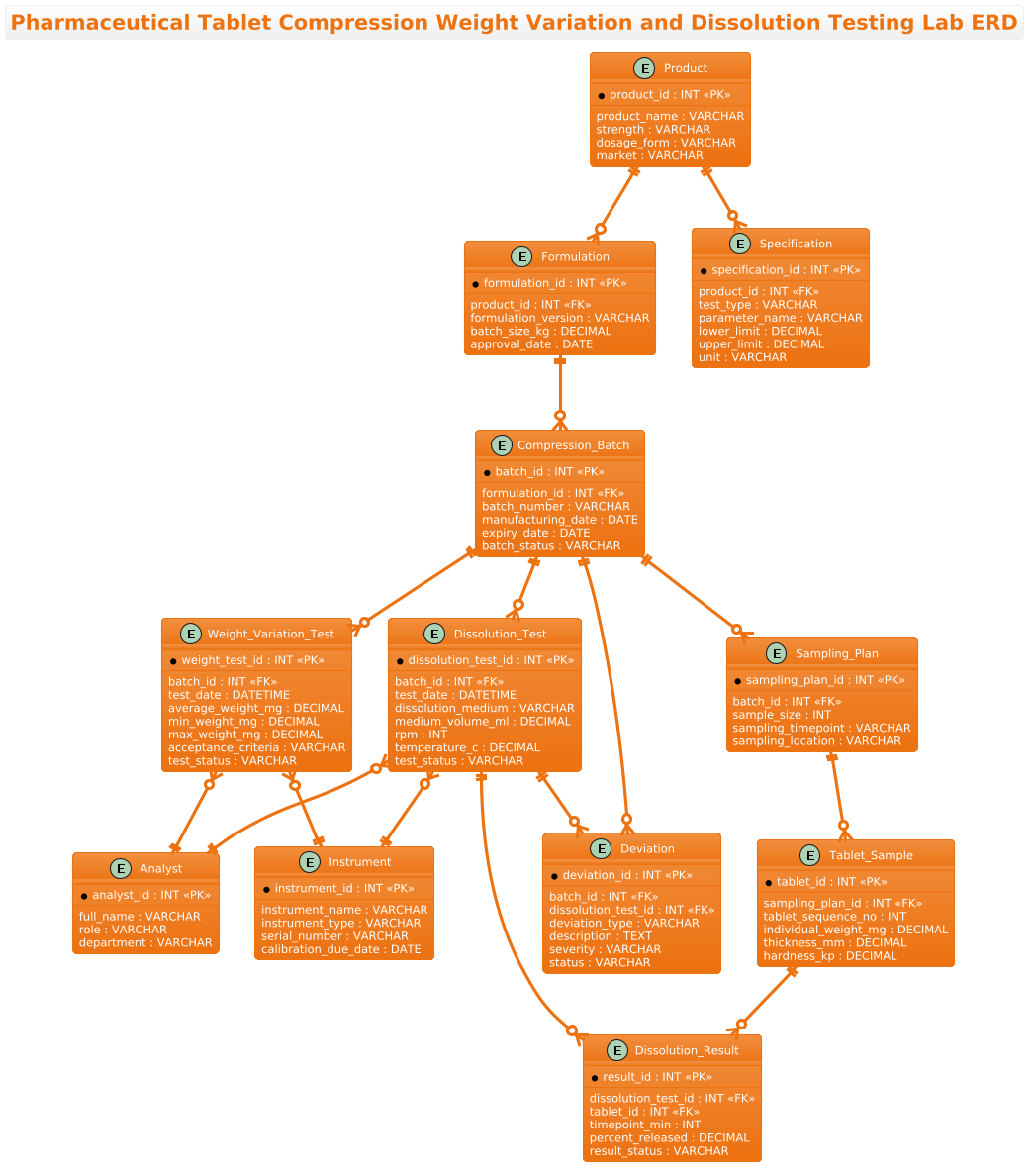
@startuml
!theme aws-orange
title Pharmaceutical Tablet Compression Weight Variation and Dissolution Testing Lab ERD

/'
This ERD models the data environment of a pharmaceutical quality control laboratory responsible for
tablet compression weight variation and dissolution testing. The diagram captures how manufactured
tablet batches are sampled, how individual tablets are weighed to assess weight uniformity, and how
dissolution testing is performed on selected tablets. It connects product formulations, compression
batches, sampling plans, weighing records, dissolution test runs, apparatus conditions, analytical
results, specifications, instruments, analysts, and deviations into a single integrated quality
data structure. The purpose of the diagram is to show the relationships among batch release data,
in-process control records, and finished product dissolution testing so that laboratory traceability,
regulatory compliance, and investigation of out-of-specification results can be supported.
'/

entity "Product" as product {
  * product_id : INT <<PK>>
  --
  product_name : VARCHAR
  strength : VARCHAR
  dosage_form : VARCHAR
  market : VARCHAR
}

entity "Formulation" as formulation {
  * formulation_id : INT <<PK>>
  --
  product_id : INT <<FK>>
  formulation_version : VARCHAR
  batch_size_kg : DECIMAL
  approval_date : DATE
}

entity "Compression_Batch" as batch {
  * batch_id : INT <<PK>>
  --
  formulation_id : INT <<FK>>
  batch_number : VARCHAR
  manufacturing_date : DATE
  expiry_date : DATE
  batch_status : VARCHAR
}

entity "Sampling_Plan" as sampling {
  * sampling_plan_id : INT <<PK>>
  --
  batch_id : INT <<FK>>
  sample_size : INT
  sampling_timepoint : VARCHAR
  sampling_location : VARCHAR
}

entity "Tablet_Sample" as tablet {
  * tablet_id : INT <<PK>>
  --
  sampling_plan_id : INT <<FK>>
  tablet_sequence_no : INT
  individual_weight_mg : DECIMAL
  thickness_mm : DECIMAL
  hardness_kp : DECIMAL
}

entity "Weight_Variation_Test" as weight_test {
  * weight_test_id : INT <<PK>>
  --
  batch_id : INT <<FK>>
  test_date : DATETIME
  average_weight_mg : DECIMAL
  min_weight_mg : DECIMAL
  max_weight_mg : DECIMAL
  acceptance_criteria : VARCHAR
  test_status : VARCHAR
}

entity "Dissolution_Test" as dissolution {
  * dissolution_test_id : INT <<PK>>
  --
  batch_id : INT <<FK>>
  test_date : DATETIME
  dissolution_medium : VARCHAR
  medium_volume_ml : DECIMAL
  rpm : INT
  temperature_c : DECIMAL
  test_status : VARCHAR
}

entity "Dissolution_Result" as diss_result {
  * result_id : INT <<PK>>
  --
  dissolution_test_id : INT <<FK>>
  tablet_id : INT <<FK>>
  timepoint_min : INT
  percent_released : DECIMAL
  result_status : VARCHAR
}

entity "Specification" as spec {
  * specification_id : INT <<PK>>
  --
  product_id : INT <<FK>>
  test_type : VARCHAR
  parameter_name : VARCHAR
  lower_limit : DECIMAL
  upper_limit : DECIMAL
  unit : VARCHAR
}

entity "Instrument" as instrument {
  * instrument_id : INT <<PK>>
  --
  instrument_name : VARCHAR
  instrument_type : VARCHAR
  serial_number : VARCHAR
  calibration_due_date : DATE
}

entity "Analyst" as analyst {
  * analyst_id : INT <<PK>>
  --
  full_name : VARCHAR
  role : VARCHAR
  department : VARCHAR
}

entity "Deviation" as deviation {
  * deviation_id : INT <<PK>>
  --
  batch_id : INT <<FK>>
  dissolution_test_id : INT <<FK>>
  deviation_type : VARCHAR
  description : TEXT
  severity : VARCHAR
  status : VARCHAR
}

product ||--o{ formulation
formulation ||--o{ batch
batch ||--o{ sampling
sampling ||--o{ tablet
batch ||--o{ weight_test
batch ||--o{ dissolution
dissolution ||--o{ diss_result
tablet ||--o{ diss_result
product ||--o{ spec
dissolution }o--|| instrument
weight_test }o--|| instrument
dissolution }o--|| analyst
weight_test }o--|| analyst
batch ||--o{ deviation
dissolution ||--o{ deviation

@endumlStep-by-Step Architectural Walkthrough
Building a complex ERD like this requires a structured approach. We will break down the construction into four logical phases: setting the stage, defining the core entities, mapping the relationships, and adding the necessary metadata.
Phase 1: Canvas Configuration & Layout Directives
Every PlantUML diagram begins with directives that set the environment. In this manufacturing context, we want a clean, professional look that aligns with standard technical documentation. We start by declaring the theme.
!theme aws-orangeThis directive applies a consistent color palette (oranges, grays, and whites) to all entities and lines, ensuring the diagram looks cohesive without needing manual styling for every box. We also add a title to immediately contextualize the diagram for anyone viewing the generated image or documentation.
title Pharmaceutical Tablet Compression Weight Variation and Dissolution Testing Lab ERDPhase 2: Declaring Core Entities, Actors, and Boundaries
The backbone of this ERD consists of the core entities. In PlantUML, we use the entity keyword to define a table. Each entity is wrapped in braces {} containing its attributes.
Consider the Product entity. It holds the master data for the drug itself. We define the Primary Key (PK) using the * symbol and the Foreign Key (FK) using FK notation.
entity "Product" as product {
  * product_id : INT <>
  --
  product_name : VARCHAR
  strength : VARCHAR
  dosage_form : VARCHAR
  market : VARCHAR
}
Notice the -- separator. This visually splits the primary key from the descriptive attributes, a common convention in ERDs to improve readability. We repeat this pattern for Formulation, Compression_Batch, and Weight_Variation_Test, ensuring that every table has a unique identifier (like batch_id or weight_test_id) to link data accurately.
Phase 3: Mapping Data Flows & Key Interactions
Once the entities are defined, we draw the relationships. The syntax entity1 ||--o{ entity2 denotes a mandatory one-to-many relationship. The double vertical bar || means “mandatory one” (the child must exist), and the crow’s foot { means “many”.
For example, the relationship between Batch and Weight_Variation_Test:
batch ||--o{ weight_testThis implies that a Batch must have at least one Weight_Variation_Test (or potentially zero if optional, depending on business logic, but here the || suggests a strong link). More complex is the Dissolution_Result, which links to both the Dissolution_Test and the Tablet_Sample. This many-to-many relationship is resolved by the result entity holding foreign keys to both parents.
dissolution ||--o{ diss_result
tablet ||--o{ diss_result
Phase 4: Grouping, Annotations & Visual Polish
The final phase involves adding context through comments and ensuring the diagram is self-documenting. We use the PlantUML comment syntax /' ... '/ to add a descriptive block at the top. This text is not rendered in the diagram itself but is crucial for anyone reading the source code or exporting the diagram to documentation.
/'
This ERD models the data environment of a pharmaceutical quality control laboratory...
'/
We also ensure that attributes like DECIMAL, DATE, and TEXT are used correctly to reflect the data types required for precision in manufacturing (e.g., weight in mg, time in minutes).
Syntax & Keyword Deep Dive
To master this ERD, you must understand the specific PlantUML syntax elements used to construct the pharmaceutical data model.
entity "Name" as alias: Defines a new table. The alias (e.g.,product) is used in relationship lines to keep the code concise.* attribute : TYPE: The asterisk*marks the Primary Key. This is the unique identifier for every row in the table.attribute : TYPE <: The> FKstereotype explicitly marks a Foreign Key, helping visualizers understand the join logic between tables.||--o{: This is the standard ERD notation for “Mandatory One to Optional Many”. The||is on the “One” side, and the{is on the “Many” side.}o--||: This is the reverse notation for “Optional Many to Mandatory One”, often used when the relationship is viewed from the child entity’s perspective.!theme: A directive to apply a pre-defined visual theme to the entire diagram, saving time on manual styling.
Best Practices & Pitfalls to Avoid
When modeling complex manufacturing data like this, adherence to best practices ensures the diagram remains maintainable and accurate.
- Use Descriptive Aliases: While the entity name might be
Compression_Batch, using a short alias likebatchin relationship lines makes the code much cleaner and easier to read. Avoid generic names likee1ore2. - Consistent Naming Conventions: Stick to a consistent style for attributes. In this guide, we used
snake_casefor attributes (e.g.,product_name) which is standard for database columns. MixingcamelCaseandsnake_casecan lead to confusion. - Define Data Types Explicitly: Never leave data types as
ANYor omit them. In pharmaceutical testing, the difference betweenINT(for RPM) andDECIMAL(for weight) is critical. Explicitly definingDECIMALensures precision in the resulting database schema. - Separate Logic from Data: Notice how Instrument and Analyst are separate entities. Do not hardcode analyst names or instrument serial numbers into the test result tables. This keeps the data normalized and allows for easy updates to personnel or equipment records without breaking historical test data.
Start Building Pharmaceutical ERDs Faster with VPasCode
Design and visualize complex manufacturing database schemas instantly in your browser with VPasCode, the free PlantUML editor for data architects.