


In the high-precision world of plastic injection molding, the difference between a profitable run and a costly downtime event often lies in the data. Manufacturing facilities rely on thousands of injection molds, each with a unique lifespan defined by the number of cycles, or “shots,” it can endure before requiring maintenance. Without a robust data model to track these metrics, facilities risk unplanned stoppages, inconsistent part quality, and accelerated tool wear. The challenge is not just collecting this data, but structuring it to predict maintenance needs before they occur.

Visualizing this operational complexity through an Entity Relationship Diagram (ERD) is the first step toward building a reliable tracking system. By mapping the relationships between tools, maintenance cycles, shot logs, and the operators who manage them, architects can ensure data integrity and streamline preventive maintenance workflows. Using PlantUML within the VPasCode editor allows engineers to define these complex schemas instantly, testing relationships and constraints without the overhead of local database installations.
Understanding the Model: Purpose, Scope & Problem Framing
Diagram Abstraction & Representation
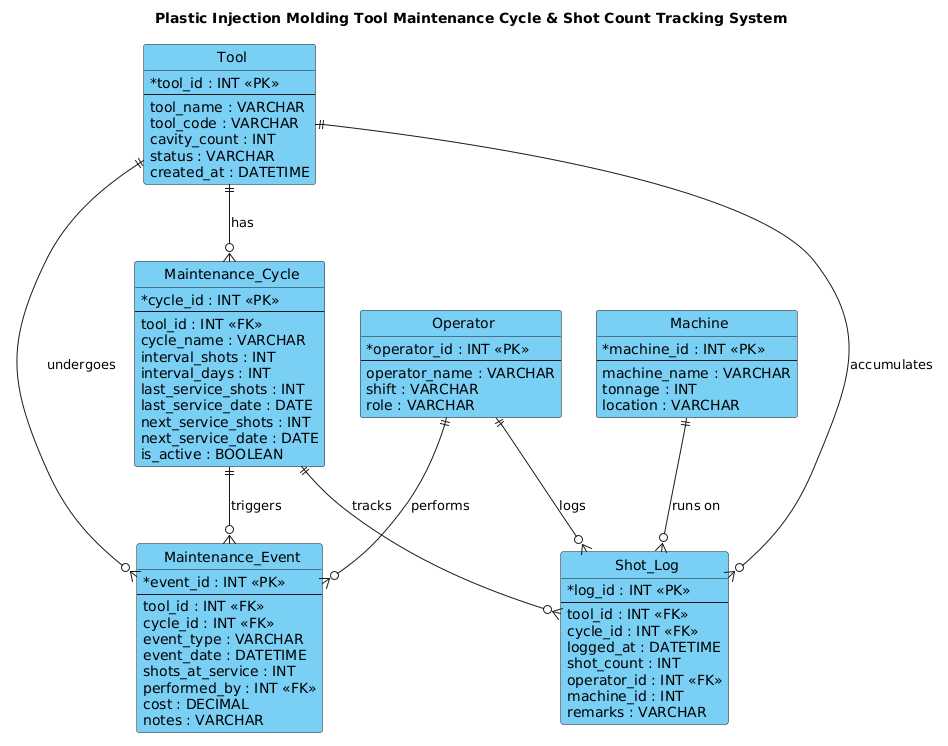
This ERD serves as the architectural blueprint for a manufacturing execution system (MES) component focused on tool lifecycle management. In this model, the Tool acts as the central entity, representing the physical mold. The diagram abstracts the concept of “usage” into Shot_Log records, which timestamp every injection cycle. The Maintenance_Cycle entity introduces the logic of thresholds, defining the rules (e.g., “service every 10,000 shots”) that trigger the Maintenance_Event.
Target Domain Scope & Scenario
The scope of this model is strictly limited to the operational tracking of a single injection molding facility’s tooling assets. It explicitly models the interaction between the physical machine, the tool, the operator, and the maintenance schedule. It does not cover the actual injection process parameters (like temperature or pressure) but focuses entirely on the count-based metrics and the administrative workflow of maintenance.
Key Takeaways & Educational Insights
By constructing this diagram, you will learn how to model one-to-many relationships for logging events, how to link historical data (shots) to scheduled actions (maintenance), and how to track operator accountability. You will gain insight into normalizing data to prevent redundancy while maintaining the ability to query historical maintenance costs and tool performance over time.
Complete Diagram & Full Source Code
Before diving into the construction, here is the complete visual representation of the Plastic Injection Molding Tool Maintenance Cycle & Shot Count Tracking System. This diagram illustrates the core entities and their interconnections, providing a clear map of the data flow from shot logging to maintenance execution.
Below is the complete PlantUML source code used to generate this diagram. You can copy this code directly into the VPasCode editor to render, modify, and export your own version.
@startuml
!include https://static.visual-paradigm.com/web/resources/plantuml-stdlib/themes/vp.puml

title Plastic Injection Molding Tool Maintenance Cycle & Shot Count Tracking System

/'
Diagram Context:
This ERD models a system used in a plastic injection molding facility to track
the usage and maintenance of injection molds (tools). Each mold accumulates
"shots" (injection cycles) over time. A maintenance cycle defines a recurring
interval (in shots or days) at which a tool must be serviced. As shots are
logged, the system detects when a tool reaches its next maintenance threshold,
triggering a maintenance event that records what was done, by whom, and when.
This helps prevent unplanned downtime, extends tool life, and ensures quality
by enforcing timely preventive maintenance.
'/

' ---------- Entities ----------

entity "Tool" as tool {
  * tool_id : INT <<PK>>
  --
  tool_name : VARCHAR
  tool_code : VARCHAR
  cavity_count : INT
  status : VARCHAR
  created_at : DATETIME
}

entity "Maintenance_Cycle" as cycle {
  * cycle_id : INT <<PK>>
  --
  tool_id : INT <<FK>>
  cycle_name : VARCHAR
  interval_shots : INT
  interval_days : INT
  last_service_shots : INT
  last_service_date : DATE
  next_service_shots : INT
  next_service_date : DATE
  is_active : BOOLEAN
}

entity "Shot_Log" as shotlog {
  * log_id : INT <<PK>>
  --
  tool_id : INT <<FK>>
  cycle_id : INT <<FK>>
  logged_at : DATETIME
  shot_count : INT
  operator_id : INT <<FK>>
  machine_id : INT
  remarks : VARCHAR
}

entity "Maintenance_Event" as event {
  * event_id : INT <<PK>>
  --
  tool_id : INT <<FK>>
  cycle_id : INT <<FK>>
  event_type : VARCHAR
  event_date : DATETIME
  shots_at_service : INT
  performed_by : INT <<FK>>
  cost : DECIMAL
  notes : VARCHAR
}

entity "Operator" as operator {
  * operator_id : INT <<PK>>
  --
  operator_name : VARCHAR
  shift : VARCHAR
  role : VARCHAR
}

entity "Machine" as machine {
  * machine_id : INT <<PK>>
  --
  machine_name : VARCHAR
  tonnage : INT
  location : VARCHAR
}

' ---------- Relationships ----------

tool ||--o{ cycle : "has"
tool ||--o{ shotlog : "accumulates"
tool ||--o{ event : "undergoes"
cycle ||--o{ shotlog : "tracks"
cycle ||--o{ event : "triggers"
operator ||--o{ shotlog : "logs"
operator ||--o{ event : "performs"
machine ||--o{ shotlog : "runs on"

@endumlStep-by-Step Architectural Walkthrough
Building this ERD requires a logical progression from defining the core assets to mapping the complex relationships between operational events and maintenance schedules. We will break this down into four distinct phases.
Phase 1: Canvas Configuration & Layout Directives
The foundation of any professional PlantUML diagram lies in its configuration. We begin by including the vp.puml theme, which provides a consistent, modern visual style suitable for technical documentation. We also define a title directive to give the diagram a clear identity. Crucially, we include a comment block using /' and '/ to document the business context directly within the code. This ensures that anyone reading the source code understands the “why” behind the model without needing external documentation.
@startuml
!include https://static.visual-paradigm.com/web/resources/plantuml-stdlib/themes/vp.puml

title Plastic Injection Molding Tool Maintenance Cycle & Shot Count Tracking System

/'
Diagram Context:
This ERD models a system used in a plastic injection molding facility...
'/
Phase 2: Declaring Core Entities, Actors, and Boundaries
Next, we define the core entities. In PlantUML, the entity keyword is used to create database tables. We start with Tool, the central asset. We define its primary key (tool_id) using the * symbol and list its attributes like tool_code and cavity_count. We then define Maintenance_Cycle, which links to the tool via a foreign key (tool_id). This entity stores the logic for when maintenance is due, tracking both shot counts and calendar days. We also define Shot_Log, Maintenance_Event, Operator, and Machine to capture the granular data of daily operations.
entity "Tool" as tool {
* tool_id : INT <>
--
tool_name : VARCHAR
tool_code : VARCHAR
cavity_count : INT
status : VARCHAR
created_at : DATETIME
}
entity "Maintenance_Cycle" as cycle {
* cycle_id : INT < >
--
tool_id : INT <>
cycle_name : VARCHAR
interval_shots : INT
interval_days : INT
last_service_shots : INT
last_service_date : DATE
next_service_shots : INT
next_service_date : DATE
is_active : BOOLEAN
} Phase 3: Mapping Data Flows & Key Interactions
With entities defined, we establish the relationships that drive the system. The ||--o{ syntax represents a “mandatory one to optional many” relationship. For instance, a Tool ||--o{ Shot_Log means a tool must exist to have shots logged, but a specific shot log is optional (it may not have happened yet). We map the Operator to both Shot_Log and Maintenance_Event to ensure accountability for who performed the actions. Similarly, the Machine is linked to the Shot_Log to record which piece of equipment was running.
tool ||--o{ shotlog : "accumulates"
operator ||--o{ shotlog : "logs"
machine ||--o{ shotlog : "runs on"
cycle ||--o{ event : "triggers"
Phase 4: Grouping, Annotations & Visual Polish
Finally, we ensure the diagram is readable by using aliases (e.g., as cycle, as shotlog) to keep relationship labels concise. We use the -- separator within entity blocks to visually group primary keys and foreign keys separately from descriptive attributes. This visual separation helps database architects quickly identify the structural integrity of the schema. The relationships are labeled with semantic verbs like “tracks,” “triggers,” and “performs” to make the diagram self-explanatory.
Syntax & Keyword Deep Dive
Understanding the specific PlantUML syntax used in this manufacturing ERD is essential for adapting this model to other scenarios. Here is a breakdown of the critical keywords and conventions:
- entity: The directive used to define a database table. It is followed by the table name in quotes and an alias for shorter reference in relationships.
- * (asterisk): Placed before an attribute name (e.g.,
* tool_id) to denote the Primary Key (PK) in the ERD rendering. - <<PK>> / <<FK>>: Stereotypes used to explicitly label Primary Keys and Foreign Keys. While
*implies a PK,<<FK>>adds clarity to attributes that reference other tables. - ||–o{: This relationship notation represents a one-to-many relationship where the “one” side is mandatory (the tool must exist) and the “many” side is optional (a tool may not have any logs yet). The
||denotes mandatory existence, ando{denotes zero or more. - –: A separator line within an entity block that visually divides the primary key and foreign key attributes from the rest of the data fields.
- /’ … ‘/: The syntax for a multi-line comment block. This is crucial for embedding business context directly into the code without affecting the rendering.
Best Practices & Pitfalls to Avoid
When modeling complex manufacturing systems like injection molding, clarity is paramount. Follow these best practices to ensure your PlantUML ERD remains maintainable and accurate.
- Use Semantic Aliases: Avoid using full entity names in relationship lines. Instead, use short aliases (e.g.,
as cycle) to keep the diagram clean and prevent label overlap. - Separate Keys from Attributes: Always use the
--separator to distinguish between structural keys (PK/FK) and data attributes. This makes the diagram easier to read for database developers. - Document Context Early: Use the
/'comment block at the top of your diagram to explain the business rules. This prevents future confusion about why certain relationships exist. - Validate Cardinality: Double-check your
||--o{vs--o{relationships. In manufacturing, ensuring that a “Shot_Log” is always tied to a valid “Tool” (mandatory one) is critical for data integrity.
Try It Yourself with VPasCode
Ready to build your own manufacturing data models? Start designing professional ERDs for injection molding systems and other complex workflows instantly with VPasCode. Write your PlantUML code in the browser, see the diagram render in real-time, and customize your visual themes without installing any software.
Start Building PlantUML ERDs Faster with VPasCode
Design complex manufacturing data models instantly with our free, browser-based PlantUML editor—no local installation required.