


In the high-precision world of custom furniture manufacturing, the gap between a design concept and a physical product is bridged by complex logistical data. A cabinet shop doesn’t just build furniture; it manages a continuous flow of raw sheet materials, optimizes cutting patterns to minimize waste, and calculates precise edge banding requirements for every panel. Without a robust data model, these processes become error-prone, leading to material shortages, costly over-ordering, and production delays. The challenge lies in capturing the intricate relationships between customer orders, specific cabinet designs, the panels that compose them, and the optimization algorithms that determine how to cut them efficiently from stock sheets.

Visualizing this ecosystem through an Entity-Relationship Diagram (ERD) provides the architectural blueprint necessary for developing or maintaining the software systems that drive modern manufacturing. By modeling the data structure for a CNC nesting optimization and edge banding calculator, architects can ensure that every panel, every piece of banding, and every cutting layout is tracked with atomic precision. This tutorial demonstrates how to construct a professional-grade ERD for a furniture cabinet shop using PlantUML within the VPasCode editor, transforming abstract requirements into a clear, executable schema that supports both production planning and cost estimation.
Understanding the Model: Purpose, Scope & Problem Framing
Diagram Abstraction & Representation
An Entity-Relationship Diagram (ERD) serves as the foundational map for database design, illustrating how different data objects relate to one another. In this specific manufacturing context, the diagram abstracts the physical world into digital entities. The Customer and Order entities represent the business transaction layer, while the Cabinet and Panel entities model the product definition. Crucially, the diagram introduces specialized entities like NestingLayout and PanelEdge to handle the computational logic of cutting optimization and material usage. This abstraction allows developers to focus on the rules of data integrity—such as ensuring a panel cannot exist without a parent cabinet or that a nesting layout must reference valid material dimensions—without getting bogged down in the implementation details of the database engine.
Target Domain Scope & Scenario
This model is scoped specifically for a custom furniture cabinet shop utilizing CNC (Computer Numerical Control) machinery. The scope covers the entire lifecycle from the initial customer order to the final calculation of material costs. It explicitly includes the Edge Banding process, where raw panel edges are covered with trim, and the Nesting process, where panels are arranged on standard sheet stock (like plywood or MDF) to maximize yield. The diagram intentionally excludes the actual G-code generation or machine control logic, focusing instead on the data required to drive those systems: dimensions, costs, positions, and relationships.
Key Takeaways & Educational Insights
By studying this diagram, readers will gain insights into how to model one-to-many relationships in hierarchical manufacturing structures (e.g., an Order containing multiple Cabinets). They will learn how to handle complex associations, such as a single Panel having multiple Edges, each potentially requiring different Edge Banding types. Furthermore, the model demonstrates how to link optimization results (Nesting Layouts) back to the original design entities, creating a traceable record of how a specific order was processed and materialized.
Complete Diagram & Full Source Code
Below is the complete visual representation of the Furniture Cabinet Shop ERD. This model captures the flow from customer request to material consumption.
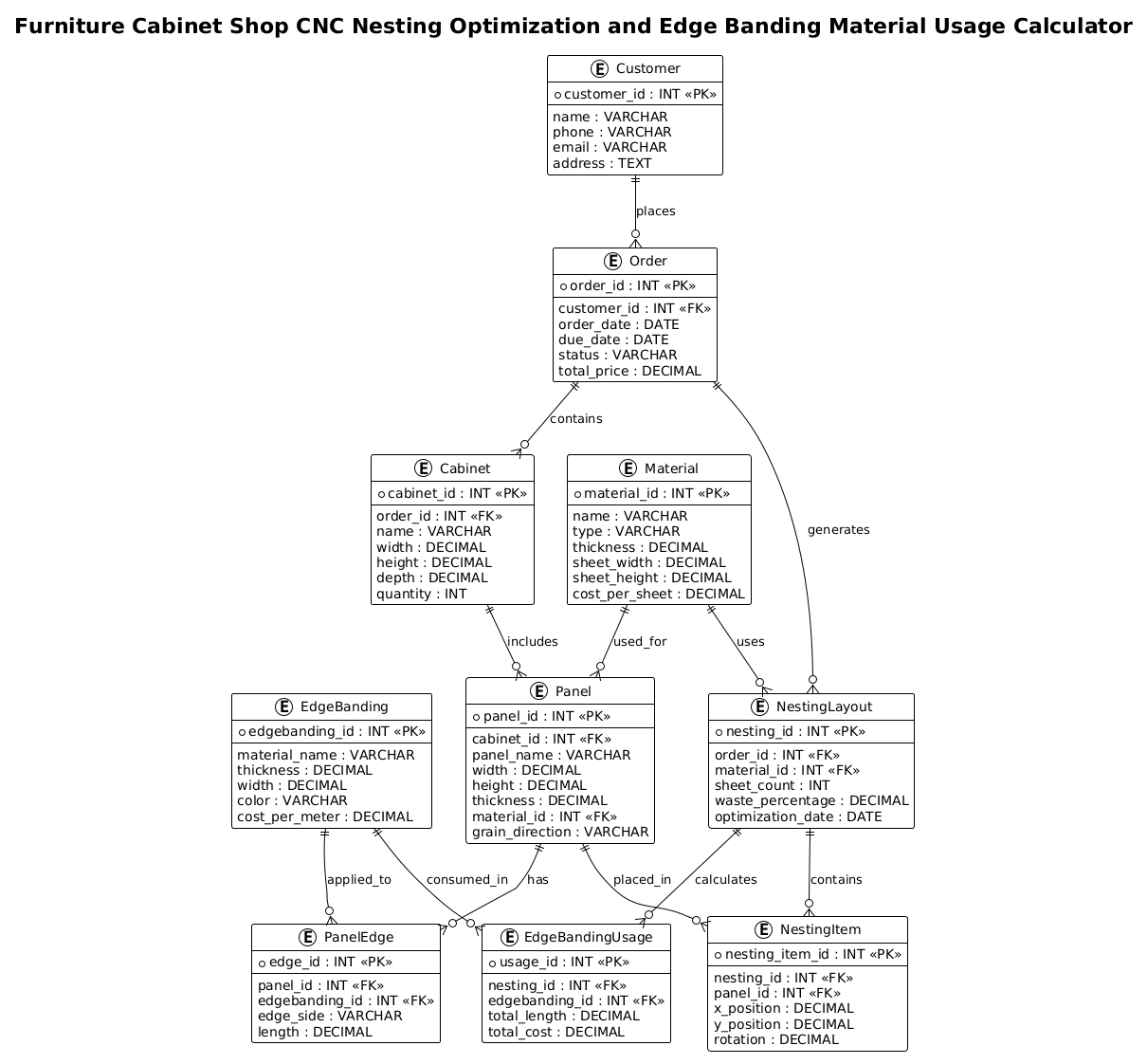
Copy the following code directly into the VPasCode editor to render the diagram interactively.
@startuml
!theme plain
title Furniture Cabinet Shop CNC Nesting Optimization and Edge Banding Material Usage Calculator

/'
Diagram Context:
This ERD models the data structure for a furniture cabinet shop system that optimizes CNC nesting
and calculates edge banding material usage. The system manages customer orders, cabinet designs,
sheet materials, and cutting layouts. A cabinet consists of multiple panels, each requiring specific
materials and edge banding. Nesting optimization groups panels onto sheet stock to minimize waste.
Edge banding calculations determine the length and type of banding needed per panel edge.
The diagram captures the relationships between orders, cabinets, panels, materials, nesting layouts,
and edge banding usage to support both production planning and cost estimation.
'/

entity "Customer" as customer {
  * customer_id : INT <<PK>>
  --
  name : VARCHAR
  phone : VARCHAR
  email : VARCHAR
  address : TEXT
}

entity "Order" as order {
  * order_id : INT <<PK>>
  --
  customer_id : INT <<FK>>
  order_date : DATE
  due_date : DATE
  status : VARCHAR
  total_price : DECIMAL
}

entity "Cabinet" as cabinet {
  * cabinet_id : INT <<PK>>
  --
  order_id : INT <<FK>>
  name : VARCHAR
  width : DECIMAL
  height : DECIMAL
  depth : DECIMAL
  quantity : INT
}

entity "Panel" as panel {
  * panel_id : INT <<PK>>
  --
  cabinet_id : INT <<FK>>
  panel_name : VARCHAR
  width : DECIMAL
  height : DECIMAL
  thickness : DECIMAL
  material_id : INT <<FK>>
  grain_direction : VARCHAR
}

entity "Material" as material {
  * material_id : INT <<PK>>
  --
  name : VARCHAR
  type : VARCHAR
  thickness : DECIMAL
  sheet_width : DECIMAL
  sheet_height : DECIMAL
  cost_per_sheet : DECIMAL
}

entity "EdgeBanding" as edgebanding {
  * edgebanding_id : INT <<PK>>
  --
  material_name : VARCHAR
  thickness : DECIMAL
  width : DECIMAL
  color : VARCHAR
  cost_per_meter : DECIMAL
}

entity "PanelEdge" as paneledge {
  * edge_id : INT <<PK>>
  --
  panel_id : INT <<FK>>
  edgebanding_id : INT <<FK>>
  edge_side : VARCHAR
  length : DECIMAL
}

entity "NestingLayout" as nesting {
  * nesting_id : INT <<PK>>
  --
  order_id : INT <<FK>>
  material_id : INT <<FK>>
  sheet_count : INT
  waste_percentage : DECIMAL
  optimization_date : DATE
}

entity "NestingItem" as nestingitem {
  * nesting_item_id : INT <<PK>>
  --
  nesting_id : INT <<FK>>
  panel_id : INT <<FK>>
  x_position : DECIMAL
  y_position : DECIMAL
  rotation : DECIMAL
}

entity "EdgeBandingUsage" as ebusage {
  * usage_id : INT <<PK>>
  --
  nesting_id : INT <<FK>>
  edgebanding_id : INT <<FK>>
  total_length : DECIMAL
  total_cost : DECIMAL
}

customer ||--o{ order : places
order ||--o{ cabinet : contains
cabinet ||--o{ panel : includes
material ||--o{ panel : used_for
panel ||--o{ paneledge : has
edgebanding ||--o{ paneledge : applied_to
order ||--o{ nesting : generates
material ||--o{ nesting : uses
nesting ||--o{ nestingitem : contains
panel ||--o{ nestingitem : placed_in
nesting ||--o{ ebusage : calculates
edgebanding ||--o{ ebusage : consumed_in

@endumlStep-by-Step Architectural Walkthrough
Building this ERD in VPasCode involves structuring the entities, defining their attributes, and establishing the relationships that bind them together. Here is the logical construction of the diagram.
Phase 1: Canvas Configuration & Layout Directives
Every PlantUML diagram begins with setup directives. We start by defining the theme to ensure a clean, professional look suitable for technical documentation. The !theme plain directive is selected to remove unnecessary graphical flourishes, focusing the reader’s attention on the data structure and relationships.
@startuml
!theme plain
Next, we define the title of the diagram. This is not just a label but a semantic description of the system’s purpose, which is crucial for documentation clarity. We also insert a comment block using the /' ... '/ syntax to provide a detailed context description that renders as a note in the diagram but remains part of the source code for future reference.
title Furniture Cabinet Shop CNC Nesting Optimization and Edge Banding Material Usage Calculator

/'
Diagram Context:
[Detailed context description here]
'/
Phase 2: Declaring Core Entities, Actors, and Boundaries
The core of the ERD is the entity definition. We begin with the business entities: Customer and Order. The entity keyword is followed by a label (e.g., “Customer”) and an alias (e.g., as customer) which is used to reference this entity in relationships later.
entity "Customer" as customer {
  * customer_id : INT <>
  --
  name : VARCHAR
  phone : VARCHAR
  email : VARCHAR
  address : TEXT
}
Inside the curly braces, we define attributes. The asterisk * denotes a Primary Key (PK), and the double angle brackets <<PK>> add a visual stereotype. The double dash -- separates keys from non-key attributes. We repeat this pattern for Order, Cabinet, and Panel, ensuring that foreign keys (FK) like customer_id in the Order table are explicitly marked to indicate their dependency on the parent entity.
Phase 3: Mapping Data Flows & Key Interactions
With the entities defined, we move to the relationships that represent the business logic. PlantUML uses the ||--o{ syntax to denote a one-to-many relationship where the entity on the left is mandatory (the solid bar) and the entity on the right is optional (the circle).
customer ||--o{ order : places
order ||--o{ cabinet : contains
cabinet ||--o{ panel : includes
This chain establishes the hierarchy: A Customer places an Order, which contains Cabinets, which include Panels. We then introduce the specialized manufacturing entities. The PanelEdge relationship is critical here, as it links a specific edge of a panel to a specific type of banding, capturing the granular details required for the calculator.
panel ||--o{ paneledge : has
edgebanding ||--o{ paneledge : applied_to
Phase 4: Grouping, Annotations & Visual Polish
The final phase involves the complex optimization entities: NestingLayout, NestingItem, and EdgeBandingUsage. These entities bridge the gap between design and production. The NestingLayout entity aggregates the cutting plan for an order, while NestingItem records the specific coordinates (x, y, rotation) of each panel on the sheet. The relationships here are many-to-many in nature but are resolved through the linking entities.
nesting ||--o{ nestingitem : contains
panel ||--o{ nestingitem : placed_in
Finally, we ensure all relationships are defined, including the cost calculation links between the nesting process and the edge banding usage, completing the data flow from raw material to finished product cost.
Syntax & Keyword Deep Dive
Understanding the specific PlantUML syntax used in this ERD is essential for customizing and extending the model.
entity: Defines a database table or class. It takes a display label and an alias for internal referencing.as: Assigns a unique alias (e.g.,as customer) to the entity, which is required for drawing relationships between entities.<and> <}: These are stereotypes used to visually mark Primary Keys and Foreign Keys within the entity box.> ||--o{: This is the relationship arrow syntax. The double bar||indicates a mandatory one-to-one connection at the start, whileo{indicates an optional one-to-many connection at the end.:'and:/(or/' ... '/): Used to wrap comment blocks. In this diagram, it is used to include a detailed text description of the diagram's purpose directly in the source code.: VARCHAR,: INT,: DECIMAL: These define the data types for attributes, ensuring the diagram reflects the expected data schema.
Best Practices & Pitfalls to Avoid
- Consistent Naming Conventions: Always use the
asalias to reference entities in relationships. Relying on the display label (e.g., "Customer") can lead to errors if the label contains spaces or special characters. Use lowercase aliases likeas customerfor clarity. - Separate Concerns: In manufacturing ERDs, it is common to conflate "Design" with "Production." Keep entities like Panel (design) distinct from NestingItem (production placement) to allow for scenarios where a design changes without invalidating the production history.
- Explicit Foreign Keys: Always mark Foreign Keys (FK) in the entity definition. While PlantUML draws the relationship arrow, explicitly defining the FK in the attribute list (e.g.,
order_id : INT <) makes the diagram self-documenting for database developers.> - Use Stereotypes for Clarity: Don't just rely on the arrow to show a relationship. Use
<and> <stereotypes to make the data integrity rules immediately visible to anyone reviewing the diagram.>
Start Building Manufacturing ERDs Faster with VPasCode
Instantly visualize and refine your furniture shop data models with VPasCode, the free web-based PlantUML editor that requires zero installation.