


In the rapidly evolving landscape of telecommunications, the backbone of Internet Service Providers (ISPs) relies on a meticulously managed network of routers, points of presence (POPs), and complex Border Gateway Protocol (BGP) peering sessions. As network infrastructures scale to handle massive data traffic, the ability to visualize and document the underlying data relationships becomes critical for operations teams, network engineers, and architects. Without a clear, unified model, troubleshooting routing policies, managing address assignments, and tracking peering states can become an overwhelming task of navigating disparate spreadsheets and legacy documentation.
Diagramming-as-code with PlantUML offers a modern solution to this challenge, allowing engineers to define their data models using simple text that renders instantly into professional ERDs. By leveraging VPasCode, a free web-based diagram editor, network architects can prototype these complex schemas without the overhead of installing local database tools or configuring rendering engines. This approach transforms static documentation into a living, version-ready asset that accurately reflects the intricate relationships between routers, interfaces, autonomous systems, and the BGP sessions that bind them.
Understanding the Model: Purpose, Scope & Problem Framing
This tutorial focuses on constructing a specialized Entity-Relationship Diagram (ERD) designed specifically for the telecommunications industry. The model captures the hierarchical and relational structure of an ISP’s routing infrastructure, moving beyond simple topology maps to define the data attributes that govern network operations.
Diagram Abstraction & Representation
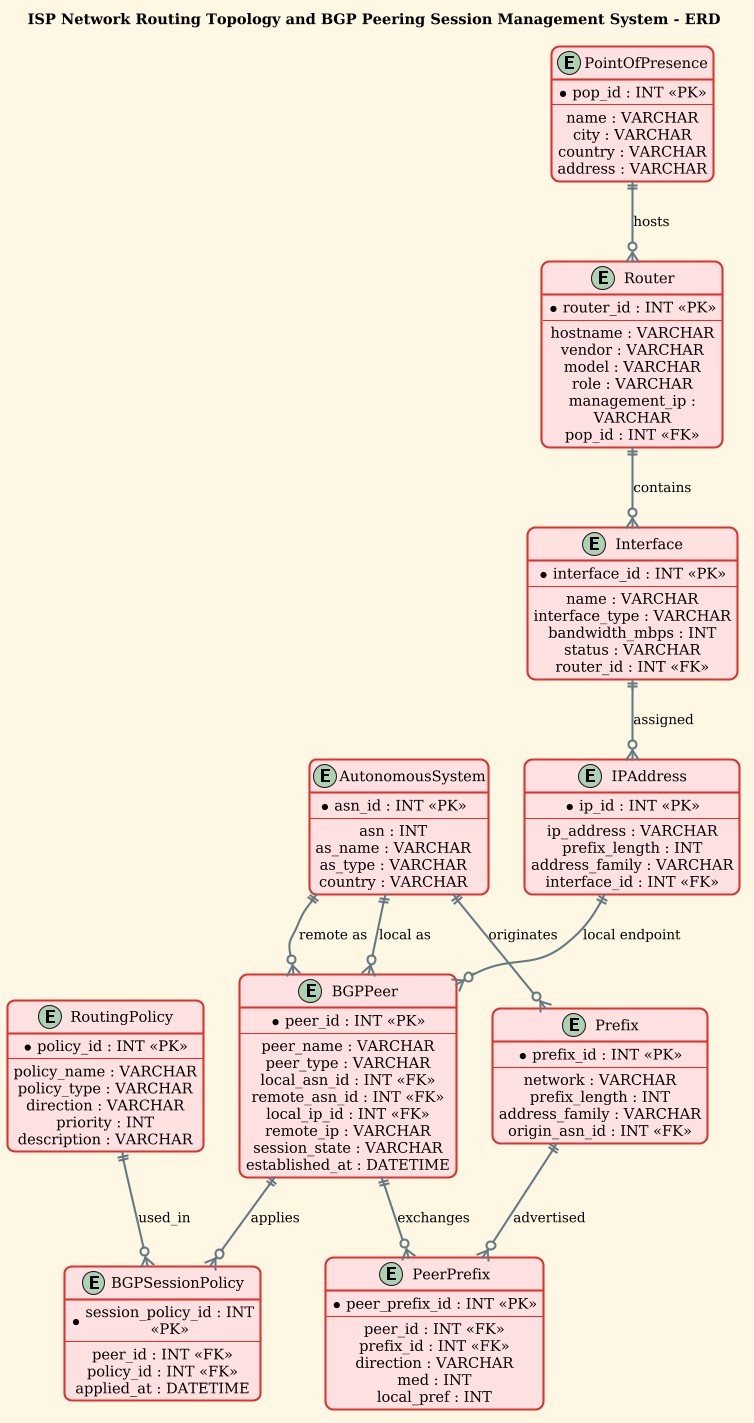
An ERD is the ideal tool for this scenario because it shifts the focus from physical cabling to logical data integrity. In this model, entities like PointOfPresence, Router, and Interface represent the physical and logical building blocks of the network. The relationships between these entities—such as a router being hosted at a specific POP or an interface holding multiple IP addresses—define the cardinality and constraints of the system. Furthermore, the inclusion of AutonomousSystem and BGPPeer entities allows the diagram to model the external peering relationships that are the lifeblood of internet routing, including the policies and prefixes exchanged between different networks.
Target Domain Scope & Scenario
The scope of this diagram is strictly defined around the management of routing infrastructure and peering sessions. It intentionally excludes end-user devices or application-layer services, focusing instead on the core network layer (Layer 3) and the control plane protocols (BGP). The model addresses the problem of tracking how an ISP assigns IP addresses to interfaces, manages the state of BGP sessions with external partners, and applies routing policies to control traffic flow. It serves as a blueprint for provisioning new routers, auditing existing peering agreements, and troubleshooting routing loops or policy misconfigurations.
Key Takeaways & Educational Insights
By following this guide, you will gain the ability to:
- Design a scalable data model that separates physical hardware (routers) from logical addressing (IPs) and routing policies.
- Understand how to represent complex many-to-many relationships, such as the exchange of prefixes between peers and the application of multiple policies to a single session.
- Utilize PlantUML’s ERD syntax to create a self-documenting schema that can be easily updated as the network evolves.
Complete Diagram & Full Source Code
Before diving into the step-by-step construction, here is the complete visual output you will achieve. This diagram illustrates the relationships between Points of Presence, Routers, Interfaces, IP Addresses, Autonomous Systems, and the BGP Peering entities, all rendered with the sunlust theme for a professional look.
Copy the following complete source code to reproduce this diagram instantly in VPasCode:
@startuml
/'
ERD for an ISP Network Routing Topology and BGP Peering Session Management System.
This diagram models the core entities involved in managing an Internet Service Provider's
routing infrastructure and external peering relationships. It captures routers deployed
across points of presence, the physical and logical interfaces they use, the IP address
assignments on those interfaces, and the BGP peering sessions established with external
autonomous systems. The model supports tracking autonomous system numbers, peering
session states, routing policies applied to sessions, and the prefixes exchanged over
each peering relationship. It is intended to give network engineers and operations teams
a unified view of how routing topology, addressing, and BGP peering data relate to one
another for provisioning, monitoring, and troubleshooting.
'/
!theme sunlust

title ISP Network Routing Topology and BGP Peering Session Management System - ERD

entity "PointOfPresence" as POP {
  * pop_id : INT <<PK>>
  --
  name : VARCHAR
  city : VARCHAR
  country : VARCHAR
  address : VARCHAR
}

entity "Router" as ROUTER {
  * router_id : INT <<PK>>
  --
  hostname : VARCHAR
  vendor : VARCHAR
  model : VARCHAR
  role : VARCHAR
  management_ip : VARCHAR
  pop_id : INT <<FK>>
}

entity "Interface" as INTERFACE {
  * interface_id : INT <<PK>>
  --
  name : VARCHAR
  interface_type : VARCHAR
  bandwidth_mbps : INT
  status : VARCHAR
  router_id : INT <<FK>>
}

entity "IPAddress" as IPADDR {
  * ip_id : INT <<PK>>
  --
  ip_address : VARCHAR
  prefix_length : INT
  address_family : VARCHAR
  interface_id : INT <<FK>>
}

entity "AutonomousSystem" as AS {
  * asn_id : INT <<PK>>
  --
  asn : INT
  as_name : VARCHAR
  as_type : VARCHAR
  country : VARCHAR
}

entity "BGPPeer" as PEER {
  * peer_id : INT <<PK>>
  --
  peer_name : VARCHAR
  peer_type : VARCHAR
  local_asn_id : INT <<FK>>
  remote_asn_id : INT <<FK>>
  local_ip_id : INT <<FK>>
  remote_ip : VARCHAR
  session_state : VARCHAR
  established_at : DATETIME
}

entity "RoutingPolicy" as POLICY {
  * policy_id : INT <<PK>>
  --
  policy_name : VARCHAR
  policy_type : VARCHAR
  direction : VARCHAR
  priority : INT
  description : VARCHAR
}

entity "BGPSessionPolicy" as SESSIONPOLICY {
  * session_policy_id : INT <<PK>>
  --
  peer_id : INT <<FK>>
  policy_id : INT <<FK>>
  applied_at : DATETIME
}

entity "Prefix" as PREFIX {
  * prefix_id : INT <<PK>>
  --
  network : VARCHAR
  prefix_length : INT
  address_family : VARCHAR
  origin_asn_id : INT <<FK>>
}

entity "PeerPrefix" as PEERPREFIX {
  * peer_prefix_id : INT <<PK>>
  --
  peer_id : INT <<FK>>
  prefix_id : INT <<FK>>
  direction : VARCHAR
  med : INT
  local_pref : INT
}

POP ||--o{ ROUTER : hosts
ROUTER ||--o{ INTERFACE : contains
INTERFACE ||--o{ IPADDR : assigned
AS ||--o{ PEER : "local as"
AS ||--o{ PEER : "remote as"
IPADDR ||--o{ PEER : "local endpoint"
PEER ||--o{ SESSIONPOLICY : applies
POLICY ||--o{ SESSIONPOLICY : used_in
AS ||--o{ PREFIX : originates
PEER ||--o{ PEERPREFIX : exchanges
PREFIX ||--o{ PEERPREFIX : advertised

@endumlStep-by-Step Architectural Walkthrough
Building a complex ERD like this requires a logical progression from high-level infrastructure down to specific data relationships. We will break this process into four distinct phases.
Phase 1: Canvas Configuration & Layout Directives
The first step in any PlantUML ERD is to set the stage. We begin by defining the theme to ensure the diagram looks professional and consistent with modern design standards. We also add a comment block to document the diagram’s purpose, which is essential for team collaboration and future maintenance.
In the code, we use !theme sunlust to apply a warm, vibrant color scheme that makes the diagram easy to read. The comment block, wrapped in /' and '/, provides a high-level summary of the system’s scope. This documentation is rendered as a tooltip or a note in some viewers, but primarily serves as an in-code reference.
/' ERD for an ISP Network Routing Topology and BGP Peering Session Management System. ... (description continues) ... '/ !theme sunlust title ISP Network Routing Topology and BGP Peering Session Management System - ERDPhase 2: Declaring Core Entities, Actors, and Boundaries
Next, we define the fundamental building blocks of the ISP network. We start with the PointOfPresence (POP), which represents the physical location of the network infrastructure. This entity includes attributes like pop_id (Primary Key), name, and location details.
We then define the Router entity. Crucially, we link the router to the POP using a Foreign Key (pop_id), establishing that a router resides within a specific POP. We also define the Interface and IPAddress entities. An interface belongs to a router, and an IP address is assigned to an interface. This hierarchy ensures data integrity: you cannot have an IP address without an interface, and an interface without a router.
entity "PointOfPresence" as POP { * pop_id : INT <> -- name : VARCHAR city : VARCHAR } entity "Router" as ROUTER { * router_id : INT < > -- hostname : VARCHAR pop_id : INT <> } Phase 3: Mapping Data Flows & Key Interactions
With the physical infrastructure defined, we move to the logical routing and peering components. The AutonomousSystem (AS) entity represents external networks (peers). The BGPPeer entity is the bridge between two Autonomous Systems, recording the session details like session_state and the IP addresses used for the peering connection.
We also introduce the RoutingPolicy and Prefix entities. A policy defines rules (e.g., “allow traffic from AS 65001”), and a prefix represents a block of IP addresses. The PeerPrefix entity acts as a junction table, linking specific peers to specific prefixes they exchange, allowing us to track attributes like med (Multi-Exit Discriminator) and local_pref for each route.
entity "AutonomousSystem" as AS { * asn_id : INT <> -- asn : INT as_name : VARCHAR } entity "BGPPeer" as PEER { * peer_id : INT < > -- local_asn_id : INT <> remote_asn_id : INT < > local_ip_id : INT < > } Phase 4: Grouping, Annotations & Visual Polish
The final phase involves connecting the entities with relationships to define the cardinality and direction of the data flow. PlantUML uses specific syntax like ||--o{ to denote a one-to-many relationship where the “one” side is mandatory (solid line) and the “many” side is optional (circle).
For example, a PointOfPresence can host zero or many Routers (POP ||--o{ ROUTER). A Router must contain at least one Interface (ROUTER ||--o{ INTERFACE). We also define the relationships for BGP peering, such as a peer having a local ASN and a remote ASN, and a peer exchanging prefixes with another entity.
POP ||--o{ ROUTER : hosts ROUTER ||--o{ INTERFACE : contains AS ||--o{ PEER : "local as" PEER ||--o{ SESSIONPOLICY : appliesSyntax & Keyword Deep Dive
To master PlantUML ERD, it is essential to understand the specific keywords and symbols used in this diagram. These elements define the structure and meaning of your data model.
entity: The keyword used to define a new table or entity in the database schema. It is followed by the entity name and an alias (e.g.,entity "Router" as ROUTER).PK(Primary Key): Denoted by<, this marks the unique identifier for a record within an entity. It is crucial for establishing relationships between tables.> FK(Foreign Key): Denoted by<, this indicates a field that links to the Primary Key of another entity, creating the relationship.> ||--o{: This relationship symbol represents a one-to-many cardinality. The solid double line (||) indicates the “one” side is mandatory, while the circle and arrow (o{) indicate the “many” side is optional.--: A separator line used within an entity block to visually divide attributes (e.g., separating keys from other fields)."label": Double quotes are used to define custom labels for relationships, such ashostsorlocal as, making the diagram self-explanatory.
Best Practices & Pitfalls to Avoid
When modeling complex network topologies like ISP routing, adherence to best practices ensures your diagrams remain maintainable and readable.
- Normalize Your Data: Avoid repeating data. For example, instead of storing the ASN name inside the
BGPPeerentity, store theasn_idas a Foreign Key. This prevents data anomalies if an ASN’s name changes. - Use Meaningful Aliases: PlantUML allows you to define a long entity name (e.g.,
"PointOfPresence") and a short alias (e.g.,as POP). Always use the short alias in relationship lines to keep the diagram clean and prevent clutter. - Group Related Entities: While this diagram uses a flat structure for clarity, in very large models, consider using
packageorfolderdirectives to group related entities (e.g., aInfrastructurepackage and aRoutingpackage). - Consistent Naming Conventions: Stick to a consistent naming convention for attributes (e.g., always use
_idfor keys,_ipfor addresses) to make the diagram easier to scan and understand at a glance.
Try It Yourself with VPasCode
Ready to visualize your own ISP network architecture? Don’t spend hours configuring local environments or wrestling with complex database tools. Use VPasCode to instantly render your PlantUML ERD code directly in your browser.
Start Building ISP Routing ERDs Faster with VPasCode
Instantly render complex BGP peering and network topology diagrams online with zero setup, interactive syntax testing, and free sharing.