


In the high-velocity world of telecommunications, the backbone of any successful service provider is a robust billing and mediation architecture. Every second a network generates terabytes of Call Detail Records (CDRs) and usage events that must be ingested, normalized, rated, and billed with absolute precision. A single flaw in the data model can lead to revenue leakage, billing disputes, or compliance failures. To architect such a complex system, engineers rely on Entity Relationship Diagrams (ERDs) not just as documentation, but as the definitive blueprint for database schema generation and data flow logic.

This tutorial walks you through the construction of a professional-grade ERD for a Telecom Subscriber Billing, Rating, and Usage Mediation platform. Using PlantUML within the VPasCode editor, we will model the critical journey from a raw usage event generated by a network element, through the mediation and rating processes, all the way to the final invoice generation and payment tracking. This visual model serves as the source of truth for database engineers, data architects, and product owners, ensuring that the complex relationships between subscribers, service plans, and usage charges are logically sound and scalable.
Understanding the Model: Purpose, Scope & Problem Framing
Diagram Abstraction & Representation
Entity Relationship Diagrams are the standard notation for defining the structural integrity of relational databases. In this specific context, the ERD abstracts the complex, multi-stage billing lifecycle into discrete entities (tables) and relationships (foreign keys). It visualizes how a Subscriber is linked to multiple Service Subscriptions, how raw Usage Events are transformed into Mediated Usage records, and how those records are priced via Rating Rules to create Rated Charges that eventually populate an Invoice.
Target Domain Scope & Scenario
This diagram focuses specifically on the Post-Pay billing model common in telecom. It covers the ingestion of raw network data, the normalization process (mediation), the application of dynamic pricing rules (rating), and the final aggregation of charges into billable invoices. It deliberately excludes pre-paid wallet management to maintain focus on the post-pay mediation flow, which is often the most complex data processing pipeline.
Key Takeaways & Educational Insights
By building this model, you will gain insights into:
1. Normalization Strategy: How to separate raw data from processed data to maintain audit trails.
2. Cardinality Management: Understanding one-to-many relationships (e.g., one subscriber to many usage events).
3. Temporal Logic: Modeling time-bound attributes like billing periods and rating rule effective dates.
Complete Diagram & Full Source Code
Before diving into the step-by-step construction, here is the complete, rendered visualization of the Telecom Billing ERD. This diagram showcases the full data flow from subscriber identity to final payment, utilizing the VP theme for a professional, enterprise-grade appearance.
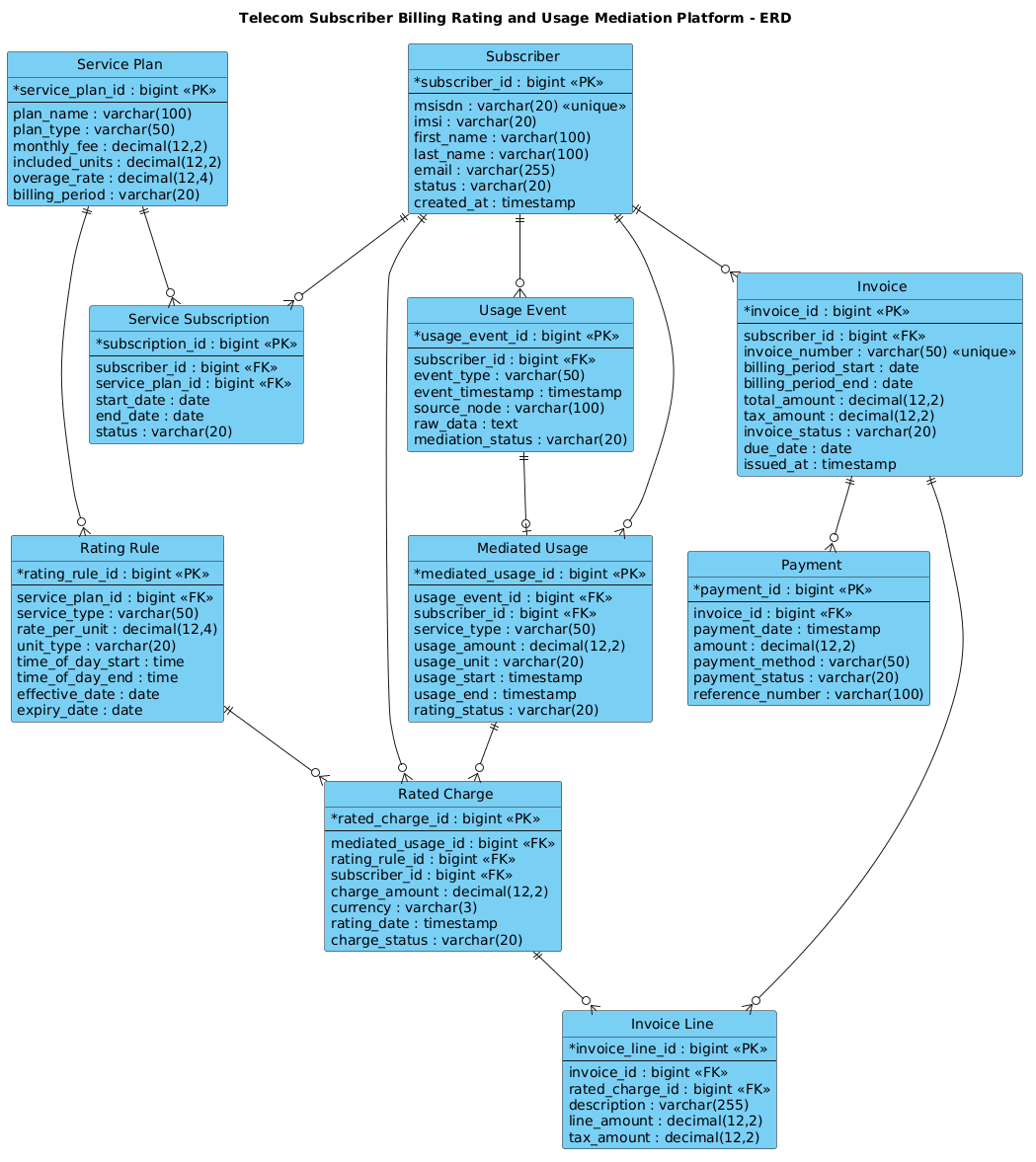
Copy the code below to see the diagram in action or to use as a starting point for your own architectural modeling.
@startuml
!include https://static.visual-paradigm.com/web/resources/plantuml-stdlib/themes/vp.puml

/'
Context: Telecom Subscriber Billing, Rating, and Usage Mediation Platform

This ERD models the core data structures needed to support usage mediation,
rating, and billing for telecom subscribers. It covers subscribers and their
service subscriptions, raw usage events collected from network elements,
mediated usage records, rating rules, rated charges, and invoice generation.
The diagram highlights how usage data flows from ingestion through mediation
and rating into billable charges and final invoices.
'/

title Telecom Subscriber Billing Rating and Usage Mediation Platform - ERD

entity "Subscriber" as subscriber {
  * subscriber_id : bigint <<PK>>
  --
  msisdn : varchar(20) <<unique>>
  imsi : varchar(20)
  first_name : varchar(100)
  last_name : varchar(100)
  email : varchar(255)
  status : varchar(20)
  created_at : timestamp
}

entity "Service Subscription" as subscription {
  * subscription_id : bigint <<PK>>
  --
  subscriber_id : bigint <<FK>>
  service_plan_id : bigint <<FK>>
  start_date : date
  end_date : date
  status : varchar(20)
}

entity "Service Plan" as service_plan {
  * service_plan_id : bigint <<PK>>
  --
  plan_name : varchar(100)
  plan_type : varchar(50)
  monthly_fee : decimal(12,2)
  included_units : decimal(12,2)
  overage_rate : decimal(12,4)
  billing_period : varchar(20)
}

entity "Usage Event" as usage_event {
  * usage_event_id : bigint <<PK>>
  --
  subscriber_id : bigint <<FK>>
  event_type : varchar(50)
  event_timestamp : timestamp
  source_node : varchar(100)
  raw_data : text
  mediation_status : varchar(20)
}

entity "Mediated Usage" as mediated_usage {
  * mediated_usage_id : bigint <<PK>>
  --
  usage_event_id : bigint <<FK>>
  subscriber_id : bigint <<FK>>
  service_type : varchar(50)
  usage_amount : decimal(12,2)
  usage_unit : varchar(20)
  usage_start : timestamp
  usage_end : timestamp
  rating_status : varchar(20)
}

entity "Rating Rule" as rating_rule {
  * rating_rule_id : bigint <<PK>>
  --
  service_plan_id : bigint <<FK>>
  service_type : varchar(50)
  rate_per_unit : decimal(12,4)
  unit_type : varchar(20)
  time_of_day_start : time
  time_of_day_end : time
  effective_date : date
  expiry_date : date
}

entity "Rated Charge" as rated_charge {
  * rated_charge_id : bigint <<PK>>
  --
  mediated_usage_id : bigint <<FK>>
  rating_rule_id : bigint <<FK>>
  subscriber_id : bigint <<FK>>
  charge_amount : decimal(12,2)
  currency : varchar(3)
  rating_date : timestamp
  charge_status : varchar(20)
}

entity "Invoice" as invoice {
  * invoice_id : bigint <<PK>>
  --
  subscriber_id : bigint <<FK>>
  invoice_number : varchar(50) <<unique>>
  billing_period_start : date
  billing_period_end : date
  total_amount : decimal(12,2)
  tax_amount : decimal(12,2)
  invoice_status : varchar(20)
  due_date : date
  issued_at : timestamp
}

entity "Invoice Line" as invoice_line {
  * invoice_line_id : bigint <<PK>>
  --
  invoice_id : bigint <<FK>>
  rated_charge_id : bigint <<FK>>
  description : varchar(255)
  line_amount : decimal(12,2)
  tax_amount : decimal(12,2)
}

entity "Payment" as payment {
  * payment_id : bigint <<PK>>
  --
  invoice_id : bigint <<FK>>
  payment_date : timestamp
  amount : decimal(12,2)
  payment_method : varchar(50)
  payment_status : varchar(20)
  reference_number : varchar(100)
}

subscriber ||--o{ subscription
service_plan ||--o{ subscription
subscriber ||--o{ usage_event
usage_event ||--o| mediated_usage
subscriber ||--o{ mediated_usage
service_plan ||--o{ rating_rule
mediated_usage ||--o{ rated_charge
rating_rule ||--o{ rated_charge
subscriber ||--o{ rated_charge
subscriber ||--o{ invoice
rated_charge ||--o{ invoice_line
invoice ||--o{ invoice_line
invoice ||--o{ payment

@endumlStep-by-Step Architectural Walkthrough
Phase 1: Canvas Configuration & Layout Directives
The first step in any professional PlantUML ERD is setting the stage. We begin by including the vp.puml theme, which provides the modern, clean aesthetic associated with Visual Paradigm. This theme automatically handles font rendering, border styles, and entity coloring, ensuring the diagram looks consistent regardless of the viewer’s browser.
We also define a comment block using the /' ... '/ syntax. This is crucial for documentation; it allows you to embed context, business rules, or problem statements directly within the source code without affecting the rendered output. Finally, we set the title directive to give the diagram a clear, descriptive header.
!include https://static.visual-paradigm.com/web/resources/plantuml-stdlib/themes/vp.puml /' Context: Telecom Subscriber Billing, Rating, and Usage Mediation Platform ... '/ title Telecom Subscriber Billing Rating and Usage Mediation Platform - ERDPhase 2: Declaring Core Entities, Actors, and Boundaries
With the canvas ready, we define the core entities. In PlantUML ERD, we use the entity keyword followed by the table name and an alias for the relationship lines. We define attributes using the * prefix for Primary Keys (PK) and -- to separate keys from regular attributes.
For the Subscriber entity, we include critical telecom identifiers like msisdn (phone number) and imsi (subscriber identity module), ensuring the phone number is marked as unique. For Service Plan, we define pricing structures using decimal types to handle currency precision accurately, which is vital for financial systems.
entity "Subscriber" as subscriber { * subscriber_id : bigint <> -- msisdn : varchar(20) <> imsi : varchar(20) ... } entity "Service Plan" as service_plan { * service_plan_id : bigint <> -- monthly_fee : decimal(12,2) overage_rate : decimal(12,4) ... } Phase 3: Mapping Data Flows & Key Interactions
The most complex part of this model is the flow from raw data to billing. We start with Usage Event, which captures the raw input from network elements. This is a transient table that holds the unprocessed data.
Next, we link it to Mediated Usage. The relationship usage_event ||--o| mediated_usage indicates that one raw event can be transformed into one mediated record (the o| notation represents a zero-or-one relationship, implying some events might be discarded or invalid). We then introduce Rated Charge, which links the mediated usage to a specific Rating Rule. This creates a many-to-many relationship effectively, allowing a single usage event to potentially trigger multiple charges if different rating rules apply (e.g., peak vs. off-peak rates).
usage_event ||--o| mediated_usage mediated_usage ||--o{ rated_charge rating_rule ||--o{ rated_chargePhase 4: Grouping, Annotations & Visual Polish
The final phase involves closing the loop with financials. We define the Invoice entity, which aggregates all Rated Charges for a specific billing period. We then link the Invoice to Invoice Line (a junction entity to handle line-item details) and finally to Payment. The relationships here ensure that one invoice can have many line items and many payments (e.g., partial payments).
We also ensure all foreign keys are explicitly defined in the entity blocks (e.g., subscriber_id : bigint <) to maintain data integrity. This explicit declaration helps database generators create the correct constraints.
subscriber ||--o{ invoice rated_charge ||--o{ invoice_line invoice ||--o{ invoice_line invoice ||--o{ paymentSyntax & Keyword Deep Dive
Understanding the specific PlantUML syntax used in this ERD is essential for maintaining and extending the model. Here are the key keywords and conventions utilized:
entity: Defines a new table or entity in the diagram. The syntax isentity "Name" as alias { ... }.||--o{: Represents a one-to-many relationship. The double bar||indicates “one” (mandatory) on the left, and the crow’s foot{indicates “many” on the right.||--o|: Represents a one-to-zero-or-one relationship. This is often used for optional transformations or 1:1 mappings where the target might not exist.bigint,varchar,decimal: Standard SQL data type annotations used to define the schema structure.PKandFK: Stereotypes used to mark Primary Keys and Foreign Keys visually within the entity box./* ... */or/' ... '/: Comment blocks. The/'syntax is specifically used in PlantUML ERD to place a description block above the diagram title.
Best Practices & Pitfalls to Avoid
When designing ERDs for complex systems like telecom billing, adherence to best practices ensures the model remains maintainable and scalable.
- Separation of Concerns: Never mix raw data (Usage Events) with processed data (Mediated Usage) in the same table. The diagram clearly separates these into distinct entities to allow for audit trails and data recovery.
- Explicit Foreign Keys: Always explicitly define Foreign Keys in the entity attributes. While PlantUML infers relationships from lines, the database schema generator needs explicit
FKtags to create the correct constraints. - Decimal Precision: For financial fields like
charge_amountormonthly_fee, always specify the precision (e.g.,decimal(12,2)). Avoid usingfloatordoubletypes for currency to prevent rounding errors. - Consistent Naming: Use singular nouns for entities (e.g.,
Subscriberinstead ofSubscribers) and snake_case or camelCase for attributes. Consistency reduces cognitive load when reading the diagram.
Start Building Telecom Billing ERDs Faster with VPasCode
Design complex data models instantly in your browser with VPasCode, the free PlantUML editor. Test your relationships, preview the diagram live, and export your schema without installing any tools.