


In the rapidly evolving landscape of 5G telecommunications, the ability to dynamically orchestrate network functions and manage the lifecycle of network slices is paramount. Telecommunications operators are no longer just building static networks; they are deploying complex, software-defined ecosystems where a single physical infrastructure must support diverse use cases ranging from ultra-reliable low-latency communications (URLLC) for autonomous vehicles to massive machine-type communications (mMTC) for IoT. To manage this complexity, architects require a robust data model that can track the intricate relationships between communication service requirements, slice templates, instantiated network functions, and their deployment locations.

Visualizing these relationships through an Entity Relationship Diagram (ERD) is critical for ensuring data integrity and operational clarity. However, traditional drag-and-drop diagramming tools often struggle with the sheer density of relationships required in a 5G architecture, leading to cluttered, hard-to-maintain visuals. By adopting a diagram-as-code approach using PlantUML, architects can define these complex data structures with precision, version them alongside their infrastructure code, and instantly render professional-grade diagrams. This tutorial demonstrates how to construct a complete ERD for 5G core network function orchestration and slice lifecycle management using VPasCode, a free, browser-based editor that brings this modeling workflow to life.
Understanding the Model: Purpose, Scope & Problem Framing
This tutorial focuses on constructing a specialized ERD designed to model the backend data architecture of a 5G Network Slice Management and Orchestration (NSM) system. Unlike a general network topology diagram, an ERD in this context defines the logical data relationships that drive the automation of slice creation, modification, and termination.
Diagram Abstraction & Representation
The diagram abstracts the physical network into logical data entities. It maps the Communication Service requirements (e.g., latency, bandwidth) to Slice Templates, which serve as blueprints for instantiation. It then tracks the Network Slices themselves as they transition from a template to a live, running state. Crucially, it links these slices to the underlying Network Functions (NFs) and their specific Descriptors (NFDs), which define the software artifacts required to deploy the function. Finally, it captures the Orchestration Jobs and Lifecycle Events that record the operational history and status of these activities.
Target Domain Scope & Scenario
The scope of this model covers the end-to-end lifecycle of a network slice within a 5G Core. It explicitly models:
- Service Definition: How high-level service requirements are stored and linked to templates.
- Template Management: Versioning and default settings for slice definitions.
- Instance Tracking: The mapping of a specific slice instance to the network functions it consumes.
- Deployment Topology: The physical or logical location (Edge, Cloud, Region) where functions are deployed.
- Operational Governance: Policies and events that govern the lifecycle of these resources.
Key Takeaways & Educational Insights
By building this diagram, you will gain a deep understanding of how to model one-to-many and many-to-many relationships in a high-cardinality system. You will learn how to structure data entities to support temporal tracking (using timestamps for creation, activation, and termination) and how to implement referential integrity through foreign keys. The resulting model provides a blueprint for database schema generation and API contract definition in 5G orchestration platforms.
Complete Diagram & Full Source Code
Below is the finished blueprint. This diagram visualizes the complex web of dependencies required to orchestrate 5G network functions. You can inspect the structure of entities like NetworkSlice, NFInstance, and OrchestrationJob to understand the data flow.
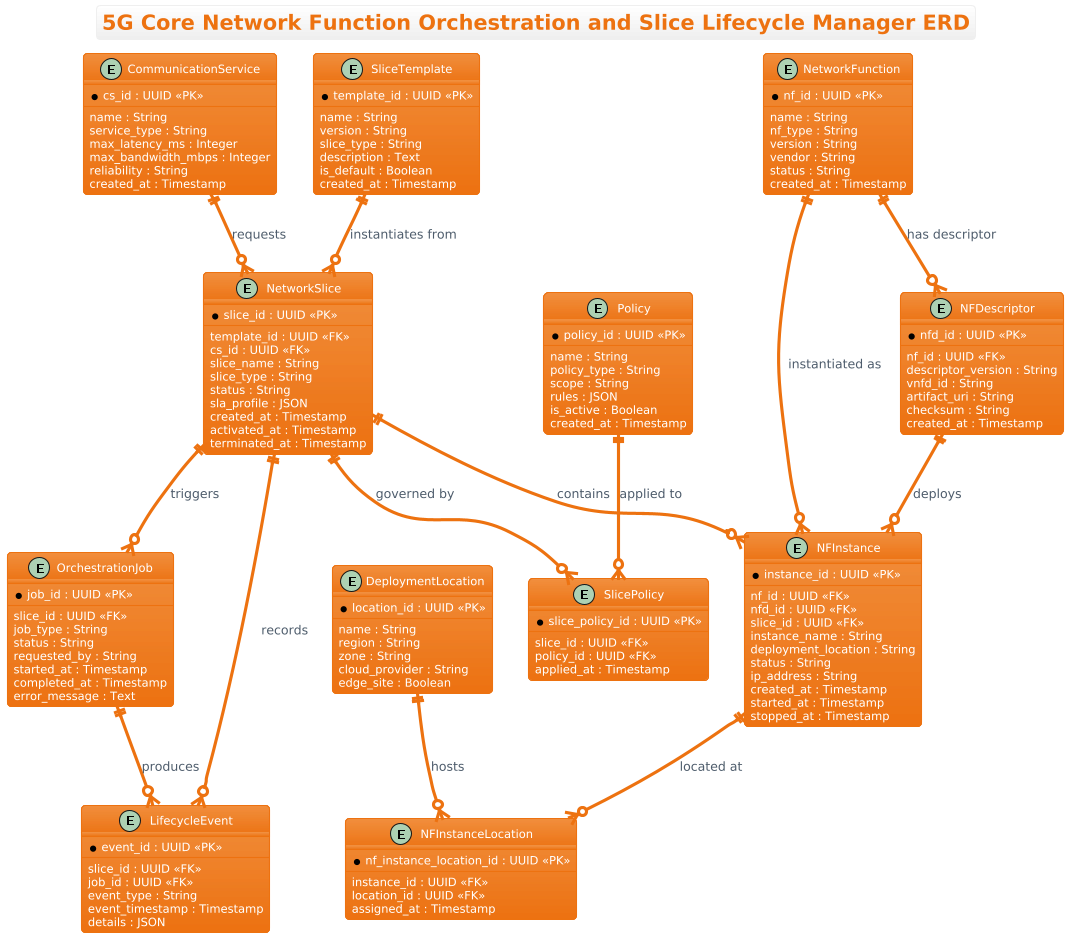
@startuml
!theme aws-orange
title 5G Core Network Function Orchestration and Slice Lifecycle Manager ERD

/'
Diagram Context:
This ERD models the data relationships required to orchestrate 5G core network functions
and manage the lifecycle of network slices. It captures how communication service
requirements drive slice templates, how slices are instantiated from those templates,
how network functions and their descriptors are catalogued, and how orchestration and
lifecycle events are tracked. The diagram also represents the mapping of network
functions to slices, deployment locations, and operational policies, providing a
structured view of slice creation, modification, monitoring, and termination.
'/

' Entities
entity "CommunicationService" as CS {
  * cs_id : UUID <<PK>>
  --
  name : String
  service_type : String
  max_latency_ms : Integer
  max_bandwidth_mbps : Integer
  reliability : String
  created_at : Timestamp
}

entity "SliceTemplate" as ST {
  * template_id : UUID <<PK>>
  --
  name : String
  version : String
  slice_type : String
  description : Text
  is_default : Boolean
  created_at : Timestamp
}

entity "NetworkSlice" as NS {
  * slice_id : UUID <<PK>>
  --
  template_id : UUID <<FK>>
  cs_id : UUID <<FK>>
  slice_name : String
  slice_type : String
  status : String
  sla_profile : JSON
  created_at : Timestamp
  activated_at : Timestamp
  terminated_at : Timestamp
}

entity "NetworkFunction" as NF {
  * nf_id : UUID <<PK>>
  --
  name : String
  nf_type : String
  version : String
  vendor : String
  status : String
  created_at : Timestamp
}

entity "NFDescriptor" as NFD {
  * nfd_id : UUID <<PK>>
  --
  nf_id : UUID <<FK>>
  descriptor_version : String
  vnfd_id : String
  artifact_uri : String
  checksum : String
  created_at : Timestamp
}

entity "NFInstance" as NFI {
  * instance_id : UUID <<PK>>
  --
  nf_id : UUID <<FK>>
  nfd_id : UUID <<FK>>
  slice_id : UUID <<FK>>
  instance_name : String
  deployment_location : String
  status : String
  ip_address : String
  created_at : Timestamp
  started_at : Timestamp
  stopped_at : Timestamp
}

entity "OrchestrationJob" as OJ {
  * job_id : UUID <<PK>>
  --
  slice_id : UUID <<FK>>
  job_type : String
  status : String
  requested_by : String
  started_at : Timestamp
  completed_at : Timestamp
  error_message : Text
}

entity "LifecycleEvent" as LE {
  * event_id : UUID <<PK>>
  --
  slice_id : UUID <<FK>>
  job_id : UUID <<FK>>
  event_type : String
  event_timestamp : Timestamp
  details : JSON
}

entity "Policy" as P {
  * policy_id : UUID <<PK>>
  --
  name : String
  policy_type : String
  scope : String
  rules : JSON
  is_active : Boolean
  created_at : Timestamp
}

entity "SlicePolicy" as SP {
  * slice_policy_id : UUID <<PK>>
  --
  slice_id : UUID <<FK>>
  policy_id : UUID <<FK>>
  applied_at : Timestamp
}

entity "DeploymentLocation" as DL {
  * location_id : UUID <<PK>>
  --
  name : String
  region : String
  zone : String
  cloud_provider : String
  edge_site : Boolean
}

entity "NFInstanceLocation" as NFIL {
  * nf_instance_location_id : UUID <<PK>>
  --
  instance_id : UUID <<FK>>
  location_id : UUID <<FK>>
  assigned_at : Timestamp
}

' Relationships
CS ||--o{ NS : "requests"
ST ||--o{ NS : "instantiates from"
NS ||--o{ OJ : "triggers"
NS ||--o{ LE : "records"
OJ ||--o{ LE : "produces"
NF ||--o{ NFD : "has descriptor"
NF ||--o{ NFI : "instantiated as"
NFD ||--o{ NFI : "deploys"
NS ||--o{ NFI : "contains"
NS ||--o{ SP : "governed by"
P ||--o{ SP : "applied to"
NFI ||--o{ NFIL : "located at"
DL ||--o{ NFIL : "hosts"

@endumlStep-by-Step Architectural Walkthrough
Building a complex ERD requires a structured approach. We will deconstruct the diagram into four logical phases: configuration, entity declaration, relationship mapping, and visual refinement.
Phase 1: Canvas Configuration & Layout Directives
Before defining any data structure, we set the stage for the diagram. In PlantUML, this involves setting the theme and the diagram title. We use the !theme directive to apply a pre-defined color scheme that matches the AWS branding, providing a professional, cloud-native aesthetic suitable for 5G documentation.
!theme aws-orange
title 5G Core Network Function Orchestration and Slice Lifecycle Manager ERD
Additionally, we insert a comment block using the /' syntax to provide context for the diagram. This is not rendered as code but serves as documentation for anyone reading the source file.
/'
Diagram Context:
This ERD models the data relationships required to orchestrate 5G core network functions...
'/
Phase 2: Declaring Core Entities, Actors, and Boundaries
The core of the ERD lies in the entity definitions. Each entity represents a database table or a major data object in the 5G system. We define the entity name, an alias (e.g., CS for CommunicationService), and its attributes.
For example, the CommunicationService entity defines the high-level requirements:
entity "CommunicationService" as CS {
  * cs_id : UUID <>
  --
  name : String
  service_type : String
  max_latency_ms : Integer
  max_bandwidth_mbps : Integer
  reliability : String
  created_at : Timestamp
}
Notice the use of * to denote the Primary Key (PK) and the -- separator to visually divide keys from other attributes. We also use stereotypes like UUID, String, and JSON to define data types, which helps in generating accurate database schemas later.
Phase 3: Mapping Data Flows & Key Interactions
Once entities are declared, we define the relationships using the ||--o{ syntax. This specific notation indicates a one-to-many relationship where the entity on the left (||) is mandatory and the entity on the right ({) is optional (zero or more).
For instance, a single CommunicationService can request zero or many NetworkSlice instances:
CS ||--o{ NS : "requests"We also model the orchestration flow. A NetworkSlice triggers an OrchestrationJob, which in turn produces multiple LifecycleEvents:
NS ||--o{ OJ : "triggers"
OJ ||--o{ LE : "produces"
This phase ensures the logical flow of data and control is accurately represented, showing how a high-level request cascades down to specific operational events.
Phase 4: Grouping, Annotations & Visual Polish
To handle the complexity of the 5G architecture, we utilize aliases (e.g., as CS, as NS) to keep relationship lines short and readable. We also include descriptive labels on the relationships (e.g., "instantiates from", "governed by") to make the diagram self-explanatory without needing external documentation. The final layout is managed automatically by PlantUML’s orthogonal layout engine, ensuring clean, non-overlapping lines even with this many entities.
Syntax & Keyword Deep Dive
To fully master this diagram, it is essential to understand the specific PlantUML syntax features used. Here is a breakdown of the key keywords and conventions:
entity: The directive used to define a new table or data object. It takes the entity name and an optional alias.attribute : Type: Defines a column within the entity. The type (e.g.,UUID,String,JSON) provides semantic meaning to the data.*(Prefix): Indicates that the attribute is a Primary Key. In PlantUML ERD, this is visually rendered with a key icon.<&> <: Stereotypes used to explicitly label Primary Keys and Foreign Keys, aiding in database schema generation.> ||--o{: The cardinality notation.||means “one and only one” on the left, and{means “zero or more” on the right. This is the standard notation for 1:N relationships in this context."label": A string literal placed after the relationship line to describe the nature of the connection (e.g.,"instantiates from").!theme: A directive to load a specific color theme, in this case,aws-orange, to match the cloud infrastructure context.
Best Practices & Pitfalls to Avoid
When modeling complex systems like 5G orchestration, adherence to best practices ensures your diagrams remain maintainable and clear.
- Use Aliases for Readability: With 12+ entities, using full names in relationship lines can create visual clutter. Always use short aliases (e.g.,
as NS) to keep lines concise. - Consistent Naming Conventions: Stick to a consistent naming pattern for entities (e.g.,
NetworkSlice,OrchestrationJob) and their attributes. This makes it easier to map the diagram to actual database schemas. - Separate Logical from Physical: While this diagram mixes logical entities with physical deployment locations, ensure you clearly distinguish between them using attributes like
cloud_providerordeployment_locationrather than creating separate diagrams for every layer unless necessary. - Document with Comments: Never rely solely on the visual. Use the
/'comment block to explain the business context, as AI-generated diagrams can sometimes obscure the “why” behind the data structure.
Start Building 5G ERD Diagrams Faster with VPasCode
Instantly prototype, render, and customize your 5G core network ERDs in your browser with VPasCode, the free diagram-as-code editor—no installation required.