


In the fast-paced world of telecommunications, customer support is the frontline of brand loyalty. When a subscriber experiences a service outage or billing discrepancy, the efficiency of the helpdesk response is critical. A robust system must do more than just record a complaint; it must intelligently route that complaint to the right specialist, track response times against strict Service Level Agreements (SLAs), and automatically escalate issues if they threaten to breach those agreements. This requires a data model that is not only relational but also capable of handling complex business logic regarding routing rules, priority levels, and audit trails.
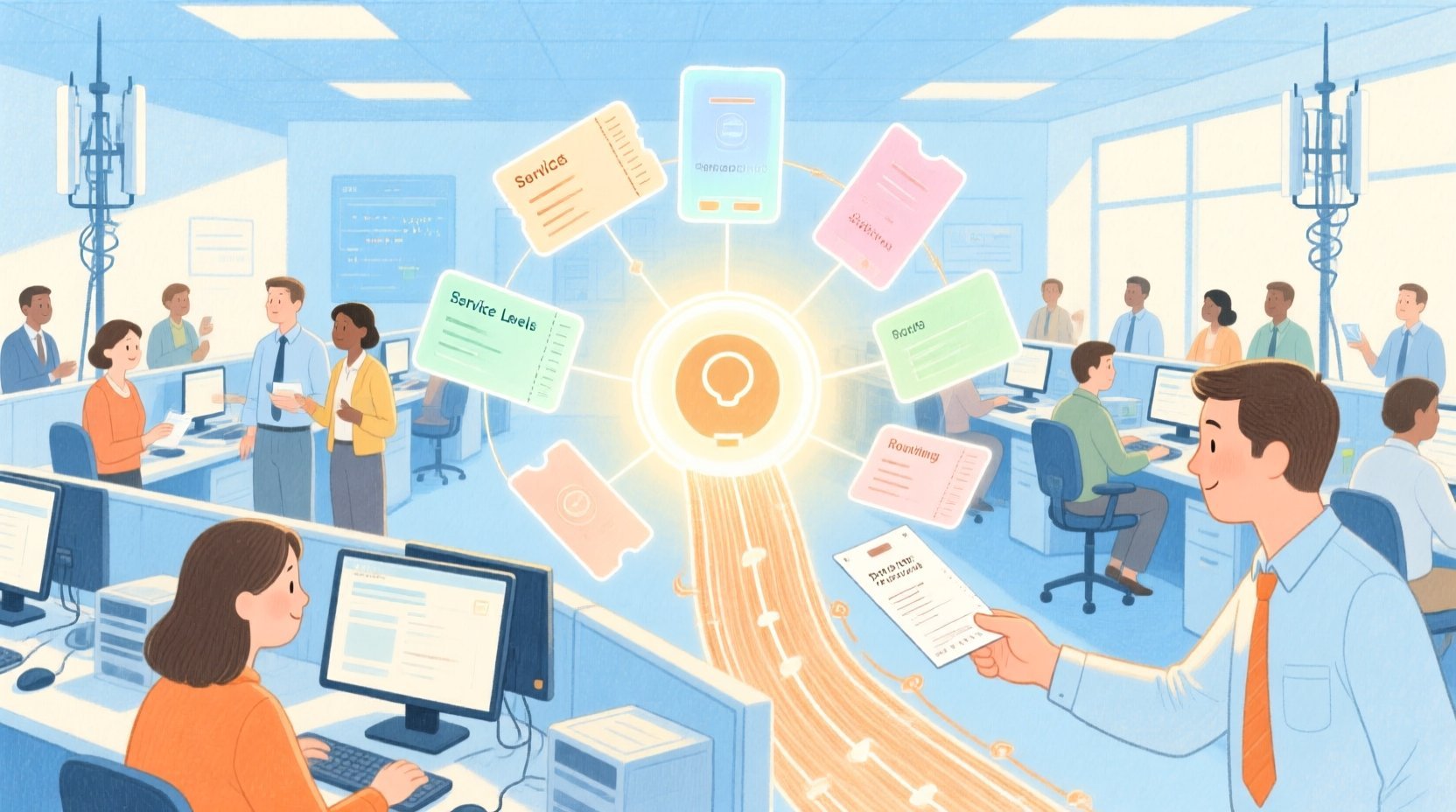
Building this data foundation manually in a database management tool can be time-consuming and prone to syntax errors, especially when defining complex relationships like many-to-many mappings or conditional escalation paths. Diagramming-as-code offers a superior alternative. By using PlantUML within VPasCode, architects can define the entire schema in text, visualize the relationships instantly, and iterate on the design without the overhead of dragging and dropping boxes. This approach ensures that the logical structure of the helpdesk system—connecting Customers to Tickets, Tickets to Routing Rules, and Policies to Escalation Events—is clear, versionable, and instantly renderable.
Understanding the Model: Purpose, Scope & Problem Framing
The Entity Relationship Diagram (ERD) presented here is designed to solve a specific operational challenge: automating the lifecycle of a support ticket from intake to resolution while ensuring accountability. In a telecommunications context, the volume of tickets can be overwhelming, and manual triage is inefficient. This model abstracts the system into core entities that manage the flow of work.
Diagram Abstraction & Representation
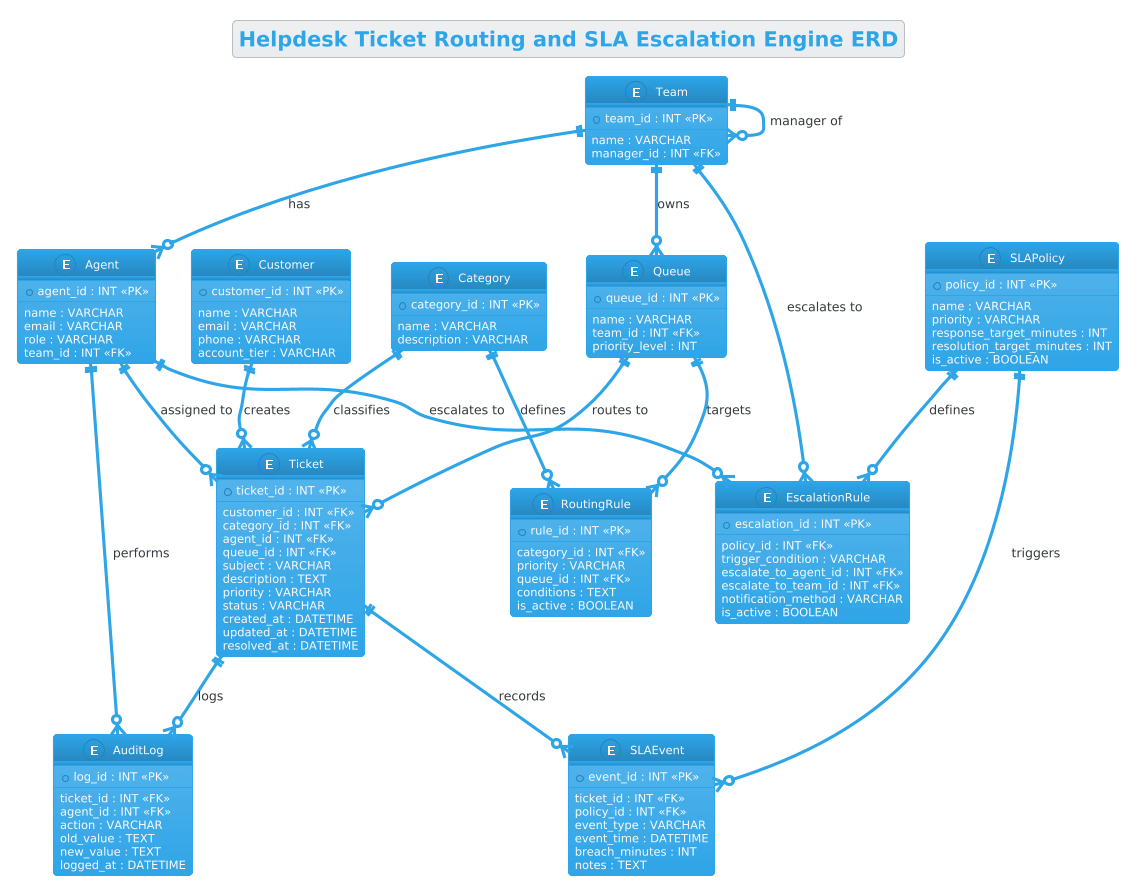
This ERD represents the structural backbone of a ticketing engine. It moves beyond simple data storage to model the behavior of the system. For instance, the Ticket entity is not just a record of a problem; it is the central hub connecting the customer’s identity, the specific issue category, the assigned agent, and the queue it resides in. The diagram explicitly models the logic for Routing (how tickets get to queues), SLA Compliance (tracking time against targets), and Escalation (identifying when a ticket needs higher-level intervention).
Target Domain Scope & Scenario
The scope of this diagram covers the core operational loop of a helpdesk system. It includes:
- Customer Management: Basic identity and account tiering.
- Intake & Classification: How tickets are categorized and initially routed.
- Resource Allocation: The relationship between Agents, Teams, and Queues.
- Performance Monitoring: The SLA Policy and Event tracking mechanism.
- Governance: Audit logging for all state changes to ensure compliance.
Key Takeaways & Educational Insights
By studying this model, developers will gain insights into how to structure a database that supports dynamic routing rules without hardcoding logic into the application layer. You will learn how to separate policy definitions (e.g., “Priority 1 tickets get a 15-minute response”) from event recording (e.g., “Ticket #123 breached the 15-minute limit at 10:05 AM”), a crucial pattern for scalable system design.
Complete Diagram & Full Source Code
Below is the fully rendered Entity Relationship Diagram for the Helpdesk Ticket Routing and SLA Escalation Engine. This visualization clearly maps the cardinality between Customers, Tickets, Agents, and the complex logic governing SLA policies and routing.
@startuml
!theme cerulean
title Helpdesk Ticket Routing and SLA Escalation Engine ERD

/'
This ERD models the data foundation of a customer service helpdesk system
that routes incoming tickets to appropriate support teams and tracks SLA
compliance with escalation rules. The core entity is Ticket, which captures
the issue details, priority, status, and timestamps. Each ticket is linked
to a Customer, a Category (e.g., billing, technical), and an assigned
Agent. Routing Rules determine how tickets are directed to Queues based on
category and priority. SLA Policies define response and resolution targets,
while SLA Events record breaches or escalations. Escalation Rules specify
when and to whom a ticket should be escalated if an SLA is at risk or
violated. Audit Logs track all state changes for accountability.
'/

entity "Customer" as customer {
  * customer_id : INT <<PK>>
  --
  name : VARCHAR
  email : VARCHAR
  phone : VARCHAR
  account_tier : VARCHAR
}

entity "Ticket" as ticket {
  * ticket_id : INT <<PK>>
  --
  customer_id : INT <<FK>>
  category_id : INT <<FK>>
  agent_id : INT <<FK>>
  queue_id : INT <<FK>>
  subject : VARCHAR
  description : TEXT
  priority : VARCHAR
  status : VARCHAR
  created_at : DATETIME
  updated_at : DATETIME
  resolved_at : DATETIME
}

entity "Category" as category {
  * category_id : INT <<PK>>
  --
  name : VARCHAR
  description : VARCHAR
}

entity "Agent" as agent {
  * agent_id : INT <<PK>>
  --
  name : VARCHAR
  email : VARCHAR
  role : VARCHAR
  team_id : INT <<FK>>
}

entity "Team" as team {
  * team_id : INT <<PK>>
  --
  name : VARCHAR
  manager_id : INT <<FK>>
}

entity "Queue" as queue {
  * queue_id : INT <<PK>>
  --
  name : VARCHAR
  team_id : INT <<FK>>
  priority_level : INT
}

entity "RoutingRule" as routing_rule {
  * rule_id : INT <<PK>>
  --
  category_id : INT <<FK>>
  priority : VARCHAR
  queue_id : INT <<FK>>
  conditions : TEXT
  is_active : BOOLEAN
}

entity "SLAPolicy" as sla_policy {
  * policy_id : INT <<PK>>
  --
  name : VARCHAR
  priority : VARCHAR
  response_target_minutes : INT
  resolution_target_minutes : INT
  is_active : BOOLEAN
}

entity "SLAEvent" as sla_event {
  * event_id : INT <<PK>>
  --
  ticket_id : INT <<FK>>
  policy_id : INT <<FK>>
  event_type : VARCHAR
  event_time : DATETIME
  breach_minutes : INT
  notes : TEXT
}

entity "EscalationRule" as escalation_rule {
  * escalation_id : INT <<PK>>
  --
  policy_id : INT <<FK>>
  trigger_condition : VARCHAR
  escalate_to_agent_id : INT <<FK>>
  escalate_to_team_id : INT <<FK>>
  notification_method : VARCHAR
  is_active : BOOLEAN
}

entity "AuditLog" as audit_log {
  * log_id : INT <<PK>>
  --
  ticket_id : INT <<FK>>
  agent_id : INT <<FK>>
  action : VARCHAR
  old_value : TEXT
  new_value : TEXT
  logged_at : DATETIME
}

' Relationships
customer ||--o{ ticket : "creates"
category ||--o{ ticket : "classifies"
agent ||--o{ ticket : "assigned to"
queue ||--o{ ticket : "routes to"
team ||--o{ agent : "has"
team ||--o{ queue : "owns"
team ||--o{ team : "manager of"

category ||--o{ routing_rule : "defines"
queue ||--o{ routing_rule : "targets"

sla_policy ||--o{ sla_event : "triggers"
ticket ||--o{ sla_event : "records"

sla_policy ||--o{ escalation_rule : "defines"
agent ||--o{ escalation_rule : "escalates to"
team ||--o{ escalation_rule : "escalates to"

ticket ||--o{ audit_log : "logs"
agent ||--o{ audit_log : "performs"

@endumlStep-by-Step Architectural Walkthrough
Phase 1: Canvas Configuration & Layout Directives
Before defining entities, we set the stage for the diagram’s appearance and context. The first step involves declaring the PlantUML start directive and applying a theme to ensure professional styling. We use @startuml to initialize the diagram and !theme cerulean to apply a clean, blue-toned aesthetic suitable for enterprise documentation.
Next, we define the diagram title and the context description. This is done using a comment block wrapped in / and '. This block is crucial for documentation purposes, as it allows you to describe the business logic directly in the code without affecting the rendering of the diagram.
@startuml
!theme cerulean
title Helpdesk Ticket Routing and SLA Escalation Engine ERD

/'
This ERD models the data foundation...
'/
Phase 2: Declaring Core Entities, Actors, and Boundaries
The heart of an ERD is the entity definition. In PlantUML, we define each table (e.g., Customer, Ticket) using the entity keyword. We provide a human-readable name and a short alias for referencing in relationships.
Inside each entity block, we define attributes. Primary Keys (PK) are marked with * and Foreign Keys (FK) with <<FK>>. This syntax is vital for database generation tools to understand the schema integrity. For example, the Ticket entity aggregates data from multiple sources:
entity "Ticket" as ticket {
* ticket_id : INT <>
--
customer_id : INT <>
category_id : INT < >
agent_id : INT < >
queue_id : INT < >
--
subject : VARCHAR
description : TEXT
priority : VARCHAR
status : VARCHAR
created_at : DATETIME
updated_at : DATETIME
resolved_at : DATETIME
} The -- separator visually groups the keys from the attributes, improving readability.
Phase 3: Mapping Data Flows & Key Interactions
Once entities are defined, we establish the relationships using the ||--o{ syntax. This specific notation represents a One-to-Many relationship where the left side (||) is mandatory (one) and the right side (o{) is optional (zero or many). This is the standard cardinality for an ERD in this context.
We map the flow of a ticket:
- Customer to Ticket:
customer ||--o{ ticket : "creates"(A customer creates zero or many tickets). - Agent to Ticket:
agent ||--o{ ticket : "assigned to"(An agent is assigned to zero or many tickets). - Queue to Ticket:
queue ||--o{ ticket : "routes to"(A queue routes zero or many tickets).
We also model the complex logic for SLAs and Escalations. The SLAEvent entity acts as a transactional log, linking back to both the Ticket and the SLAPolicy to record exactly which policy was violated and when.
Phase 4: Grouping, Annotations & Visual Polish
To ensure the diagram is self-documenting, we use the title directive and the comment block described in Phase 1. Additionally, the relationship labels (e.g., "creates", "classifies") provide semantic meaning to the lines connecting the boxes. This transforms a raw schema into a narrative diagram that explains how the data interacts, not just what the data is.
Syntax & Keyword Deep Dive
Understanding the specific PlantUML ERD syntax is key to mastering this diagram-as-code approach. Here are the critical keywords used in this tutorial:
entity: Defines a new table or entity. It takes a display name and an alias for internal referencing.*: Placed before an attribute name to denote a Primary Key. This is essential for identifying the unique identifier of a record.<<FK>>: A stereotype used to mark a Foreign Key attribute, explicitly linking it to a primary key in another entity.||--o{: A relationship connector.||means “one and only one” (mandatory), ando{means “zero or many” (optional). This is the standard for One-to-Many relationships in ERDs."label": The text following the relationship connector describes the nature of the relationship (e.g., “assigned to”, “routes to”)./' ... '/: A multi-line comment block. Unlike standard single-line comments ('), this block allows for detailed documentation that is ignored by the renderer but preserved in the source.
Best Practices & Pitfalls to Avoid
When building complex ERDs like this helpdesk system, adhering to best practices ensures your diagram remains maintainable and clear.
- Consistent Naming Conventions: Always use the same naming pattern for keys (e.g.,
_idsuffix for IDs) and use snake_case for attribute names to match standard SQL conventions. This reduces cognitive load when translating the diagram to actual SQL. - Separate Logic from Data: Notice how
RoutingRuleandSLAPolicyare separate entities rather than columns in theTickettable. This allows you to change routing logic or SLA targets without altering the core ticket structure, supporting a more flexible system. - Avoid Circular Dependencies: Be careful when defining relationships between
AgentandTeam. Ensure that foreign keys point to existing primary keys to avoid logical loops that can confuse database generators. - Document the “Why”: Use the comment block (
/…/) to explain the business rules. A diagram shows the structure, but the comment explains the intent (e.g., why a ticket is routed to a specific queue).
Start Building Telecommunications ERDs Faster with VPasCode
Instantly visualize and test your complex helpdesk database schemas online with VPasCode’s free PlantUML editor—no installation required.