


In the rapidly evolving telecommunications sector, the backbone of network expansion relies not just on physical infrastructure, but on the precise management of the data that governs it. As operators deploy 5G networks and expand rural coverage, the complexity of managing mobile tower sites, lease agreements, and radio frequency (RF) engineering data has reached a critical point. A fragmented data model can lead to compliance risks, inefficient site utilization, and inaccurate coverage predictions. To solve this, architects require a unified data blueprint that seamlessly connects legal contract administration with technical RF planning parameters.
This tutorial demonstrates how to construct a robust Entity Relationship Diagram (ERD) that bridges these distinct domains. By modeling the relationships between a physical tower site, its lease contract, the specific antenna and transmitter equipment installed, and the resulting RF coverage predictions, we create a single source of truth. Using PlantUML within the VPasCode editor allows us to define these complex relationships with code, ensuring that our documentation is versioned, reproducible, and instantly visualizable. This approach is essential for teams aiming to synchronize legal, physical, and engineering data streams for optimal network performance.
Understanding the Model: Purpose, Scope & Problem Framing
The diagram we are about to build is a classic Entity Relationship Diagram (ERD), a standard notation for visualizing the logical structure of a database. In the context of telecommunications, an ERD serves as the architectural blueprint for the backend systems that manage network assets. Unlike a flowchart which depicts a process, an ERD defines the “things” (entities) that exist in the system and the “rules” (relationships) that bind them together.
Diagram Abstraction & Representation
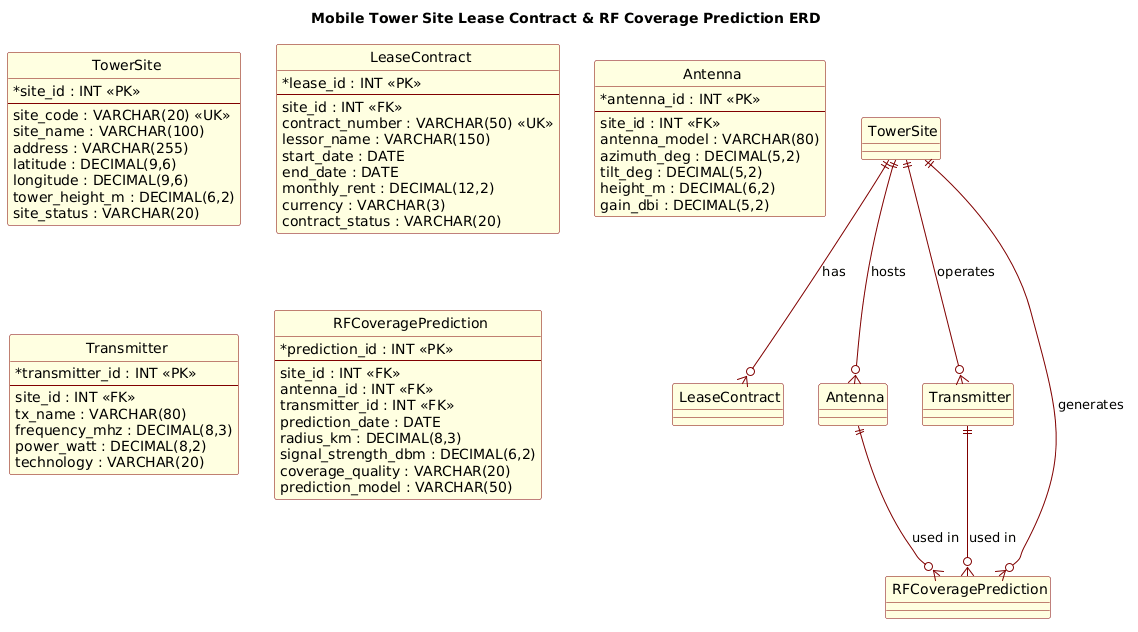
This specific ERD abstracts the real-world complexity of a cellular network into manageable data objects. The TowerSite entity represents the physical location and its geographic coordinates. The LeaseContract entity captures the legal agreement and financial obligations associated with that location. The Antenna and Transmitter entities represent the active hardware components that define the radio signal characteristics. Finally, the RFCoveragePrediction entity links these hardware components to the engineering outcomes, storing the results of propagation models used to predict signal strength and coverage areas.
Target Domain Scope & Scenario
The scope of this model is strictly limited to the lifecycle of a single tower site’s data lineage. It does not cover the broader customer billing system or the core network switching infrastructure. Instead, it focuses on the interface between the Real Estate/Lease management team and the RF Engineering team. The scenario assumes a one-to-many relationship where a single site can host multiple antennas and transmitters, and each configuration can generate multiple prediction records over time.
Key Takeaways & Educational Insights
By studying this model, you will gain insights into how to map one-to-many relationships in a database schema, how to structure primary and foreign keys to maintain data integrity, and how to group related entities to reflect real-world operational dependencies. You will learn how to use PlantUML’s entity-relationship notation to create a diagram that is not just a picture, but a functional specification for database development.
Complete Diagram & Full Source Code
Before diving into the construction steps, here is the final blueprint. This diagram visualizes the complete data structure for managing mobile tower site leases and RF coverage predictions, utilizing the Rose theme for a professional aesthetic.
@startuml
!include https://static.visual-paradigm.com/web/resources/plantuml-stdlib/themes/rose.puml

/'
Diagram Context:
This ERD models the core data structures for managing mobile tower site leases
and the associated RF coverage predictions. The system links physical tower
sites and their lease contracts to engineering data used for radio frequency
planning. A single tower site may have one or more lease agreements, and each
site also generates multiple RF coverage prediction records. Antenna and
transmitter equipment at a site provide the technical parameters required for
coverage simulations. The diagram supports contract administration, site
inventory, and network planning by connecting legal, physical, and RF domains.
'/

title Mobile Tower Site Lease Contract & RF Coverage Prediction ERD

' ==================== ENTITIES ====================

entity "TowerSite" as towersite {
  * site_id : INT <<PK>>
  --
  site_code : VARCHAR(20) <<UK>>
  site_name : VARCHAR(100)
  address : VARCHAR(255)
  latitude : DECIMAL(9,6)
  longitude : DECIMAL(9,6)
  tower_height_m : DECIMAL(6,2)
  site_status : VARCHAR(20)
}

entity "LeaseContract" as lease {
  * lease_id : INT <<PK>>
  --
  site_id : INT <<FK>>
  contract_number : VARCHAR(50) <<UK>>
  lessor_name : VARCHAR(150)
  start_date : DATE
  end_date : DATE
  monthly_rent : DECIMAL(12,2)
  currency : VARCHAR(3)
  contract_status : VARCHAR(20)
}

entity "Antenna" as antenna {
  * antenna_id : INT <<PK>>
  --
  site_id : INT <<FK>>
  antenna_model : VARCHAR(80)
  azimuth_deg : DECIMAL(5,2)
  tilt_deg : DECIMAL(5,2)
  height_m : DECIMAL(6,2)
  gain_dbi : DECIMAL(5,2)
}

entity "Transmitter" as transmitter {
  * transmitter_id : INT <<PK>>
  --
  site_id : INT <<FK>>
  tx_name : VARCHAR(80)
  frequency_mhz : DECIMAL(8,3)
  power_watt : DECIMAL(8,2)
  technology : VARCHAR(20)
}

entity "RFCoveragePrediction" as rfpred {
  * prediction_id : INT <<PK>>
  --
  site_id : INT <<FK>>
  antenna_id : INT <<FK>>
  transmitter_id : INT <<FK>>
  prediction_date : DATE
  radius_km : DECIMAL(8,3)
  signal_strength_dbm : DECIMAL(6,2)
  coverage_quality : VARCHAR(20)
  prediction_model : VARCHAR(50)
}

' ==================== RELATIONSHIPS ====================

TowerSite ||--o{ LeaseContract : "has"
TowerSite ||--o{ Antenna : "hosts"
TowerSite ||--o{ Transmitter : "operates"
TowerSite ||--o{ RFCoveragePrediction : "generates"
Antenna ||--o{ RFCoveragePrediction : "used in"
Transmitter ||--o{ RFCoveragePrediction : "used in"

@endumlStep-by-Step Architectural Walkthrough
Phase 1: Canvas Configuration & Layout Directives
Every professional PlantUML diagram begins with setup directives that define the rendering environment. In this ERD, we first include the rose.puml theme to ensure the diagram has a polished, modern look suitable for technical documentation. We then define a comment block using /' ... '/ to provide context for anyone reading the code later, explaining the business domain without cluttering the visual output. Finally, we set the title directive to give the diagram a clear, descriptive header.
!include https://static.visual-paradigm.com/web/resources/plantuml-stdlib/themes/rose.puml

/'
Diagram Context: ...
'/

title Mobile Tower Site Lease Contract & RF Coverage Prediction ERD
Phase 2: Declaring Core Entities, Actors, and Boundaries
The foundation of an ERD is the definition of entities. In PlantUML, we use the entity keyword followed by the entity name, an alias (for use in relationships), and a block defining the attributes. We use the * symbol to denote Primary Keys (PK) and FK for Foreign Keys. The -- separator visually divides keys from regular attributes. For the TowerSite, we define geographic coordinates using DECIMAL types to ensure precision, which is critical for RF coverage calculations.
entity "TowerSite" as towersite {
  * site_id : INT <>
  --
  site_code : VARCHAR(20) <>
  site_name : VARCHAR(100)
  latitude : DECIMAL(9,6)
  longitude : DECIMAL(9,6)
  tower_height_m : DECIMAL(6,2)
}
We repeat this pattern for LeaseContract, Antenna, Transmitter, and RFCoveragePrediction, ensuring that each entity has a unique identifier and the necessary attributes to describe its role in the telecommunications ecosystem.
Phase 3: Mapping Data Flows & Key Interactions
Once entities are defined, we establish the relationships that link them. PlantUML uses specific cardinality notation. The symbol || represents “one and only one” (mandatory), while o{ represents “zero or many” (optional). For example, a TowerSite must have at least one LeaseContract (conceptually, though in code we might allow nulls, the business rule implies a lease exists for a site), but a site can have many contracts over time. Here, we model that a site “hosts” antennas and “operates” transmitters.
TowerSite ||--o{ LeaseContract : "has"
TowerSite ||--o{ Antenna : "hosts"
TowerSite ||--o{ Transmitter : "operates"
We also link the hardware components to the engineering outcomes. The RFCoveragePrediction entity is the central hub for engineering data, linking back to the site, the specific antenna, and the specific transmitter used during the simulation.
TowerSite ||--o{ RFCoveragePrediction : "generates"
Antenna ||--o{ RFCoveragePrediction : "used in"
Transmitter ||--o{ RFCoveragePrediction : "used in"
Phase 4: Grouping, Annotations & Visual Polish
While this ERD relies on clear naming and relationship lines, PlantUML allows for further visual organization. In a larger diagram, you might group these entities into packages (e.g., package "Legal" for leases and package "Engineering" for RF data) to separate concerns. For this specific diagram, the clarity of the relationships and the use of the rose theme provides sufficient visual polish to communicate the architecture effectively. The comment block added in Phase 1 serves as the primary annotation, ensuring the diagram remains self-documenting.
Syntax & Keyword Deep Dive
To master this diagram, you must understand the specific PlantUML syntax elements used to define the data structure and relationships.
- entity “Name” as alias: Defines a new table or object. The alias (e.g.,
towersite) is used in relationship definitions to keep the code concise. - attribute : TYPE <
>: Defines a column. INT,VARCHAR, andDECIMALare standard SQL data types. The double brackets << >> denote a stereotype, such asPKfor Primary Key orFKfor Foreign Key. - –: A separator line used inside an entity block to visually distinguish keys from other attributes.
- ||–o{: This is the cardinality notation.
||means “one and only one” (mandatory), ando{means “zero or many” (optional). This creates a one-to-many relationship. - : “label”: Defines the text label on the relationship line, describing the nature of the connection (e.g., “has”, “hosts”, “used in”).
- /’ … ‘/: The syntax for a multi-line comment in PlantUML. This text is rendered in the diagram’s legend or tooltip but does not affect the visual layout of the entities.
Best Practices & Pitfalls to Avoid
When building complex ERDs for telecommunications or any enterprise system, adherence to best practices ensures the diagram remains maintainable and useful.
- Use Descriptive Aliases: While the entity name might be
LeaseContract, using a shorter alias likeleasein relationships makes the code cleaner and easier to read. However, ensure the alias is not too generic to avoid confusion. - Consistent Data Typing: Always define data types explicitly (e.g.,
DECIMAL(9,6)for coordinates). In telecommunications, precision is paramount; vague types likeNUMBERcan lead to implementation errors in the database. - Logical Grouping: Even if you don’t use packages, group related entities visually in the code. Place the RF entities near each other and the Legal entities together to mirror the logical separation of concerns.
- Avoid Over-Engineering: Start with the core entities required for the immediate problem. Don’t add entities for “User Permissions” or “Audit Logs” unless they are strictly necessary for the current scope of the diagram.
Start Building Telecom ERDs Faster with VPasCode
Design and visualize complex database schemas for mobile networks instantly in your browser with VPasCode, the free PlantUML editor for telecom architects.