


In the rapidly evolving telecommunications sector, the physical layer of the network—comprising fiber optic cables, splice points, enclosures, and support infrastructure—represents a critical asset that must be meticulously managed. As operators deploy dense fiber-to-the-home (FTTH) and 5G backhaul networks, the complexity of tracking physical assets alongside their performance metrics has become a significant operational challenge. Traditional spreadsheet-based tracking or static CAD drawings often fail to capture the dynamic relationships between geographic locations, cable routes, and the precise optical loss measurements required for network acceptance and maintenance.
This is where a robust Entity Relationship Diagram (ERD) becomes indispensable. By modeling the data structure that underpins a Fiber Optic Cable Plant GIS mapping and Splice Loss Test Record system, architects can ensure data integrity, streamline fault tracing, and enable spatial queries across the network. Using PlantUML within the VPasCode editor allows engineers to define these complex relationships as code, ensuring that the documentation evolves in lockstep with the physical network. This approach eliminates the friction of manual drawing updates and provides a living schema that can be versioned, shared, and rendered instantly.
Understanding the Model: Purpose, Scope & Problem Framing
Diagram Abstraction & Representation
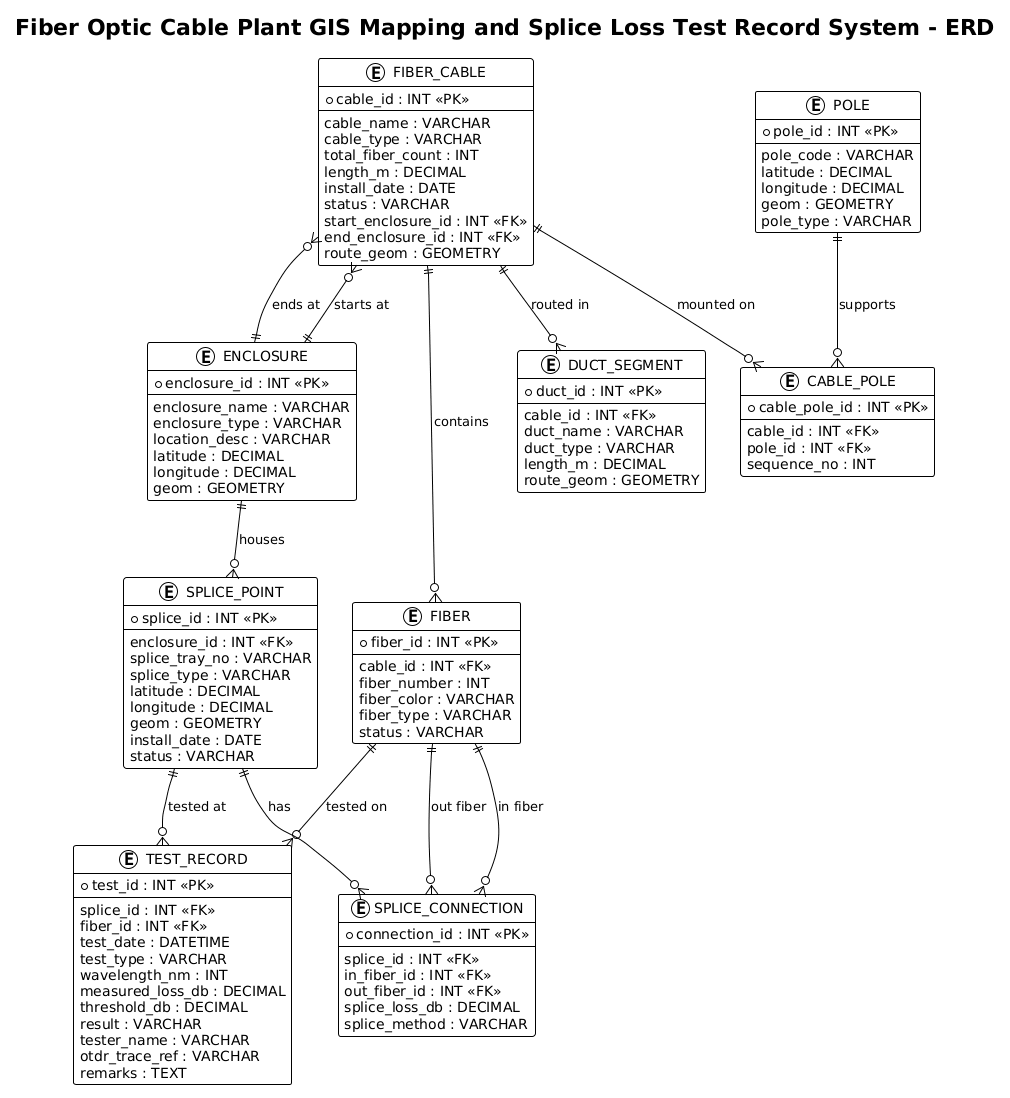
This ERD serves as the logical blueprint for a database system designed to manage the lifecycle of fiber optic infrastructure. Unlike a simple inventory list, this model captures the hierarchical nature of the cable plant: a Cable contains multiple Fibers, which terminate at Enclosures or Splice Points. Crucially, it also integrates the physical environment by linking these assets to GIS Geometries (latitude/longitude/shape) and Support Structures like Poles and Ducts. The inclusion of Splice Connections and Test Records adds a layer of performance data, linking specific physical joints to their optical loss measurements (in dB) and test results.
Target Domain Scope & Scenario
The scope of this diagram covers the end-to-end data flow for a telecommunications operator’s GIS and testing platform. It addresses the problem of correlating a physical fault location (e.g., a high loss event at a specific splice) with its exact geographic coordinates and the cable route it resides on. The model is designed to support operations such as tracing a fiber path from a central office to a customer premise, verifying splice quality during installation, and maintaining a historical log of all testing activities for compliance and troubleshooting.
Key Takeaways & Educational Insights
By studying this model, you will learn how to:
- Model one-to-many relationships between physical infrastructure components (e.g., one cable containing many fibers).
- Represent spatial data requirements using geometry attributes for GIS integration.
- Design a junction table structure (
SPLICE_CONNECTION) to handle many-to-many relationships between fibers at a splice point. - Link performance metrics (test records) back to specific physical entities without creating data redundancy.
Complete Diagram & Full Source Code
Below is the complete visualization of the Fiber Optic Cable Plant GIS and Splice Loss Test Record system. This diagram clearly delineates the entities, their attributes, and the cardinality of their relationships, providing a clear roadmap for database implementation.
@startuml
!theme plain
title Fiber Optic Cable Plant GIS Mapping and Splice Loss Test Record System - ERD

/'
Diagram Context:
This ERD models the data structure for managing a fiber optic cable plant.
It combines GIS mapping of physical infrastructure (cables, enclosures, splice points,
poles/ducts) with splice loss test records used for acceptance testing and maintenance.
The central entities are FIBER_CABLE (the physical cable route) and SPLICE_POINT
(where fibers are joined). Each cable contains multiple FIBER strands. Splices connect
two fiber ends at a splice point. Test records capture OTDR/power meter measurements
for each splice or fiber segment, including loss values and pass/fail status.
GIS coordinates are stored for cables, splice points, and enclosures to support map
visualization and spatial queries. This schema enables tracing fiber paths, tracking
splice loss history, and locating faults geographically.
'/

entity "FIBER_CABLE" as cable {
  * cable_id : INT <<PK>>
  --
  cable_name : VARCHAR
  cable_type : VARCHAR
  total_fiber_count : INT
  length_m : DECIMAL
  install_date : DATE
  status : VARCHAR
  start_enclosure_id : INT <<FK>>
  end_enclosure_id : INT <<FK>>
  route_geom : GEOMETRY
}

entity "FIBER" as fiber {
  * fiber_id : INT <<PK>>
  --
  cable_id : INT <<FK>>
  fiber_number : INT
  fiber_color : VARCHAR
  fiber_type : VARCHAR
  status : VARCHAR
}

entity "ENCLOSURE" as enclosure {
  * enclosure_id : INT <<PK>>
  --
  enclosure_name : VARCHAR
  enclosure_type : VARCHAR
  location_desc : VARCHAR
  latitude : DECIMAL
  longitude : DECIMAL
  geom : GEOMETRY
}

entity "SPLICE_POINT" as splice {
  * splice_id : INT <<PK>>
  --
  enclosure_id : INT <<FK>>
  splice_tray_no : VARCHAR
  splice_type : VARCHAR
  latitude : DECIMAL
  longitude : DECIMAL
  geom : GEOMETRY
  install_date : DATE
  status : VARCHAR
}

entity "SPLICE_CONNECTION" as spliceconn {
  * connection_id : INT <<PK>>
  --
  splice_id : INT <<FK>>
  in_fiber_id : INT <<FK>>
  out_fiber_id : INT <<FK>>
  splice_loss_db : DECIMAL
  splice_method : VARCHAR
}

entity "TEST_RECORD" as testrec {
  * test_id : INT <<PK>>
  --
  splice_id : INT <<FK>>
  fiber_id : INT <<FK>>
  test_date : DATETIME
  test_type : VARCHAR
  wavelength_nm : INT
  measured_loss_db : DECIMAL
  threshold_db : DECIMAL
  result : VARCHAR
  tester_name : VARCHAR
  otdr_trace_ref : VARCHAR
  remarks : TEXT
}

entity "DUCT_SEGMENT" as duct {
  * duct_id : INT <<PK>>
  --
  cable_id : INT <<FK>>
  duct_name : VARCHAR
  duct_type : VARCHAR
  length_m : DECIMAL
  route_geom : GEOMETRY
}

entity "POLE" as pole {
  * pole_id : INT <<PK>>
  --
  pole_code : VARCHAR
  latitude : DECIMAL
  longitude : DECIMAL
  geom : GEOMETRY
  pole_type : VARCHAR
}

entity "CABLE_POLE" as cablepole {
  * cable_pole_id : INT <<PK>>
  --
  cable_id : INT <<FK>>
  pole_id : INT <<FK>>
  sequence_no : INT
}

cable ||--o{ fiber : contains
cable }o--|| enclosure : "starts at"
cable }o--|| enclosure : "ends at"
enclosure ||--o{ splice : houses
splice ||--o{ spliceconn : has
fiber ||--o{ spliceconn : "in fiber"
fiber ||--o{ spliceconn : "out fiber"
splice ||--o{ testrec : "tested at"
fiber ||--o{ testrec : "tested on"
cable ||--o{ duct : "routed in"
cable ||--o{ cablepole : "mounted on"
pole ||--o{ cablepole : supports

@endumlStep-by-Step Architectural Walkthrough
Phase 1: Canvas Configuration & Layout Directives
The first step in creating a professional ERD is setting the stage. We begin by declaring the diagram type and applying a specific theme to ensure visual consistency. In this case, we use the !theme plain directive to strip away complex graphical decorations, focusing the reader’s attention on the data structure and relationships. The title directive provides a clear, descriptive header for the diagram, which is essential for documentation.
@startuml
!theme plain
title Fiber Optic Cable Plant GIS Mapping and Splice Loss Test Record System - ERD
Phase 2: Declaring Core Entities, Actors, and Boundaries
Next, we define the core entities. In PlantUML, the entity keyword is used to define a table or object. Each entity block starts with the name (e.g., FIBER_CABLE) and an alias (e.g., cable) which is used for referencing in relationships. Inside the block, we define attributes. Primary Keys (PK) are marked with * and Foreign Keys (FK) with <. Note the inclusion of GEOMETRY and DECIMAL types, which are critical for GIS and optical loss calculations.
entity "FIBER_CABLE" as cable {
  * cable_id : INT <>
  --
  cable_name : VARCHAR
  route_geom : GEOMETRY
}
We repeat this process for FIBER, ENCLOSURE, SPLICE_POINT, and other infrastructure components. The use of aliases like as fiber or as splice keeps the relationship lines concise and readable later in the diagram.
Phase 3: Mapping Data Flows & Key Interactions
With entities defined, we establish the relationships using cardinality notation. The ||--o{ syntax represents a mandatory one-to-mandatory-many relationship (or optional depending on the specific notation variant, here o{ is optional many, || is mandatory one). For example, a FIBER_CABLE must contain at least one FIBER (or can contain many). The ||--o{ syntax is used to show that a Cable contains Fibers.
cable ||--o{ fiber : contains
We also handle complex relationships. The SPLICE_CONNECTION entity acts as a junction table. It connects to SPLICE_POINT (one splice point has many connections) and links two FIBER entities (one “in” and one “out”), effectively modeling the physical act of splicing two fibers together.
fiber ||--o{ spliceconn : "in fiber"
fiber ||--o{ spliceconn : "out fiber"
Phase 4: Grouping, Annotations & Visual Polish
Finally, we add contextual information. The comment block at the top (wrapped in /' ... '/) provides a narrative description of the system’s purpose without cluttering the visual diagram with code syntax. This is vital for stakeholders who need to understand the “why” behind the data model. We also ensure that all geographic entities (ENCLOSURE, SPLICE_POINT, POLE) share a consistent attribute pattern for latitude, longitude, and geom, reinforcing the GIS theme of the diagram.
Syntax & Keyword Deep Dive
To fully leverage PlantUML for ERD creation, understanding the specific syntax used in this diagram is essential. Here are the key keywords and conventions:
entity: Defines a new table or entity. The syntaxentity "Name" as alias { ... }allows for a display name and a shorter reference name.attribute : TYPE: Defines a column. Types likeINT,VARCHAR,DECIMAL, andGEOMETRYdefine the data constraints.*(Primary Key): Preceding an attribute name with*marks it as the Primary Key (e.g.,* cable_id).<(Foreign Key): Used to explicitly mark attributes that reference other tables, aiding in database normalization visualization.> ||--o{(Cardinality): Represents a relationship where the left side is mandatory (one) and the right side is optional (many). Theorepresents the optional side, and{represents the “many” side./' ... '/(Comment Block): Allows for multi-line text descriptions that are rendered as part of the diagram context but do not affect the logic.
Best Practices & Pitfalls to Avoid
When designing ERDs for complex infrastructure like fiber networks, keep these best practices in mind:
- Normalize Your Junction Tables: As seen with
SPLICE_CONNECTION, avoid creating many-to-many relationships directly. Always introduce an intermediate entity to hold the specific attributes of that relationship (likesplice_loss_db). - Consistent Naming Conventions: Use clear, descriptive names for entities (e.g.,
SPLICE_POINTinstead ofSP) to ensure the diagram remains readable for new team members. - Separate Logic from Geometry: Keep physical attributes (like
length_m) and spatial attributes (likegeom) distinct but clearly associated within the same entity block to show they belong to the same physical object. - Use Aliases for Readability: Long entity names like
FIBER_CABLEcan make relationship lines cluttered. Usingas cablekeeps the diagram clean while retaining the full name in the entity box.
Start Building Fiber Optic ERDs Faster with VPasCode
Instantly render, edit, and customize your complex telecommunications database schemas online with zero local installation required.