


In the rapidly evolving landscape of telecommunications, the reliability and scalability of a Voice over IP (VoIP) Private Branch Exchange (PBX) system depend heavily on the integrity of its underlying data architecture. Whether managing a small enterprise or a large-scale carrier, architects must ensure that subscriber data, extension assignments, and device registrations are tightly coupled with the massive volume of Call Detail Records (CDRs) generated daily. Without a clear, normalized data model, systems face risks of billing errors, compliance failures, and performance bottlenecks when querying historical call logs.

This tutorial demonstrates how to construct a comprehensive Entity Relationship Diagram (ERD) specifically designed for a VoIP PBX environment using PlantUML. By leveraging diagram-as-code methodologies, we can define the relationships between subscribers, their assigned extensions, endpoint devices, and the complex logic required to archive CDRs for audit and billing purposes. Using VPasCode, you can instantly visualize this architecture, ensuring that every foreign key, cardinality, and constraint is explicitly defined before a single line of database schema code is written.
Understanding the Model: Purpose, Scope & Problem Framing
An Entity Relationship Diagram (ERD) serves as the blueprint for relational databases, defining how data entities interact and constrain one another. In the context of a VoIP PBX system, the primary challenge is managing the lifecycle of a subscriber’s identity, their specific telephony features (extensions), and the immutable history of their communication activities (CDRs).
Diagram Abstraction & Representation
This model abstracts the telephony domain into logical entities. The subscriber represents the human or organizational account holder. The extension acts as the logical link between a subscriber and a specific phone number or feature set. The endpoint_device represents the physical or virtual hardware (IP phones, softphones) registered to that extension. Crucially, the cdr entity captures the transient event of a call, linking the caller and callee while referencing the specific dial_plan_rule that governed the routing. The model also introduces an archiving layer (cdr_archive_batch and cdr_archive_entry) to handle the separation of active call data from long-term storage, a common pattern in telecommunications compliance.
Target Domain Scope & Scenario
The scope of this diagram covers the core provisioning and audit workflow. It includes:
- Provisioning: How a subscriber gets an extension, how that extension is linked to a device, and how voicemail or call queues are assigned.
- Routing Logic: How
dial_plan_ruleentities dictate call paths. - Event Logging: The generation of CDRs for every call attempt, including direction, duration, and disposition.
- Archival: The mechanism to move completed CDRs into batched storage for compliance.
Key Takeaways & Educational Insights
By the end of this guide, you will understand how to model one-to-many relationships (e.g., one subscriber has many extensions), many-to-many relationships resolved via junction tables (e.g., extensions in call queues), and the critical links between active data and archival data. You will also learn how to apply the sunlust theme to create visually distinct, professional diagrams that communicate complex data structures clearly.
Complete Diagram & Full Source Code
Below is the complete, rendered diagram. This ERD visualizes the entire data lifecycle from subscriber onboarding to call record archiving.
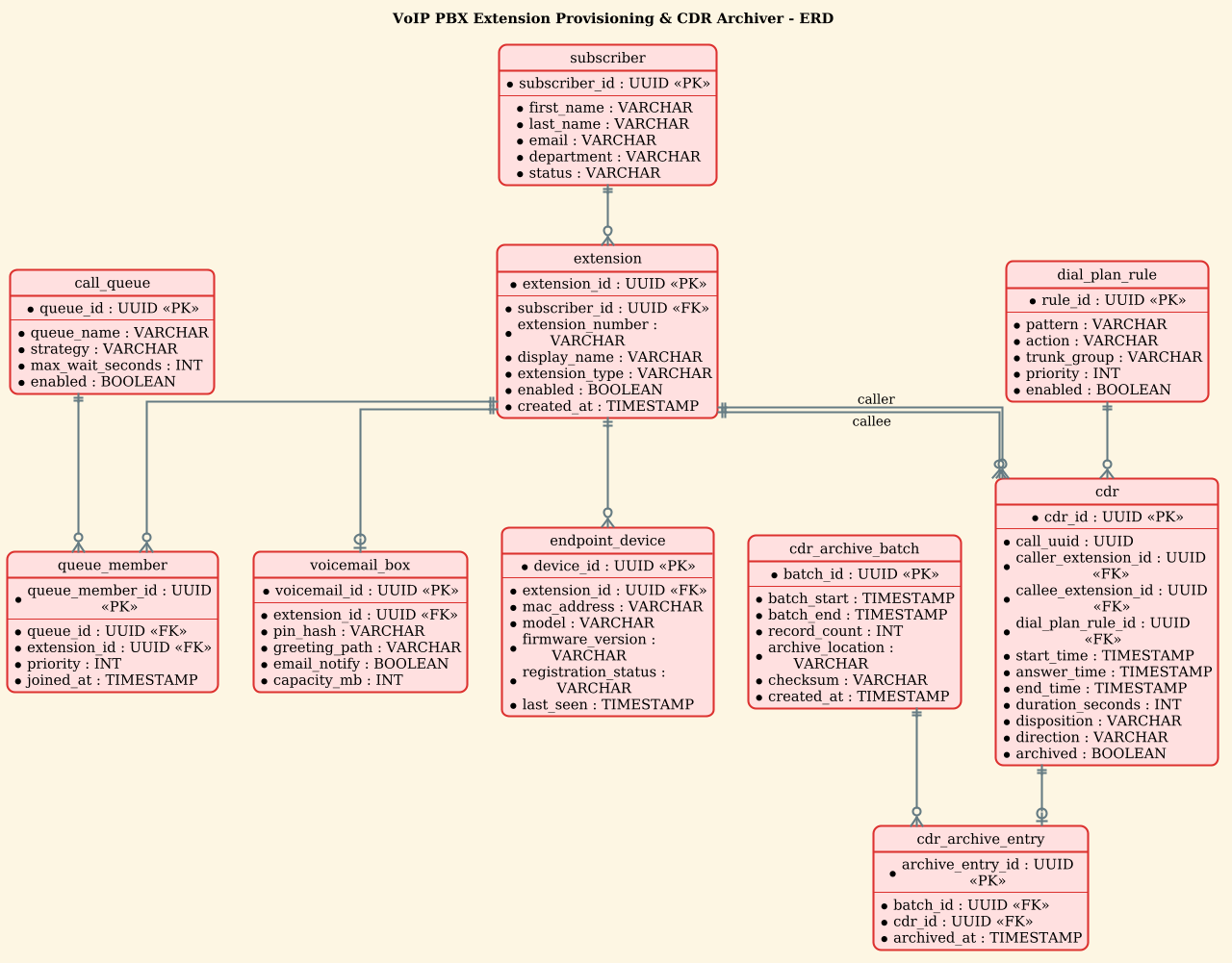
@startuml
!theme sunlust
title VoIP PBX Extension Provisioning & CDR Archiver - ERD
/'
Diagram Context:
This ERD models the data foundation for a VoIP PBX system that manages
extension provisioning and archives call detail records (CDRs). It supports
tracking subscribers, their assigned extensions, the devices/endpoints used,
and the dial plan that governs how calls are routed. Each call is recorded
as a CDR with detailed metadata such as caller, callee, start/end timestamps,
duration, and disposition. CDRs are linked to the originating and terminating
extensions so they can be archived, queried for billing, and retained for
audit and compliance purposes. Provisioning tables capture how extensions
are configured, which features are enabled, and which voicemail boxes or
queues they belong to.
'/
hide circle
skinparam linetype ortho

entity "subscriber" as subscriber {
  * subscriber_id : UUID <<PK>>
  --
  * first_name : VARCHAR
  * last_name : VARCHAR
  * email : VARCHAR
  * department : VARCHAR
  * status : VARCHAR
}

entity "extension" as extension {
  * extension_id : UUID <<PK>>
  --
  * subscriber_id : UUID <<FK>>
  * extension_number : VARCHAR
  * display_name : VARCHAR
  * extension_type : VARCHAR
  * enabled : BOOLEAN
  * created_at : TIMESTAMP
}

entity "endpoint_device" as endpoint_device {
  * device_id : UUID <<PK>>
  --
  * extension_id : UUID <<FK>>
  * mac_address : VARCHAR
  * model : VARCHAR
  * firmware_version : VARCHAR
  * registration_status : VARCHAR
  * last_seen : TIMESTAMP
}

entity "voicemail_box" as voicemail_box {
  * voicemail_id : UUID <<PK>>
  --
  * extension_id : UUID <<FK>>
  * pin_hash : VARCHAR
  * greeting_path : VARCHAR
  * email_notify : BOOLEAN
  * capacity_mb : INT
}

entity "call_queue" as call_queue {
  * queue_id : UUID <<PK>>
  --
  * queue_name : VARCHAR
  * strategy : VARCHAR
  * max_wait_seconds : INT
  * enabled : BOOLEAN
}

entity "queue_member" as queue_member {
  * queue_member_id : UUID <<PK>>
  --
  * queue_id : UUID <<FK>>
  * extension_id : UUID <<FK>>
  * priority : INT
  * joined_at : TIMESTAMP
}

entity "dial_plan_rule" as dial_plan_rule {
  * rule_id : UUID <<PK>>
  --
  * pattern : VARCHAR
  * action : VARCHAR
  * trunk_group : VARCHAR
  * priority : INT
  * enabled : BOOLEAN
}

entity "cdr" as cdr {
  * cdr_id : UUID <<PK>>
  --
  * call_uuid : UUID
  * caller_extension_id : UUID <<FK>>
  * callee_extension_id : UUID <<FK>>
  * dial_plan_rule_id : UUID <<FK>>
  * start_time : TIMESTAMP
  * answer_time : TIMESTAMP
  * end_time : TIMESTAMP
  * duration_seconds : INT
  * disposition : VARCHAR
  * direction : VARCHAR
  * archived : BOOLEAN
}

entity "cdr_archive_batch" as cdr_archive_batch {
  * batch_id : UUID <<PK>>
  --
  * batch_start : TIMESTAMP
  * batch_end : TIMESTAMP
  * record_count : INT
  * archive_location : VARCHAR
  * checksum : VARCHAR
  * created_at : TIMESTAMP
}

entity "cdr_archive_entry" as cdr_archive_entry {
  * archive_entry_id : UUID <<PK>>
  --
  * batch_id : UUID <<FK>>
  * cdr_id : UUID <<FK>>
  * archived_at : TIMESTAMP
}

subscriber ||--o{ extension
extension ||--o{ endpoint_device
extension ||--o| voicemail_box
extension ||--o{ queue_member
call_queue ||--o{ queue_member
extension ||--o{ cdr : "caller"
extension ||--o{ cdr : "callee"
dial_plan_rule ||--o{ cdr
cdr_archive_batch ||--o{ cdr_archive_entry
cdr ||--o| cdr_archive_entry
@endumlStep-by-Step Architectural Walkthrough
Building a complex ERD requires a structured approach. We will deconstruct the diagram into four logical phases: canvas setup, entity declaration, relationship mapping, and final polish.
Phase 1: Canvas Configuration & Layout Directives
Before defining data, we set the visual language of the diagram. This ensures consistency and readability. We begin by importing the sunlust theme, which provides a modern, vibrant color palette suitable for technical documentation.
!theme sunlust
title VoIP PBX Extension Provisioning & CDR Archiver - ERD
hide circle
skinparam linetype ortho
The hide circle directive removes the default circular cardinality markers (crow’s feet circles) often found in PlantUML ERDs, allowing us to use cleaner, straight lines with explicit labels. The skinparam linetype ortho forces all relationship lines to be orthogonal (right-angled), which significantly reduces visual clutter in dense diagrams with many entities.
Phase 2: Declaring Core Entities, Actors, and Boundaries
Next, we define the core data structures. In PlantUML, we use the entity keyword. Each entity is defined with a name, an alias (for relationship mapping), and a list of attributes.
entity "subscriber" as subscriber {
  * subscriber_id : UUID <>
  --
  * first_name : VARCHAR
  * last_name : VARCHAR
  * email : VARCHAR
  * department : VARCHAR
  * status : VARCHAR
}
Notice the use of * to denote mandatory attributes and UUID as the primary key type, which is standard for distributed systems. The PK stereotype is applied to the primary key. The double hyphen -- acts as a separator between the key and the descriptive attributes. We repeat this pattern for extension, endpoint_device, and others, ensuring each table has a unique identifier and relevant metadata fields like created_at or status.
Phase 3: Mapping Data Flows & Key Interactions
With entities defined, we establish the relationships. In a VoIP PBX, the relationships are critical for data integrity. For instance, a subscriber can have multiple extensions, but an extension belongs to exactly one subscriber.
subscriber ||--o{ extension
extension ||--o{ endpoint_device
extension ||--o| voicemail_box
The syntax ||--o{ represents a “one or many” relationship (one subscriber, zero or many extensions). The || indicates mandatory participation on the left, while o{ indicates optional participation on the right. We also handle the many-to-many relationship between call_queue and extension using a junction table queue_member, which links the two via foreign keys.
Phase 4: Grouping, Annotations & Visual Polish
The final phase involves the CDR archiving logic. This is a critical architectural pattern for compliance. We link the active cdr table to the cdr_archive_entry, which in turn links to a cdr_archive_batch.
cdr ||--o| cdr_archive_entry
cdr_archive_batch ||--o{ cdr_archive_entry
This structure allows the system to archive millions of call records into batches (e.g., daily or weekly) without locking the active production database. The diagram also includes a comment block at the top to provide immediate context for any reader, ensuring the diagram remains self-documenting.
Syntax & Keyword Deep Dive
To fully master this PlantUML ERD, it is essential to understand the specific syntax elements used to define the data model.
entity: The core keyword used to define a database table. It is followed by the display name and the alias used for relationships.UUID&UUID <: Defines the data type as a Universally Unique Identifier. The> PKstereotype explicitly marks this attribute as the Primary Key, which is crucial for database generation tools.FK(Foreign Key): Used in attributes likesubscriber_id : UUID <to denote a reference to another table’s primary key.> ||--o{: Represents the cardinality “One or Many”. The||means “mandatory one” (left side) ando{means “optional many” (right side). This is used for the relationship between a subscriber and their extensions.: "label": Used in relationship definitions (e.g.,extension ||--o{ cdr : "caller") to label the specific role an entity plays in the relationship, distinguishing between a caller and a callee.!theme: A directive to load a predefined visual theme.sunlustprovides a high-contrast, professional look./' ... '/: The syntax for a multi-line comment block. This is used to embed human-readable context directly within the code file, which is rendered as a header note in the diagram.
Best Practices & Pitfalls to Avoid
When designing ERDs for complex systems like VoIP PBXs, adhering to best practices ensures your diagrams remain maintainable and accurate.
- Use Aliases for Clarity: Always define an alias (e.g.,
entity "extension" as extension). This allows you to keep the display name distinct from the logical name used in relationships, preventing confusion when the same entity appears in multiple contexts. - Explicit Cardinality: Do not rely on default line styles. Explicitly define cardinality (e.g.,
||--o{) to communicate data constraints clearly. Ambiguous relationships can lead to data integrity issues in the actual database. - Separation of Concerns: Notice how we separated the
cdrtable from thecdr_archive_entryandcdr_archive_batch. This follows the principle of separating active transactional data from archival data, a critical pattern for scalability. - Standardize Data Types: Use consistent data types like
UUIDfor keys andTIMESTAMPfor auditing. Avoid mixingINTandBIGINTarbitrarily; choose types that match the expected scale of your data.
Start Building VoIP PBX ERDs Faster with VPasCode
Instantly prototype, preview, and customize your VoIP data models in the browser without installing any database tools or local dependencies.