


In the rapidly evolving landscape of mobile telecommunications, the integrity of subscriber data is paramount. Every time a user inserts a SIM card, activates a line, or travels abroad, a complex web of database interactions occurs behind the scenes to authenticate identity, manage location, and authorize roaming services. For software architects and database designers, modeling these interactions requires a precision that goes beyond simple text descriptions; it demands a clear visual schema that defines how entities like SIM cards, Home Location Registers (HLR), and Visited Location Registers (VLR) relate to one another.

Designing an Entity-Relationship Diagram (ERD) for these systems is critical for ensuring data consistency across distributed networks. The challenge lies not just in defining the attributes of a subscriber, but in mapping the lifecycle of a SIM card from activation to roaming sessions, while maintaining strict referential integrity between the home network and visited networks. This tutorial provides a comprehensive masterclass on building a professional-grade ERD that captures the essence of mobile subscriber management, utilizing the power of diagram-as-code to iterate quickly and maintain documentation accuracy.
Understanding the Model: Purpose, Scope & Problem Framing
This tutorial focuses on constructing a specialized ERD that models the core data architecture of a mobile network operator (MNO). The diagram is designed to solve the problem of visualizing the complex data flows required for subscriber lifecycle management and international roaming.
Diagram Abstraction & Representation
An Entity-Relationship Diagram is the standard blueprint for relational database design. In this specific telecommunications context, we are modeling Entities (such as SIM_CARD, SUBSCRIBER, and HLR_PROFILE) and the Relationships that bind them. The diagram abstracts the physical database tables into a logical view, highlighting how a single subscriber identity is linked to multiple network profiles (HLR and VLR) and how roaming agreements govern data exchange between operators.
Target Domain Scope & Scenario
The scope of this model covers the end-to-end data lifecycle of a mobile user:
- Activation: The initial binding of a physical SIM (ICCID) to a logical subscriber account.
- Profile Management: The synchronization of authentication keys and subscription types between the Home Location Register (HLR) and the subscriber.
- Location Tracking: The registration of the subscriber’s current location in the Visited Location Register (VLR) when they move.
- Roaming: The authorization and logging of data sessions when a user travels to a visited network outside their home operator’s coverage.
Key Takeaways & Educational Insights
By studying this model, you will learn how to represent one-to-many relationships (e.g., one subscriber having multiple activation logs), how to structure composite keys for authentication, and how to model inter-operator agreements. This level of architectural clarity is essential for developers building backend systems for telecom providers, ensuring that data retrieval for billing or authentication is both efficient and accurate.
Complete Diagram & Full Source Code
Below is the finalized Entity-Relationship Diagram. It visualizes the entities SIM_CARD, SUBSCRIBER, HLR_PROFILE, VLR_PROFILE, ROAMING_AGREEMENT, NETWORK_OPERATOR, ACTIVATION_LOG, and ROAMING_SESSION, along with their cardinality constraints.
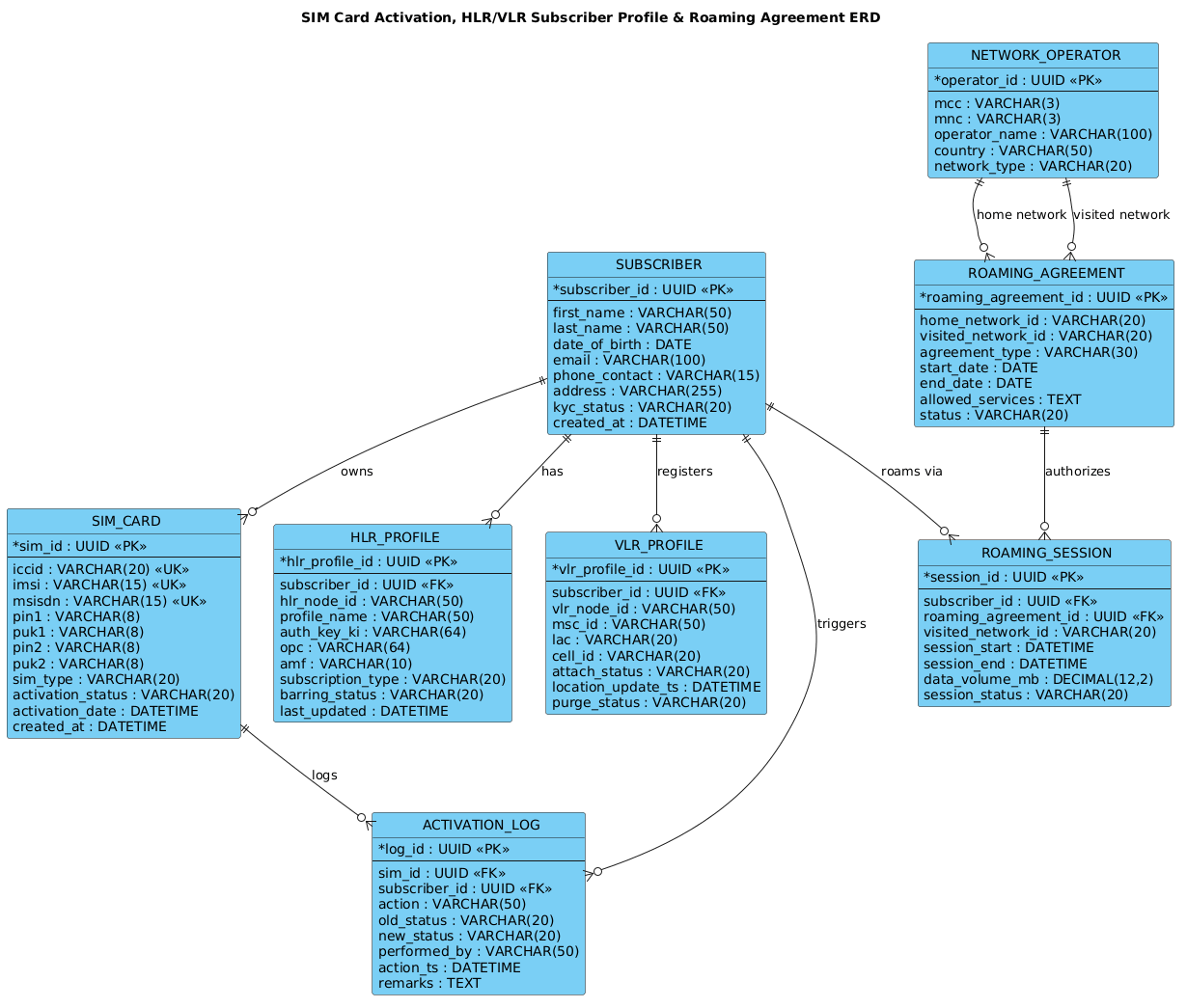
The complete source code for this diagram is provided below. You can copy this code directly into the VPasCode editor to render, modify, and export your own version.
@startuml
!include https://static.visual-paradigm.com/web/resources/plantuml-stdlib/themes/vp.puml

title SIM Card Activation, HLR/VLR Subscriber Profile & Roaming Agreement ERD
/'
This diagram models the core database entities and relationships involved in mobile subscriber
SIM activation and roaming management. It covers SIM cards, subscribers, HLR/VLR subscriber
profiles, and roaming agreements between operators. The problem context is to illustrate how
activation data, subscriber identity, profile state, and roaming permissions are linked to
support authentication, location management, and roaming authorization across networks.
'/

entity "SIM_CARD" as sim {
  * sim_id : UUID <<PK>>
  --
  iccid : VARCHAR(20) <<UK>>
  imsi : VARCHAR(15) <<UK>>
  msisdn : VARCHAR(15) <<UK>>
  pin1 : VARCHAR(8)
  puk1 : VARCHAR(8)
  pin2 : VARCHAR(8)
  puk2 : VARCHAR(8)
  sim_type : VARCHAR(20)
  activation_status : VARCHAR(20)
  activation_date : DATETIME
  created_at : DATETIME
}

entity "SUBSCRIBER" as sub {
  * subscriber_id : UUID <<PK>>
  --
  first_name : VARCHAR(50)
  last_name : VARCHAR(50)
  date_of_birth : DATE
  email : VARCHAR(100)
  phone_contact : VARCHAR(15)
  address : VARCHAR(255)
  kyc_status : VARCHAR(20)
  created_at : DATETIME
}

entity "HLR_PROFILE" as hlr {
  * hlr_profile_id : UUID <<PK>>
  --
  subscriber_id : UUID <<FK>>
  hlr_node_id : VARCHAR(50)
  profile_name : VARCHAR(50)
  auth_key_ki : VARCHAR(64)
  opc : VARCHAR(64)
  amf : VARCHAR(10)
  subscription_type : VARCHAR(20)
  barring_status : VARCHAR(20)
  last_updated : DATETIME
}

entity "VLR_PROFILE" as vlr {
  * vlr_profile_id : UUID <<PK>>
  --
  subscriber_id : UUID <<FK>>
  vlr_node_id : VARCHAR(50)
  msc_id : VARCHAR(50)
  lac : VARCHAR(20)
  cell_id : VARCHAR(20)
  attach_status : VARCHAR(20)
  location_update_ts : DATETIME
  purge_status : VARCHAR(20)
}

entity "ROAMING_AGREEMENT" as ra {
  * roaming_agreement_id : UUID <<PK>>
  --
  home_network_id : VARCHAR(20)
  visited_network_id : VARCHAR(20)
  agreement_type : VARCHAR(30)
  start_date : DATE
  end_date : DATE
  allowed_services : TEXT
  status : VARCHAR(20)
}

entity "NETWORK_OPERATOR" as op {
  * operator_id : UUID <<PK>>
  --
  mcc : VARCHAR(3)
  mnc : VARCHAR(3)
  operator_name : VARCHAR(100)
  country : VARCHAR(50)
  network_type : VARCHAR(20)
}

entity "ACTIVATION_LOG" as log {
  * log_id : UUID <<PK>>
  --
  sim_id : UUID <<FK>>
  subscriber_id : UUID <<FK>>
  action : VARCHAR(50)
  old_status : VARCHAR(20)
  new_status : VARCHAR(20)
  performed_by : VARCHAR(50)
  action_ts : DATETIME
  remarks : TEXT
}

entity "ROAMING_SESSION" as rs {
  * session_id : UUID <<PK>>
  --
  subscriber_id : UUID <<FK>>
  roaming_agreement_id : UUID <<FK>>
  visited_network_id : VARCHAR(20)
  session_start : DATETIME
  session_end : DATETIME
  data_volume_mb : DECIMAL(12,2)
  session_status : VARCHAR(20)
}

sub ||--o{ sim : "owns"
sub ||--o{ hlr : "has"
sub ||--o{ vlr : "registers"
sub ||--o{ log : "triggers"
sim ||--o{ log : "logs"
sub ||--o{ rs : "roams via"
ra ||--o{ rs : "authorizes"
op ||--o{ ra : "home network"
op ||--o{ ra : "visited network"

@endumlStep-by-Step Architectural Walkthrough
Building a complex ERD requires a structured approach. We will deconstruct the diagram into four logical phases: canvas setup, entity declaration, relationship mapping, and visual refinement.
Phase 1: Canvas Configuration & Layout Directives
Every PlantUML ERD begins with configuration directives that set the stage for rendering. We start by including the Visual Paradigm theme to ensure the diagram looks professional and consistent with industry standards. We also define a descriptive title that serves as the diagram’s legend.
@startuml
!include https://static.visual-paradigm.com/web/resources/plantuml-stdlib/themes/vp.puml

title SIM Card Activation, HLR/VLR Subscriber Profile & Roaming Agreement ERD
The title directive places a header at the top of the diagram, while the !include directive fetches the vp.puml theme, which defines the colors, fonts, and shapes for the entities.
Phase 2: Declaring Core Entities, Actors, and Boundaries
Next, we define the entities. In PlantUML ERD syntax, an entity is defined using the entity keyword followed by the table name and an alias (e.g., sim). The internal attributes are listed within curly braces.
entity "SIM_CARD" as sim {
  * sim_id : UUID <>
  --
  iccid : VARCHAR(20) <>
  --
  activation_status : VARCHAR(20)
}
Key syntax elements here include:
*prefix: Indicates the Primary Key (PK).<and> <: Stereotypes that visually label the attribute as a Primary Key or Unique Key.> --: A separator line often used to divide keys from other attributes for better readability.entity "Name" as alias: Allows us to reference this entity later by the short alias (e.g.,sim) instead of the full name.
We repeat this process for SUBSCRIBER, HLR_PROFILE, VLR_PROFILE, and others, ensuring that foreign keys (marked with <) are included to maintain referential integrity.
Phase 3: Mapping Data Flows & Key Interactions
Once entities are defined, we connect them using relationship lines. In PlantUML, the syntax entity1 ||--o{ entity2 : "Label" defines the cardinality and direction.
sub ||--o{ sim : "owns"
sub ||--o{ hlr : "has"
sub ||--o{ vlr : "registers"
Here, we are modeling the core business logic:
sub ||--o{ sim: A subscriber owns zero or more SIM cards (one-to-many).sub ||--o{ hlr: A subscriber has an HLR profile.sub ||--o{ vlr: A subscriber registers with a VLR profile.
The symbols || (one) and o{ (zero or many) clearly communicate the database constraints visually.
Phase 4: Grouping, Annotations & Visual Polish
The final phase involves ensuring the diagram is self-explanatory. We use the comment block syntax /' ... '/ to add a detailed description of the diagram’s context without cluttering the visual output. This is crucial for documentation, allowing future developers to understand the “why” behind the schema.
/'
This diagram models the core database entities...
'/
This comment appears in the rendered diagram (depending on theme settings) or is preserved in the source code as a vital piece of metadata.
Syntax & Keyword Deep Dive
To master ERD modeling in PlantUML, it is essential to understand the specific keywords and symbols used to define structure and relationships.
entity: The fundamental building block used to define a database table or class. It is followed by the table name and an alias for referencing.||--o{: A relationship connector indicating a “One-to-Many” relationship. The||side represents “One” and theo{side represents “Zero or Many”. This is standard for foreign key relationships.<, <> > : Stereotypes (double brackets) used to annotate attributes.PKmarks a Primary Key, whileFKmarks a Foreign Key, ensuring the diagram accurately reflects database constraints.--: A visual separator line used within entity blocks to distinguish key attributes from general data fields./' ... '/: The syntax for multi-line comments. This is used to embed documentation directly into the code file, which is often rendered as a note or description in the final diagram.
Best Practices & Pitfalls to Avoid
When designing ERDs for telecommunications or any complex domain, adhering to best practices ensures your diagrams remain maintainable and readable.
- Use Descriptive Aliases: While
SIM_CARDis clear, usingas simmakes relationship lines much cleaner (e.g.,sim ||--o{ logvsSIM_CARD ||--o{ ACTIVATION_LOG). This reduces visual clutter. - Consistent Naming Conventions: Stick to a consistent naming style for attributes (e.g., always using
snake_caseorPascalCase) and data types. In our example, we usedUUIDandVARCHARconsistently. - Separate Logic from Data: Clearly distinguish between static data (like
operator_name) and dynamic state (likeactivation_status). Use the--separator to visually group keys and status fields. - Document the Context: Never rely solely on the diagram. Always include a comment block (like the one used in this tutorial) to explain the business rules that the diagram implies but cannot explicitly state.
Start Building Telecom ERDs Faster with VPasCode
Design complex database schemas for mobile networks instantly in your browser with VPasCode, the free PlantUML editor that renders diagrams in real-time.