


In the rapidly evolving telecommunications landscape, the provisioning of broadband services relies heavily on precise data management. When a technician installs a new line or a network engineer reconfigures a port, the underlying system must track not just the physical connection, but the entire lifecycle of that connection. This includes the physical DSLAM port, the logical subscriber line, the customer’s service address, and the critical line qualification test results that determine if a line can support a specific speed tier. Without a robust data model, operators risk provisioning errors, inaccurate billing, and service delays.
Visualizing this complex web of relationships is essential for database architects and network engineers. An Entity Relationship Diagram (ERD) provides the blueprint for how data flows from the physical hardware (DSLAM devices) to the subscriber (Customer) and the quality metrics (Test Results). By using diagram-as-code with PlantUML in VPasCode, teams can treat their data models as living documentation, versioned alongside their infrastructure code, ensuring that the database schema always matches the operational reality of the network.
Understanding the Model: Purpose, Scope & Problem Framing
This tutorial focuses on constructing a specialized ERD designed for telecommunications infrastructure management. Unlike generic database schemas, this model addresses the specific operational workflow of managing DSL (Digital Subscriber Line) access multiplexers (DSLAMs) and the qualification process required to activate broadband services.
Diagram Abstraction & Representation
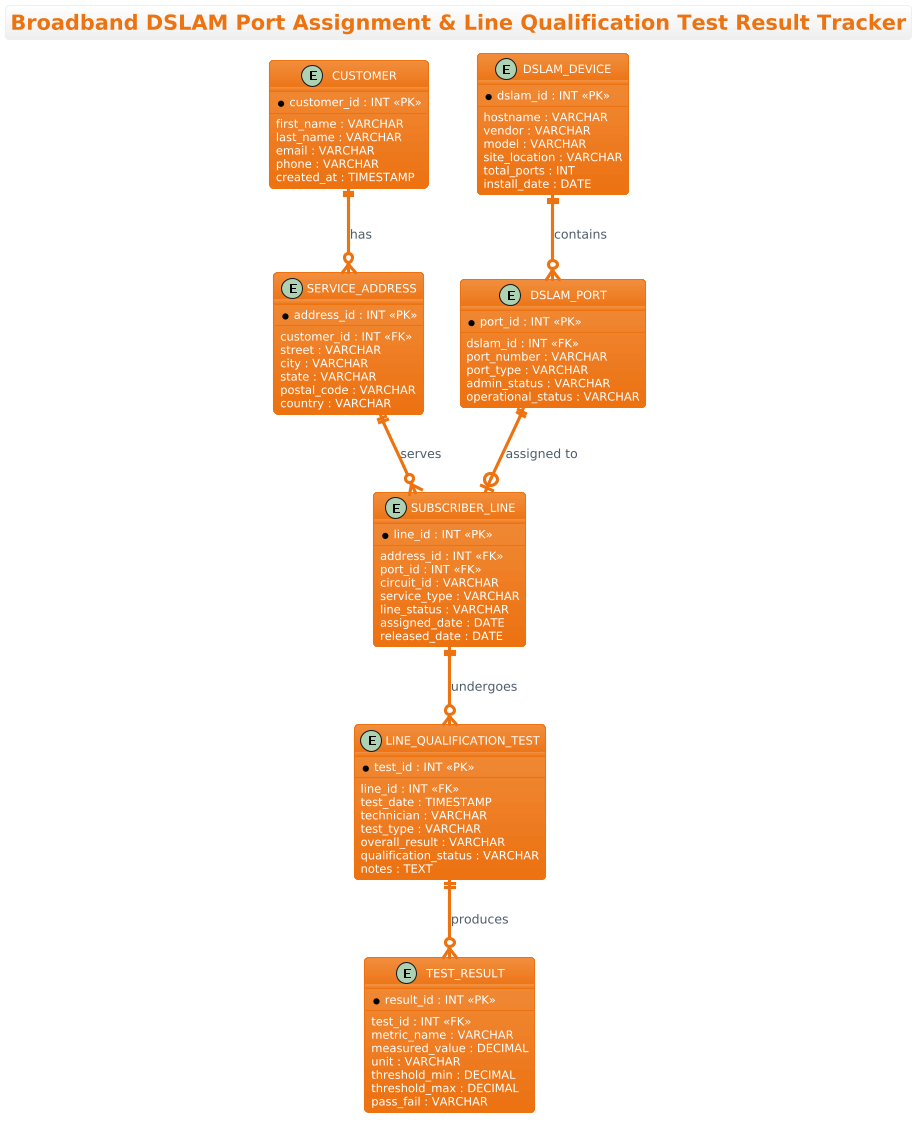
An ERD is the ideal tool for this scenario because it explicitly maps the cardinality and relationships between physical assets and logical records. In this model, we abstract the physical world into entities: a DSLAM_DEVICE represents the hardware cabinet, a DSLAM_PORT represents a specific physical jack, and a SUBSCRIBER_LINE represents the logical service path assigned to a customer. The diagram also captures the qualification process through the LINE_QUALIFICATION_TEST and TEST_RESULT entities, which store the technical metrics (attenuation, noise margin) required to validate service quality.
Target Domain Scope & Scenario
The scope of this diagram covers the end-to-end data requirements for a service provisioning system. It intentionally excludes billing history or marketing data, focusing strictly on the operational state of the network. The model assumes a scenario where a port is assigned to a line, a test is run, and the results determine if the service can be activated. This scope is critical for database normalization and ensuring that the system can track port utilization and line history without data redundancy.
Key Takeaways & Educational Insights
By building this diagram, you will learn how to model hierarchical hardware structures (Device -> Port), link them to customer data via addresses, and capture iterative test results in a normalized structure. You will gain insight into how to represent one-to-many relationships (e.g., one test producing many result metrics) and how to handle optional relationships (e.g., a port may be unassigned). The resulting model serves as a definitive source of truth for database engineers and network operations teams.
Complete Diagram & Full Source Code
Below is the complete visual representation of the Broadband DSLAM Port Assignment and Line Qualification Test Result Tracker. This diagram illustrates the relationships between customers, service addresses, DSLAM hardware, and the technical qualification tests required for service activation.
Copy the following complete source code to replicate this diagram instantly in the VPasCode editor:
@startuml
!theme aws-orange
title Broadband DSLAM Port Assignment & Line Qualification Test Result Tracker

/'
Diagram Context:
This ERD models the operational data needed to manage broadband subscriber
lines from the DSLAM (Digital Subscriber Line Access Multiplexer) through to
service qualification. A central DSLAM_PORT represents a physical port on a
DSLAM device and can be assigned to at most one subscriber line at a time,
capturing the assignment lifecycle (assigned date, release date, status).
Each subscriber line belongs to a customer and is associated with a service
address. Line qualification tests are performed against a subscriber line to
measure loop characteristics (attenuation, noise margin, sync rate, etc.)
and determine whether the line can support the requested broadband service.
A DSLAM_DEVICE groups ports and records vendor, model, and location details,
while TEST_RESULT stores individual qualification test outcomes and overall
pass/fail qualification status. This structure supports tracking port
utilisation, line history, and the qualification evidence required before
provisioning a broadband service.
'/

entity "CUSTOMER" as customer {
  * customer_id : INT <<PK>>
  --
  first_name : VARCHAR
  last_name : VARCHAR
  email : VARCHAR
  phone : VARCHAR
  created_at : TIMESTAMP
}

entity "SERVICE_ADDRESS" as address {
  * address_id : INT <<PK>>
  --
  customer_id : INT <<FK>>
  street : VARCHAR
  city : VARCHAR
  state : VARCHAR
  postal_code : VARCHAR
  country : VARCHAR
}

entity "DSLAM_DEVICE" as dslam {
  * dslam_id : INT <<PK>>
  --
  hostname : VARCHAR
  vendor : VARCHAR
  model : VARCHAR
  site_location : VARCHAR
  total_ports : INT
  install_date : DATE
}

entity "DSLAM_PORT" as port {
  * port_id : INT <<PK>>
  --
  dslam_id : INT <<FK>>
  port_number : VARCHAR
  port_type : VARCHAR
  admin_status : VARCHAR
  operational_status : VARCHAR
}

entity "SUBSCRIBER_LINE" as line {
  * line_id : INT <<PK>>
  --
  address_id : INT <<FK>>
  port_id : INT <<FK>>
  circuit_id : VARCHAR
  service_type : VARCHAR
  line_status : VARCHAR
  assigned_date : DATE
  released_date : DATE
}

entity "LINE_QUALIFICATION_TEST" as test {
  * test_id : INT <<PK>>
  --
  line_id : INT <<FK>>
  test_date : TIMESTAMP
  technician : VARCHAR
  test_type : VARCHAR
  overall_result : VARCHAR
  qualification_status : VARCHAR
  notes : TEXT
}

entity "TEST_RESULT" as result {
  * result_id : INT <<PK>>
  --
  test_id : INT <<FK>>
  metric_name : VARCHAR
  measured_value : DECIMAL
  unit : VARCHAR
  threshold_min : DECIMAL
  threshold_max : DECIMAL
  pass_fail : VARCHAR
}

customer ||--o{ address : "has"
address ||--o{ line : "serves"
dslam ||--o{ port : "contains"
port ||--o| line : "assigned to"
line ||--o{ test : "undergoes"
test ||--o{ result : "produces"

@endumlStep-by-Step Architectural Walkthrough
Building a complex ERD requires a structured approach. We will deconstruct this diagram into four logical phases, starting with the visual theme and ending with the relationship mapping.
Phase 1: Canvas Configuration & Layout Directives
Before defining any entities, we must set the stage for the diagram. This ensures the visual output matches the branding and layout preferences of the project. We start by declaring the PlantUML directive to apply a specific theme.
@startuml
!theme aws-orange
title Broadband DSLAM Port Assignment & Line Qualification Test Result Tracker
Here, !theme aws-orange applies a pre-defined color palette inspired by AWS, using warm oranges and neutral grays to differentiate entities. The title directive provides a clear, descriptive header for the diagram, which is essential for documentation. We also include a comment block using /' and '/ to embed a detailed context description directly within the code, serving as a living document for the model’s purpose.
Phase 2: Declaring Core Entities, Actors, and Boundaries
The foundation of an ERD is the entity definition. We define the core tables using the entity keyword. Each entity is given a database-style name and a short alias for relationship mapping.
entity "CUSTOMER" as customer {
  * customer_id : INT <>
  --
  first_name : VARCHAR
  last_name : VARCHAR
  email : VARCHAR
  phone : VARCHAR
  created_at : TIMESTAMP
}
In this block, we define the CUSTOMER entity. The syntax * before a field indicates it is a Primary Key (PK). The -- separator visually divides the key fields from the attributes. We use the alias as customer to create a short handle that will be used later to draw lines between entities. This pattern is repeated for SERVICE_ADDRESS, DSLAM_DEVICE, DSLAM_PORT, SUBSCRIBER_LINE, LINE_QUALIFICATION_TEST, and TEST_RESULT.
Phase 3: Mapping Data Flows & Key Interactions
Once the entities are defined, we must establish the relationships between them. In PlantUML ERD syntax, relationships are drawn using the ||--o{ or ||--o| notation. These arrows represent cardinality (one-to-many, one-to-one, etc.).
customer ||--o{ address : "has"
address ||--o{ line : "serves"
dslam ||--o{ port : "contains"
port ||--o| line : "assigned to"
line ||--o{ test : "undergoes"
test ||--o{ result : "produces"
Let’s break down the critical relationships:
customer ||--o{ address: A customer has zero or many addresses (the crow’s foot{indicates “many”, the double bar||indicates “one” on the customer side).port ||--o| line: A port is assigned to exactly one line (indicated by the single bar|on the line side), but a line must have a port.test ||--o{ result: One test produces many result metrics (e.g., attenuation, noise margin), which is why the crow’s foot is on the result side.
Phase 4: Grouping, Annotations & Visual Polish
The final phase involves ensuring the diagram is readable and professional. We use the title directive for the header and the comment block for context. The aws-orange theme handles the grouping colors automatically, but we ensure that field names are clearly labeled with their data types (e.g., INT, VARCHAR, DECIMAL) to aid database engineers in schema generation.
Syntax & Keyword Deep Dive
To master PlantUML ERD diagrams, it is crucial to understand the specific keywords and symbols used in this model.
entity: The primary keyword used to define a database table. It accepts a display name and an alias.as: Used immediately after the entity name to define a short alias (e.g.,as customer) that is used for drawing relationships.*: A prefix symbol for a field to denote it as a Primary Key (PK). This is rendered as a key icon in the diagram.<and> <: Stereotypes used to explicitly label fields as Primary Keys and Foreign Keys, providing semantic clarity in the visual output.> ||--o{: A relationship arrow representing a one-to-many relationship. The double bar (||) means “one and only one” on the source side, and the crow’s foot ({) means “zero or many” on the target side.||--o|: A relationship arrow representing a one-to-one relationship. The single bar (|) on the target side indicates that the target entity must exist exactly once for the source./'and'/: The delimiter for a multi-line comment block. This allows you to embed rich text descriptions directly in the code without affecting the diagram rendering.
Best Practices & Pitfalls to Avoid
When creating ERDs for complex systems like telecommunications infrastructure, adherence to best practices ensures the diagram remains maintainable and useful.
- Use Meaningful Aliases: While entity names like
DSLAM_PORTare descriptive, they are long. Always define a short alias (e.g.,as port) to keep relationship lines clean and readable. - Normalize Test Results: In this diagram,
TEST_RESULTis a separate entity linked toLINE_QUALIFICATION_TEST. This is a best practice for handling variable metrics (like attenuation, noise margin, sync rate) that differ per test. Avoid storing these as columns in the test table. - Be Precise with Cardinality: In telecom, the difference between a port being “optional” (unassigned) and “required” (assigned) is critical. Use
||--o|(mandatory one-to-one) versus||--o{(optional one-to-many) carefully to reflect business rules. - Document Context Early: Use the
/'comment block at the top to explain the diagram’s scope. As the model grows, this context prevents confusion about why certain entities exist.
Start Building DSLAM ERDs Faster with VPasCode
Instantly visualize and refine your telecom data models in your browser with zero setup, using the free VPasCode PlantUML editor.