


In the rapidly evolving landscape of telecommunications, satellite operators face the critical challenge of optimizing limited orbital resources while maintaining high-quality service delivery. The backbone of this operational efficiency lies in robust data modeling that can handle complex relationships between satellites, transponders, earth stations, and the dynamic calculations required for link budgeting. A well-structured Entity-Relationship Diagram (ERD) serves as the architectural blueprint, ensuring that bandwidth allocation strategies are data-driven, interference is minimized, and link performance metrics like EIRP and C/N ratios are accurately tracked.

Visualizing these intricate dependencies through diagramming-as-code offers a distinct advantage over traditional drawing tools. By using PlantUML within the VPasCode editor, architects can define the schema for a system managing satellite transponder bandwidth and earth station link budgets with precision. This approach not only guarantees consistency across documentation but also allows for rapid iteration. As regulatory requirements shift and new satellite constellations launch, the ability to instantly render, modify, and diagram-as-code modeling the logical data structure becomes a strategic asset for any telecommunications engineering team.
Understanding the Model: Purpose, Scope & Problem Framing
This guide focuses on constructing a comprehensive ERD for a Satellite Transponder Bandwidth Allocation and Earth Station Link Budget Calculator. The primary objective is to model a system that manages the lifecycle of satellite resources, from the physical characteristics of the satellite to the dynamic allocation of bandwidth to earth stations.
Diagram Abstraction & Representation
An ERD is the ideal abstraction for this domain because it explicitly defines the entities (tables) and the cardinality of relationships between them. In this specific context:
- Entities represent tangible assets and calculated records: Satellites, Transponders, Earth Stations, and Link Budgets.
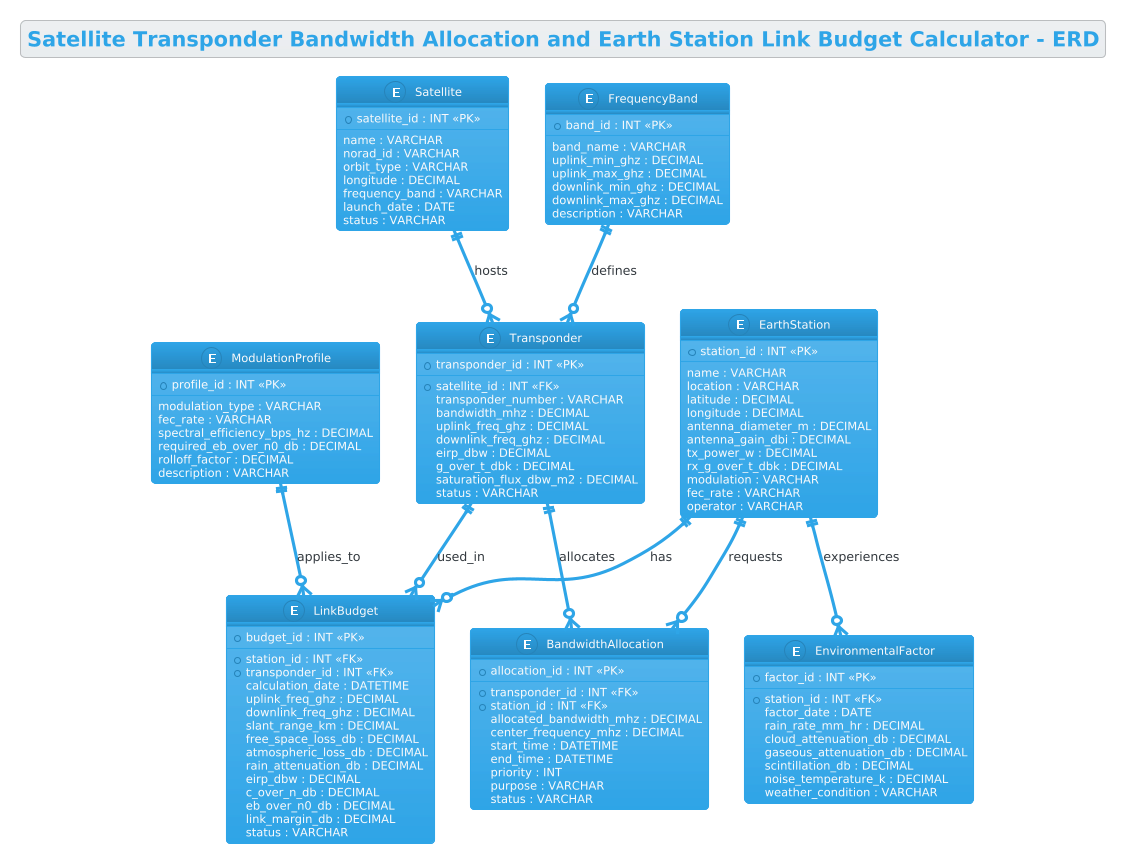
- Relationships capture the operational logic: A satellite hosts transponders, an earth station has a link budget, and a transponder allocates bandwidth to a station.
- Attributes hold the critical technical parameters: Frequency bands, power levels (EIRP), antenna gains, and environmental factors like rain attenuation.
Target Domain Scope & Scenario
The scope of this diagram covers the end-to-end data flow required to calculate and manage a satellite communication link. It includes the static configuration of hardware (satellites and earth stations), the dynamic assignment of resources (bandwidth allocation), and the computational records (link budgets) that validate signal integrity. The diagram deliberately excludes external billing systems or user management interfaces to focus strictly on the core engineering data model.
Key Takeaways & Educational Insights
By building this model, you will gain insights into how to:
- Model one-to-many relationships between a satellite and its transponders.
- Design junction tables for many-to-many relationships, such as bandwidth allocation between stations and transponders.
- Structure complex calculation records (Link Budget) that depend on multiple entities.
- Apply specific PlantUML syntax for database modeling, including primary keys, foreign keys, and data types.
Complete Diagram & Full Source Code
Before diving into the step-by-step construction, here is the complete, finalized ERD. This diagram visualizes the entire ecosystem of satellite resource management, highlighting the critical paths from the satellite down to the earth station.
@startuml
!theme cerulean
title Satellite Transponder Bandwidth Allocation and Earth Station Link Budget Calculator - ERD

/'
This ERD illustrates the data model for a system that manages satellite transponder bandwidth allocation
and calculates earth station link budgets. The diagram captures satellites hosting multiple transponders,
each with defined bandwidth and power characteristics. Earth stations are associated with specific
satellites and transponders for communication links. The link budget calculator computes key parameters
such as EIRP, path loss, G/T, and C/N ratios based on the earth station configuration, transponder
attributes, and environmental factors. Bandwidth allocations track how transponder capacity is assigned
to different earth stations or services, ensuring efficient utilization and preventing interference.
'/

entity "Satellite" as sat {
  * satellite_id : INT <<PK>>
  --
  name : VARCHAR
  norad_id : VARCHAR
  orbit_type : VARCHAR
  longitude : DECIMAL
  frequency_band : VARCHAR
  launch_date : DATE
  status : VARCHAR
}

entity "Transponder" as trsp {
  * transponder_id : INT <<PK>>
  --
  * satellite_id : INT <<FK>>
  transponder_number : VARCHAR
  bandwidth_mhz : DECIMAL
  uplink_freq_ghz : DECIMAL
  downlink_freq_ghz : DECIMAL
  eirp_dbw : DECIMAL
  g_over_t_dbk : DECIMAL
  saturation_flux_dbw_m2 : DECIMAL
  status : VARCHAR
}

entity "EarthStation" as es {
  * station_id : INT <<PK>>
  --
  name : VARCHAR
  location : VARCHAR
  latitude : DECIMAL
  longitude : DECIMAL
  antenna_diameter_m : DECIMAL
  antenna_gain_dbi : DECIMAL
  tx_power_w : DECIMAL
  rx_g_over_t_dbk : DECIMAL
  modulation : VARCHAR
  fec_rate : VARCHAR
  operator : VARCHAR
}

entity "LinkBudget" as lb {
  * budget_id : INT <<PK>>
  --
  * station_id : INT <<FK>>
  * transponder_id : INT <<FK>>
  calculation_date : DATETIME
  uplink_freq_ghz : DECIMAL
  downlink_freq_ghz : DECIMAL
  slant_range_km : DECIMAL
  free_space_loss_db : DECIMAL
  atmospheric_loss_db : DECIMAL
  rain_attenuation_db : DECIMAL
  eirp_dbw : DECIMAL
  c_over_n_db : DECIMAL
  eb_over_n0_db : DECIMAL
  link_margin_db : DECIMAL
  status : VARCHAR
}

entity "BandwidthAllocation" as ba {
  * allocation_id : INT <<PK>>
  --
  * transponder_id : INT <<FK>>
  * station_id : INT <<FK>>
  allocated_bandwidth_mhz : DECIMAL
  center_frequency_mhz : DECIMAL
  start_time : DATETIME
  end_time : DATETIME
  priority : INT
  purpose : VARCHAR
  status : VARCHAR
}

entity "ModulationProfile" as mp {
  * profile_id : INT <<PK>>
  --
  modulation_type : VARCHAR
  fec_rate : VARCHAR
  spectral_efficiency_bps_hz : DECIMAL
  required_eb_over_n0_db : DECIMAL
  rolloff_factor : DECIMAL
  description : VARCHAR
}

entity "FrequencyBand" as fb {
  * band_id : INT <<PK>>
  --
  band_name : VARCHAR
  uplink_min_ghz : DECIMAL
  uplink_max_ghz : DECIMAL
  downlink_min_ghz : DECIMAL
  downlink_max_ghz : DECIMAL
  description : VARCHAR
}

entity "EnvironmentalFactor" as ef {
  * factor_id : INT <<PK>>
  --
  * station_id : INT <<FK>>
  factor_date : DATE
  rain_rate_mm_hr : DECIMAL
  cloud_attenuation_db : DECIMAL
  gaseous_attenuation_db : DECIMAL
  scintillation_db : DECIMAL
  noise_temperature_k : DECIMAL
  weather_condition : VARCHAR
}

sat ||--o{ trsp : "hosts"
es ||--o{ lb : "has"
trsp ||--o{ lb : "used_in"
trsp ||--o{ ba : "allocates"
es ||--o{ ba : "requests"
mp ||--o{ lb : "applies_to"
fb ||--o{ trsp : "defines"
es ||--o{ ef : "experiences"

@endumlStep-by-Step Architectural Walkthrough
Phase 1: Canvas Configuration & Layout Directives
Every PlantUML diagram begins with configuration directives that set the visual tone and structural rules. In this telecommunications ERD, we prioritize clarity and a professional look suitable for engineering documentation.
We start by declaring the @startuml block. Immediately after, we apply the !theme cerulean directive. This theme provides a clean, blue-toned aesthetic that is highly readable for complex diagrams with many entities. It ensures that the borders, background, and text colors are harmonious without requiring manual CSS adjustments.
We also define the title using the title keyword, which appears at the top of the diagram. This is crucial for quick identification in large documentation sets. Finally, we include a comment block using the / syntax to describe the diagram’s context, which is invisible in the rendered output but invaluable for readers.
Phase 2: Declaring Core Entities, Actors, and Boundaries
The core of the ERD is the definition of entities. In PlantUML, we use the entity keyword. Each entity represents a table in the database schema.
For example, the Satellite entity is defined with a primary key * satellite_id : INT <. The asterisk * denotes the primary key, and the < stereotype reinforces this visually. We then list the attributes, such as norad_id and orbit_type, using standard data types like VARCHAR and DECIMAL. The -- separator is used to visually group attributes, often separating keys from descriptive fields.
We repeat this process for Transponder, EarthStation, and LinkBudget. Note the Transponder entity includes a foreign key * satellite_id : INT <, indicating a relationship back to the Satellite. This establishes the hierarchy: one satellite can have many transponders.
Phase 3: Mapping Data Flows & Key Interactions
Once entities are defined, we must link them to show how data flows and how resources are consumed. PlantUML uses relationship arrows with cardinality symbols.
For the relationship between Satellite and Transponder, we use sat ||--o{ trsp : "hosts". The || on the left represents the “one” side (mandatory), and the o{ on the right represents “zero or many” (optional). This accurately models that a satellite must exist to host transponders, but a satellite might have zero transponders if it’s in storage.
We also model the BandwidthAllocation entity. This is a junction table (or associative entity) that resolves a many-to-many relationship between EarthStation and Transponder. The relationships trsp ||--o{ ba : "allocates" and es ||--o{ ba : "requests" show that a single allocation record links one transponder to one station at a specific time.
Phase 4: Grouping, Annotations & Visual Polish
To make the diagram even more informative, we can add annotations and group related entities. While the ERD here focuses on standard entity relationships, we can extend it by adding notes for complex calculations or grouping entities into packages if the diagram becomes too large.
In this specific model, we rely on the title and the comment block to provide the necessary context. The LinkBudget entity is particularly dense with attributes (like rain_attenuation_db and slant_range_km), so ensuring the font size and spacing are optimized via the theme is key to readability.
Syntax & Keyword Deep Dive
To master this diagram, it is essential to understand the specific PlantUML syntax used for database modeling.
entity "Name" as alias: Defines a new entity. Theas aliaspart creates a shorthand (e.g.,sat) used later to draw relationships, keeping the code concise.* attribute : Type: The asterisk prefix indicates a Primary Key. It is the unique identifier for the record.<and> <: Stereotypes used to visually label Primary Keys and Foreign Keys in the diagram rendering.> --: A separator line used within an entity block to visually group attributes, often separating keys from other fields.||--o{: A relationship arrow.||means “mandatory one” ando{means “optional many”. You can use|for mandatory one,|ofor optional one, etc."label": Text placed after the relationship arrow to describe the nature of the connection (e.g.,"hosts","allocates")./…/: A multi-line comment block. Text inside is ignored by the renderer but is visible in the source code for documentation.
Best Practices & Pitfalls to Avoid
When building ERDs for complex systems like telecommunications, following best practices ensures your diagrams remain maintainable and readable.
- Use Meaningful Aliases: Always define short aliases (e.g.,
sat,trsp) for long entity names. This makes relationship lines cleaner and the code easier to read. - Consistent Data Types: Stick to standard SQL data types (
INT,VARCHAR,DECIMAL) for clarity. Avoid mixing generic types with specific ones unless necessary. - Logical Grouping: If your diagram grows large, consider grouping entities into packages (e.g.,
package "Satellite Ops" { ... }) to reduce visual clutter. - Clear Cardinality: Always define the cardinality (one-to-many, many-to-many) explicitly. Ambiguous relationships lead to database design errors later.
Start Building Satellite ERDs Faster with VPasCode
Design, test, and refine your telecommunications data models instantly in your browser with VPasCode, the free PlantUML editor for architects.