


In the high-velocity world of telecommunications and enterprise collaboration, the ability to track user availability and preserve communication history is not just a feature—it is the backbone of modern workflow. Unified Communications (UC) platforms must handle complex state changes where a user’s presence (Available, Busy, Away) shifts across multiple devices simultaneously, while ensuring that every instant message sent in a one-to-one or group chat is reliably stored, delivered, and audited. Without a rigorous data model, these systems risk data loss, inconsistent status reporting, and a fractured user experience.

Building a reliable data schema for such a system requires more than just listing tables; it demands a clear visualization of how entities like users, sessions, and messages interact over time. By using diagram-as-code with PlantUML, architects can define these relationships with precision, version the schema logic alongside their application code, and instantly visualize the data topology. This tutorial demonstrates how to construct a professional Entity-Relationship Diagram (ERD) for a UC platform, covering presence tracking, session management, and message history, all within the instant, browser-based environment of VPasCode.
Understanding the Model: Purpose, Scope & Problem Framing
This diagram addresses the core data abstraction challenge in unified communications: maintaining the “truth” of a user’s status while managing the history of their interactions. Unlike simple chat logs, a UC system must distinguish between a user’s current state (which is ephemeral and device-specific) and their conversation history (which is persistent and relational).
Diagram Abstraction & Representation
As an Entity-Relationship Diagram (ERD), this model visualizes the static structure of the database that powers the application. It maps the cardinalities between key entities:
- Users & Presence: A single user can have multiple active presence statuses (e.g., one for mobile, one for desktop), but the diagram models the link between a user and their current state.
- Conversations & Messages: The model separates the “container” (Conversation) from the “content” (Message), allowing for efficient archiving and membership management without duplicating message data.
- Receipts & Attachments: These are child entities that depend on the existence of a Message, ensuring data integrity for delivery tracking and file storage.
Target Domain Scope & Scenario
The scope covers the backend data layer for a telecommunications-grade messaging service. It intentionally excludes UI components or API endpoints, focusing strictly on how data is stored. The scenario involves a user logging in from a new device, updating their status, joining a group chat, sending a message with an attachment, and having the system track exactly when that message was read.
Key Takeaways & Educational Insights
By the end of this guide, you will understand how to model one-to-many relationships for message history, handle self-referencing relationships for message replies, and structure tables to support both real-time presence updates and historical audit trails.
Complete Diagram & Full Source Code
Below is the final blueprint for the Unified Communications ERD. This model utilizes the rose theme for a professional aesthetic and clearly defines primary keys (PK), foreign keys (FK), and data types.
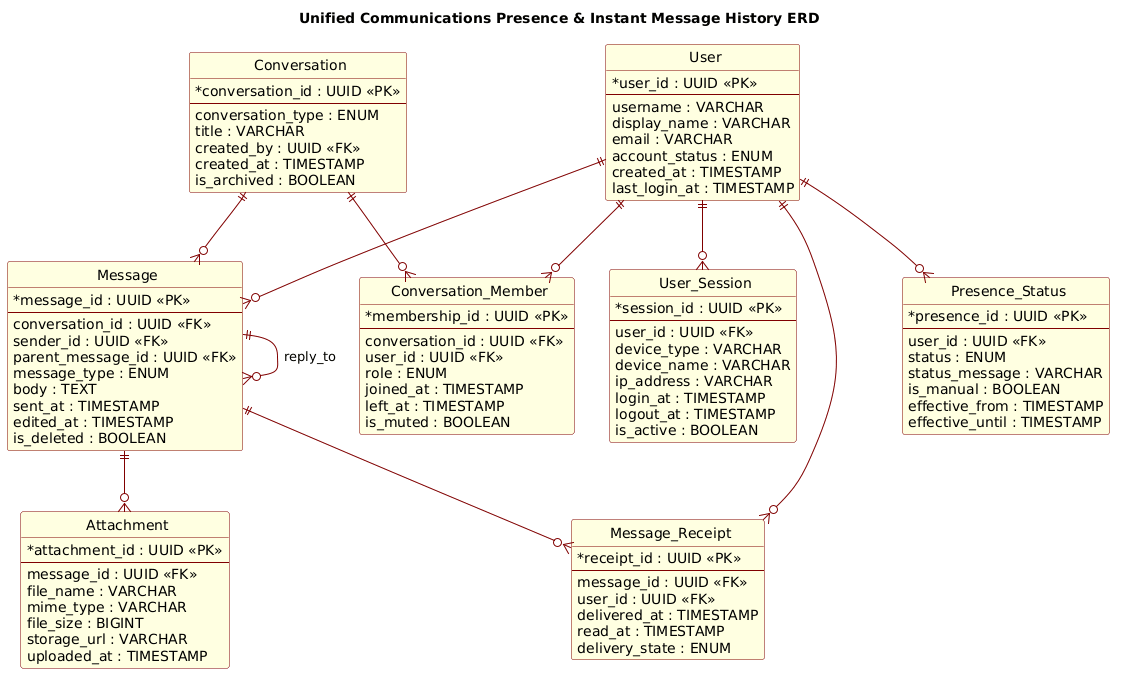
@startuml
!include https://static.visual-paradigm.com/web/resources/plantuml-stdlib/themes/rose.puml

title Unified Communications Presence & Instant Message History ERD
/'
This diagram models the data layer for a unified communications platform.
It shows how user presence status is tracked across sessions and devices,
while instant message history is stored for one-to-one and group conversations.
The core entities cover users, presence states, sessions, conversations,
messages, message delivery receipts, and attachments.
The relationships support real-time presence visibility, conversation
membership, message delivery tracking, and auditability of chat history.
'/

entity "User" as user {
  * user_id : UUID <<PK>>
  --
  username : VARCHAR
  display_name : VARCHAR
  email : VARCHAR
  account_status : ENUM
  created_at : TIMESTAMP
  last_login_at : TIMESTAMP
}

entity "Presence_Status" as presence {
  * presence_id : UUID <<PK>>
  --
  user_id : UUID <<FK>>
  status : ENUM
  status_message : VARCHAR
  is_manual : BOOLEAN
  effective_from : TIMESTAMP
  effective_until : TIMESTAMP
}

entity "User_Session" as session {
  * session_id : UUID <<PK>>
  --
  user_id : UUID <<FK>>
  device_type : VARCHAR
  device_name : VARCHAR
  ip_address : VARCHAR
  login_at : TIMESTAMP
  logout_at : TIMESTAMP
  is_active : BOOLEAN
}

entity "Conversation" as conversation {
  * conversation_id : UUID <<PK>>
  --
  conversation_type : ENUM
  title : VARCHAR
  created_by : UUID <<FK>>
  created_at : TIMESTAMP
  is_archived : BOOLEAN
}

entity "Conversation_Member" as member {
  * membership_id : UUID <<PK>>
  --
  conversation_id : UUID <<FK>>
  user_id : UUID <<FK>>
  role : ENUM
  joined_at : TIMESTAMP
  left_at : TIMESTAMP
  is_muted : BOOLEAN
}

entity "Message" as message {
  * message_id : UUID <<PK>>
  --
  conversation_id : UUID <<FK>>
  sender_id : UUID <<FK>>
  parent_message_id : UUID <<FK>>
  message_type : ENUM
  body : TEXT
  sent_at : TIMESTAMP
  edited_at : TIMESTAMP
  is_deleted : BOOLEAN
}

entity "Message_Receipt" as receipt {
  * receipt_id : UUID <<PK>>
  --
  message_id : UUID <<FK>>
  user_id : UUID <<FK>>
  delivered_at : TIMESTAMP
  read_at : TIMESTAMP
  delivery_state : ENUM
}

entity "Attachment" as attachment {
  * attachment_id : UUID <<PK>>
  --
  message_id : UUID <<FK>>
  file_name : VARCHAR
  mime_type : VARCHAR
  file_size : BIGINT
  storage_url : VARCHAR
  uploaded_at : TIMESTAMP
}

user ||--o{ presence
user ||--o{ session
user ||--o{ member
user ||--o{ message
user ||--o{ receipt

conversation ||--o{ member
conversation ||--o{ message

message ||--o{ receipt
message ||--o{ attachment
message ||--o{ message : "reply_to"

@endumlStep-by-Step Architectural Walkthrough
Constructing this ERD in VPasCode involves four logical phases: setting the visual theme, defining the core entities, establishing the relationships, and refining the details.
Phase 1: Canvas Configuration & Layout Directives
Every PlantUML diagram begins with setup directives. We start by including the rose theme, which provides a consistent, professional color palette and styling for the entire diagram. This ensures that entity boxes and relationship lines look polished without manual CSS tweaking.
!include https://static.visual-paradigm.com/web/resources/plantuml-stdlib/themes/rose.puml

title Unified Communications Presence & Instant Message History ERD
We also add a comment block using / to document the diagram’s purpose. This is critical for maintaining documentation clarity as the schema evolves.
Phase 2: Declaring Core Entities, Actors, and Boundaries
The foundation of the ERD lies in the entity blocks. We define the User entity first, as it is the central actor. Notice the use of UUID for primary keys, a best practice in modern distributed systems to avoid collisions.
entity "User" as user {
  * user_id : UUID <>
  --
  username : VARCHAR
  display_name : VARCHAR
  ...
We then define Presence_Status and User_Session. These entities are linked to the User but represent transient states. The Presence_Status includes fields like is_manual to distinguish between a user setting their status and an automated system update.
Phase 3: Mapping Data Flows & Key Interactions
The most complex part of this model is the conversation and message flow. We define the Conversation entity, which acts as a container. The Message entity is then linked to the conversation.
A critical architectural pattern here is the self-referencing relationship for replies. The Message entity includes a parent_message_id, allowing a message to point back to another message within the same table. This enables nested reply threads.
entity "Message" as message {
  * message_id : UUID <>
  --
  parent_message_id : UUID <>
  ...
Phase 4: Grouping, Annotations & Visual Polish
Finally, we define the relationships using PlantUML’s cardinality notation. The ||--o{ syntax indicates a mandatory one-to-many relationship (one user has many messages) or an optional one-to-many (a user *can* have messages). We also explicitly label the self-reference for clarity.
message ||--o{ message : "reply_to"

user ||--o{ message
This finalizes the diagram, ensuring that the visual output matches the logical data requirements of the UC platform.
Syntax & Keyword Deep Dive
PlantUML’s ERD notation provides powerful keywords to define complex data structures concisely.
entity: Defines a database table or entity. The syntaxentity "Name" as aliasallows you to give the entity a display name and a shorter alias for use in relationship definitions.*(Primary Key Marker): Placed before an attribute name (e.g.,* user_id) to indicate it is the Primary Key.<<PK>>&<<FK>>(Stereotypes): These annotations visually label attributes as Primary Keys or Foreign Keys in the diagram, improving readability for database architects.||--o{(Cardinality): This is the standard PlantUML ERD relationship syntax.||represents “one and only one” (mandatory), ando{represents “zero or many” (optional). For example,user ||--o{ messagemeans a User must exist, but can have zero or many Messages.label(Relationship Label): The syntax: "label"allows you to name the relationship, such as: "reply_to", which is essential for self-referencing entities.
Best Practices & Pitfalls to Avoid
When modeling complex systems like Unified Communications, adhering to best practices ensures your diagram remains a useful tool rather than a source of confusion.
- Consistent Naming Conventions: Use clear, singular names for entities (e.g.,
Messageinstead ofMessages) and consistent casing for attributes. This makes the diagram easier to read and the generated SQL easier to understand. - Avoid Over-Engineering: While it is tempting to model every possible edge case, focus on the core flows first (e.g., sending a message). Add optional fields like
is_archivedonly when they represent a significant state change. - Clarify Self-References: When an entity references itself (like
MessagereferencingMessagefor replies), always provide a label (e.g.,: "reply_to"). Without it, the diagram becomes ambiguous. - Use Comments for Context: As shown in this tutorial, use the
/comment block to describe the diagram’s scope. This helps future maintainers understand the “why” behind the data model.
Start Building Unified Communications ERDs Faster with VPasCode
Design, test, and refine your database schemas instantly in your browser with VPasCode’s free PlantUML editor—no installation required.