


In the fast-paced telecommunications industry, the seamless portability of telephone numbers is the backbone of customer retention and market competition. When a subscriber switches carriers, the Number Portability Administration Center (NPAC) acts as the central authority, ensuring that calls are routed correctly to the new provider. This process relies on a highly complex, normalized database schema that links carriers, routing numbers, and porting history with absolute precision. Without a clear visual model of these relationships, architects risk data inconsistencies that could lead to failed call routing or regulatory compliance issues.
Visual modeling is not just a documentation exercise; it is a critical engineering tool for understanding the cardinality and integrity constraints of the NPAC ecosystem. By using a diagram-as-code approach, architects can maintain a single source of truth that evolves alongside the system. PlantUML, rendered instantly in the VPasCode web editor, allows teams to define these intricate Entity Relationship Diagrams (ERDs) with the same rigor as writing production code, ensuring that the schema definition is versioned, testable, and instantly viewable by stakeholders.

This tutorial guides you through the construction of a comprehensive ERD for the NPAC routing and Carrier Identification Code (CIC) database. We will break down the specific entities that manage carrier assignments, Local Routing Numbers (LRNs), and the transactional history of number porting. By the end of this guide, you will have a fully functional PlantUML script that you can modify, extend, and deploy directly from your browser.
Understanding the Model: Purpose, Scope & Problem Framing
The diagram we are building is an Entity Relationship Diagram (ERD) specifically tailored for the telecommunications domain. Unlike generic database schemas, this model addresses the unique requirements of the NPAC, which must handle the lifecycle of a telephone number from its initial assignment to its porting between multiple carriers.
Diagram Abstraction & Representation
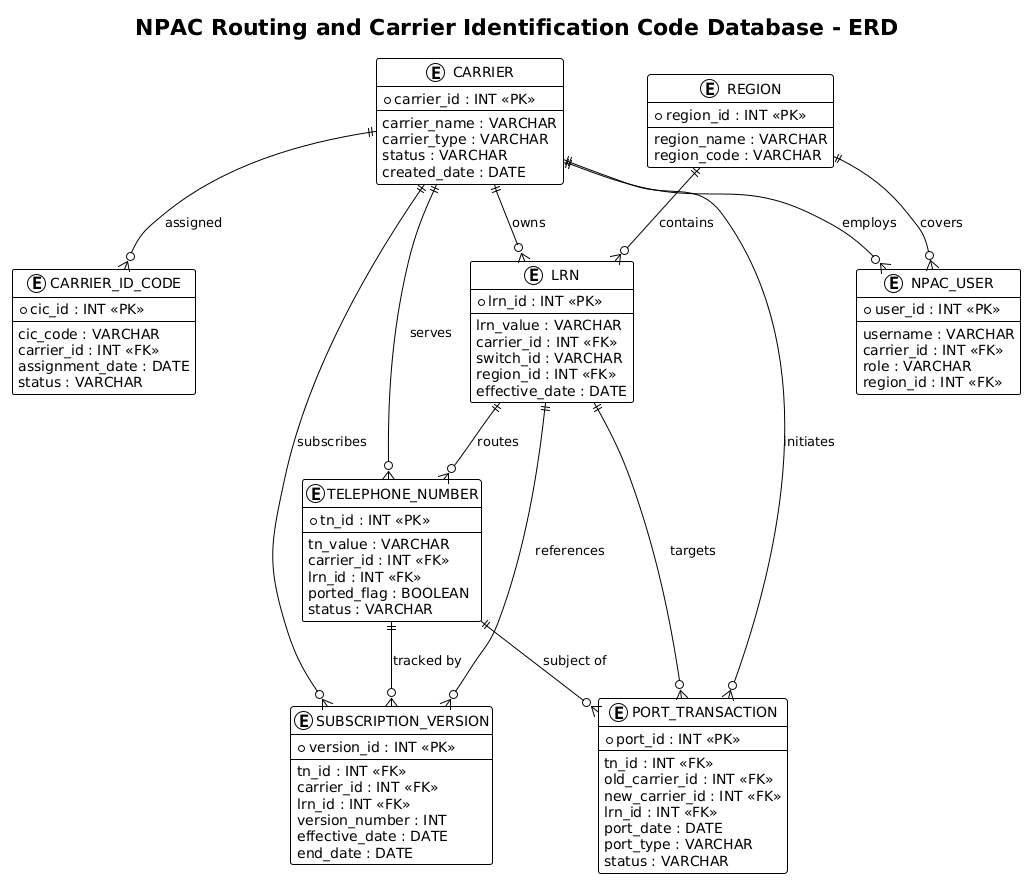
In this ERD, Entities represent the core data objects: Carrier (the service provider), Telephone Number (the asset), LRN (the routing instruction), and Port Transaction (the event). Relationships define the constraints, such as a carrier “owning” an LRN or a telephone number being the “subject of” a port transaction. The use of cardinality indicators (one-to-many) clarifies that a single carrier can own many numbers, but a specific number instance at a point in time is associated with one specific carrier.
Target Domain Scope & Scenario
The scope of this model covers the administrative and operational boundaries of the NPAC. It includes the management of Carrier Identification Codes (CICs), which uniquely identify providers, and Subscription Versions, which track the history of a number’s ownership over time. The diagram explicitly models the geographic boundaries via the Region entity and the user access controls via the NPAC User entity, ensuring the schema supports both operational routing and administrative governance.
Key Takeaways & Educational Insights
By studying this model, you will gain insights into how to normalize data for portability operations. You will learn how to model historical changes (the Subscription Version table) to support auditing, how to link routing instructions (LRNs) to physical switches, and how to structure foreign keys to maintain referential integrity across complex transactional flows.
Complete Diagram & Full Source Code
Below is the finished blueprint of the NPAC Routing and Carrier Identification Code Database. This diagram encapsulates the entire data model, from carrier definitions to the granular details of porting transactions.
@startuml
/'
Diagram Context:
This ERD represents the Number Portability Administration Center (NPAC)
routing and Carrier Identification Code (CIC) database. It models how
telephone numbers are ported between carriers, how routing instructions
are resolved during call processing, and how carriers are uniquely
identified within the NPAC ecosystem.

The diagram captures the relationships between carriers, their assigned
Carrier Identification Codes, the telephone numbers they own or have
ported, Local Routing Numbers (LRNs) used to route calls to the correct
switch, and the porting transactions that transfer number ownership
between carriers. Subscription versions track changes to number records
over time, while NPAC users and regions define administrative and
geographic boundaries for portability operations.
'/
!theme plain

title NPAC Routing and Carrier Identification Code Database - ERD

entity "CARRIER" as carrier {
  * carrier_id : INT <<PK>>
  --
  carrier_name : VARCHAR
  carrier_type : VARCHAR
  status : VARCHAR
  created_date : DATE
}

entity "CARRIER_ID_CODE" as cic {
  * cic_id : INT <<PK>>
  --
  cic_code : VARCHAR
  carrier_id : INT <<FK>>
  assignment_date : DATE
  status : VARCHAR
}

entity "LRN" as lrn {
  * lrn_id : INT <<PK>>
  --
  lrn_value : VARCHAR
  carrier_id : INT <<FK>>
  switch_id : VARCHAR
  region_id : INT <<FK>>
  effective_date : DATE
}

entity "TELEPHONE_NUMBER" as tn {
  * tn_id : INT <<PK>>
  --
  tn_value : VARCHAR
  carrier_id : INT <<FK>>
  lrn_id : INT <<FK>>
  ported_flag : BOOLEAN
  status : VARCHAR
}

entity "PORT_TRANSACTION" as port {
  * port_id : INT <<PK>>
  --
  tn_id : INT <<FK>>
  old_carrier_id : INT <<FK>>
  new_carrier_id : INT <<FK>>
  lrn_id : INT <<FK>>
  port_date : DATE
  port_type : VARCHAR
  status : VARCHAR
}

entity "SUBSCRIPTION_VERSION" as subver {
  * version_id : INT <<PK>>
  --
  tn_id : INT <<FK>>
  carrier_id : INT <<FK>>
  lrn_id : INT <<FK>>
  version_number : INT
  effective_date : DATE
  end_date : DATE
}

entity "NPAC_USER" as user {
  * user_id : INT <<PK>>
  --
  username : VARCHAR
  carrier_id : INT <<FK>>
  role : VARCHAR
  region_id : INT <<FK>>
}

entity "REGION" as region {
  * region_id : INT <<PK>>
  --
  region_name : VARCHAR
  region_code : VARCHAR
}

carrier ||--o{ cic : "assigned"
carrier ||--o{ lrn : "owns"
carrier ||--o{ tn : "serves"
carrier ||--o{ port : "initiates"
carrier ||--o{ subver : "subscribes"
carrier ||--o{ user : "employs"

region ||--o{ lrn : "contains"
region ||--o{ user : "covers"

lrn ||--o{ tn : "routes"
lrn ||--o{ port : "targets"
lrn ||--o{ subver : "references"

tn ||--o{ port : "subject of"
tn ||--o{ subver : "tracked by"

@endumlStep-by-Step Architectural Walkthrough
Building this ERD requires a structured approach. We will deconstruct the code into four logical phases: configuration, entity declaration, attribute definition, and relationship mapping.
Phase 1: Canvas Configuration & Layout Directives
Before defining any data, we must set the stage. PlantUML allows us to control the visual theme and add documentation directly within the code. In this phase, we initialize the diagram with a comment block to describe the context, followed by a theme directive.
First, we define the diagram context using a comment block. This is crucial for documentation, as it explains the business logic to anyone reading the code later. We wrap the comment in /' and /' to ensure it renders as a single block note.
/'
Diagram Context:
This ERD represents the Number Portability Administration Center (NPAC)
routing and Carrier Identification Code (CIC) database...
'/
Next, we apply the !theme plain directive. This ensures the diagram uses a clean, professional look without distracting graphical effects, which is ideal for technical documentation.
!theme plain
Phase 2: Declaring Core Entities, Actors, and Boundaries
The core of the ERD lies in the entity blocks. We start by defining the CARRIER entity, which is the central actor in this ecosystem. We use the syntax entity "NAME" as alias to define a readable label and a programmatic alias for use in relationships.
entity "CARRIER" as carrier {
  * carrier_id : INT <>
  --
  carrier_name : VARCHAR
  ...
}
We then declare the supporting entities: CARRIER_ID_CODE (for unique provider identification), LRN (Local Routing Number), TELEPHONE_NUMBER, PORT_TRANSACTION, SUBSCRIPTION_VERSION, NPAC_USER, and REGION. Each entity is defined with a clear alias (e.g., as carrier, as tn) to keep the relationship lines readable.
Phase 3: Mapping Data Flows & Key Interactions
Once entities are declared, we define the attributes. Notice the use of * for Primary Keys (PK) and < for Foreign Keys. This explicitly documents the database schema constraints. For example, the PORT_TRANSACTION entity links the telephone number, the old carrier, and the new carrier, creating a complete audit trail of the porting event.
entity "PORT_TRANSACTION" as port {
* port_id : INT <>
--
tn_id : INT <>
old_carrier_id : INT < >
new_carrier_id : INT < >
...
}
We also define the SUBSCRIPTION_VERSION entity. This is a critical pattern in telecommunications modeling where historical data must be preserved. By including effective_date and end_date, we can track the lifecycle of a number’s ownership over time.
Phase 4: Grouping, Annotations & Visual Polish
The final phase involves connecting the entities using relationship syntax. We use the ||--o{ syntax to denote a mandatory one-to-many relationship (a carrier must have at least one CIC, or can have many). We label these relationships to explain the business logic.
carrier ||--o{ cic : "assigned"
carrier ||--o{ lrn : "owns"
lrn ||--o{ tn : "routes"
This section ensures that the diagram is not just a list of tables, but a story of how data flows: a carrier is assigned a code, owns an LRN, and serves telephone numbers.
Syntax & Keyword Deep Dive
Understanding the specific PlantUML syntax used in this ERD is essential for mastering diagram-as-code. Here are the key keywords and conventions utilized:
entity: The primary keyword used to define a table or class. It takes a display name and an alias for internal referencing.<and> <: These stereotypes (double angle brackets) explicitly mark Primary Keys and Foreign Keys, making the database schema immediately recognizable without needing a legend.> ||--o{: This relationship arrow indicates a mandatory one-to-many relationship. The||represents the “one” side (mandatory), and theo{represents the “zero or many” side.:/: The colon syntax is used to label the relationship line, providing context like “assigned” or “routes”.!theme: A directive to apply a global visual style to the entire diagram, ensuring consistency.
Best Practices & Pitfalls to Avoid
When modeling complex telecommunications databases like the NPAC schema, adherence to best practices ensures your diagrams remain maintainable and clear.
- Use Descriptive Aliases: Always assign a short, meaningful alias (e.g.,
as carrier) to your entities. This makes the relationship lines much cleaner than using the full entity name. - Separate Keys from Attributes: Use the
--separator to visually distinguish Primary and Foreign keys from other attributes. This mimics standard SQL schema definitions and aids quick scanning. - Document Context Early: Place the
/' ... '/comment block at the very top. This ensures that anyone opening the file immediately understands the business domain without digging into the code. - Consistent Cardinality: Be precise with your relationship arrows. Misusing
--o{(optional) vs||--o{(mandatory) can lead to architectural misunderstandings regarding data integrity.
Start Building NPAC ERDs Faster with VPasCode
Instantly render, edit, and customize your telecommunications database schemas in your browser with zero local installation required.