


In the rapidly evolving landscape of telecommunications and enterprise networking, the shift from traditional MPLS to Software-Defined Wide Area Networking (SD-WAN) has introduced unprecedented complexity in managing network topology, traffic steering, and performance monitoring. Architects and engineers must now visualize not just physical connections, but the intricate web of logical overlay tunnels, application-specific policies, and real-time telemetry data that drive modern connectivity. A single misconfiguration in how an application flow is mapped to a tunnel can result in latency spikes or service outages, making clear architectural documentation essential for operational success.

Modeling this ecosystem requires more than a simple network map; it demands a robust data schema that captures the hierarchy of sites, the multiplicity of edge devices, the lifecycle of underlay links, and the granular metrics required for Service Level Agreement (SLA) enforcement. This tutorial guides you through constructing a professional-grade Entity-Relationship Diagram (ERD) that serves as the blueprint for an SD-WAN management platform. By leveraging PlantUML within the VPasCode editor, you can translate these complex telecommunications concepts into a living, interactive diagram that clarifies the relationships between physical infrastructure and logical performance metrics.
Understanding the Model: Purpose, Scope & Problem Framing
Diagram Abstraction & Representation
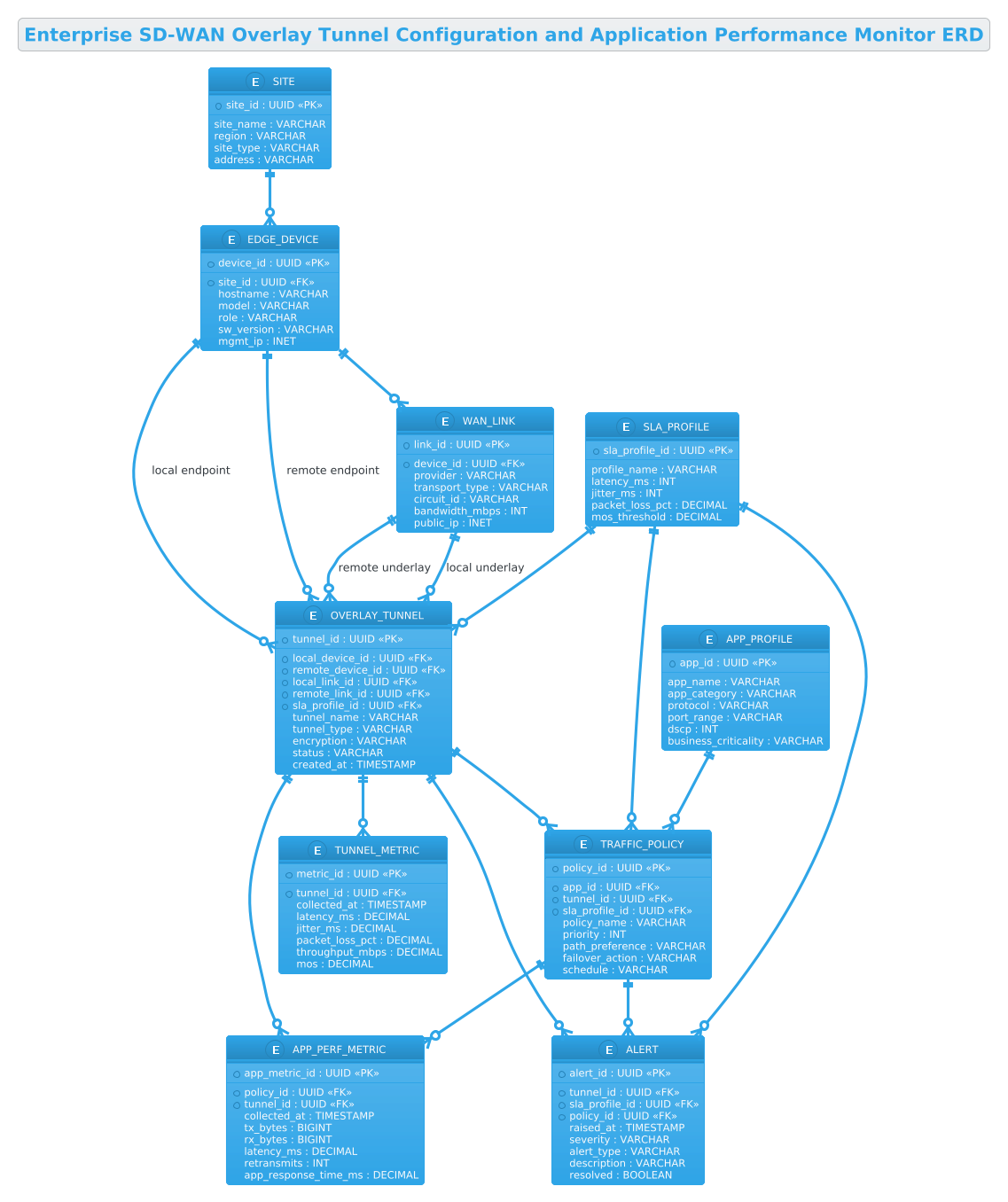
This ERD serves as the structural backbone for an SD-WAN orchestration system. Unlike a standard network topology diagram that focuses on connectivity, an ERD models the data entities and their constraints. It abstracts the physical world into logical constructs: a Site represents a physical location (HQ or Branch), an Edge Device represents the hardware gateway, and a WAN Link represents the underlying carrier circuit (MPLS, Broadband, or 5G). The core innovation in this model is the Overlay Tunnel, which represents the secure logical path (e.g., IPsec or GRE) stitched together over these physical links.
The diagram further extends into the realm of application performance by introducing entities like APP_PROFILE and TRAFFIC_POLICY. These entities define the business logic: which applications get priority, how they are classified, and which tunnels they are allowed to traverse. Finally, the TUNNEL_METRIC and APP_PERF_METRIC entities capture the time-series data necessary for dynamic path selection and alerting, ensuring the model reflects a system that is not just static, but responsive to real-time network conditions.
Target Domain Scope & Scenario
The scope of this diagram is strictly limited to the management plane and data plane configuration of an SD-WAN environment. It covers the relationship between the physical transport layer (underlay) and the logical service layer (overlay). It explicitly models the lifecycle of a tunnel from creation to monitoring, including the SLA profiles that define acceptable performance thresholds. The diagram does not model internal LAN switches or end-user workstations, focusing instead on the WAN edge infrastructure and the policies that govern inter-site communication.
Key Takeaways & Educational Insights
By studying this model, you will gain insights into how to structure database schemas for high-scale network telemetry. You will learn how to represent one-to-many relationships (e.g., one site having many edge devices) and many-to-many relationships (e.g., multiple policies mapping to a single tunnel). Furthermore, you will understand how to organize complex data into logical groups, using PlantUML’s entity and relationship syntax to create a documentation asset that is both human-readable and machine-verifiable.
Complete Diagram & Full Source Code
Below is the complete rendered ERD. This visual representation consolidates all the entities, attributes, and relationships defined in the code, providing a clear overview of the SD-WAN data architecture.
@startuml
!theme cerulean

title Enterprise SD-WAN Overlay Tunnel Configuration and Application Performance Monitor ERD

/'
Diagram Context:
This ERD models an enterprise SD-WAN management and monitoring platform. It captures the
relationship between physical transport underlays, logical overlay tunnels, and the policies
that steer application traffic across them. The central OVERLAY_TUNNEL entity represents a
secured logical path (such as IPsec or GRE) built between two SD-WAN edge devices over one
or more WAN transports. SITE and EDGE_DEVICE define the physical and logical endpoints of
the network. APP_PROFILE and TRAFFIC_POLICY define how application flows are classified,
prioritized, and mapped onto specific tunnels. SLA_PROFILE defines the performance thresholds
that tunnels must satisfy. TUNNEL_METRIC and APP_PERF_METRIC store the continuous telemetry
used to evaluate SLA compliance and to trigger dynamic path selection. ALERT records threshold
breaches and failover events raised by the monitoring subsystem.
'/

entity "SITE" as site {
  * site_id : UUID <<PK>>
  --
  site_name : VARCHAR
  region : VARCHAR
  site_type : VARCHAR
  address : VARCHAR
}

entity "EDGE_DEVICE" as edge {
  * device_id : UUID <<PK>>
  --
  * site_id : UUID <<FK>>
  hostname : VARCHAR
  model : VARCHAR
  role : VARCHAR
  sw_version : VARCHAR
  mgmt_ip : INET
}

entity "WAN_LINK" as wanlink {
  * link_id : UUID <<PK>>
  --
  * device_id : UUID <<FK>>
  provider : VARCHAR
  transport_type : VARCHAR
  circuit_id : VARCHAR
  bandwidth_mbps : INT
  public_ip : INET
}

entity "OVERLAY_TUNNEL" as tunnel {
  * tunnel_id : UUID <<PK>>
  --
  * local_device_id : UUID <<FK>>
  * remote_device_id : UUID <<FK>>
  * local_link_id : UUID <<FK>>
  * remote_link_id : UUID <<FK>>
  * sla_profile_id : UUID <<FK>>
  tunnel_name : VARCHAR
  tunnel_type : VARCHAR
  encryption : VARCHAR
  status : VARCHAR
  created_at : TIMESTAMP
}

entity "SLA_PROFILE" as sla {
  * sla_profile_id : UUID <<PK>>
  --
  profile_name : VARCHAR
  latency_ms : INT
  jitter_ms : INT
  packet_loss_pct : DECIMAL
  mos_threshold : DECIMAL
}

entity "APP_PROFILE" as app {
  * app_id : UUID <<PK>>
  --
  app_name : VARCHAR
  app_category : VARCHAR
  protocol : VARCHAR
  port_range : VARCHAR
  dscp : INT
  business_criticality : VARCHAR
}

entity "TRAFFIC_POLICY" as policy {
  * policy_id : UUID <<PK>>
  --
  * app_id : UUID <<FK>>
  * tunnel_id : UUID <<FK>>
  * sla_profile_id : UUID <<FK>>
  policy_name : VARCHAR
  priority : INT
  path_preference : VARCHAR
  failover_action : VARCHAR
  schedule : VARCHAR
}

entity "TUNNEL_METRIC" as tmetric {
  * metric_id : UUID <<PK>>
  --
  * tunnel_id : UUID <<FK>>
  collected_at : TIMESTAMP
  latency_ms : DECIMAL
  jitter_ms : DECIMAL
  packet_loss_pct : DECIMAL
  throughput_mbps : DECIMAL
  mos : DECIMAL
}

entity "APP_PERF_METRIC" as ametric {
  * app_metric_id : UUID <<PK>>
  --
  * policy_id : UUID <<FK>>
  * tunnel_id : UUID <<FK>>
  collected_at : TIMESTAMP
  tx_bytes : BIGINT
  rx_bytes : BIGINT
  latency_ms : DECIMAL
  retransmits : INT
  app_response_time_ms : DECIMAL
}

entity "ALERT" as alert {
  * alert_id : UUID <<PK>>
  --
  * tunnel_id : UUID <<FK>>
  * sla_profile_id : UUID <<FK>>
  * policy_id : UUID <<FK>>
  raised_at : TIMESTAMP
  severity : VARCHAR
  alert_type : VARCHAR
  description : VARCHAR
  resolved : BOOLEAN
}

site ||--o{ edge
edge ||--o{ wanlink
edge ||--o{ tunnel : "local endpoint"
edge ||--o{ tunnel : "remote endpoint"
wanlink ||--o{ tunnel : "local underlay"
wanlink ||--o{ tunnel : "remote underlay"
sla ||--o{ tunnel
app ||--o{ policy
tunnel ||--o{ policy
sla ||--o{ policy
tunnel ||--o{ tmetric
policy ||--o{ ametric
tunnel ||--o{ ametric
tunnel ||--o{ alert
sla ||--o{ alert
policy ||--o{ alert

@endumlStep-by-Step Architectural Walkthrough
Building this diagram in VPasCode involves a logical progression from defining the theme to establishing complex relationships. Let’s break down the construction process.
Phase 1: Canvas Configuration & Layout Directives
Every PlantUML diagram begins with configuration directives that set the stage for the rendering engine. In this model, we prioritize a clean, professional aesthetic suitable for enterprise documentation. We start by specifying the @startuml and @enduml delimiters to define the code block boundaries. Immediately following, we apply the !theme cerulean directive. This command loads a pre-defined color palette and font style that offers high contrast and readability, essential for technical diagrams with many entities.
Next, we define the diagram title using the title keyword. This provides an immediate context for anyone viewing the rendered output. We also include a comment block using the /' and '/ syntax. This allows us to embed a detailed textual description of the diagram’s purpose directly within the code, serving as living documentation that stays synchronized with the visual model.
Phase 2: Declaring Core Entities, Actors, and Boundaries
The foundation of an ERD is the entity definition. In PlantUML, we use the entity keyword followed by the entity name in quotes. For example, entity "SITE" as site defines a logical entity named “SITE” and assigns it the alias site for use in relationship declarations. Inside the curly braces, we list the attributes. The asterisk * prefix denotes a Primary Key (PK), while the double asterisk ** or explicit FK notation indicates Foreign Keys.
We define the core infrastructure entities first. EDGE_DEVICE and WAN_LINK are critical as they represent the physical hardware and network circuits. Notice the use of specific data types like UUID, INET (for IP addresses), and TIMESTAMP. These type hints are crucial for database schema generation and ensure the diagram accurately reflects the underlying data model. The OVERLAY_TUNNEL entity is the most complex, requiring multiple foreign keys to link back to local/remote devices and links, reflecting the bidirectional nature of SD-WAN tunnels.
Phase 3: Mapping Data Flows & Key Interactions
Once entities are declared, we establish the relationships using the ||--o{ syntax. This specific notation represents a “one-to-many” relationship with a mandatory one side (the solid line) and an optional many side (the circle and crow’s foot). For instance, site ||--o{ edge indicates that one Site must have at least one Edge Device, but an Edge Device belongs to exactly one Site.
We also handle complex relationships. The OVERLAY_TUNNEL entity is linked to EDGE_DEVICE twice: once as a local endpoint and once as a remote endpoint. This is achieved by adding a label to the relationship line, such as edge ||--o{ tunnel : "local endpoint". This distinction is vital for understanding the topology of the SD-WAN, where a single tunnel connects two distinct edges. Similarly, we map the TRAFFIC_POLICY to link applications to specific tunnels and SLA profiles, creating a matrix of policy enforcement.
Phase 4: Grouping, Annotations & Visual Polish
To enhance readability, we utilize the title directive and the comment block to provide context. While PlantUML ERD does not support complex grouping boxes in the same way as class diagrams, the logical separation of entities (Infrastructure, Policy, Metrics) creates a natural visual grouping. The use of the cerulean theme further unifies the look, ensuring that Primary Keys are highlighted and relationships are clearly distinguishable. The final step involves ensuring all relationship labels are descriptive, such as "local underlay" or "remote endpoint", to prevent ambiguity when the diagram is viewed by stakeholders.
Syntax & Keyword Deep Dive
To master PlantUML ERD modeling, it is essential to understand the specific keywords and symbols used in this diagram. Here is a breakdown of the critical syntax elements:
entity: The primary keyword used to define a table or class. It takes a display name (e.g.,"SITE") and an internal alias (e.g.,as site) for referencing in relationships.||--o{: A relationship arrow notation. The||represents a mandatory one (the solid double line), ando{represents an optional many (the circle and crow’s foot). This denotes that one parent record can have zero or more child records.<and> <: Stereotypes used to visually mark Primary Keys and Foreign Keys. The> *prefix in the attribute list is a shorthand often used to denote the PK column specifically.!theme: A directive that applies a global stylesheet to the diagram.!theme cerulean/' ... '/: The comment block syntax. Unlike single-line comments, this allows for multi-line text descriptions that are rendered as a note or header within the diagram, perfect for explaining the diagram’s context.label: Text enclosed in quotes after a relationship arrow (e.g.,: "local endpoint") adds a descriptive label to the relationship line, clarifying the nature of the connection.
Best Practices & Pitfalls to Avoid
When constructing complex diagrams like this SD-WAN ERD, adhering to best practices ensures maintainability and clarity. First, use consistent naming conventions. We used plural names for relationship labels (e.g., local endpoint) but singular names for entity aliases (e.g., edge) to maintain readability. Second, group related entities logically. While the layout engine handles positioning, you should mentally group Infrastructure, Policy, and Metrics entities to make the diagram easier to scan. Third, avoid over-complicating relationships. If a relationship is too complex (e.g., a many-to-many with multiple attributes), consider if a new associative entity is needed, as seen with the TRAFFIC_POLICY entity linking apps and tunnels. Finally, always document the context. The comment block at the top is not just decoration; it is a critical part of the documentation that explains the “why” behind the model.
Start Building SD-WAN ERDs Faster with VPasCode
Design complex telecommunications data models instantly in your browser with VPasCode, the free PlantUML editor that renders your ERD code in real-time without any installation.