


In the high-stakes world of telecommunications, the financial backbone of the industry relies on the precise exchange of traffic between wholesale carriers. Every minute of voice, every megabyte of data, and every SMS message traversing international borders generates a complex web of financial obligations. For network operators and billing architects, the challenge is not just in routing the traffic, but in accurately capturing, rating, and reconciling the resulting data to ensure fair settlement between partners. A single error in data modeling can lead to significant revenue leakage or disputes that take months to resolve.

Visualizing this intricate ecosystem requires more than just a list of database tables; it demands a clear, semantic map of how entities like Call Detail Records (CDRs), Rate Cards, and Settlement Invoices relate to one another. This is where the diagram-as-code approach shines. By using PlantUML within VPasCode, architects can define the entire data schema in a text-based format that is version-ready, easy to iterate, and instantly renderable. This tutorial guides you through building a robust Entity-Relationship Diagram (ERD) specifically tailored for a Wholesale Carrier Interconnect Settlement and Traffic Exchange Reconciliation System, covering everything from carrier agreements to dispute resolution workflows.
Understanding the Model: Purpose, Scope & Problem Framing
Diagram Abstraction & Representation
An Entity-Relationship Diagram (ERD) serves as the blueprint for the database architecture that powers the settlement engine. In this specific context, the diagram abstracts the physical network infrastructure into logical data entities. It models the lifecycle of a call from the moment it is recorded (CDR) to the moment it is paid (Payment). The diagram uses standard notation to represent entities (tables), attributes (columns), and cardinalities (relationships), ensuring that data integrity rules—such as a single Invoice belonging to one Agreement but containing multiple Line Items—are clearly defined.
Target Domain Scope & Scenario
This model focuses exclusively on the wholesale segment of telecommunications. It does not model retail subscriber data or customer-facing billing. Instead, it covers the inter-carrier domain. The scope includes:
- Agreements & Trunks: Defining the commercial and technical boundaries between carriers.
- Traffic Flow: Capturing raw Call Detail Records (CDRs) and their rated versions.
- Financials: Generating invoices, managing line items, and tracking payments.
- Reconciliation: Identifying discrepancies between the local carrier’s records and the partner’s records, and escalating them to disputes.
Key Takeaways & Educational Insights
By constructing this diagram, you will gain a deep understanding of how to model many-to-many relationships in a normalized database schema, how to handle temporal data (effective dates for rate cards), and how to structure a system that supports complex financial workflows like dispute resolution. You will learn to separate concerns between operational data (CDRs) and financial data (Invoices) while maintaining clear referential integrity.
Complete Diagram & Full Source Code
Before diving into the step-by-step construction, here is the complete visual result of the diagram. This ERD showcases the relationships between carriers, agreements, traffic records, and financial settlements, all styled with the aws-orange theme for a clean, professional look.
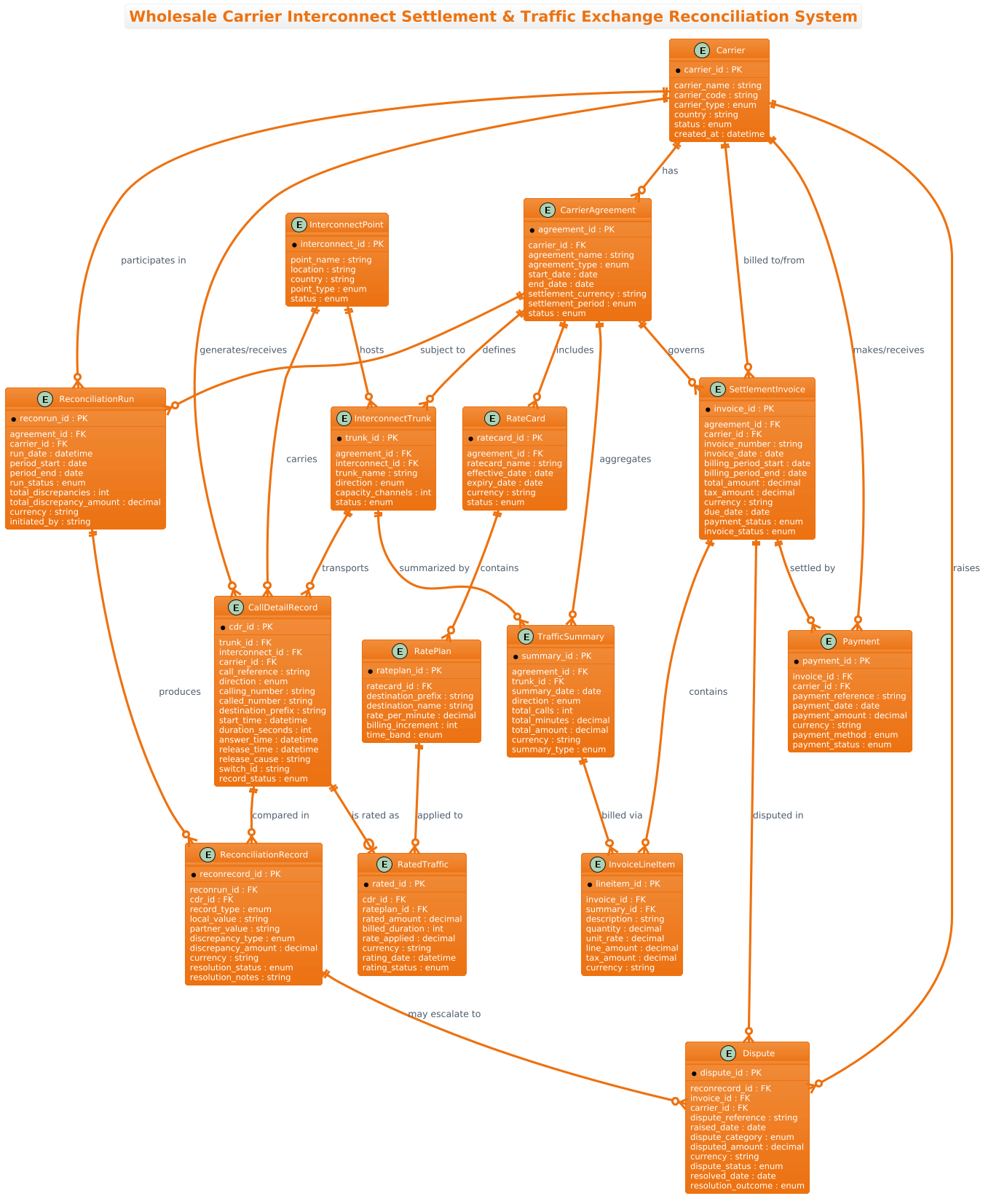
@startuml
!theme aws-orange
title Wholesale Carrier Interconnect Settlement & Traffic Exchange Reconciliation System

/'
Diagram Context:
This ERD models the operational and financial data flows between wholesale
telecommunications carriers that exchange traffic across interconnect points.
It captures carrier agreements, interconnect trunks, call detail records (CDRs),
rated traffic, settlement invoices, dispute handling, and reconciliation runs.
The diagram supports tracking of inbound/outbound traffic volumes, financial
settlements, rate cards, and discrepancy resolution between partner carriers.
'/

' Core entities
entity "Carrier" as carrier {
  * carrier_id : PK
  --
  carrier_name : string
  carrier_code : string
  carrier_type : enum
  country : string
  status : enum
  created_at : datetime
}

entity "CarrierAgreement" as agreement {
  * agreement_id : PK
  --
  carrier_id : FK
  agreement_name : string
  agreement_type : enum
  start_date : date
  end_date : date
  settlement_currency : string
  settlement_period : enum
  status : enum
}

entity "InterconnectPoint" as interconnect {
  * interconnect_id : PK
  --
  point_name : string
  location : string
  country : string
  point_type : enum
  status : enum
}

entity "InterconnectTrunk" as trunk {
  * trunk_id : PK
  --
  agreement_id : FK
  interconnect_id : FK
  trunk_name : string
  direction : enum
  capacity_channels : int
  status : enum
}

entity "RateCard" as ratecard {
  * ratecard_id : PK
  --
  agreement_id : FK
  ratecard_name : string
  effective_date : date
  expiry_date : date
  currency : string
  status : enum
}

entity "RatePlan" as rateplan {
  * rateplan_id : PK
  --
  ratecard_id : FK
  destination_prefix : string
  destination_name : string
  rate_per_minute : decimal
  billing_increment : int
  time_band : enum
}

' Traffic & CDR entities
entity "CallDetailRecord" as cdr {
  * cdr_id : PK
  --
  trunk_id : FK
  interconnect_id : FK
  carrier_id : FK
  call_reference : string
  direction : enum
  calling_number : string
  called_number : string
  destination_prefix : string
  start_time : datetime
  duration_seconds : int
  answer_time : datetime
  release_time : datetime
  release_cause : string
  switch_id : string
  record_status : enum
}

entity "RatedTraffic" as rated {
  * rated_id : PK
  --
  cdr_id : FK
  rateplan_id : FK
  rated_amount : decimal
  billed_duration : int
  rate_applied : decimal
  currency : string
  rating_date : datetime
  rating_status : enum
}

entity "TrafficSummary" as summary {
  * summary_id : PK
  --
  agreement_id : FK
  trunk_id : FK
  summary_date : date
  direction : enum
  total_calls : int
  total_minutes : decimal
  total_amount : decimal
  currency : string
  summary_type : enum
}

' Settlement & Reconciliation entities
entity "SettlementInvoice" as invoice {
  * invoice_id : PK
  --
  agreement_id : FK
  carrier_id : FK
  invoice_number : string
  invoice_date : date
  billing_period_start : date
  billing_period_end : date
  total_amount : decimal
  tax_amount : decimal
  currency : string
  due_date : date
  payment_status : enum
  invoice_status : enum
}

entity "InvoiceLineItem" as lineitem {
  * lineitem_id : PK
  --
  invoice_id : FK
  summary_id : FK
  description : string
  quantity : decimal
  unit_rate : decimal
  line_amount : decimal
  tax_amount : decimal
  currency : string
}

entity "ReconciliationRun" as reconrun {
  * reconrun_id : PK
  --
  agreement_id : FK
  carrier_id : FK
  run_date : datetime
  period_start : date
  period_end : date
  run_status : enum
  total_discrepancies : int
  total_discrepancy_amount : decimal
  currency : string
  initiated_by : string
}

entity "ReconciliationRecord" as reconrecord {
  * reconrecord_id : PK
  --
  reconrun_id : FK
  cdr_id : FK
  record_type : enum
  local_value : string
  partner_value : string
  discrepancy_type : enum
  discrepancy_amount : decimal
  currency : string
  resolution_status : enum
  resolution_notes : string
}

entity "Dispute" as dispute {
  * dispute_id : PK
  --
  reconrecord_id : FK
  invoice_id : FK
  carrier_id : FK
  dispute_reference : string
  raised_date : date
  dispute_category : enum
  disputed_amount : decimal
  currency : string
  dispute_status : enum
  resolved_date : date
  resolution_outcome : enum
}

entity "Payment" as payment {
  * payment_id : PK
  --
  invoice_id : FK
  carrier_id : FK
  payment_reference : string
  payment_date : date
  payment_amount : decimal
  currency : string
  payment_method : enum
  payment_status : enum
}

' Relationships
carrier ||--o{ agreement : "has"
carrier ||--o{ cdr : "generates/receives"
carrier ||--o{ invoice : "billed to/from"
carrier ||--o{ reconrun : "participates in"
carrier ||--o{ dispute : "raises"
carrier ||--o{ payment : "makes/receives"

agreement ||--o{ trunk : "defines"
agreement ||--o{ ratecard : "includes"
agreement ||--o{ summary : "aggregates"
agreement ||--o{ invoice : "governs"
agreement ||--o{ reconrun : "subject to"

interconnect ||--o{ trunk : "hosts"
interconnect ||--o{ cdr : "carries"

trunk ||--o{ cdr : "transports"
trunk ||--o{ summary : "summarized by"

ratecard ||--o{ rateplan : "contains"
rateplan ||--o{ rated : "applied to"

cdr ||--o| rated : "is rated as"
cdr ||--o{ reconrecord : "compared in"

summary ||--o{ lineitem : "billed via"

invoice ||--o{ lineitem : "contains"
invoice ||--o{ dispute : "disputed in"
invoice ||--o{ payment : "settled by"

reconrun ||--o{ reconrecord : "produces"
reconrecord ||--o{ dispute : "may escalate to"

@endumlStep-by-Step Architectural Walkthrough
Phase 1: Canvas Configuration & Layout Directives
Every PlantUML diagram begins with configuration directives that set the stage for the rendering engine. In this tutorial, we start by defining the theme to ensure the diagram aligns with modern design standards.
We use the !theme directive to apply the aws-orange theme. This provides a consistent color palette (oranges, whites, and grays) that is visually appealing and professional. We also add a title directive to give the diagram a clear, descriptive header.
@startuml
!theme aws-orange
title Wholesale Carrier Interconnect Settlement & Traffic Exchange Reconciliation System
Immediately following the title, we insert a comment block using /' and '/. This is crucial for documentation. Unlike code comments, these blocks can span multiple lines and provide context for anyone reading the diagram source code, explaining the business domain without cluttering the visual output.
Phase 2: Declaring Core Entities, Actors, and Boundaries
The foundation of an ERD is the entity definition. In PlantUML, we use the entity keyword. We define the core business objects first: Carrier and CarrierAgreement.
Notice the syntax for attributes. We define the Primary Key (PK) by prefixing the attribute with an asterisk (*). For example, * carrier_id : PK. Foreign Keys (FK) are marked with a double dash (--) separator or simply listed as attributes. In this model, we use the as keyword to create a shorthand alias (e.g., as carrier) which we will use later to draw relationships, keeping the diagram code clean and readable.
entity "Carrier" as carrier {
  * carrier_id : PK
  --
  carrier_name : string
  carrier_code : string
  ...
}
We repeat this pattern for all critical entities, including InterconnectPoint, RateCard, and CallDetailRecord. The use of specific data types like decimal for financial amounts and datetime for timestamps ensures the model accurately reflects the requirements of a settlement system.
Phase 3: Mapping Data Flows & Key Interactions
Once the entities are defined, we map the relationships using the double-dash syntax --. The cardinality is defined by the symbols on the ends of the line.
||represents “Mandatory One” (The line must exist).o{represents “Optional Many” (Zero or more).|represents “Mandatory One” (The relationship must exist).
For example, a Carrier can have many Agreements, but an Agreement must belong to one Carrier. This is expressed as:
carrier ||--o{ agreement : "has"
We continue this for complex flows. The CallDetailRecord is linked to a Trunk (transport) and a Carrier (origin). The RatedTraffic entity links back to the CDR, showing the transformation of raw data into billable data. This phase effectively traces the lifecycle of a transaction through the system.
Phase 4: Grouping, Annotations & Visual Polish
While PlantUML ERDs are powerful, visual organization is key for readability. In this diagram, we use the entity block structure to group attributes logically (Primary Key first, then Foreign Keys, then other attributes). We also use the relationship labels (e.g., : "billed to/from") to add semantic meaning to the lines, making the diagram self-documenting.
The final touch is ensuring that all entities are correctly linked. For instance, the ReconciliationRecord acts as a bridge between the ReconciliationRun and the Dispute entity, allowing the system to escalate discrepancies into formal disputes. This logical grouping helps stakeholders understand the dispute resolution workflow at a glance.
Syntax & Keyword Deep Dive
To master this diagram, you must understand the specific PlantUML syntax elements used to represent the telecommunications domain accurately.
entity: The fundamental building block. It defines a table or class. The syntax isentity "Name" as alias { attributes }.* attribute: Indicates a Primary Key. This is critical for defining unique identifiers in the ERD.--: A separator line used to visually group attributes (e.g., separating keys from regular fields) within the entity block.||--o{: The relationship syntax.||means mandatory one, ando{means optional many. This is used to define cardinality (e.g., One Carrier has Many Agreements).as: Allows you to define a shorthand alias for an entity (e.g.,as cdrforCallDetailRecord), which is used in relationship definitions to keep the code concise.:'and'/: Multi-line comment delimiters. These are used to wrap the diagram context description, providing rich documentation without affecting the rendered image.!theme: A directive to apply a predefined color scheme.aws-orangeis used here for a consistent, modern aesthetic.
Best Practices & Pitfalls to Avoid
When building complex ERDs like this one, adhering to best practices ensures the diagram remains maintainable and clear.
- Keep Entity Names Descriptive but Concise: While the full name
CallDetailRecordis good, using the aliasas cdrfor relationships keeps the diagram from becoming cluttered with long text strings. - Normalize Financial Data: Always use
decimalfor currency andintfor counts. Avoid usingstringfor numbers, as it implies potential non-numeric characters which can break calculation logic in the actual database. - Use Explicit Cardinalities: Don’t leave relationships as simple lines. Always define the cardinality (e.g.,
||--o{) to clearly communicate business rules. Ambiguity here leads to database design errors. - Document the Flow: Use the relationship labels (the text after the colon) to explain the nature of the relationship. Instead of just a line, write
: "billed to/from"to clarify the direction and context of the financial flow.
Start Building Complex ERDs Faster with VPasCode
Design intricate database schemas for telecom and finance systems instantly in your browser with VPasCode, the free PlantUML editor with zero installation required.