


In the rapidly evolving landscape of 5G and LTE telecommunications, the reliability of the Radio Access Network (RAN) hinges on precise data management. As network operators deploy thousands of Baseband Units (BBUs) across diverse geographic sites, maintaining an accurate record of software versions, cell configurations, and neighbor relations becomes a critical operational challenge. Manual tracking is prone to error, leading to service outages, failed handovers, and suboptimal network performance. To address this, architects and data engineers are increasingly turning to diagram-as-code methodologies to visualize and validate their data models before implementation.
This tutorial explores the construction of a specialized Entity-Relationship Diagram (ERD) designed for a tool that manages software versioning on BBUs and optimizes neighbor relations. By leveraging PlantUML within the VPasCode environment, we can define complex relationships between physical network elements, software deployments, and optimization sessions with mathematical precision. This approach not only serves as living documentation but also acts as a blueprint for database schema generation, ensuring that the underlying data structure supports the dynamic needs of modern network optimization workflows.
Understanding the Model: Purpose, Scope & Problem Framing
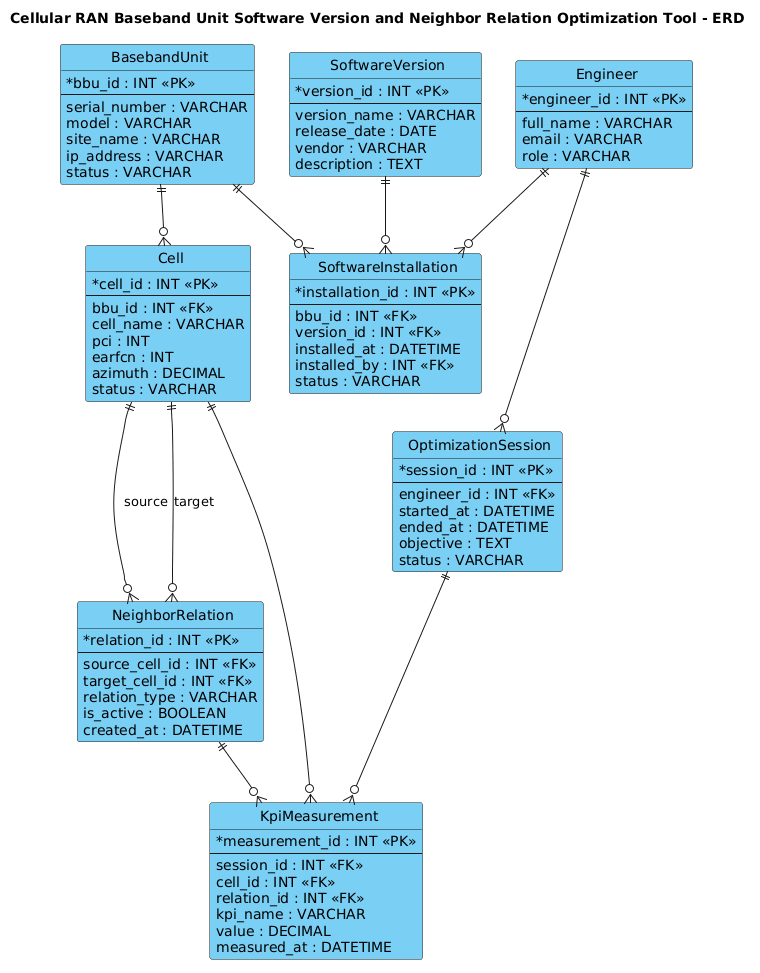
The diagram we are about to build represents the core data backbone for a Network Optimization and Software Management system. Unlike generic ERDs, this model is deeply rooted in the specific constraints and entities of the telecommunications domain. The primary goal is to answer two critical questions: “Which software version is currently running on a specific BBU?” and “How do cells interact with their neighbors to ensure seamless handovers?”
Diagram Abstraction & Representation
An Entity-Relationship Diagram is the standard visual language for defining data structures. In this context, we map physical network hardware (BBUs) to logical software instances (SoftwareVersions) and the radio topology (Cells and NeighborRelations). The diagram uses standard Chen or Crow’s Foot notation to express cardinality—showing, for instance, that a single BBU can host multiple software installations over time, but a specific installation instance belongs to exactly one BBU.
Target Domain Scope & Scenario
This model specifically targets the Cellular RAN (Radio Access Network) layer. It covers the lifecycle of a BBU from installation to software updates, the definition of radio cells (PCI, EARFCN), and the complex web of neighbor relations that dictate handover behavior. It also introduces the concept of Optimization Sessions, which allow engineers or SON (Self-Organizing Network) functions to group a set of changes and KPI (Key Performance Indicator) measurements for analysis.
Key Takeaways & Educational Insights
By following this guide, you will learn how to model one-to-many relationships between hardware and software, handle self-referencing relationships (like a cell being a neighbor to another cell), and link performance metrics to specific optimization actions. You will gain a clear understanding of how to structure a database that supports both historical tracking (version history) and real-time operational data (active neighbor relations).
Complete Diagram & Full Source Code
Below is the final, rendered Entity-Relationship Diagram. This blueprint encapsulates the relationships between Baseband Units, Software Versions, Cells, Neighbor Relations, and Optimization Sessions. You can view the complete structure and its interactive properties by copying the code block below.
@startuml
!include https://static.visual-paradigm.com/web/resources/plantuml-stdlib/themes/vp.puml

title Cellular RAN Baseband Unit Software Version and Neighbor Relation Optimization Tool - ERD

/'
This ERD models the data foundation for a tool that tracks software versions running on cellular RAN baseband units (BBUs)
and manages neighbor relations for optimization. A Baseband Unit is a physical network element deployed at a cell site.
Each BBU runs one or more software loads over time; a Software Version represents a released software package.
The Software Installation entity records which version is installed on which BBU, when, and its current status.
A Cell is the radio coverage entity served by a BBU. Cells have Neighbor Relations to other cells, which are critical
for handover and interference management. The Neighbor Relation entity captures the source cell, target cell,
relation type, and optimization state. An Optimization Session groups neighbor relation changes and KPI measurements
executed by an engineer or SON function. KPI Measurements are time-stamped metrics collected per cell or relation
to evaluate optimization impact. Engineers own optimization sessions and perform software upgrades.
'/

entity "BasebandUnit" as bbu {
  * bbu_id : INT <<PK>>
  --
  serial_number : VARCHAR
  model : VARCHAR
  site_name : VARCHAR
  ip_address : VARCHAR
  status : VARCHAR
}

entity "SoftwareVersion" as swv {
  * version_id : INT <<PK>>
  --
  version_name : VARCHAR
  release_date : DATE
  vendor : VARCHAR
  description : TEXT
}

entity "SoftwareInstallation" as swi {
  * installation_id : INT <<PK>>
  --
  bbu_id : INT <<FK>>
  version_id : INT <<FK>>
  installed_at : DATETIME
  installed_by : INT <<FK>>
  status : VARCHAR
}

entity "Cell" as cell {
  * cell_id : INT <<PK>>
  --
  bbu_id : INT <<FK>>
  cell_name : VARCHAR
  pci : INT
  earfcn : INT
  azimuth : DECIMAL
  status : VARCHAR
}

entity "NeighborRelation" as nr {
  * relation_id : INT <<PK>>
  --
  source_cell_id : INT <<FK>>
  target_cell_id : INT <<FK>>
  relation_type : VARCHAR
  is_active : BOOLEAN
  created_at : DATETIME
}

entity "OptimizationSession" as opt {
  * session_id : INT <<PK>>
  --
  engineer_id : INT <<FK>>
  started_at : DATETIME
  ended_at : DATETIME
  objective : TEXT
  status : VARCHAR
}

entity "KpiMeasurement" as kpi {
  * measurement_id : INT <<PK>>
  --
  session_id : INT <<FK>>
  cell_id : INT <<FK>>
  relation_id : INT <<FK>>
  kpi_name : VARCHAR
  value : DECIMAL
  measured_at : DATETIME
}

entity "Engineer" as eng {
  * engineer_id : INT <<PK>>
  --
  full_name : VARCHAR
  email : VARCHAR
  role : VARCHAR
}

bbu ||--o{ swi
swv ||--o{ swi
eng ||--o{ swi
bbu ||--o{ cell
cell ||--o{ nr : "source"
cell ||--o{ nr : "target"
eng ||--o{ opt
opt ||--o{ kpi
cell ||--o{ kpi
nr ||--o{ kpi

@endumlStep-by-Step Architectural Walkthrough
Building a complex ERD requires a logical progression. We will construct this diagram in four distinct phases, moving from the foundational hardware to the dynamic optimization workflows.
Phase 1: Canvas Configuration & Layout Directives
Before defining any entities, we set the stage for the diagram’s appearance and context. We begin by including the Visual Paradigm theme to ensure a professional, consistent look that matches the VPasCode ecosystem. We also add a title directive to give the diagram a clear identity and a comment block to explain the domain context.
@startuml
!include https://static.visual-paradigm.com/web/resources/plantuml-stdlib/themes/vp.puml

title Cellular RAN Baseband Unit Software Version and Neighbor Relation Optimization Tool - ERD

'/
[Comment block describing the diagram context]
'/
Phase 2: Declaring Core Entities, Actors, and Boundaries
The next step is to define the fundamental data objects. In PlantUML, we use the entity keyword. We start with the physical hardware and software definitions.
We define BasebandUnit (bbu) as the primary physical asset, containing attributes like serial_number and ip_address. We define SoftwareVersion (swv) as a catalog of available software packages. Crucially, we introduce a linking entity, SoftwareInstallation (swi), to track the history of which software runs on which BBU at what time.
entity "BasebandUnit" as bbu {
* bbu_id : INT <>
--
serial_number : VARCHAR
model : VARCHAR
status : VARCHAR
}
entity "SoftwareVersion" as swv {
* version_id : INT < >
--
version_name : VARCHAR
vendor : VARCHAR
}
entity "SoftwareInstallation" as swi {
* installation_id : INT < >
--
bbu_id : INT <>
version_id : INT < >
installed_at : DATETIME
status : VARCHAR
}
Phase 3: Mapping Data Flows & Key Interactions
With the core entities defined, we model the radio topology. A Cell (cell) is served by a BBU. We then define the critical NeighborRelation (nr) entity, which links two cells together. This is a self-referencing relationship where one cell acts as the source and another as the target.
We also introduce the operational side with OptimizationSession (opt) and KpiMeasurement (kpi). These entities allow us to record when an engineer (defined in Engineer) performs an optimization and what metrics were observed.
entity "Cell" as cell {
* cell_id : INT <>
--
bbu_id : INT <>
pci : INT
earfcn : INT
}
entity "NeighborRelation" as nr {
* relation_id : INT <>
--
source_cell_id : INT <>
target_cell_id : INT < >
is_active : BOOLEAN
}
entity "OptimizationSession" as opt {
* session_id : INT <>
--
engineer_id : INT <>
objective : TEXT
}
entity "KpiMeasurement" as kpi {
* measurement_id : INT <>
--
session_id : INT <>
cell_id : INT < >
kpi_name : VARCHAR
value : DECIMAL
}
Phase 4: Grouping, Annotations & Visual Polish
The final phase involves drawing the relationships. We use the ||--o{ syntax to denote a mandatory one-to-many relationship (e.g., a BBU must have at least one installation, or a Cell must have a BBU). We explicitly label the directions of the neighbor relations (“source” and “target”) to clarify the flow of handover logic.
bbu ||--o{ swi
swv ||--o{ swi
bbu ||--o{ cell
cell ||--o{ nr : "source"
cell ||--o{ nr : "target"
eng ||--o{ opt
opt ||--o{ kpi
Syntax & Keyword Deep Dive
PlantUML provides a rich set of keywords that make ERD modeling intuitive and powerful. Here is a breakdown of the specific syntax used in this telecommunications diagram:
entity: Defines a database table or class. The syntaxentity "Name" as aliasallows for a readable label and a short code alias for use in relationship lines.PK&FK(Stereotypes): Used within the entity definition.<<PK>>marks a Primary Key, while<<FK>>marks a Foreign Key, ensuring the database integrity is visually communicated.||--o{(Cardinality): This is the Crow’s Foot notation.||represents “mandatory one” (the circle on the left is a solid line, meaning the relationship is required), ando{represents “zero or many” (the circle indicates optionality, and the crow’s foot indicates many). For example,bbu ||--o{ swimeans a BBU must exist, and can have zero or many software installations.title: A directive to set the main heading of the diagram, essential for documentation headers./' ... '/(Comment Block): A multi-line comment used to embed rich text descriptions, requirements, or domain context directly within the code without affecting the rendering.
Best Practices & Pitfalls to Avoid
When modeling complex telecommunications data structures, adherence to best practices ensures your diagrams remain maintainable and accurate.
- Use Descriptive Aliases: While entity names like
BasebandUnitare long, using short aliases likebbuin relationship lines keeps the code clean and easier to read. Avoid using the full name in every line of code. - Separate Hardware and Software: Never mix physical hardware attributes with software attributes in the same entity. As seen in this guide, we separated
BasebandUnitfromSoftwareVersionand used a junction entitySoftwareInstallationto handle the many-to-many relationship. This is crucial for tracking historical versions. - Clarify Self-References: When an entity references itself (like
CellreferencingCellfor neighbor relations), always label the relationship directions (e.g., “source” and “target”) to prevent ambiguity in the visual output. - Consistent Data Types: Ensure you use consistent data types (e.g.,
INT,VARCHAR,DATETIME) across your entities to reflect real-world database schema standards.
Start Building Professional ERDs Faster with VPasCode
Design complex telecommunications data models instantly in your browser with VPasCode’s free PlantUML editor—no installation required.