


In the rapidly evolving telecommunications sector, the backbone of any successful prepaid mobile business lies in its ability to precisely track financial flows, manage inventory, and calculate commissions across a vast network of resellers and operators. Unlike simple transaction logs, a robust database schema must account for the intricate web of relationships between mobile network operators, resellers, end-users, voucher products, and the dynamic commission rules that govern profitability. As telecom architectures grow more distributed, relying on static visual diagrams or poorly documented spreadsheets becomes a liability, leading to revenue leakage and operational bottlenecks.

This tutorial presents a masterclass in building a professional Entity Relationship Diagram (ERD) using PlantUML and VPasCode, specifically tailored for a prepaid mobile voucher top-up and airtime reseller commission tracker. By adopting a diagram-as-code approach, architects can ensure their data models are versioned, reproducible, and instantly renderable. This guide walks you through the construction of a schema that captures the lifecycle of a top-up transaction, from the initial voucher purchase by a reseller to the final commission payout, ensuring data integrity and clear business logic visualization.
Understanding the Model: Purpose, Scope & Problem Framing
Diagram Abstraction & Representation
An Entity Relationship Diagram (ERD) is the blueprint of a database, defining how data is stored, related, and constrained. In this specific context, the ERD models a multi-tenant financial ecosystem. It abstracts complex business entities—such as Resellers acting as intermediaries, Mobile Networks as the infrastructure providers, and Voucher Products as the digital inventory—into structured tables. The diagram uses cardinality constraints (one-to-many, one-to-one) to enforce business rules, ensuring that a reseller cannot have a transaction without a valid voucher, and that commission calculations are always tied to a specific rule and transaction.
Target Domain Scope & Scenario
The scope of this model covers the end-to-end financial reconciliation process for a prepaid airtime distribution system. It specifically addresses the “Reseller Economy” where third-party agents sell airtime to customers. The diagram captures the critical data points required to answer questions like: “What is the current balance of Reseller A?”, “Which vouchers were sold to Customer B?”, and “How is the commission for a specific network calculated and paid?”. It intentionally excludes low-level network signaling data, focusing purely on the commercial and financial data layer.
Key Takeaways & Educational Insights
By following this guide, you will gain insights into how to model financial ledgers, handle dynamic pricing rules, and manage multi-step payout processes within a single schema. You will learn how to use PlantUML’s entity syntax to define primary and foreign keys clearly, how to group related entities using logical naming, and how to visualize the flow of funds from a top-up transaction to a reseller’s ledger and eventual commission payout.
Complete Diagram & Full Source Code
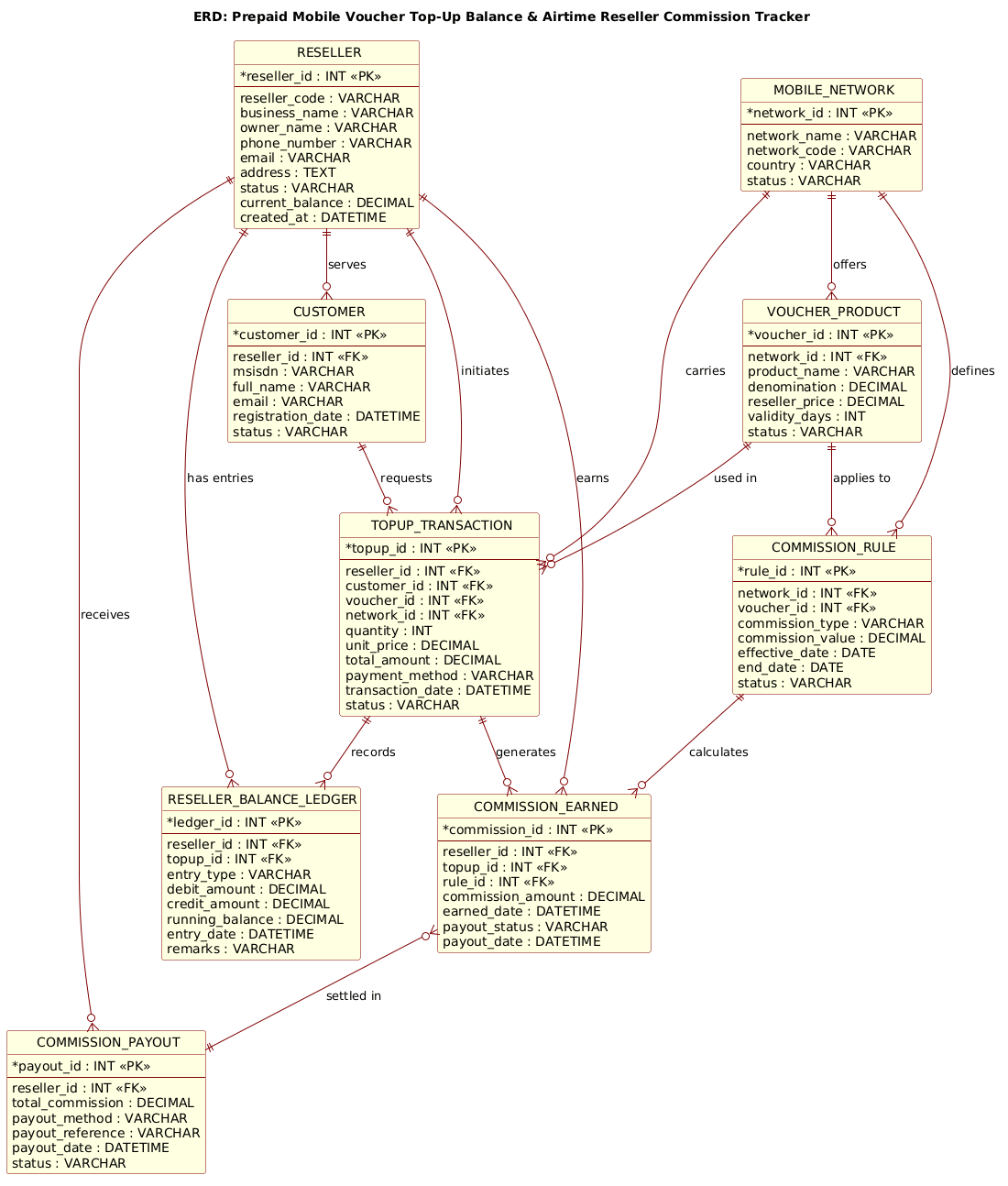
@startuml
!include https://static.visual-paradigm.com/web/resources/plantuml-stdlib/themes/rose.puml

/'
This ERD models a prepaid mobile voucher top-up and airtime reseller
commission tracking system. It captures the relationships between
resellers, their customers, mobile network operators, voucher products,
top-up transactions, and the commissions earned by resellers. The
diagram supports tracking of reseller balances, airtime inventory,
sales performance, and commission payouts across multiple mobile
network operators.
'/

title ERD: Prepaid Mobile Voucher Top-Up Balance & Airtime Reseller Commission Tracker

entity "RESELLER" as reseller {
  * reseller_id : INT <<PK>>
  --
  reseller_code : VARCHAR
  business_name : VARCHAR
  owner_name : VARCHAR
  phone_number : VARCHAR
  email : VARCHAR
  address : TEXT
  status : VARCHAR
  current_balance : DECIMAL
  created_at : DATETIME
}

entity "CUSTOMER" as customer {
  * customer_id : INT <<PK>>
  --
  reseller_id : INT <<FK>>
  msisdn : VARCHAR
  full_name : VARCHAR
  email : VARCHAR
  registration_date : DATETIME
  status : VARCHAR
}

entity "MOBILE_NETWORK" as network {
  * network_id : INT <<PK>>
  --
  network_name : VARCHAR
  network_code : VARCHAR
  country : VARCHAR
  status : VARCHAR
}

entity "VOUCHER_PRODUCT" as voucher {
  * voucher_id : INT <<PK>>
  --
  network_id : INT <<FK>>
  product_name : VARCHAR
  denomination : DECIMAL
  reseller_price : DECIMAL
  validity_days : INT
  status : VARCHAR
}

entity "TOPUP_TRANSACTION" as topup {
  * topup_id : INT <<PK>>
  --
  reseller_id : INT <<FK>>
  customer_id : INT <<FK>>
  voucher_id : INT <<FK>>
  network_id : INT <<FK>>
  quantity : INT
  unit_price : DECIMAL
  total_amount : DECIMAL
  payment_method : VARCHAR
  transaction_date : DATETIME
  status : VARCHAR
}

entity "RESELLER_BALANCE_LEDGER" as ledger {
  * ledger_id : INT <<PK>>
  --
  reseller_id : INT <<FK>>
  topup_id : INT <<FK>>
  entry_type : VARCHAR
  debit_amount : DECIMAL
  credit_amount : DECIMAL
  running_balance : DECIMAL
  entry_date : DATETIME
  remarks : VARCHAR
}

entity "COMMISSION_RULE" as rule {
  * rule_id : INT <<PK>>
  --
  network_id : INT <<FK>>
  voucher_id : INT <<FK>>
  commission_type : VARCHAR
  commission_value : DECIMAL
  effective_date : DATE
  end_date : DATE
  status : VARCHAR
}

entity "COMMISSION_EARNED" as commission {
  * commission_id : INT <<PK>>
  --
  reseller_id : INT <<FK>>
  topup_id : INT <<FK>>
  rule_id : INT <<FK>>
  commission_amount : DECIMAL
  earned_date : DATETIME
  payout_status : VARCHAR
  payout_date : DATETIME
}

entity "COMMISSION_PAYOUT" as payout {
  * payout_id : INT <<PK>>
  --
  reseller_id : INT <<FK>>
  total_commission : DECIMAL
  payout_method : VARCHAR
  payout_reference : VARCHAR
  payout_date : DATETIME
  status : VARCHAR
}

reseller ||--o{ customer : "serves"
reseller ||--o{ topup : "initiates"
reseller ||--o{ ledger : "has entries"
reseller ||--o{ commission : "earns"
reseller ||--o{ payout : "receives"

network ||--o{ voucher : "offers"
network ||--o{ topup : "carries"
network ||--o{ rule : "defines"

voucher ||--o{ topup : "used in"
voucher ||--o{ rule : "applies to"

customer ||--o{ topup : "requests"

topup ||--o{ ledger : "records"
topup ||--o{ commission : "generates"

rule ||--o{ commission : "calculates"

commission }o--|| payout : "settled in"

@endumlStep-by-Step Architectural Walkthrough
Phase 1: Canvas Configuration & Layout Directives
The first step in building any professional PlantUML diagram is setting the stage. We begin by including a theme to ensure the diagram looks polished and modern. In this tutorial, we utilize the rose theme, which provides a clean, professional color palette suitable for enterprise documentation. We also add a comment block to explain the diagram’s purpose, which is crucial for team collaboration and future maintenance.
@startuml !include https://static.visual-paradigm.com/web/resources/plantuml-stdlib/themes/rose.puml /' This ERD models a prepaid mobile voucher top-up... '/ title ERD: Prepaid Mobile Voucher Top-Up Balance & Airtime Reseller Commission TrackerThe @startuml directive marks the beginning of the diagram, while !include fetches the external theme file. The title directive sets the main heading for the rendered output, making it instantly identifiable in reports.
Phase 2: Declaring Core Entities, Actors, and Boundaries
Next, we define the core entities. In PlantUML ERD syntax, we use the entity keyword followed by the table name and an alias for easier reference in relationships. We structure each entity with a primary key (*), a separator (--), and a list of attributes with their data types.
For the RESELLER entity, we define the reseller_id as the Primary Key (PK) and include critical business fields like current_balance and status. Similarly, the MOBILE_NETWORK and VOUCHER_PRODUCT entities are defined to represent the infrastructure and inventory. Note how we use DECIMAL for all monetary values to ensure precision in financial calculations.
entity "RESELLER" as reseller { * reseller_id : INT <> -- reseller_code : VARCHAR business_name : VARCHAR current_balance : DECIMAL } We repeat this process for CUSTOMER, TOPUP_TRANSACTION, RESELLER_BALANCE_LEDGER, and the commission-related entities. The use of Foreign Keys (FK) is explicitly marked with the < stereotype to visually indicate referential integrity constraints.
Phase 3: Mapping Data Flows & Key Interactions
With the entities defined, we now establish the relationships that drive the business logic. PlantUML uses specific arrow notation to denote cardinality. For instance, reseller ||--o{ customer indicates that one reseller serves zero or many customers. The || represents the “one” side, and o{ represents the “zero or many” side.
We map the critical financial flow: a TOPUP_TRANSACTION is initiated by a reseller, uses a voucher, and belongs to a customer. This transaction then triggers entries in the RESELLER_BALANCE_LEDGER and generates a record in COMMISSION_EARNED. The relationships are defined sequentially to ensure the diagram layout remains logical and readable.
reseller ||--o{ topup : "initiates" topup ||--o{ ledger : "records" topup ||--o{ commission : "generates"This phase is crucial for visualizing how data cascades through the system. A single top-up event creates a ripple effect across multiple tables, updating balances, recording sales, and calculating liabilities.
Phase 4: Grouping, Annotations & Visual Polish
The final phase involves refining the diagram for clarity. We ensure that relationship labels (e.g., "serves", "initiates") are concise and descriptive. We also verify that all foreign keys are correctly linked to their parent primary keys. The COMMISSION_PAYOUT entity is linked to COMMISSION_EARNED with a specific notation commission }o--|| payout, indicating that many commission records can be settled in a single payout batch, a common pattern in financial systems.
The use of the rose theme automatically handles the background colors and line styles, but the logical grouping of entities (Reseller-centric, Network-centric, Transaction-centric) helps the reader understand the domain boundaries without needing explicit packages.
Syntax & Keyword Deep Dive
PlantUML’s ERD extension provides powerful syntax features that make database modeling intuitive. Here is a breakdown of the key keywords and symbols used in this diagram:
entity: Defines a new table or entity. The syntax isentity "TableName" as alias { ... }, where the alias is used for referencing in relationships.*(Asterisk): Placed before an attribute name (e.g.,* reseller_id) to denote it as the Primary Key (PK). This is a visual shorthand that PlantUML renders automatically.<and> <: Stereotypes used to explicitly label Primary and Foreign Keys within the attribute list, enhancing readability for database developers.> --(Double Dash): A separator line used to divide the key attributes from the rest of the table columns, mimicking standard ERD visual conventions.||--o{: Relationship notation.||means “One and Only One” (mandatory one), ando{means “Zero or Many” (optional many). This defines the cardinality of the relationship.}o--||: Inverse cardinality.}omeans “Zero or Many” on the left side, and||means “One and Only One” on the right side. This is used for the payout relationship."Label": Quotes are used to define the label of a relationship line, explaining the nature of the connection (e.g.,"initiates","settled in").!include: A directive to load external files, such as themes or common definitions, keeping the diagram code modular and maintainable.
Best Practices & Pitfalls to Avoid
When modeling complex financial systems like telecom voucher tracking, adherence to best practices ensures your diagram remains a useful tool rather than a source of confusion.
- Use Descriptive Aliases: While table names like
VOUCHER_PRODUCTare clear, using short aliases likevoucherin relationships makes the code much cleaner and easier to read. Avoid using the full table name in every relationship line. - Consistent Naming Conventions: Stick to uppercase for entity names and snake_case for attribute names. This consistency helps in quickly scanning the diagram and mapping it to SQL code.
- Explicit Data Types: Always specify data types (e.g.,
DECIMAL,INT,DATETIME). Ambiguity in types can lead to implementation errors, especially for financial fields where precision is paramount. - Modularize with Themes: Instead of manually setting colors and fonts for every entity, use
!includeto load a standard theme. This reduces code bloat and ensures a professional look with minimal effort. - Avoid Over-Complexity: If a diagram becomes too crowded, consider splitting it into multiple diagrams (e.g., one for the Core Transaction flow and another for the Commission Payout flow). This keeps the focus clear and the rendering fast.
Try It Yourself with VPasCode
Start Building PlantUML ERDs Faster with VPasCode
Instantly render, customize, and export your telecom database schemas online without installing any local tools or configuration.