


In the high-stakes environment of telecommunications and contact center operations, the efficiency of a customer’s journey hinges on the precision of the underlying routing logic. Every second a caller waits, or every misrouted call to an unqualified agent, represents a direct hit to service levels and customer satisfaction. Architects and system designers face the challenge of visualizing a dual-layered complexity: the dynamic, branching logic of the Interactive Voice Response (IVR) system that guides the caller, and the static yet intricate matrix of agent skills and group assignments that determines the final destination.
Traditional drag-and-drop modeling tools often struggle to capture the granular relationships required for these systems, such as the specific condition types for node transitions or the proficiency levels linking agents to skills. Diagram-as-code offers a superior alternative, allowing architects to define these relationships with exacting precision using text-based syntax. By leveraging PlantUML within the VPasCode editor, teams can create living documentation that is version-ready, easily modifiable, and instantly rendered, ensuring that the architectural blueprint matches the operational reality of the call center.

This tutorial walks you through the construction of a comprehensive Entity Relationship Diagram (ERD) specifically designed for a contact center platform. We will model how a call flow is constructed from discrete nodes (menus, prompts, queues) and how those nodes connect to routing matrices that map to agent skill groups. This visual model is critical for stakeholders to understand the data integrity required to support complex routing strategies like “skill-based” or “priority-based” distribution.
Understanding the Model: Purpose, Scope & Problem Framing
The diagram we are about to build serves as the backbone for a modern contact center orchestration system. Unlike a simple flowchart that only shows the path a call takes, an ERD in this context defines the data structure that powers that path. It answers critical architectural questions: How do we store the logic for a specific menu? How do we ensure an agent is only assigned to a group if they possess the required certification? How do we track the proficiency level of an agent in a specific skill category?
Diagram Abstraction & Representation
This ERD models two distinct but interconnected domains:
- The IVR Logic Domain: Represented by
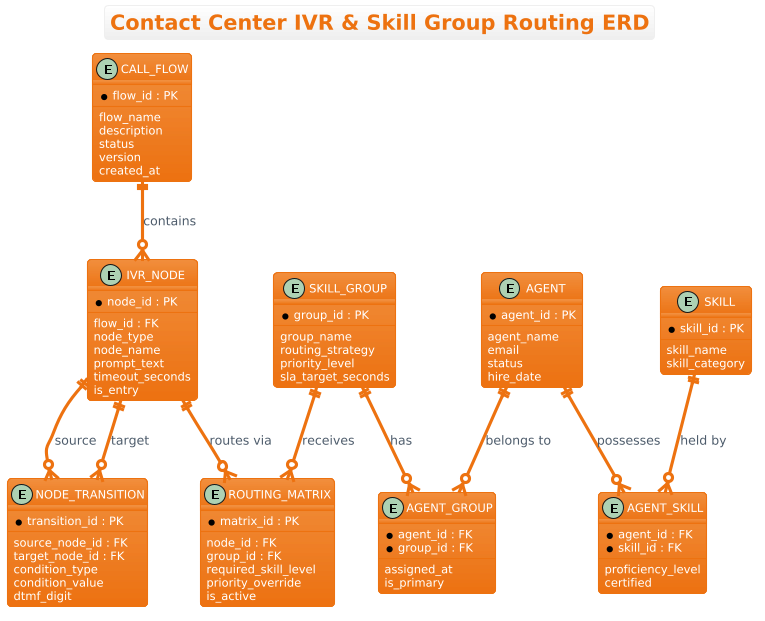
CALL_FLOW,IVR_NODE, andNODE_TRANSITION. This section abstracts the call journey. A call is not just a phone call; it is a traversal through a graph of nodes. Each node has attributes liketimeout_secondsordtmf_digit(touch-tone input), which are critical for the system to function correctly. - The Workforce Domain: Represented by
AGENT,SKILL_GROUP, andROUTING_MATRIX. This section abstracts human resources. It defines the hierarchy where agents possess skills, belong to groups, and how those groups are targeted by the IVR system.
Target Domain Scope & Scenario
The scope of this model is the telecommunications contact center. It intentionally excludes external telephony hardware details (like specific SIP trunks) to focus on the application-level logic. The scenario involves a caller entering a CALL_FLOW, navigating through IVR_NODEs, and eventually hitting a QUEUE node. At that point, the system consults the ROUTING_MATRIX to find the appropriate SKILL_GROUP, which then filters available AGENTs based on their AGENT_SKILL proficiency.
Key Takeaways & Educational Insights
By constructing this model, you will gain clarity on:
- Normalization Strategies: How to separate
SKILLdefinitions fromAGENTassignments to avoid data redundancy. - Routing Logic Data Structure: How the
ROUTING_MATRIXacts as a bridge between the call flow and the workforce, allowing for dynamic priority overrides. - State Management: How attributes like
is_entryorstatusdefine the lifecycle of a node or agent within the system.
Complete Diagram & Full Source Code
Before diving into the step-by-step construction, here is the complete visual representation of the Contact Center IVR & Skill Group Routing ERD. This blueprint encapsulates the relationships between call flows, node transitions, and the complex skill-matching logic required for efficient agent routing.
Copy the following complete source code to replicate this diagram in VPasCode:
@startuml
!theme aws-orange

/'
This ERD models a contact center platform combining an IVR call flow designer
with agent skill group routing. It captures how call flows are built from nodes
(menu, prompt, queue, transfer, voicemail), how nodes connect to each other,
and how queue nodes route callers to skill groups based on required skills,
priority, and routing strategy. Agents belong to skill groups, hold individual
skills with proficiency levels, and the routing matrix links skill groups to
the IVR queue nodes that feed them. The goal is to show how a caller's journey
through the IVR results in a match to the right agent based on skill,
availability, and priority.
'/

title Contact Center IVR & Skill Group Routing ERD

entity "CALL_FLOW" as callflow {
  * flow_id : PK
  --
  flow_name
  description
  status
  version
  created_at
}

entity "IVR_NODE" as node {
  * node_id : PK
  --
  flow_id : FK
  node_type
  node_name
  prompt_text
  timeout_seconds
  is_entry
}

entity "NODE_TRANSITION" as transition {
  * transition_id : PK
  --
  source_node_id : FK
  target_node_id : FK
  condition_type
  condition_value
  dtmf_digit
}

entity "SKILL_GROUP" as skillgroup {
  * group_id : PK
  --
  group_name
  routing_strategy
  priority_level
  sla_target_seconds
}

entity "ROUTING_MATRIX" as matrix {
  * matrix_id : PK
  --
  node_id : FK
  group_id : FK
  required_skill_level
  priority_override
  is_active
}

entity "SKILL" as skill {
  * skill_id : PK
  --
  skill_name
  skill_category
}

entity "AGENT" as agent {
  * agent_id : PK
  --
  agent_name
  email
  status
  hire_date
}

entity "AGENT_SKILL" as agentskill {
  * agent_id : FK
  * skill_id : FK
  --
  proficiency_level
  certified
}

entity "AGENT_GROUP" as agentgroup {
  * agent_id : FK
  * group_id : FK
  --
  assigned_at
  is_primary
}

callflow ||--o{ node : "contains"
node ||--o{ transition : "source"
node ||--o{ transition : "target"
node ||--o{ matrix : "routes via"
skillgroup ||--o{ matrix : "receives"
skillgroup ||--o{ agentgroup : "has"
agent ||--o{ agentgroup : "belongs to"
agent ||--o{ agentskill : "possesses"
skill ||--o{ agentskill : "held by"

@endumlStep-by-Step Architectural Walkthrough
Building a robust ERD requires a structured approach. We will break the construction into four phases: setting the visual theme, defining the core entities, establishing the relationships, and refining the data attributes.
Phase 1: Canvas Configuration & Layout Directives
Every PlantUML diagram begins with configuration directives that set the tone and style. In this telecommunications scenario, we want a professional, clean look that aligns with enterprise standards. We start by importing the aws-orange theme, which provides a warm, distinct color palette suitable for highlighting critical infrastructure components.
Additionally, we must include the documentation block. This is a comment that explains the diagram’s purpose without cluttering the visual output. In PlantUML, comments are wrapped in / at the start and / at the end.
@startuml
!theme aws-orange

/'
This ERD models a contact center platform combining an IVR call flow designer
with agent skill group routing...
'/

title Contact Center IVR & Skill Group Routing ERD
Phase 2: Declaring Core Entities, Actors, and Boundaries
The heart of an ERD is the entity definition. We define the tables that will exist in the database. We use the entity keyword followed by the table name in quotes, and an alias (lowercase) for referencing relationships later.
For the Call Flow and Node entities, we define the primary key (PK) and foreign key (FK) relationships. Notice the use of * to denote a primary key and -- to separate keys from other attributes.
entity "CALL_FLOW" as callflow {
  * flow_id : PK
  --
  flow_name
  description
  status
  version
  created_at
}

entity "IVR_NODE" as node {
  * node_id : PK
  --
  flow_id : FK
  node_type
  node_name
  prompt_text
  timeout_seconds
  is_entry
}
Similarly, we define the Workforce entities like AGENT and SKILL_GROUP, ensuring we capture attributes like sla_target_seconds which is critical for contact center performance metrics.
Phase 3: Mapping Data Flows & Key Interactions
Once entities are declared, we must define how they relate. In PlantUML, relationships are drawn using the ||--o{ syntax, which represents a standard one-to-many relationship (one Call Flow contains many Nodes). The || indicates the “one” side (mandatory), and o{ indicates the “many” side (optional).
We map the critical routing logic here. The ROUTING_MATRIX is the bridge. It connects the IVR_NODE (the caller’s location) to the SKILL_GROUP (the destination).
node ||--o{ matrix : "routes via"
skillgroup ||--o{ matrix : "receives"
We also model the agent’s qualifications. An agent possesses multiple SKILLs, but this relationship is many-to-many, so we introduce a junction table called AGENT_SKILL to store the proficiency_level.
Phase 4: Grouping, Annotations & Visual Polish
The final phase involves ensuring the diagram is readable and self-documenting. We use the title directive to provide a clear header. We also ensure that the relationship labels (e.g., “contains”, “routes via”) are descriptive, helping stakeholders understand the direction of the data flow without needing to read the schema documentation.
The final relationship block connects all domains:
agent ||--o{ agentgroup : "belongs to"
agent ||--o{ agentskill : "possesses"
skill ||--o{ agentskill : "held by"
Syntax & Keyword Deep Dive
To master this diagram, it is essential to understand the specific PlantUML syntax elements used to define the ERD structure.
entity: The primary keyword used to define a database table or entity. It takes the table name and an optional alias.PKandFK: Abbreviations for Primary Key and Foreign Key. These are used within the entity definition to denote the structural integrity of the data.||--o{: This is the cardinality syntax.||means “one and only one” (mandatory), ando{means “zero or many” (optional). This accurately models the relationship where a Call Flow must have nodes, but a specific Node transition might be optional....(Ellipsis in Comments): Used in the comment block to allow multi-line descriptions that explain the business context without affecting the rendering.!theme: A directive that loads a pre-defined color scheme.!theme aws-orangeapplies a specific palette to the entity boxes and lines.
Best Practices & Pitfalls to Avoid
When building complex ERDs for telecommunications systems, adhere to these best practices to ensure maintainability and clarity:
- Normalize Junction Tables: Never model a many-to-many relationship directly (e.g., Agent to Skill). Always create an intermediate entity like
AGENT_SKILLto store attributes likeproficiency_levelorcertified. - Consistent Naming Conventions: Use clear, descriptive names for attributes. Avoid abbreviations like
dtmfwithout context; ensure the diagram is readable by non-technical stakeholders. - Separate Logic from Data: In the ERD, distinguish between the
IVR_NODE(the data structure) and the logic that runs on it. The diagram shows the storage, not the execution flow, so keep attribute names focused on data storage. - Use Aliases for Readability: Always define an alias (e.g.,
as callflow) for your entities. This makes the relationship lines much cleaner and easier to read than using the full entity name.
Start Building Contact Center ERDs Faster with VPasCode
Instantly visualize complex IVR and skill routing architectures in your browser with zero local installation, and customize your diagrams with interactive syntax testing.