


In the rapidly evolving telecommunications landscape, managing the physical infrastructure of fiber optics is as much a legal and commercial challenge as it is an engineering one. Telecommunications providers and infrastructure owners must maintain rigorous records of dark fiber conduit leases—where tenants rent unused fiber capacity—and lit building connectivity inventories, which track active services delivered to end-user locations. The complexity arises from the need to map physical assets (conduits, strands, buildings) to commercial contracts (leases, agreements, allocations) and service endpoints (circuit IDs, ports, racks). Without a unified data model, organizations struggle to track capacity utilization, manage billing cycles, and ensure regulatory compliance across vast geographic networks.
Visualizing this intricate web of relationships through an Entity-Relationship Diagram (ERD) is critical for architects and database administrators. It provides a single source of truth that bridges the gap between physical fiber plant management and commercial lease administration. By using diagram-as-code with PlantUML, teams can version their data models alongside their infrastructure code, ensuring that the database schema always reflects the current operational reality. This approach eliminates the disconnect often found between static Visio diagrams and the dynamic, evolving nature of fiber networks.
Understanding the Model: Purpose, Scope & Problem Framing
Diagram Abstraction & Representation
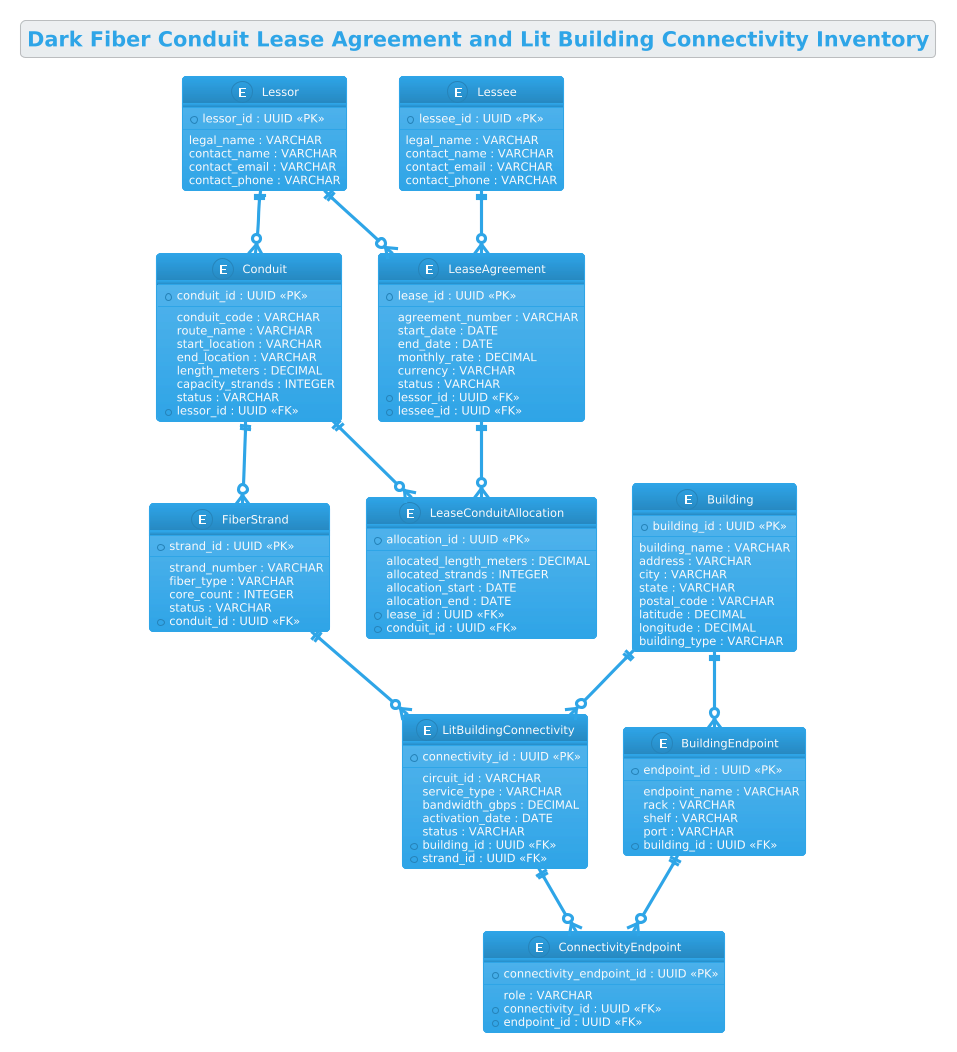
This ERD serves as the foundational blueprint for a database system designed to manage the lifecycle of fiber infrastructure. It abstracts the physical world into manageable data entities. The Conduit and FiberStrand entities represent the physical plant, capturing attributes like route names, lengths, and strand counts. The Lessor and Lessee entities define the commercial parties involved. The model bridges the physical and commercial worlds through the LeaseAgreement and LeaseConduitAllocation entities, which link a specific contract to specific physical resources (e.g., allocating 50 meters of a conduit or 12 specific strands). Finally, the LitBuildingConnectivity and BuildingEndpoint entities handle the active services, tracking where fiber is actually terminated and how it is connected to customer equipment.
Target Domain Scope & Scenario
The scope of this diagram is strictly limited to the telecommunications infrastructure management domain. It covers the entire lifecycle from the initial lease agreement for dark fiber capacity to the final activation of a service at a building endpoint. It intentionally excludes internal network routing protocols or customer billing systems beyond the lease terms, focusing instead on the asset-to-contract mapping. The scenario involves a Lessor (infrastructure owner) leasing capacity to a Lessee (carrier or enterprise), who then utilizes that capacity to provide services to a Building.
Key Takeaways & Educational Insights
By studying this model, readers will learn how to handle many-to-many relationships (e.g., a lease covering multiple conduits, or a conduit containing many strands) using associative entities like LeaseConduitAllocation. You will also see how to model hierarchical data (Building -> Endpoint -> Connectivity) and how to distinguish between physical attributes (latitude, longitude, strand number) and commercial attributes (monthly rate, currency, agreement number). This clarity is essential for designing scalable, normalized databases that prevent data redundancy and ensure data integrity.
Complete Diagram & Full Source Code
Below is the complete visual representation of the Dark Fiber Conduit Lease Agreement and Lit Building Connectivity Inventory. This diagram clearly delineates the entities, their attributes, and the cardinality of their relationships, providing a comprehensive view of the data architecture.
@startuml
!theme cerulean

/'
Context: This ERD models the operational and commercial data required to manage dark fiber
conduit lease agreements alongside lit building connectivity inventory. It captures lessors,
lessees, conduits, fiber strands, lease terms, and the endpoints or buildings where fiber
is lit and services are delivered. The diagram supports tracking capacity, assignments,
terminations, and billing relationships across the physical fiber plant and leased
infrastructure.
'/

title Dark Fiber Conduit Lease Agreement and Lit Building Connectivity Inventory

entity "Lessor" as lessor {
  *lessor_id : UUID <<PK>>
  --
  legal_name : VARCHAR
  contact_name : VARCHAR
  contact_email : VARCHAR
  contact_phone : VARCHAR
}

entity "Lessee" as lessee {
  *lessee_id : UUID <<PK>>
  --
  legal_name : VARCHAR
  contact_name : VARCHAR
  contact_email : VARCHAR
  contact_phone : VARCHAR
}

entity "Conduit" as conduit {
  *conduit_id : UUID <<PK>>
  --
  conduit_code : VARCHAR
  route_name : VARCHAR
  start_location : VARCHAR
  end_location : VARCHAR
  length_meters : DECIMAL
  capacity_strands : INTEGER
  status : VARCHAR
  *lessor_id : UUID <<FK>>
}

entity "FiberStrand" as strand {
  *strand_id : UUID <<PK>>
  --
  strand_number : VARCHAR
  fiber_type : VARCHAR
  core_count : INTEGER
  status : VARCHAR
  *conduit_id : UUID <<FK>>
}

entity "LeaseAgreement" as lease {
  *lease_id : UUID <<PK>>
  --
  agreement_number : VARCHAR
  start_date : DATE
  end_date : DATE
  monthly_rate : DECIMAL
  currency : VARCHAR
  status : VARCHAR
  *lessor_id : UUID <<FK>>
  *lessee_id : UUID <<FK>>
}

entity "LeaseConduitAllocation" as alloc {
  *allocation_id : UUID <<PK>>
  --
  allocated_length_meters : DECIMAL
  allocated_strands : INTEGER
  allocation_start : DATE
  allocation_end : DATE
  *lease_id : UUID <<FK>>
  *conduit_id : UUID <<FK>>
}

entity "Building" as building {
  *building_id : UUID <<PK>>
  --
  building_name : VARCHAR
  address : VARCHAR
  city : VARCHAR
  state : VARCHAR
  postal_code : VARCHAR
  latitude : DECIMAL
  longitude : DECIMAL
  building_type : VARCHAR
}

entity "LitBuildingConnectivity" as lit {
  *connectivity_id : UUID <<PK>>
  --
  circuit_id : VARCHAR
  service_type : VARCHAR
  bandwidth_gbps : DECIMAL
  activation_date : DATE
  status : VARCHAR
  *building_id : UUID <<FK>>
  *strand_id : UUID <<FK>>
}

entity "BuildingEndpoint" as endpoint {
  *endpoint_id : UUID <<PK>>
  --
  endpoint_name : VARCHAR
  rack : VARCHAR
  shelf : VARCHAR
  port : VARCHAR
  *building_id : UUID <<FK>>
}

entity "ConnectivityEndpoint" as conn_endpoint {
  *connectivity_endpoint_id : UUID <<PK>>
  --
  role : VARCHAR
  *connectivity_id : UUID <<FK>>
  *endpoint_id : UUID <<FK>>
}

lessor ||--o{ conduit
lessor ||--o{ lease
lessee ||--o{ lease
lease ||--o{ alloc
conduit ||--o{ alloc
conduit ||--o{ strand
strand ||--o{ lit
building ||--o{ lit
building ||--o{ endpoint
lit ||--o{ conn_endpoint
endpoint ||--o{ conn_endpoint

@endumlStep-by-Step Architectural Walkthrough
Constructing this ERD requires a logical progression from defining the actors to mapping the complex relationships between physical assets and commercial contracts. We will walk through the creation of this diagram in four distinct phases.
Phase 1: Canvas Configuration & Layout Directives
Before defining any entities, we set the stage for the diagram’s visual identity. In PlantUML, this is done using directives at the top of the file. We start with @startuml to begin the diagram and @enduml to close it. Crucially, we apply the !theme cerulean directive. This single line transforms the default monochrome look into a professional, blue-toned aesthetic that is highly readable for technical documentation. We also insert a comment block using /' and '/ to provide context for anyone reading the source code, explaining the diagram’s purpose without cluttering the visual output.
Phase 2: Declaring Core Entities, Actors, and Boundaries
The foundation of any ERD is the definition of entities. In PlantUML, we use the entity keyword followed by the entity name and an alias for relationship mapping. We begin with the commercial actors: Lessor and Lessee. These entities contain standard contact information (name, email, phone) and a Primary Key (PK) marked with * to denote the unique identifier (UUID in this case).
Next, we define the physical infrastructure. The Conduit entity represents the physical pipe, including attributes like route_name and capacity_strands. It also includes a Foreign Key (FK) lessor_id to link it back to the owner. Similarly, the FiberStrand entity represents the individual fibers inside the conduit, linked via conduit_id. We also define the Building entity, which captures the physical location details including geospatial data (latitude/longitude), essential for mapping fiber routes.
Phase 3: Mapping Data Flows & Key Interactions
This is where the complexity of the telecommunications domain is modeled. We introduce the LeaseAgreement entity, which acts as the central hub connecting the Lessor and Lessee. However, a lease often covers multiple conduits or specific portions of a conduit. To handle this, we create an associative entity called LeaseConduitAllocation. This entity resolves the many-to-many relationship between Lease and Conduit, allowing us to store specific details like allocated_length_meters and allocated_strands for each specific agreement.
We then model the “lit” side of the network. The LitBuildingConnectivity entity links a specific Building and a specific FiberStrand to an active circuit. This entity tracks the service details like bandwidth_gbps and circuit_id. Finally, the BuildingEndpoint and ConnectivityEndpoint entities model the physical termination points (rack, shelf, port) where the fiber actually connects to customer equipment, creating a complete chain from the lease to the physical port.
Phase 4: Grouping, Annotations & Visual Polish
The final phase involves defining the relationships using PlantUML’s arrow syntax. We use the ||--o{ syntax to denote “One-to-Many” relationships where the circle indicates optionality (zero or more) and the double bar indicates mandatory participation (one and only one). For example, lessor ||--o{ conduit means a Lessor must have at least one Conduit (or can have many), but a Conduit must belong to exactly one Lessor. We ensure that all Foreign Keys in the entity definitions match the relationship arrows, maintaining logical consistency between the visual diagram and the underlying database schema.
Syntax & Keyword Deep Dive
To fully leverage PlantUML for ERD generation, it is essential to understand the specific keywords and symbols used in this diagram.
entity: The primary keyword used to define a table or entity. It takes the formentity "Name" as alias { ... }, where the alias is used for drawing relationships.PKandFKStereotypes: Inside the entity block, we use<<PK>>to mark a Primary Key and<<FK>>for a Foreign Key. These are rendered visually to help database designers quickly identify key constraints.attribute_name : TYPE: Defines the column name and its data type (e.g.,UUID,VARCHAR,DECIMAL). The colon separates the name from the type.--Separator: Used within an entity block to visually separate the key attributes from the rest of the columns, improving readability.||--o{Relationship Arrow: This specific arrow syntax denotes a one-to-many relationship. The||represents the “one” side (mandatory), and theo{represents the “many” side (optional). This is standard notation for ERDs in PlantUML./' ... '/Comment Block: Used to add multi-line comments that are visible in the source code but do not appear in the rendered diagram, perfect for documentation.
Best Practices & Pitfalls to Avoid
When modeling complex telecommunications data, adherence to best practices ensures your diagrams remain maintainable and accurate.
- Use Descriptive Aliases: Always assign a short, unique alias to your entities (e.g.,
as lessor,as alloc). This makes the relationship lines much cleaner and easier to read than using the full entity names. - Separate Physical and Commercial Concerns: As seen in this model, clearly distinguish between the physical plant (Conduit, Strand) and the commercial agreements (Lease, Allocation). Using associative entities like
LeaseConduitAllocationprevents data redundancy and allows for flexible reporting on capacity usage. - Maintain Consistent Data Types: Ensure that Foreign Keys in your relationship definitions match the Primary Key types in the referenced entities. For example, if
lessor_idis a UUID in theLessorentity, it must be a UUID in theConduitentity. - Document with Comments: Never leave a diagram unexplained. Use the
/' ... '/comment block to describe the business context, as this is often the first thing developers read before looking at the syntax.
Start Building Professional PlantUML ERDs Faster with VPasCode
Instantly visualize and refine your telecommunications data models with our free, browser-based PlantUML editor—no local installation required.