


In the rapidly evolving landscape of Machine-to-Machine (M2M) communications and Internet of Things (IoT), telecommunications operators and device manufacturers face the critical challenge of managing millions of SIM cards, their associated hardware, and the vast amounts of data traffic they generate. Unlike consumer mobile networks, M2M environments require precise, automated tracking of connectivity states, data consumption patterns, and strict adherence to usage thresholds to prevent service disruption or billing disputes. A robust data model is not just a database schema; it is the architectural backbone that enables real-time monitoring, predictive alerting, and efficient resource allocation across the entire IoT ecosystem.

Visualizing this complex ecosystem through an Entity Relationship Diagram (ERD) allows architects to define clear boundaries between SIM profiles, device assignments, and data session histories. By modeling the relationships between connectivity status, aggregated usage summaries, and dynamic threshold rules, teams can ensure that their systems are capable of triggering alerts the moment a device approaches its data limit. This tutorial leverages PlantUML, a powerful diagram-as-code language, within the VPasCode web editor to construct a scalable, maintainable, and professional ERD tailored specifically for telecommunications use cases.
Understanding the Model: Purpose, Scope & Problem Framing
Diagram Abstraction & Representation
An Entity Relationship Diagram (ERD) serves as the blueprint for data integrity in any application. In the context of M2M IoT, this specific diagram abstracts the physical SIM cards and devices into logical entities, defining how they relate to one another over time. The model captures the lifecycle of a SIM—from activation to deactivation—and tracks its dynamic state through connectivity logs and data sessions. Crucially, it introduces a rule-based system where thresholds are defined against usage metrics, creating a direct path from raw data collection to actionable alerting mechanisms.
Target Domain Scope & Scenario
This diagram focuses exclusively on the core data entities required for connectivity management and usage monitoring within a telecommunications backend. It intentionally excludes external provisioning systems or billing gateway integrations to maintain clarity on the internal data flow. The scope covers the relationship between a single SIM and its assigned device, the aggregation of data sessions into usage summaries, and the generation of alerts when specific rules are violated. This scope is ideal for architects designing the internal database schema for IoT connectivity platforms.
Key Takeaways & Educational Insights
By constructing this model, you will gain insights into handling one-to-many relationships common in telemetry data (e.g., one SIM having many data sessions). You will learn how to model temporal data using DateTime and Date types for billing periods and session logs. Furthermore, the diagram demonstrates how to structure a rule-engine pattern using Threshold_Rule and Alert entities, a pattern essential for building responsive IoT monitoring systems.
Complete Diagram & Full Source Code
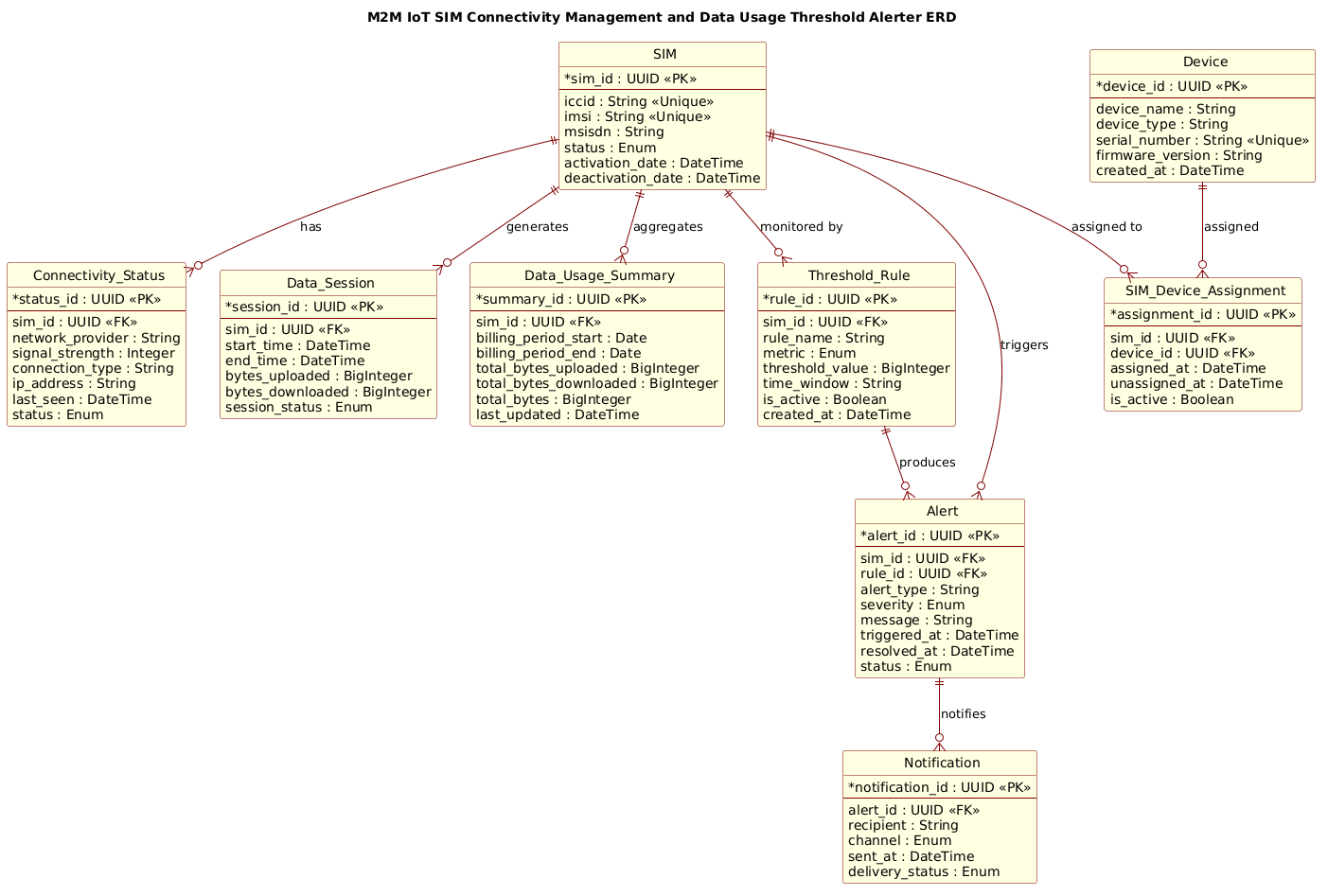
Below is the complete visual representation of the M2M IoT SIM Connectivity Management and Data Usage Threshold Alerter ERD. This diagram illustrates the entities, their attributes, primary keys, foreign keys, and the cardinality of relationships between them.
@startuml
!include https://static.visual-paradigm.com/web/resources/plantuml-stdlib/themes/rose.puml

/'
This ERD models the core entities required for M2M IoT SIM connectivity management
and data usage threshold alerting. It supports tracking SIMs, their assigned devices,
connectivity status, data sessions, aggregated data usage, threshold rules,
and alert notifications. The structure enables monitoring SIM connectivity,
collecting usage records, evaluating thresholds, and generating alerts when
limits are exceeded.
'/

title M2M IoT SIM Connectivity Management and Data Usage Threshold Alerter ERD

entity "SIM" as sim {
  * sim_id : UUID <<PK>>
  --
  iccid : String <<Unique>>
  imsi : String <<Unique>>
  msisdn : String
  status : Enum
  activation_date : DateTime
  deactivation_date : DateTime
}

entity "Device" as device {
  * device_id : UUID <<PK>>
  --
  device_name : String
  device_type : String
  serial_number : String <<Unique>>
  firmware_version : String
  created_at : DateTime
}

entity "SIM_Device_Assignment" as assignment {
  * assignment_id : UUID <<PK>>
  --
  sim_id : UUID <<FK>>
  device_id : UUID <<FK>>
  assigned_at : DateTime
  unassigned_at : DateTime
  is_active : Boolean
}

entity "Connectivity_Status" as conn_status {
  * status_id : UUID <<PK>>
  --
  sim_id : UUID <<FK>>
  network_provider : String
  signal_strength : Integer
  connection_type : String
  ip_address : String
  last_seen : DateTime
  status : Enum
}

entity "Data_Session" as data_session {
  * session_id : UUID <<PK>>
  --
  sim_id : UUID <<FK>>
  start_time : DateTime
  end_time : DateTime
  bytes_uploaded : BigInteger
  bytes_downloaded : BigInteger
  session_status : Enum
}

entity "Data_Usage_Summary" as usage_summary {
  * summary_id : UUID <<PK>>
  --
  sim_id : UUID <<FK>>
  billing_period_start : Date
  billing_period_end : Date
  total_bytes_uploaded : BigInteger
  total_bytes_downloaded : BigInteger
  total_bytes : BigInteger
  last_updated : DateTime
}

entity "Threshold_Rule" as threshold {
  * rule_id : UUID <<PK>>
  --
  sim_id : UUID <<FK>>
  rule_name : String
  metric : Enum
  threshold_value : BigInteger
  time_window : String
  is_active : Boolean
  created_at : DateTime
}

entity "Alert" as alert {
  * alert_id : UUID <<PK>>
  --
  sim_id : UUID <<FK>>
  rule_id : UUID <<FK>>
  alert_type : String
  severity : Enum
  message : String
  triggered_at : DateTime
  resolved_at : DateTime
  status : Enum
}

entity "Notification" as notification {
  * notification_id : UUID <<PK>>
  --
  alert_id : UUID <<FK>>
  recipient : String
  channel : Enum
  sent_at : DateTime
  delivery_status : Enum
}

sim ||--o{ assignment : "assigned to"
device ||--o{ assignment : "assigned"

sim ||--o{ conn_status : "has"
sim ||--o{ data_session : "generates"
sim ||--o{ usage_summary : "aggregates"
sim ||--o{ threshold : "monitored by"
sim ||--o{ alert : "triggers"

threshold ||--o{ alert : "produces"
alert ||--o{ notification : "notifies"

@endumlStep-by-Step Architectural Walkthrough
Phase 1: Canvas Configuration & Layout Directives
The foundation of any PlantUML diagram lies in its configuration. We begin by including the rose.puml theme, which provides a professional, modern aesthetic suitable for technical documentation. This theme automatically handles background colors, entity borders, and font styles, ensuring the diagram looks polished without manual CSS tweaking. We also define a title directive to clearly label the diagram’s purpose at the top of the canvas.
!include https://static.visual-paradigm.com/web/resources/plantuml-stdlib/themes/rose.puml

title M2M IoT SIM Connectivity Management and Data Usage Threshold Alerter ERD
Additionally, we insert a multi-line comment block using /' and '/ to describe the diagram’s context. This acts as living documentation within the code, ensuring that anyone reading the source understands the business logic without needing to render the diagram first.
Phase 2: Declaring Core Entities, Actors, and Boundaries
The core of the ERD is the definition of entities. In PlantUML, we use the entity keyword followed by the entity name and an alias for the relationship lines. We define the SIM entity first, as it is the central anchor of the model. Inside the curly braces, we list attributes. Primary keys are marked with * and Foreign Keys with FK. We use UUID for unique identifiers, which is a best practice in distributed IoT systems to avoid collision issues. We also define data types like String, BigInteger (for large byte counts), and Enum for status fields.
entity "SIM" as sim {
* sim_id : UUID <>
--
iccid : String <>
imsi : String < >
msisdn : String
status : Enum
activation_date : DateTime
deactivation_date : DateTime
} We follow a similar pattern for the Device entity, capturing hardware details like serial numbers and firmware versions. The SIM_Device_Assignment entity is introduced as a junction table to handle the many-to-many relationship between SIMs and Devices, allowing for historical tracking of assignments via assigned_at and unassigned_at timestamps.
Phase 3: Mapping Data Flows & Key Interactions
With entities defined, we map the relationships that drive the business logic. The SIM entity acts as the parent for connectivity, sessions, usage, and alerts. We use the ||--o{ syntax to denote a one-to-zero-or-many relationship, indicating that one SIM can have multiple connectivity statuses, data sessions, or alerts.
sim ||--o{ conn_status : "has"
sim ||--o{ data_session : "generates"
sim ||--o{ usage_summary : "aggregates"
sim ||--o{ threshold : "monitored by"
sim ||--o{ alert : "triggers"
We also model the flow of alerts. A Threshold_Rule produces an Alert, which in turn triggers a Notification to a recipient. This creates a clear chain of custody for data events: Rule -> Alert -> Notification.
Phase 4: Grouping, Annotations & Visual Polish
To enhance readability, we use the -- separator within entities to visually group primary keys separately from other attributes. We also utilize the title directive to provide a high-level summary. While PlantUML does not have a built-in “package” grouping for ERDs in the same way as class diagrams, the logical separation of entities (e.g., grouping Threshold_Rule, Alert, and Notification together conceptually) helps in maintaining the diagram’s structure. The rose.puml theme automatically applies consistent styling to these groupings.
Syntax & Keyword Deep Dive
Understanding the specific PlantUML syntax used in this ERD is crucial for customization and extension.
entity: The primary keyword used to define a database table or object. The syntax isentity "Name" as alias { ... }.PKandFKStereotypes: Written as<or> <, these tags visually denote Primary Keys and Foreign Keys in the rendered diagram, essential for understanding database relationships.> ||--o{Relationship: This syntax represents a mandatory one-to-zero-or-many relationship. The||indicates mandatory participation (one), ando{indicates zero or many on the other side.BigIntegerType: Used for data fields likebytes_uploadedto accommodate large numbers typical in IoT data transfer scenarios, ensuring the diagram accurately reflects technical requirements.EnumType: Used for fields likestatusorseverityto indicate that the value must be one of a predefined set of constants, a common pattern in state management.
Best Practices & Pitfalls to Avoid
When designing ERDs for complex IoT systems, adherence to best practices ensures long-term maintainability.
- Use Descriptive Aliases: Always assign a short alias (e.g.,
as sim) to your entities. This makes the relationship lines much cleaner and easier to read than using the full entity name. - Separate Keys Clearly: Use the
--separator to visually distinguish Primary Keys from other attributes. This helps database administrators quickly identify the structure of the table. - Avoid Over-Normalization in Diagrams: While your database schema might be highly normalized, ensure the ERD remains readable. If a relationship is too complex, consider adding a descriptive note or splitting the diagram into logical sections.
- Consistent Naming Conventions: Stick to a consistent naming convention for attributes (e.g., camelCase or snake_case) and data types to reduce cognitive load when reading the code.
Start Building M2M IoT ERDs Faster with VPasCode
Instantly render, customize, and export your PlantUML Entity Relationship Diagrams in your browser with zero local installation required.