


In the rapidly evolving telecommunications sector, maintaining the physical integrity of cell towers is a critical operational necessity. These structures, often standing hundreds of feet tall and exposed to harsh weather conditions, require rigorous, scheduled inspections to ensure safety and service continuity. The data generated from these inspections—ranging from structural component assessments to precise guy wire tension measurements—forms a complex web of relationships that must be modeled accurately to support predictive maintenance and safety compliance.
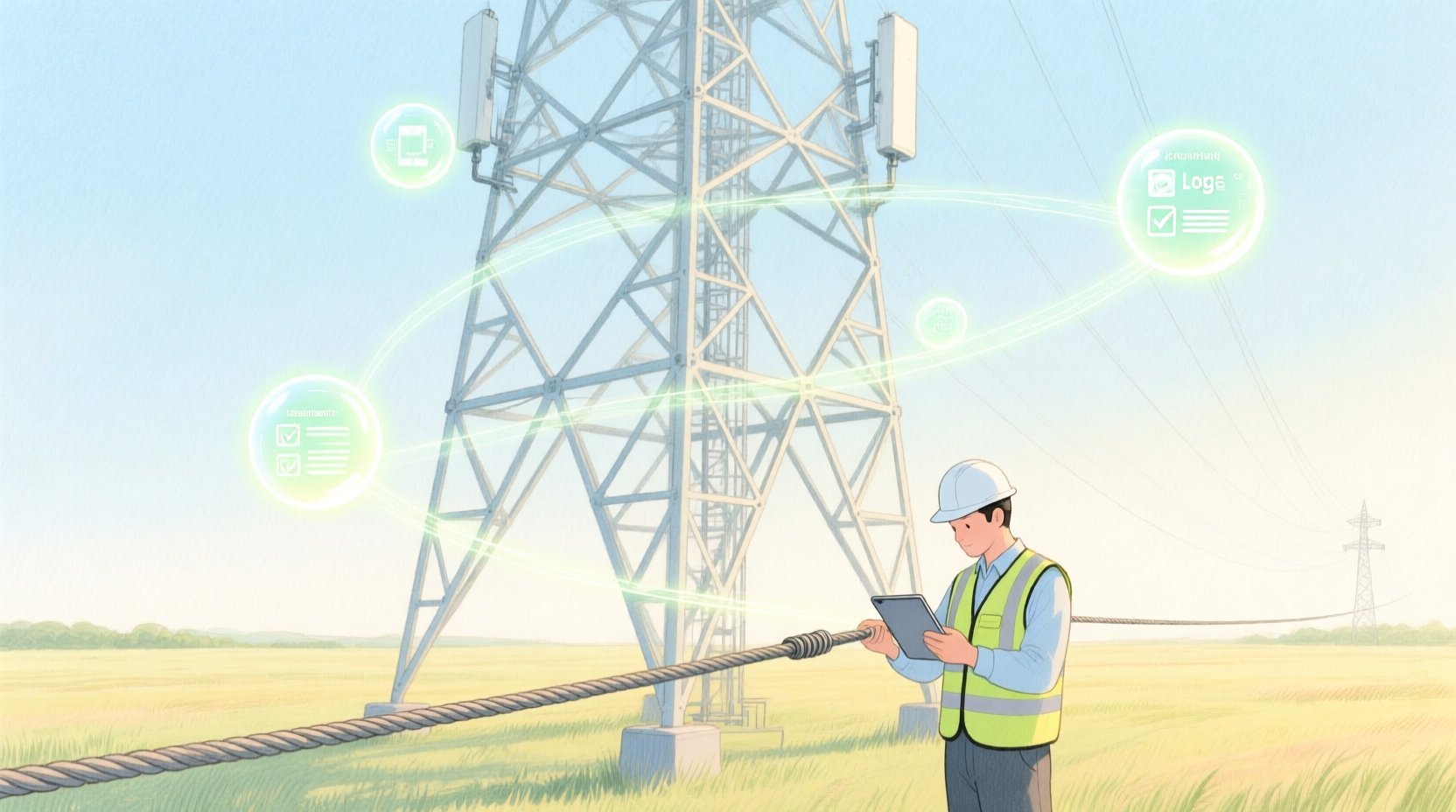
Traditionally, capturing this data involved disparate spreadsheets or siloed database systems, making it difficult to trace the history of a specific tower or correlate environmental factors with structural degradation. A well-structured Entity-Relationship Diagram (ERD) serves as the blueprint for a unified data model, linking the physical assets (towers and guy wires) with the operational processes (inspections and findings). By using PlantUML within VPasCode, engineers can visualize these relationships instantly, ensuring that the database schema supports the complex querying required to monitor structural health trends over time.
Understanding the Model: Purpose, Scope & Problem Framing
This guide focuses on modeling a specific domain within the telecommunications industry: the structural integrity management of telecom towers. The primary goal is to create a data schema that not only stores static asset information but also captures dynamic, time-series data regarding maintenance activities and environmental conditions.
Diagram Abstraction & Representation
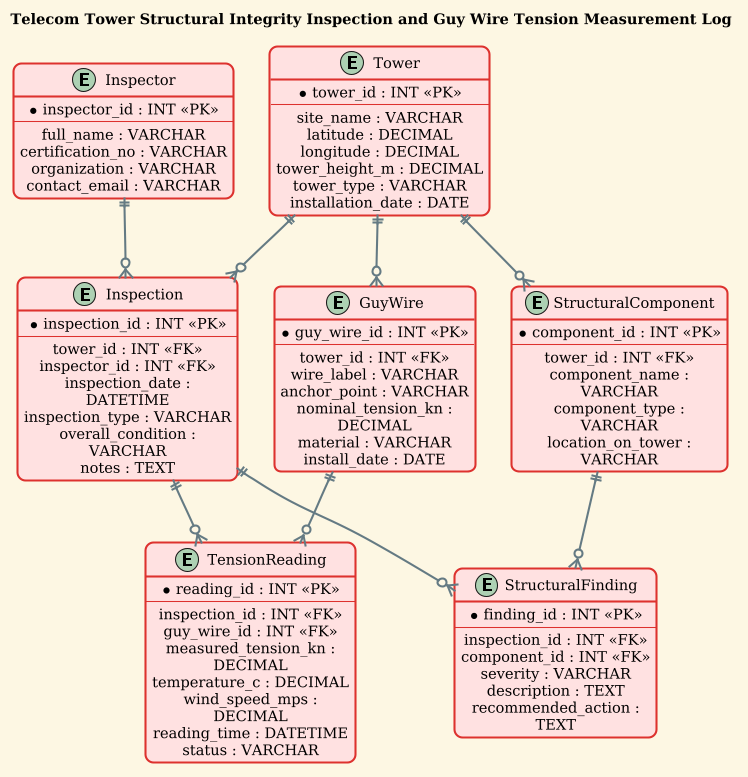
An Entity-Relationship Diagram (ERD) is the standard tool for visualizing data architecture. In this context, we are modeling Entities (the nouns of the system, such as Towers, Inspectors, and Wires) and their Relationships (how they interact). The diagram abstracts the physical world into logical data structures. For instance, a “GuyWire” is not just a cable; in this model, it is an entity with specific attributes like nominal tension and material, linked to a Tower. The relationships define cardinality, such as one tower having many guy wires, or one inspection recording many tension readings.
Target Domain Scope & Scenario
The scope of this model is strictly limited to the lifecycle of tower inspections and structural monitoring. It covers:
- Asset Management: Defining the tower’s location, type, and height.
- Workforce Management: Tracking the inspectors who perform the work.
- Operational Logging: Recording specific findings (cracks, rust) and sensor readings (tension, temperature) during an inspection event.
- Temporal Analysis: Linking measurements to specific dates and times to allow for trend analysis.
Key Takeaways & Educational Insights
By constructing this diagram, you will learn how to handle one-to-many relationships (a tower has many components) and many-to-many resolutions (an inspection records many findings, requiring a junction entity or specific linking). You will also see how to model temporal data (datetime fields) and conditional attributes (severity levels) essential for engineering logs.
Complete Diagram & Full Source Code
Below is the complete, rendered Entity-Relationship Diagram for the Telecom Tower Structural Integrity system. This visual representation clarifies how the Tower acts as the central hub, connecting to GuyWires, Inspections, and StructuralComponents, while Inspector data is linked to the inspection process.
The following code block contains the complete PlantUML source code. You can copy this directly into the VPasCode editor to see the live rendering.
@startuml
!theme sunlust
title Telecom Tower Structural Integrity Inspection and Guy Wire Tension Measurement Log

/'
This ERD models the data needed to track structural inspections of telecom towers
and the tension measurements of their guy wires over time. Towers are inspected
on scheduled dates by field engineers, and each inspection may cover multiple
structural components (e.g., legs, braces, anchor points). Guy wires are attached
to towers and their tension is measured during inspections to detect looseness,
over-tensioning, or corrosion-related degradation. The schema links towers to
their guy wires, inspections, structural findings, and tension readings so that
engineers can monitor integrity trends and schedule maintenance.
'/

entity "Tower" as tower {
  * tower_id : INT <<PK>>
  --
  site_name : VARCHAR
  latitude : DECIMAL
  longitude : DECIMAL
  tower_height_m : DECIMAL
  tower_type : VARCHAR
  installation_date : DATE
}

entity "GuyWire" as guywire {
  * guy_wire_id : INT <<PK>>
  --
  tower_id : INT <<FK>>
  wire_label : VARCHAR
  anchor_point : VARCHAR
  nominal_tension_kn : DECIMAL
  material : VARCHAR
  install_date : DATE
}

entity "Inspection" as inspection {
  * inspection_id : INT <<PK>>
  --
  tower_id : INT <<FK>>
  inspector_id : INT <<FK>>
  inspection_date : DATETIME
  inspection_type : VARCHAR
  overall_condition : VARCHAR
  notes : TEXT
}

entity "Inspector" as inspector {
  * inspector_id : INT <<PK>>
  --
  full_name : VARCHAR
  certification_no : VARCHAR
  organization : VARCHAR
  contact_email : VARCHAR
}

entity "StructuralComponent" as component {
  * component_id : INT <<PK>>
  --
  tower_id : INT <<FK>>
  component_name : VARCHAR
  component_type : VARCHAR
  location_on_tower : VARCHAR
}

entity "StructuralFinding" as finding {
  * finding_id : INT <<PK>>
  --
  inspection_id : INT <<FK>>
  component_id : INT <<FK>>
  severity : VARCHAR
  description : TEXT
  recommended_action : TEXT
}

entity "TensionReading" as reading {
  * reading_id : INT <<PK>>
  --
  inspection_id : INT <<FK>>
  guy_wire_id : INT <<FK>>
  measured_tension_kn : DECIMAL
  temperature_c : DECIMAL
  wind_speed_mps : DECIMAL
  reading_time : DATETIME
  status : VARCHAR
}

tower ||--o{ guywire
tower ||--o{ inspection
tower ||--o{ component
inspector ||--o{ inspection
inspection ||--o{ finding
inspection ||--o{ reading
component ||--o{ finding
guywire ||--o{ reading

@endumlStep-by-Step Architectural Walkthrough
Building a professional ERD requires a logical progression from defining the core assets to mapping the complex interactions. Here is how we constructed this model using PlantUML syntax.
Phase 1: Canvas Configuration & Layout Directives
Before defining any entities, we set the stage for the diagram. We use the @startuml directive to begin the PlantUML script. Crucially, we apply the !theme sunlust directive to give the diagram a modern, vibrant aesthetic suitable for technical documentation, ensuring high contrast and readability.
We also include a title block to identify the diagram’s purpose immediately:
title Telecom Tower Structural Integrity Inspection and Guy Wire Tension Measurement LogFinally, we insert a comment block using /' ... '/ to provide a narrative description of the business logic, which appears as a tooltip or annotation in the rendered output, helping stakeholders understand the context without cluttering the schema.
Phase 2: Declaring Core Entities, Actors, and Boundaries
The foundation of the ERD lies in the entity blocks. We start with the Tower, the central asset. We define its primary key (tower_id) using the * symbol and list its attributes like latitude and tower_height_m. The -- separator visually divides the key attributes from the descriptive ones.
We then define the Inspector entity. Unlike the Tower, this represents the human actor. We include fields for certification and contact information, which are critical for audit trails in telecommunications compliance.
entity "Tower" as tower {
* tower_id : INT <>
--
site_name : VARCHAR
...
}
entity "Inspector" as inspector {
* inspector_id : INT < >
--
full_name : VARCHAR
...
} Phase 3: Mapping Data Flows & Key Interactions
The complexity of this model arises in the Inspection and Reading entities. An inspection is an event that links a specific Tower and a specific Inspector. We use Foreign Keys (<) to establish these links. For example, the Inspection entity contains tower_id and inspector_id, creating the bridge between the asset and the worker.
We also model the TensionReading entity, which captures granular data. This entity links back to both the Inspection and the specific GuyWire, allowing us to answer questions like: “What was the tension on Guy Wire A during the inspection on Jan 1st?”
entity "TensionReading" as reading {
* reading_id : INT <>
--
inspection_id : INT <>
guy_wire_id : INT < >
measured_tension_kn : DECIMAL
...
} Phase 4: Grouping, Annotations & Visual Polish
The final phase involves drawing the relationships using PlantUML’s cardinality notation. The syntax ||--o{ denotes a relationship where the left side (e.g., Tower) must have at least one, and the right side (e.g., GuyWire) can have zero or many. This accurately reflects the real-world constraint that a tower must have guy wires for stability, but a specific wire might be removed or not yet installed in a theoretical scenario.
We map all connections:
tower ||--o{ guywire
tower ||--o{ inspection
tower ||--o{ component
inspector ||--o{ inspection
inspection ||--o{ finding
inspection ||--o{ reading
component ||--o{ finding
guywire ||--o{ reading
Syntax & Keyword Deep Dive
PlantUML offers powerful keywords to define database schemas within a diagram. Here is a breakdown of the specific syntax used in this Telecom ERD:
entity "Name" as alias: Defines a table or entity. Theas aliaspart allows us to reference the entity later in the relationship diagram using a shorter name (e.g.,towerinstead ofTower).* attribute : TYPE <: The asterisk> *indicates a Primary Key. The<stereotype explicitly marks this field as the unique identifier in the rendered database diagram.> --: A visual separator line within an entity block that divides primary keys from other attributes, improving readability.<: The Foreign Key stereotype. This visually indicates that a column references the primary key of another entity, establishing the relationship link.> ||--o{: This is the Crow’s Foot notation. The double bar||means “one and only one” (mandatory), and the crow’s foot{means “zero or many” (optional). This creates a One-to-Many relationship./' ... '/: The comment syntax. Anything between these slashes is treated as a comment. In VPasCode, this often renders as a descriptive note attached to the diagram title.!theme sunlust: A directive that applies a specific color palette and styling to the entire diagram, overriding default settings.
Best Practices & Pitfalls to Avoid
When modeling complex systems like telecommunications infrastructure, adherence to best practices ensures your diagram remains maintainable and useful.
- Use Aliases for Relationships: Always define a short alias for your entities (e.g.,
as tower). This prevents the relationship lines from becoming cluttered with long entity names and makes the code easier to read. - Consistent Naming Conventions: Stick to a consistent naming strategy for your columns. Using
snake_case(e.g.,guy_wire_id) for database fields is standard and improves readability compared to camelCase. - Separate Keys from Data: Always use the
--separator in your entity blocks. This visual distinction helps database architects quickly identify the primary keys and foreign keys without scanning every line. - Model the “Event” Entities Separately: In this diagram, Inspection and TensionReading are distinct entities. Do not try to nest these inside the Tower entity. This normalization prevents data redundancy and allows for historical tracking of multiple inspections.
Start Building Telecom ERDs Faster with VPasCode
Design complex database schemas instantly in your browser with VPasCode. No installation required—just write PlantUML and get a live, professional diagram.