


In the high-stakes world of undersea telecommunications, the reliability of transoceanic data transmission hinges on the integrity of the physical infrastructure buried deep beneath the ocean floor. Submarine cable systems are the backbone of global internet traffic, yet they operate in an environment where physical access is nearly impossible once deployed. To maintain these critical assets, operators rely on sophisticated telemetry systems that monitor power feed equipment, repeater health, and signal integrity in real-time. When a fault occurs, the ability to precisely localize the damage and correlate it with historical power data is the difference between a quick repair and a catastrophic data loss event.
Designing the data models that support these operations requires a clear understanding of complex relationships between physical segments, electrical parameters, and fault events. A well-structured Entity Relationship Diagram (ERD) serves as the blueprint for the databases that power these monitoring systems. By using diagram-as-code with PlantUML, architects can diagram-as-code modeling their data models, ensure consistency across documentation, and instantly visualize the intricate links between power feed sessions, telemetry readings, and maintenance actions. This approach transforms abstract database schemas into living, breathing documentation that evolves with the system.
Understanding the Model: Purpose, Scope & Problem Framing
This tutorial focuses on constructing a specialized ERD for a Submarine Cable Repeater Power Feed and Fault Localization Telemetry System. Unlike generic database schemas, this model addresses the unique operational requirements of the telecommunications industry, specifically the need to track long-distance electrical power feeds and pinpoint faults with high precision.
Diagram Abstraction & Representation
In this ERD, we model the hierarchical structure of a submarine cable system. The diagram abstracts the physical reality into manageable entities:
- Cable_System: Represents the entire infrastructure, linking the two landing stations and defining the total capacity.
- Cable_Segment & Repeater: These entities break down the continuous cable into manageable sections and the active amplification points (repeaters) located within them.
- Power_Feed_Equipment (PFE) & Sessions: These capture the electrical power injection points and the specific time-bound sessions where power is applied.
- Telemetry_Reading: A time-series entity capturing voltage, current, and impedance data from specific repeaters during a power session.
- Fault_Event & Localization: These entities model the incident response workflow, from initial detection to the calculated distance of the fault and the subsequent maintenance action.
Target Domain Scope & Scenario
The scope of this model covers the end-to-end operational lifecycle of a power feed event. It begins with the definition of the cable system and its segments, moves through the active power feeding and data collection phases, and concludes with fault detection, localization, and maintenance tracking. This diagram is designed to support operational fault management, maintenance dispatch, and historical analysis of power feed anomalies.
Key Takeaways & Educational Insights
By building this diagram, you will gain insights into:
- How to model one-to-many relationships between physical assets (System -> Segment -> Repeater).
- The importance of linking temporal data (Telemetry Sessions) to static physical assets.
- Best practices for structuring fault management workflows within a relational database schema.
Complete Diagram & Full Source Code
Below is the complete, rendered ERD that we will be constructing step-by-step. This diagram visualizes the robust data structures required to manage submarine cable telemetry.
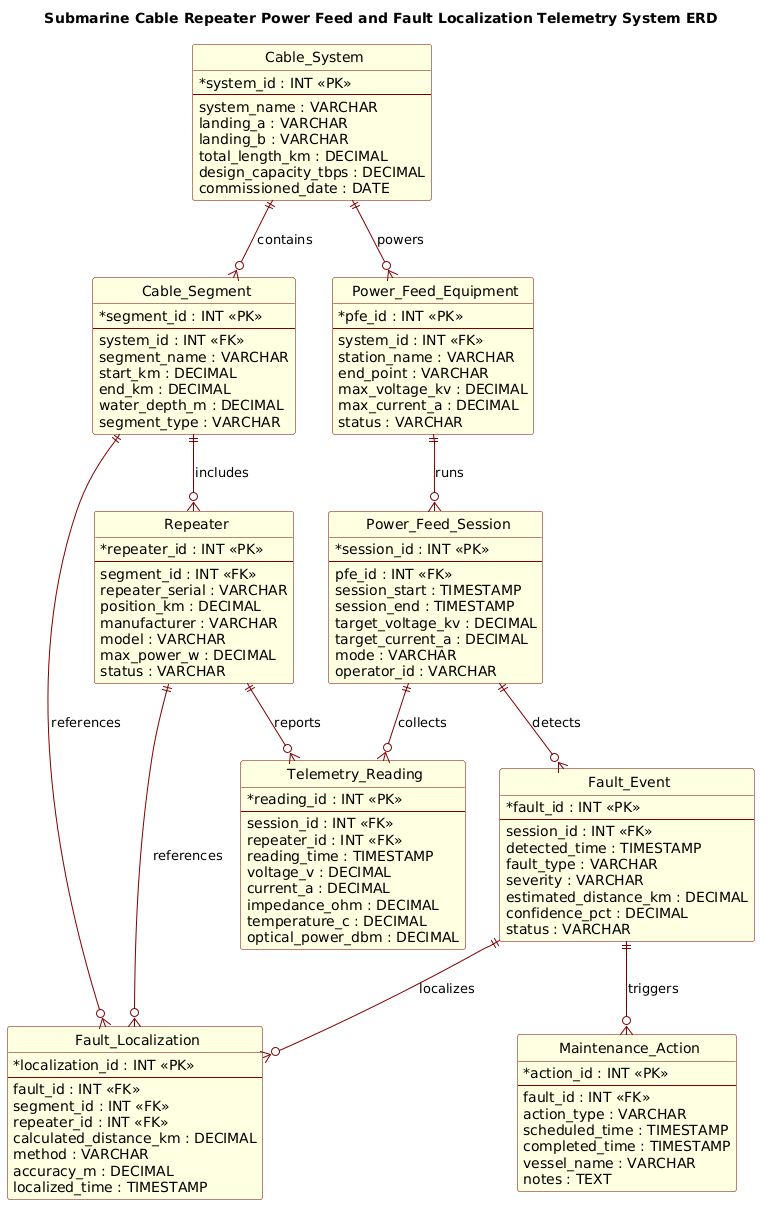
Here is the complete PlantUML source code for the diagram. You can copy this directly into the VPasCode editor to see the live rendering.
@startuml
!include https://static.visual-paradigm.com/web/resources/plantuml-stdlib/themes/rose.puml

title Submarine Cable Repeater Power Feed and Fault Localization Telemetry System ERD

/'
Diagram context:
This ERD models the core data structures used to monitor submarine cable repeater power feed and localize faults along a wet plant segment.
The system tracks cable segments, repeaters, power feed equipment (PFE), telemetry measurements, fault events, and localization results.
It supports correlating electrical telemetry (voltage, current, impedance) with repeater and segment locations to identify fault types and distances.
The entities are designed for operational fault management, maintenance dispatch, and historical analysis of power feed anomalies.
'/

entity "Cable_System" as CS {
  * system_id : INT <<PK>>
  --
  system_name : VARCHAR
  landing_a : VARCHAR
  landing_b : VARCHAR
  total_length_km : DECIMAL
  design_capacity_tbps : DECIMAL
  commissioned_date : DATE
}

entity "Cable_Segment" as SEG {
  * segment_id : INT <<PK>>
  --
  system_id : INT <<FK>>
  segment_name : VARCHAR
  start_km : DECIMAL
  end_km : DECIMAL
  water_depth_m : DECIMAL
  segment_type : VARCHAR
}

entity "Repeater" as REP {
  * repeater_id : INT <<PK>>
  --
  segment_id : INT <<FK>>
  repeater_serial : VARCHAR
  position_km : DECIMAL
  manufacturer : VARCHAR
  model : VARCHAR
  max_power_w : DECIMAL
  status : VARCHAR
}

entity "Power_Feed_Equipment" as PFE {
  * pfe_id : INT <<PK>>
  --
  system_id : INT <<FK>>
  station_name : VARCHAR
  end_point : VARCHAR
  max_voltage_kv : DECIMAL
  max_current_a : DECIMAL
  status : VARCHAR
}

entity "Power_Feed_Session" as PFS {
  * session_id : INT <<PK>>
  --
  pfe_id : INT <<FK>>
  session_start : TIMESTAMP
  session_end : TIMESTAMP
  target_voltage_kv : DECIMAL
  target_current_a : DECIMAL
  mode : VARCHAR
  operator_id : VARCHAR
}

entity "Telemetry_Reading" as TEL {
  * reading_id : INT <<PK>>
  --
  session_id : INT <<FK>>
  repeater_id : INT <<FK>>
  reading_time : TIMESTAMP
  voltage_v : DECIMAL
  current_a : DECIMAL
  impedance_ohm : DECIMAL
  temperature_c : DECIMAL
  optical_power_dbm : DECIMAL
}

entity "Fault_Event" as FLT {
  * fault_id : INT <<PK>>
  --
  session_id : INT <<FK>>
  detected_time : TIMESTAMP
  fault_type : VARCHAR
  severity : VARCHAR
  estimated_distance_km : DECIMAL
  confidence_pct : DECIMAL
  status : VARCHAR
}

entity "Fault_Localization" as LOC {
  * localization_id : INT <<PK>>
  --
  fault_id : INT <<FK>>
  segment_id : INT <<FK>>
  repeater_id : INT <<FK>>
  calculated_distance_km : DECIMAL
  method : VARCHAR
  accuracy_m : DECIMAL
  localized_time : TIMESTAMP
}

entity "Maintenance_Action" as MNT {
  * action_id : INT <<PK>>
  --
  fault_id : INT <<FK>>
  action_type : VARCHAR
  scheduled_time : TIMESTAMP
  completed_time : TIMESTAMP
  vessel_name : VARCHAR
  notes : TEXT
}

CS ||--o{ SEG : contains
SEG ||--o{ REP : includes
CS ||--o{ PFE : powers
PFE ||--o{ PFS : runs
PFS ||--o{ TEL : collects
REP ||--o{ TEL : reports
PFS ||--o{ FLT : detects
FLT ||--o{ LOC : localizes
SEG ||--o{ LOC : references
REP ||--o{ LOC : references
FLT ||--o{ MNT : triggers

@endumlStep-by-Step Architectural Walkthrough
Phase 1: Canvas Configuration & Layout Directives
Before defining any entities, we must set the stage for our diagram. In this phase, we include the rose theme to give the diagram a professional, polished look suitable for enterprise documentation. We also add a descriptive title and a comment block that explains the diagram’s context without cluttering the visual model.
Start by including the theme and setting the title:
!include https://static.visual-paradigm.com/web/resources/plantuml-stdlib/themes/rose.puml
title Submarine Cable Repeater Power Feed and Fault Localization Telemetry System ERD
Next, we add a multi-line comment block using the /' and '/ syntax. This is crucial for documentation, as it allows you to store architectural context that is invisible in the rendered diagram but visible in the source code.
/'
Diagram context:
This ERD models the core data structures used to monitor submarine cable repeater power feed and localize faults along a wet plant segment.
... (rest of comment) ...
'/
Phase 2: Declaring Core Entities, Actors, and Boundaries
Now we define the fundamental building blocks of the system. We use the entity keyword to declare tables, followed by the entity name and an alias (e.g., CS for Cable_System). Inside the curly braces, we list the attributes.
Key attributes include Primary Keys (*) and Foreign Keys (FK). For example, the Cable_Segment entity has a system_id which is a foreign key linking it back to the Cable_System.
entity "Cable_System" as CS {
* system_id : INT <>
--
system_name : VARCHAR
landing_a : VARCHAR
...
}
entity "Cable_Segment" as SEG {
* segment_id : INT < >
--
system_id : INT <>
...
} We continue this pattern for Repeater, Power_Feed_Equipment, and Power_Feed_Session. Notice how the data types (INT, VARCHAR, DECIMAL, TIMESTAMP) are explicitly defined to ensure the resulting database schema is type-safe.
Phase 3: Mapping Data Flows & Key Interactions
The power of an ERD lies in the relationships. We define these using the ||--o{ syntax (mandatory one to optional many) to show how entities interact. In this diagram, we model the flow from power injection to fault detection.
For instance, a Power_Feed_Session collects telemetry readings. We define this relationship explicitly:
PFS ||--o{ TEL : collectsSimilarly, we link the physical repeaters to the telemetry they report:
REP ||--o{ TEL : reportsThis phase establishes the logical flow of data, showing that a single session can have many readings, and a single repeater can report many readings over time.
Phase 4: Grouping, Annotations & Visual Polish
Finally, we close the diagram with the remaining relationships that handle fault management. We link Fault_Event to Fault_Localization and Maintenance_Action to show the operational response workflow. The FLT ||--o{ MNT : triggers relationship clearly indicates that a detected fault initiates a maintenance action.
Once all relationships are defined, the diagram is complete. The use of the rose theme automatically handles the styling, ensuring that primary keys are bolded and relationships are drawn with clear crow’s feet notation.
Syntax & Keyword Deep Dive
To master PlantUML ERD diagrams, you need to understand the specific keywords and syntax used in this model. Here is a breakdown of the essential elements:
entity: Defines a new table or entity in the database schema. It takes a name (e.g.,"Cable_System") and an alias (e.g.,as CS).PK(Primary Key): Denoted by*before the attribute name (e.g.,* system_id). This identifies the unique identifier for each row in the table.FK(Foreign Key): Denoted by<<FK>>after the data type. This indicates a reference to a primary key in another table, establishing the relationship link.||--o{: This is the relationship syntax. The||represents “one and only one” (mandatory), and theo{represents “zero or many” (optional). This creates a one-to-many relationship.data-type: Standard SQL types likeINT,VARCHAR,DECIMAL, andTIMESTAMPare used to define the nature of the data stored in each attribute.title: Sets the main heading of the diagram, providing immediate context to the viewer./' ... '/: The multi-line comment syntax. Text inside these delimiters is ignored during rendering but remains in the source code for documentation.
Best Practices & Pitfalls to Avoid
When designing complex ERDs like this submarine telemetry system, adhering to best practices ensures clarity and maintainability.
- Consistent Naming Conventions: Use clear, descriptive names for entities (e.g.,
Telemetry_Reading) and consistent aliases (e.g.,TEL). This makes the diagram easier to read and the code easier to maintain. - Logical Grouping: Group related entities together in the code. While PlantUML arranges them automatically, keeping the code organized helps you spot missing relationships or orphaned tables.
- Document Context: Always use the
/'comment block to explain the diagram’s purpose. This is invaluable for new team members or future audits. - Avoid Over-Normalization in Diagrams: While your database might be highly normalized, an ERD for documentation should focus on readability. Ensure that the relationships clearly tell the story of the data flow without getting bogged down in overly granular join tables unless necessary for the narrative.
Start Building Submarine Cable ERDs Faster with VPasCode
Immediately test, preview, and customize this Submarine Cable Repeater ERD online in VPasCode without installing any tools or configuring environments.