


In the rapidly evolving landscape of Unified Communications as a Service (UCaaS), telecommunications architects face a unique challenge: balancing the granular needs of individual tenant provisioning with the macro-level requirements of global SIP trunk capacity planning. Unlike traditional on-premise telephony, cloud-based platforms must dynamically allocate resources across multiple regions, carriers, and customer tiers while maintaining strict data integrity. A well-structured database schema is the backbone of such a system, ensuring that every phone number, user extension, and SIP channel is accounted for and correctly linked to its parent organization.

Visualizing this complexity through a standard text editor or a static database tool often leads to fragmented understanding. However, by adopting a diagram-as-code approach with PlantUML, architects can treat their data models as living documentation. This method allows for rapid iteration, versioning of logic, and immediate validation of cardinality and relationships. In this masterclass, we will construct a comprehensive Entity Relationship Diagram (ERD) using VPasCode, a free web-based editor, to model the critical entities of a UCaaS platform, including tenants, sites, users, phone numbers, and the sophisticated logic required for SIP trunk capacity forecasting.
Understanding the Model: Purpose, Scope & Problem Framing
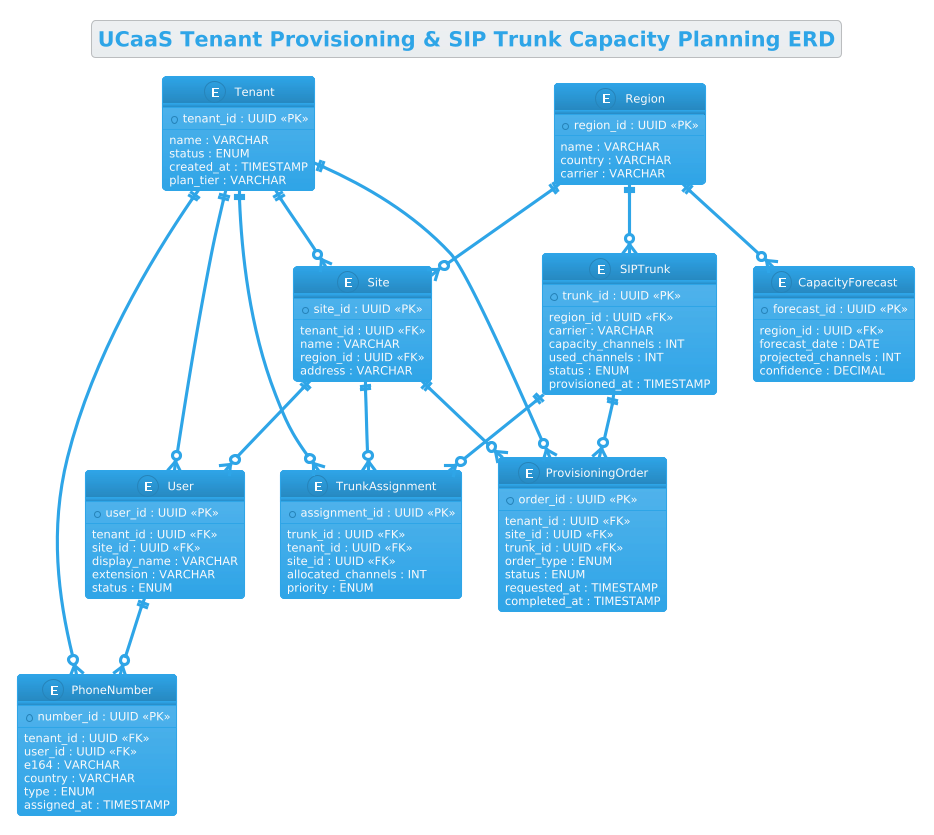
This ERD is designed to solve a multi-layered architectural problem common in modern telecommunications: how to decouple tenant identity from physical infrastructure while maintaining tight coupling for resource allocation. The model captures the hierarchy of a UCaaS provider where a single Tenant (an enterprise customer) can have multiple Sites (locations), each hosting numerous Users with specific Phone Numbers. Crucially, it introduces the concept of SIP Trunks as a shared resource pool managed by Regions, enabling operations teams to forecast capacity needs based on projected growth.
Diagram Abstraction & Representation
The diagram uses standard Entity Relationship notation to represent the logical structure of the database. Entities like Tenant and SIPTrunk act as the foundational tables, while relationships (one-to-many, zero-to-many) define how data flows. For instance, the relationship between a Region and a SIPTrunk illustrates that a geographic region can host multiple trunks, but a specific trunk belongs to only one region. This abstraction allows developers to focus on the logical constraints of the business logic rather than specific SQL dialects.
Target Domain Scope & Scenario
The scope of this model is strictly limited to the core provisioning and capacity planning domains. It covers the lifecycle of a tenant from creation to site assignment, the allocation of phone numbers to users, and the tracking of SIP channel utilization. It intentionally excludes lower-level signaling protocols or detailed billing logic to maintain clarity on the structural relationships. The scenario assumes a multi-tenant architecture where resource isolation and capacity forecasting are critical operational requirements.
Key Takeaways & Educational Insights
By the end of this tutorial, you will understand how to model complex many-to-many relationships using associative entities (like TrunkAssignment), how to implement capacity planning metrics directly into the schema visualization, and how to use PlantUML’s ERD syntax to create clean, readable, and professional documentation that serves as a single source of truth for your development team.
Complete Diagram & Full Source Code
Before diving into the construction phases, here is the complete visual output of the ERD we will build. This diagram illustrates the hierarchical structure of a UCaaS platform, showing how tenants branch into sites and users, while SIP trunks and regions manage the underlying telephony capacity.
@startuml
!theme cerulean
title UCaaS Tenant Provisioning & SIP Trunk Capacity Planning ERD

/'
Diagram Context:
This ERD models a UCaaS platform that provisions tenants and plans SIP trunk capacity.
It captures the relationships between tenants, their sites, users, phone numbers, and the
SIP trunks that carry their traffic. The design supports capacity planning by linking
trunks to regions and tracking channel utilization, so operations teams can forecast
when additional SIP capacity is needed as tenants grow. It also tracks provisioning
orders and number assignments to ensure every tenant's telephony resources are
accounted for and correctly allocated.
'/

entity "Tenant" as tenant {
  * tenant_id : UUID <<PK>>
  --
  name : VARCHAR
  status : ENUM
  created_at : TIMESTAMP
  plan_tier : VARCHAR
}

entity "Site" as site {
  * site_id : UUID <<PK>>
  --
  tenant_id : UUID <<FK>>
  name : VARCHAR
  region_id : UUID <<FK>>
  address : VARCHAR
}

entity "User" as user {
  * user_id : UUID <<PK>>
  --
  tenant_id : UUID <<FK>>
  site_id : UUID <<FK>>
  display_name : VARCHAR
  extension : VARCHAR
  status : ENUM
}

entity "PhoneNumber" as number {
  * number_id : UUID <<PK>>
  --
  tenant_id : UUID <<FK>>
  user_id : UUID <<FK>>
  e164 : VARCHAR
  country : VARCHAR
  type : ENUM
  assigned_at : TIMESTAMP
}

entity "Region" as region {
  * region_id : UUID <<PK>>
  --
  name : VARCHAR
  country : VARCHAR
  carrier : VARCHAR
}

entity "SIPTrunk" as trunk {
  * trunk_id : UUID <<PK>>
  --
  region_id : UUID <<FK>>
  carrier : VARCHAR
  capacity_channels : INT
  used_channels : INT
  status : ENUM
  provisioned_at : TIMESTAMP
}

entity "TrunkAssignment" as assignment {
  * assignment_id : UUID <<PK>>
  --
  trunk_id : UUID <<FK>>
  tenant_id : UUID <<FK>>
  site_id : UUID <<FK>>
  allocated_channels : INT
  priority : ENUM
}

entity "CapacityForecast" as forecast {
  * forecast_id : UUID <<PK>>
  --
  region_id : UUID <<FK>>
  forecast_date : DATE
  projected_channels : INT
  confidence : DECIMAL
}

entity "ProvisioningOrder" as order {
  * order_id : UUID <<PK>>
  --
  tenant_id : UUID <<FK>>
  site_id : UUID <<FK>>
  trunk_id : UUID <<FK>>
  order_type : ENUM
  status : ENUM
  requested_at : TIMESTAMP
  completed_at : TIMESTAMP
}

tenant ||--o{ site
tenant ||--o{ user
tenant ||--o{ number
tenant ||--o{ assignment
tenant ||--o{ order

site ||--o{ user
site ||--o{ assignment
site ||--o{ order

region ||--o{ site
region ||--o{ trunk
region ||--o{ forecast

user ||--o{ number

trunk ||--o{ assignment
trunk ||--o{ order

@endumlStep-by-Step Architectural Walkthrough
Phase 1: Canvas Configuration & Layout Directives
Every professional PlantUML diagram begins with setting the stage. In this phase, we define the visual theme and the overall title to provide immediate context. We start by declaring the diagram type using @startuml. To ensure the diagram looks modern and clean, we apply the cerulean theme, which provides a professional blue-toned aesthetic suitable for technical documentation. We also add a title that clearly states the diagram’s purpose.
@startuml
!theme cerulean
title UCaaS Tenant Provisioning & SIP Trunk Capacity Planning ERD
Following the header, we insert a comment block using the /' ... '/ syntax. This is a best practice for ERDs, as it allows us to document the business logic and scope of the diagram directly within the code, ensuring that future readers understand the “why” behind the schema without needing external documentation.
Phase 2: Declaring Core Entities, Actors, and Boundaries
The heart of an ERD lies in the entities. We define each table using the entity keyword. For the Tenant entity, we use the syntax entity "Tenant" as tenant to give it a readable label and a shorthand alias. Inside the curly braces, we define the attributes. Primary Keys (PK) are marked with * and Foreign Keys (FK) with FK stereotypes. For example, the Tenant entity has a tenant_id as its primary key and a plan_tier to differentiate service levels.
entity "Tenant" as tenant {
  * tenant_id : UUID <>
  --
  name : VARCHAR
  status : ENUM
  created_at : TIMESTAMP
  plan_tier : VARCHAR
}
We repeat this pattern for Site, User, and PhoneNumber, ensuring that every entity has a unique identifier and appropriate data types. Notice how the Site entity links back to the Tenant via tenant_id, establishing the foundational hierarchy of the UCaaS platform.
Phase 3: Mapping Data Flows & Key Interactions
Once the entities are defined, we must establish the relationships that bind them. PlantUML ERD uses specific arrow syntax to denote cardinality. The ||--o{ syntax represents a “One or Many” relationship, where the left side (the parent) must exist and can have zero or many children. For instance, a Region can have many Sites, but a Site must belong to exactly one Region.
region ||--o{ site
region ||--o{ trunk
region ||--o{ forecast
We also define complex relationships like the link between Trunk and Assignment. The TrunkAssignment entity acts as an associative entity to handle the many-to-many relationship between a trunk and a tenant/site, allowing us to track specific allocated channels and priority levels for each assignment.
Phase 4: Grouping, Annotations & Visual Polish
To finalize the diagram, we ensure that all relationships are bidirectional where necessary and that the flow of data is logical. We link User to PhoneNumber and Site to Assignment, ensuring that the diagram accurately reflects the real-world constraints of a telecommunications system. The final step involves running the code in VPasCode to verify that the layout is clean, labels are not overlapping, and the cerulean theme renders the entities with the correct styling.
Syntax & Keyword Deep Dive
Understanding the specific PlantUML syntax is crucial for mastering ERD creation. Here are the key keywords and conventions used in this tutorial:
entity: The primary keyword used to define a database table or entity. It accepts a display name and an alias for internal referencing.entity "Name" as alias: Allows you to use a short alias (liketenant) in relationship lines instead of the full name, keeping the code clean and readable./* ... */or/' ... '/: Comment blocks used to describe the diagram’s context, business rules, or scope directly in the source code.entity { ... }: A block used to define the attributes of an entity. Attributes are listed line by line.* attribute : Type <: Defines a column. The> *indicates a Primary Key. The<and> <stereotypes visually label these keys in the rendered diagram.> ||--o{: Represents a One-to-Many relationship. The double bar||means “one and only one” on the left, and the crow’s footo{means “zero or many” on the right.!theme cerulean: A directive to apply a specific visual theme to the entire diagram, changing colors, fonts, and shapes to match the desired aesthetic.
Best Practices & Pitfalls to Avoid
When building complex ERDs like this UCaaS model, adhering to best practices ensures your diagrams remain maintainable and clear.
- Use Consistent Naming Conventions: Always use singular names for entities (e.g.,
Tenantinstead ofTenants) and lowercase aliases (e.g.,tenant). This makes relationship lines easier to read and write. - Keep Attributes Logical: Group related attributes together. For example, keep all timestamps (
created_at,updated_at) together, and separate keys from business data with a separator line. - Document Relationships Clearly: If a relationship is complex (like a many-to-many resolved via an associative entity), ensure the associative entity has its own primary key and clearly defined foreign keys.
- Avoid Overcrowding: If a diagram becomes too large, consider splitting it into multiple diagrams (e.g., one for Tenant Management, one for SIP Trunking) or using packages to group related entities.
Start Building UCaaS ERDs Faster with VPasCode
Design and visualize complex database schemas instantly in your browser with VPasCode, the free PlantUML editor for telecommunications architects.