


In the rapidly evolving landscape of telecommunications, the allocation of radio spectrum is a high-stakes process governed by complex regulatory frameworks and sophisticated auction mechanisms. Regulators must manage not only the financial aspects of bidding but also the technical intricacies of frequency assignment, interference coordination, and long-term compliance. A robust data model is the backbone of any system handling these operations, ensuring that auction rules are enforced, bids are tracked with precision, and frequency licenses are assigned without conflict.
Visualizing this intricate ecosystem through an Entity Relationship Diagram (ERD) is essential for database architects and system designers. It transforms abstract regulatory requirements into a concrete blueprint, clarifying how auction events, bidder eligibility, and frequency blocks interact. By leveraging diagram-as-code with PlantUML in VPasCode, architects can prototype these complex schemas instantly, iterate on relationships, and generate living documentation that evolves alongside the system.

This tutorial serves as a deep dive into constructing a comprehensive ERD for a spectrum license auction system. We will explore how to model the lifecycle of an auction, from the initial declaration of frequency blocks to the final frequency assignment and payment tracking. Using the AWS Orange theme, we will create a clean, professional diagram that captures the cardinality of relationships between bidders, blocks, and regulatory constraints, providing a clear architectural view for stakeholders.
Understanding the Model: Purpose, Scope & Problem Framing
The diagram we are about to build is an Entity Relationship Diagram (ERD) specifically tailored for the telecommunications domain. Unlike simple data models, this ERD must capture the temporal and regulatory nuances of a spectrum auction. It represents a transactional system where high-value assets (frequency bands) are allocated to qualified entities (bidders) based on competitive bidding rules, followed by strict post-auction compliance.
Diagram Abstraction & Representation
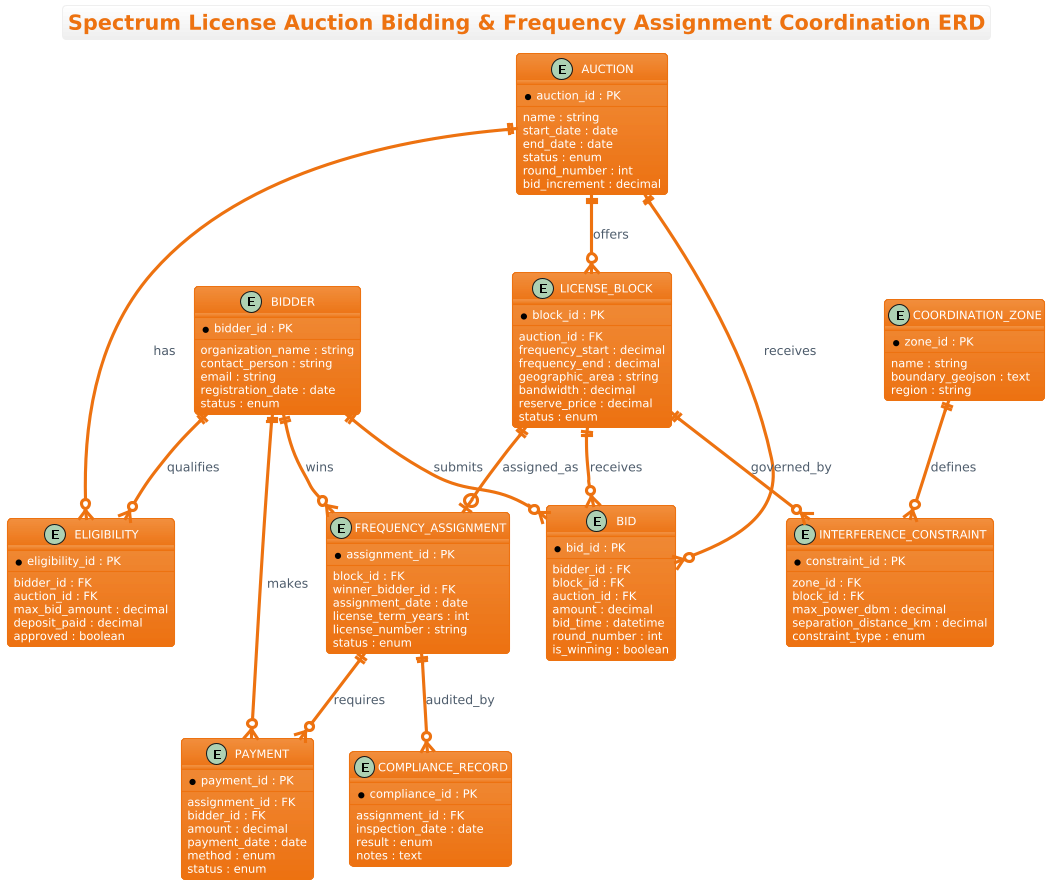
In this context, the ERD acts as the structural contract for the database. Each Entity represents a critical business object: Auction defines the event, Bidder represents the market participant, and License_Block defines the asset being sold. The relationships (lines) define the constraints and cardinalities, such as a single auction having many license blocks, or a single bidder submitting many bids. The diagram abstracts away implementation details like SQL data types, focusing instead on the logical connections: who bids on what, who wins, and how compliance is tracked.
Target Domain Scope & Scenario
This model covers the full lifecycle of a spectrum allocation event. It starts with the definition of an auction and the qualification of bidders. It moves through the dynamic phase of bidding on specific frequency blocks, handling multiple rounds. Finally, it concludes with the administrative phase of assigning frequencies, managing payments, and auditing compliance. It explicitly excludes external systems like payment gateways or GIS mapping tools, focusing strictly on the internal data integrity of the auction platform.
Key Takeaways & Educational Insights
By building this diagram, you will gain insights into modeling complex one-to-many and many-to-many relationships in a regulated environment. You will learn how to structure entities to handle financial data (decimals for bids), temporal data (dates for auctions and assignments), and regulatory constraints (interference zones). The use of PlantUML allows you to define these relationships declaratively, ensuring the visual output matches the logical schema perfectly.
Complete Diagram & Full Source Code
Below is the final rendered ERD. It features the AWS Orange theme for a professional look, clearly defining entities such as AUCTION, BIDDER, ELIGIBILITY, LICENSE_BLOCK, and BID, along with their critical relationships.
@startuml
/'
This ERD models a spectrum license auction and frequency assignment coordination system.
The core entities capture:
- Auction events with rules and schedules
- Bidders (organizations) and their eligibility
- License blocks (frequency bands/geographic areas) being auctioned
- Bid submissions with amounts and timestamps
- Frequency assignments after auction close
- Coordination zones and interference constraints
- Payment and compliance tracking
'/
!theme aws-orange

title Spectrum License Auction Bidding & Frequency Assignment Coordination ERD

' =====================
' ENTITIES
' =====================

entity "AUCTION" as auction {
  * auction_id : PK
  --
  name : string
  start_date : date
  end_date : date
  status : enum
  round_number : int
  bid_increment : decimal
}

entity "BIDDER" as bidder {
  * bidder_id : PK
  --
  organization_name : string
  contact_person : string
  email : string
  registration_date : date
  status : enum
}

entity "ELIGIBILITY" as eligibility {
  * eligibility_id : PK
  --
  bidder_id : FK
  auction_id : FK
  max_bid_amount : decimal
  deposit_paid : decimal
  approved : boolean
}

entity "LICENSE_BLOCK" as license_block {
  * block_id : PK
  --
  auction_id : FK
  frequency_start : decimal
  frequency_end : decimal
  geographic_area : string
  bandwidth : decimal
  reserve_price : decimal
  status : enum
}

entity "BID" as bid {
  * bid_id : PK
  --
  bidder_id : FK
  block_id : FK
  auction_id : FK
  amount : decimal
  bid_time : datetime
  round_number : int
  is_winning : boolean
}

entity "FREQUENCY_ASSIGNMENT" as freq_assign {
  * assignment_id : PK
  --
  block_id : FK
  winner_bidder_id : FK
  assignment_date : date
  license_term_years : int
  license_number : string
  status : enum
}

entity "COORDINATION_ZONE" as coord_zone {
  * zone_id : PK
  --
  name : string
  boundary_geojson : text
  region : string
}

entity "INTERFERENCE_CONSTRAINT" as interference {
  * constraint_id : PK
  --
  zone_id : FK
  block_id : FK
  max_power_dbm : decimal
  separation_distance_km : decimal
  constraint_type : enum
}

entity "PAYMENT" as payment {
  * payment_id : PK
  --
  assignment_id : FK
  bidder_id : FK
  amount : decimal
  payment_date : date
  method : enum
  status : enum
}

entity "COMPLIANCE_RECORD" as compliance {
  * compliance_id : PK
  --
  assignment_id : FK
  inspection_date : date
  result : enum
  notes : text
}

' =====================
' RELATIONSHIPS
' =====================

auction ||--o{ license_block : "offers"
auction ||--o{ eligibility : "has"
auction ||--o{ bid : "receives"

bidder ||--o{ eligibility : "qualifies"
bidder ||--o{ bid : "submits"
bidder ||--o{ freq_assign : "wins"
bidder ||--o{ payment : "makes"

license_block ||--o{ bid : "receives"
license_block ||--o| freq_assign : "assigned_as"
license_block ||--o{ interference : "governed_by"

coord_zone ||--o{ interference : "defines"

freq_assign ||--o{ payment : "requires"
freq_assign ||--o{ compliance : "audited_by"

@endumlStep-by-Step Architectural Walkthrough
Constructing this ERD in VPasCode is a logical process of defining the core objects, detailing their attributes, and finally connecting them to represent the business logic. Here is how we built it.
Phase 1: Canvas Configuration & Layout Directives
Every PlantUML diagram starts with a preamble. We begin by declaring the diagram type and the comment block. The comment block is crucial for documentation; it uses /' to start and /' to end, allowing us to describe the diagram’s purpose without affecting the rendering. We then apply the !theme aws-orange directive to ensure the diagram adheres to a consistent, professional color palette suitable for enterprise architecture.
/'
This ERD models a spectrum license auction and frequency assignment coordination system.
... (comment content) ...
'/
!theme aws-orange
Phase 2: Declaring Core Entities, Actors, and Boundaries
The foundation of an ERD is the entity definition. In PlantUML, we use the entity keyword. For this model, we defined ten core entities. Each entity is split into two sections: the primary key (marked with *) and the rest of the attributes (separated by --). For example, the AUCTION entity captures the event metadata, while the LICENSE_BLOCK entity captures the technical details of the spectrum (frequency start/end, bandwidth).
entity "AUCTION" as auction {
  * auction_id : PK
  --
  name : string
  start_date : date
  ...
}
Notice how we use FK to denote foreign keys. This is a visual convention within the entity block that helps the reader understand the data relationships before looking at the connecting lines.
Phase 3: Mapping Data Flows & Key Interactions
Once entities are defined, we map the relationships using the ||--o{ syntax. This syntax represents a “one-to-many” relationship where the circle indicates optionality (zero or more) and the crow’s foot indicates the “many” side. For instance, an AUCTION can have zero or many LICENSE_BLOCKs. We also added relationship labels (e.g., "offers") to make the diagram self-explanatory. The relationship between LICENSE_BLOCK and FREQUENCY_ASSIGNMENT uses a specific notation ||--o| to indicate a mandatory assignment for blocks that have been won, reflecting the business rule that a block cannot remain unassigned after a winner is declared.
auction ||--o{ license_block : "offers"
bidder ||--o{ bid : "submits"
license_block ||--o| freq_assign : "assigned_as"
Phase 4: Grouping, Annotations & Visual Polish
To ensure the diagram remains readable despite its complexity, we utilized the title directive to provide a clear header. We also grouped related entities logically in the code (e.g., all entities related to payments and compliance are defined sequentially). The use of the aws-orange theme automatically applies consistent colors and fonts, reducing the need for manual skinparam adjustments and ensuring the diagram looks polished immediately.
Syntax & Keyword Deep Dive
Understanding the specific PlantUML syntax used in this ERD is key to mastering diagram-as-code. Here are the critical components:
entity: The primary keyword used to define a table or entity. It accepts a display name (e.g., “AUCTION”) and an alias (e.g.,as auction) which is used in relationship definitions.*(Primary Key Marker): Placed before an attribute name (e.g.,* auction_id) to visually indicate it is the Primary Key. PlantUML renders this with a distinct icon or formatting.--(Separator): Used inside an entity block to separate the header (PK) from the body (other attributes). This is a PlantUML ERD convention for readability.||--o{(Relationship Cardinality): This is the most powerful part of the syntax.||means “one and only one” (mandatory),--is the line, ando{means “zero or many” (optional). This allows precise modeling of business rules like “An auction must have at least one block, but a block can receive zero bids.”/' ... /'(Comment Block): A multi-line comment syntax that renders as a text box in the diagram, perfect for context descriptions.!theme: A directive to load a predefined color scheme (likeaws-orange) to style the entire diagram instantly.
Best Practices & Pitfalls to Avoid
When modeling complex systems like spectrum auctions, clarity is paramount. Here are three best practices to keep your diagrams effective:
- Use Aliases for Relationships: Always define an alias for your entities (e.g.,
as auction) rather than using the full display name in relationships. This keeps the code clean and prevents errors if you decide to change the display name later. - Group Related Attributes: Within the
entityblock, keep related attributes together (e.g., all financial fields likeamountanddeposit_paidin the same section). This makes the entity definition easier to scan. - Document Business Logic in Comments: Use the
/' ... /'comment block to explain the scope of the diagram. Since diagrams can become complex, a clear summary at the top prevents misinterpretation of the model’s intent.
Try It Yourself with VPasCode
Start Building Spectrum Auction ERDs Faster with VPasCode
Create, edit, and preview your complex telecommunications database schemas instantly in your browser with VPasCode’s free PlantUML editor—no installation required.