


In the rapidly evolving telecommunications sector, Mobile Virtual Network Operators (MVNOs) rely heavily on seamless integration with Host Mobile Network Operators (MNOs) to deliver services to end-users. The backbone of this integration lies in a robust data architecture that manages subscriber identities, tracks API interactions, handles provisioning workflows, and ensures audit compliance. As MVNOs scale, the complexity of managing SIM inventories, rate plans, and real-time usage records across disparate systems becomes a critical architectural challenge. Without a clear visual model, the risk of data inconsistencies, failed provisioning requests, and security vulnerabilities increases significantly.
Visualizing these relationships through an Entity Relationship Diagram (ERD) is not merely a documentation exercise; it is a foundational step in system design. By mapping the flow of data between the MVNO gateway and the host network’s API endpoints, architects can identify bottlenecks, define strict data integrity constraints, and ensure traceability for every subscriber lifecycle event. Using diagram-as-code with PlantUML within VPasCode allows teams to maintain this documentation as a living artifact, versioned alongside their code, ensuring that the data model always reflects the current state of the integration logic.
Understanding the Model: Purpose, Scope & Problem Framing
This tutorial focuses on constructing a specialized ERD that bridges the gap between an MVNO’s internal subscriber management system and the external Host Network API. The primary objective is to model the data structures required for provisioning subscribers, tracking API requests, and managing inventory across the network.
Diagram Abstraction & Representation
As an Entity Relationship Diagram, this model abstracts the physical database implementation into logical entities and their relationships. Each entity represents a core concept in the MVNO ecosystem, such as Subscriber, Host_Network, or API_Request_Log. The relationships (lines connecting entities) define the cardinality and directionality of data flow, such as how a single subscriber can have multiple provisioning orders or how a host network can have multiple API credentials. This visual abstraction helps stakeholders understand the schema without getting bogged down in SQL syntax immediately.
Target Domain Scope & Scenario
The scope of this diagram is strictly defined around the integration and provisioning layer. It covers:
- Subscriber Lifecycle: From initial registration to service activation and usage tracking.
- Host Network Connectivity: Configuration of MNO endpoints, authentication credentials (OAuth/Client Secret), and API schema references.
- Operational Workflows: The tracking of provisioning orders, task execution, and error handling.
- Compliance & Auditing: Recording usage records and event logs for billing and security audits.
Entities outside this scope, such as billing gateway internal ledgers or marketing CRM data, are intentionally excluded to maintain focus on the technical integration layer.
Key Takeaways & Educational Insights
By building this diagram, you will gain insights into how to model complex many-to-many and one-to-many relationships in a telecommunications context. You will learn how to structure data to support high-volume API logging while maintaining referential integrity for subscriber data. Furthermore, you will see how to organize entities into logical groups (like Host Network vs. Subscriber) to improve diagram readability in VPasCode.
Complete Diagram & Full Source Code
Below is the complete, rendered view of the MVNO Host Network API Integration ERD. This diagram showcases the full schema including entities for subscriber profiles, host network credentials, API request logs, provisioning workflows, and usage auditing.
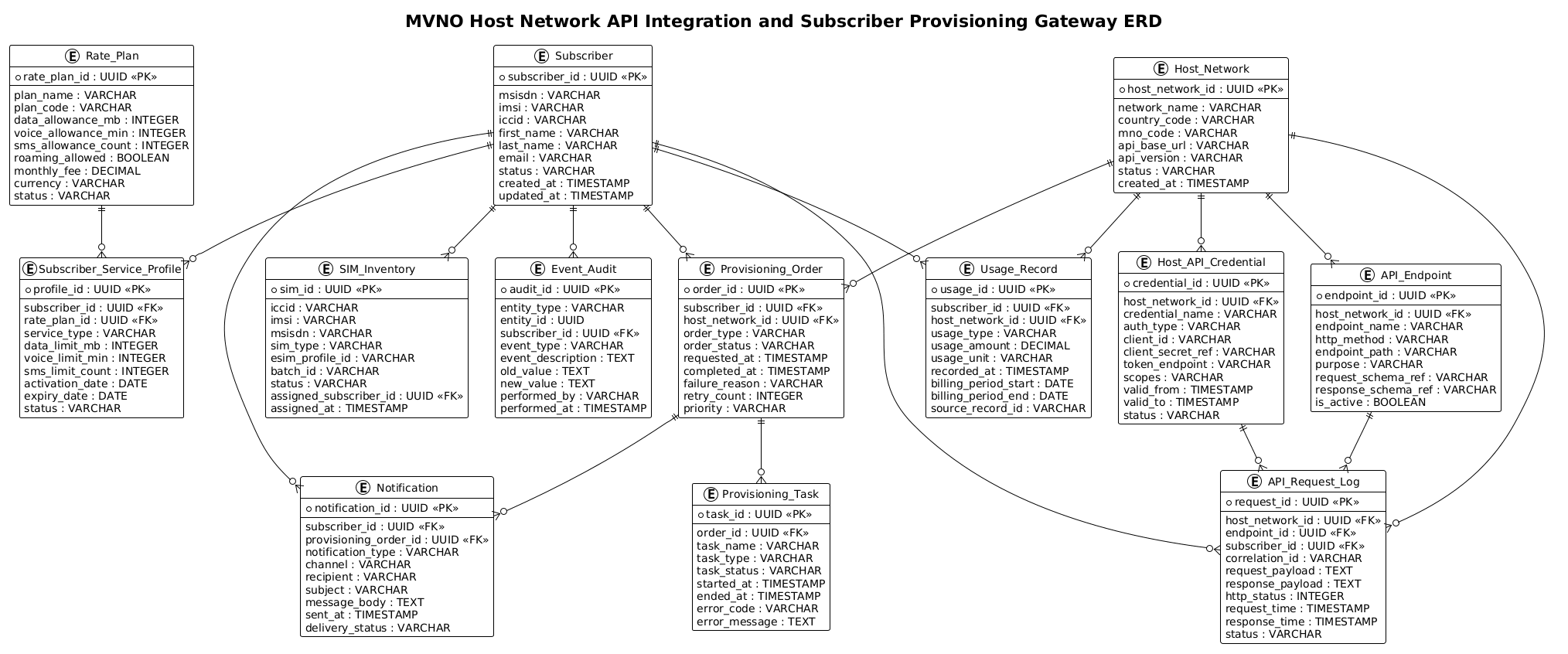
The following is the complete PlantUML source code used to generate this diagram. You can copy this code and paste it directly into the VPasCode editor to see the live rendering.
@startuml
!theme plain
title MVNO Host Network API Integration and Subscriber Provisioning Gateway ERD

/'
Diagram Context:
This ERD models the data relationships required for an MVNO to integrate with a host mobile network operator's API
and to provision subscribers through a centralized gateway. The diagram covers subscriber identity and service
profiles, host network credentials and endpoints, API request/response tracking, provisioning workflows, SIM and
eSIM inventory, rate plans, usage records, and event auditing. It is intended to show how subscriber lifecycle
data flows between the MVNO gateway and the host network while maintaining traceability across provisioning and
API integration activities.
'/

entity "Subscriber" as subscriber {
  * subscriber_id : UUID <<PK>>
  --
  msisdn : VARCHAR
  imsi : VARCHAR
  iccid : VARCHAR
  first_name : VARCHAR
  last_name : VARCHAR
  email : VARCHAR
  status : VARCHAR
  created_at : TIMESTAMP
  updated_at : TIMESTAMP
}

entity "Subscriber_Service_Profile" as service_profile {
  * profile_id : UUID <<PK>>
  --
  subscriber_id : UUID <<FK>>
  rate_plan_id : UUID <<FK>>
  service_type : VARCHAR
  data_limit_mb : INTEGER
  voice_limit_min : INTEGER
  sms_limit_count : INTEGER
  activation_date : DATE
  expiry_date : DATE
  status : VARCHAR
}

entity "Host_Network" as host_network {
  * host_network_id : UUID <<PK>>
  --
  network_name : VARCHAR
  country_code : VARCHAR
  mno_code : VARCHAR
  api_base_url : VARCHAR
  api_version : VARCHAR
  status : VARCHAR
  created_at : TIMESTAMP
}

entity "Host_API_Credential" as host_api_credential {
  * credential_id : UUID <<PK>>
  --
  host_network_id : UUID <<FK>>
  credential_name : VARCHAR
  auth_type : VARCHAR
  client_id : VARCHAR
  client_secret_ref : VARCHAR
  token_endpoint : VARCHAR
  scopes : VARCHAR
  valid_from : TIMESTAMP
  valid_to : TIMESTAMP
  status : VARCHAR
}

entity "API_Endpoint" as api_endpoint {
  * endpoint_id : UUID <<PK>>
  --
  host_network_id : UUID <<FK>>
  endpoint_name : VARCHAR
  http_method : VARCHAR
  endpoint_path : VARCHAR
  purpose : VARCHAR
  request_schema_ref : VARCHAR
  response_schema_ref : VARCHAR
  is_active : BOOLEAN
}

entity "API_Request_Log" as api_request_log {
  * request_id : UUID <<PK>>
  --
  host_network_id : UUID <<FK>>
  endpoint_id : UUID <<FK>>
  subscriber_id : UUID <<FK>>
  correlation_id : VARCHAR
  request_payload : TEXT
  response_payload : TEXT
  http_status : INTEGER
  request_time : TIMESTAMP
  response_time : TIMESTAMP
  status : VARCHAR
}

entity "Provisioning_Order" as provisioning_order {
  * order_id : UUID <<PK>>
  --
  subscriber_id : UUID <<FK>>
  host_network_id : UUID <<FK>>
  order_type : VARCHAR
  order_status : VARCHAR
  requested_at : TIMESTAMP
  completed_at : TIMESTAMP
  failure_reason : VARCHAR
  retry_count : INTEGER
  priority : VARCHAR
}

entity "Provisioning_Task" as provisioning_task {
  * task_id : UUID <<PK>>
  --
  order_id : UUID <<FK>>
  task_name : VARCHAR
  task_type : VARCHAR
  task_status : VARCHAR
  started_at : TIMESTAMP
  ended_at : TIMESTAMP
  error_code : VARCHAR
  error_message : TEXT
}

entity "SIM_Inventory" as sim_inventory {
  * sim_id : UUID <<PK>>
  --
  iccid : VARCHAR
  imsi : VARCHAR
  msisdn : VARCHAR
  sim_type : VARCHAR
  esim_profile_id : VARCHAR
  batch_id : VARCHAR
  status : VARCHAR
  assigned_subscriber_id : UUID <<FK>>
  assigned_at : TIMESTAMP
}

entity "Rate_Plan" as rate_plan {
  * rate_plan_id : UUID <<PK>>
  --
  plan_name : VARCHAR
  plan_code : VARCHAR
  data_allowance_mb : INTEGER
  voice_allowance_min : INTEGER
  sms_allowance_count : INTEGER
  roaming_allowed : BOOLEAN
  monthly_fee : DECIMAL
  currency : VARCHAR
  status : VARCHAR
}

entity "Usage_Record" as usage_record {
  * usage_id : UUID <<PK>>
  --
  subscriber_id : UUID <<FK>>
  host_network_id : UUID <<FK>>
  usage_type : VARCHAR
  usage_amount : DECIMAL
  usage_unit : VARCHAR
  recorded_at : TIMESTAMP
  billing_period_start : DATE
  billing_period_end : DATE
  source_record_id : VARCHAR
}

entity "Event_Audit" as event_audit {
  * audit_id : UUID <<PK>>
  --
  entity_type : VARCHAR
  entity_id : UUID
  subscriber_id : UUID <<FK>>
  event_type : VARCHAR
  event_description : TEXT
  old_value : TEXT
  new_value : TEXT
  performed_by : VARCHAR
  performed_at : TIMESTAMP
}

entity "Notification" as notification {
  * notification_id : UUID <<PK>>
  --
  subscriber_id : UUID <<FK>>
  provisioning_order_id : UUID <<FK>>
  notification_type : VARCHAR
  channel : VARCHAR
  recipient : VARCHAR
  subject : VARCHAR
  message_body : TEXT
  sent_at : TIMESTAMP
  delivery_status : VARCHAR
}

subscriber ||--o{ service_profile
subscriber ||--o{ provisioning_order
subscriber ||--o{ api_request_log
subscriber ||--o{ usage_record
subscriber ||--o{ event_audit
subscriber ||--o{ notification
subscriber ||--o{ sim_inventory

host_network ||--o{ host_api_credential
host_network ||--o{ api_endpoint
host_network ||--o{ api_request_log
host_network ||--o{ provisioning_order
host_network ||--o{ usage_record

host_api_credential ||--o{ api_request_log
api_endpoint ||--o{ api_request_log

provisioning_order ||--o{ provisioning_task
provisioning_order ||--o{ notification

rate_plan ||--o{ service_profile

@endumlStep-by-Step Architectural Walkthrough
Building a complex ERD requires a structured approach to ensure clarity and maintainability. We will break down the construction of this diagram into four distinct phases.
Phase 1: Canvas Configuration & Layout Directives
Before defining entities, we must set the stage for the diagram. We start by initializing the PlantUML block and applying the !theme plain directive. This ensures a clean, professional look suitable for technical documentation, removing unnecessary decorative elements that might distract from the data relationships.
@startuml
!theme plain
title MVNO Host Network API Integration and Subscriber Provisioning Gateway ERD

/'
Diagram Context:
This ERD models the data relationships required for an MVNO to integrate with a host mobile network operator's API
and to provision subscribers through a centralized gateway. The diagram covers subscriber identity and service
profiles, host network credentials and endpoints, API request/response tracking, provisioning workflows, SIM and
eSIM inventory, rate plans, usage records, and event auditing. It is intended to show how subscriber lifecycle
data flows between the MVNO gateway and the host network while maintaining traceability across provisioning and
API integration activities.
'/
@enduml
We also include a comment block using /' ... '/ to provide context for anyone reading the code. This is a best practice for keeping documentation self-contained.
Phase 2: Declaring Core Entities, Actors, and Boundaries
Next, we define the core entities. In PlantUML, we use the entity keyword followed by the entity name and an alias (e.g., "Subscriber" as subscriber). The alias is crucial for defining relationships later. Inside the curly braces, we list attributes. We use * to denote a Primary Key (PK) and < to denote Foreign Keys.
entity "Subscriber" as subscriber {
  * subscriber_id : UUID <>
  --
  msisdn : VARCHAR
  imsi : VARCHAR
  iccid : VARCHAR
  first_name : VARCHAR
  last_name : VARCHAR
  email : VARCHAR
  status : VARCHAR
  created_at : TIMESTAMP
  updated_at : TIMESTAMP
}
We repeat this process for all core entities like Host_Network, API_Request_Log, and Provisioning_Order. The separation line -- visually groups the primary key separately from the other attributes, improving readability.
Phase 3: Mapping Data Flows & Key Interactions
With entities defined, we now establish the relationships using the ||--o{ syntax. This specific notation represents a “One-to-Many” relationship where the “One” side is mandatory (the double bar ||) and the “Many” side is optional (the circle and arrow o{).
subscriber ||--o{ provisioning_order
subscriber ||--o{ api_request_log
host_network ||--o{ api_request_log
provisioning_order ||--o{ provisioning_task
For example, subscriber ||--o{ provisioning_order indicates that one subscriber must exist, but they may have zero or many provisioning orders. This accurately reflects the business logic of an MVNO system.
Phase 4: Grouping, Annotations & Visual Polish
While this diagram uses a flat layout for simplicity, the relationships naturally group the entities. The Subscriber entity acts as a central hub for most operational data. The Host_Network entity serves as the anchor for all external integration data. By ensuring consistent naming conventions (e.g., using underscores for multi-word entities) and clear attribute types (UUID, VARCHAR, TIMESTAMP), the diagram remains professional and easy to parse.
Syntax & Keyword Deep Dive
Understanding the specific PlantUML syntax used in this ERD is essential for customizing the diagram for your own needs.
entity "Name" as alias: Defines a new entity with a display name and a short alias used for referencing in relationships.* attribute : Type: The asterisk*marks the attribute as the Primary Key (PK). This is critical for database schema generation.<: A stereotype marker indicating that an attribute is a Foreign Key, linking to another entity.> --: A horizontal separator line inside an entity block, visually distinguishing the primary key from other attributes.||--o{: The relationship connector.||means “mandatory one” (the entity on the left must exist for the right to exist), ando{means “optional many” (the entity on the right can have zero or many instances)./' ... '/: The comment block syntax. This allows for multi-line text descriptions that do not render in the diagram but are visible in the source code.
Best Practices & Pitfalls to Avoid
When modeling complex ERDs for telecommunications systems, adhering to best practices ensures your diagrams remain maintainable.
- Consistent Naming Conventions: Always use the same casing and delimiters (e.g., underscores) for entity names and aliases. Mixing
Subscriberandsubscribercan lead to confusion. - Logical Grouping: While PlantUML arranges entities automatically, try to order your entity declarations in the code logically (e.g., core entities first, then relationship entities) to make the source code easier to read.
- Avoid Over-Complexity: If a diagram becomes too crowded, consider splitting it into multiple diagrams (e.g., one for Subscriber Management, one for API Integration) rather than trying to fit everything on one canvas.
- Document Foreign Keys Explicitly: Always mark foreign keys with
<. This makes the diagram self-documenting and helps developers quickly identify relationships without guessing.>
Start Building MVNO ERDs Faster with VPasCode
Design and visualize complex telecommunications data models instantly in your browser with VPasCode’s free PlantUML editor—no installation required.