


In the complex ecosystem of government finance, the integrity of tax processing relies on robust data architecture. A tax authority must manage millions of taxpayer records, process intricate income filings, calculate liabilities with precision, and simultaneously maintain a sophisticated risk-based audit selection engine. Without a clear visual blueprint, the relationships between taxpayer identities, filing histories, payment records, and audit cases can become convoluted, leading to data inconsistencies, compliance gaps, and inefficient enforcement workflows.

Visual modeling becomes the critical bridge between abstract policy requirements and concrete database implementation. By using diagram-as-code with PlantUML, architects can define the schema for the Tax Authority Income Assessment Return Processing and Audit Selection Engine with mathematical precision. This approach ensures that the data structures governing taxpayer registration, income reporting, assessment calculations, and audit case management are logically sound before a single line of SQL is written. It allows stakeholders to trace the lifecycle of a return from submission through assessment, payment, and potential audit, ensuring every entity is properly linked and constrained.
Understanding the Model: Purpose, Scope & Problem Framing
This Entity-Relationship Diagram (ERD) serves as the foundational data model for a modern tax administration system. Unlike generic business diagrams, this model specifically addresses the high-stakes domain of public finance, where data integrity and audit trails are paramount.
Diagram Abstraction & Representation
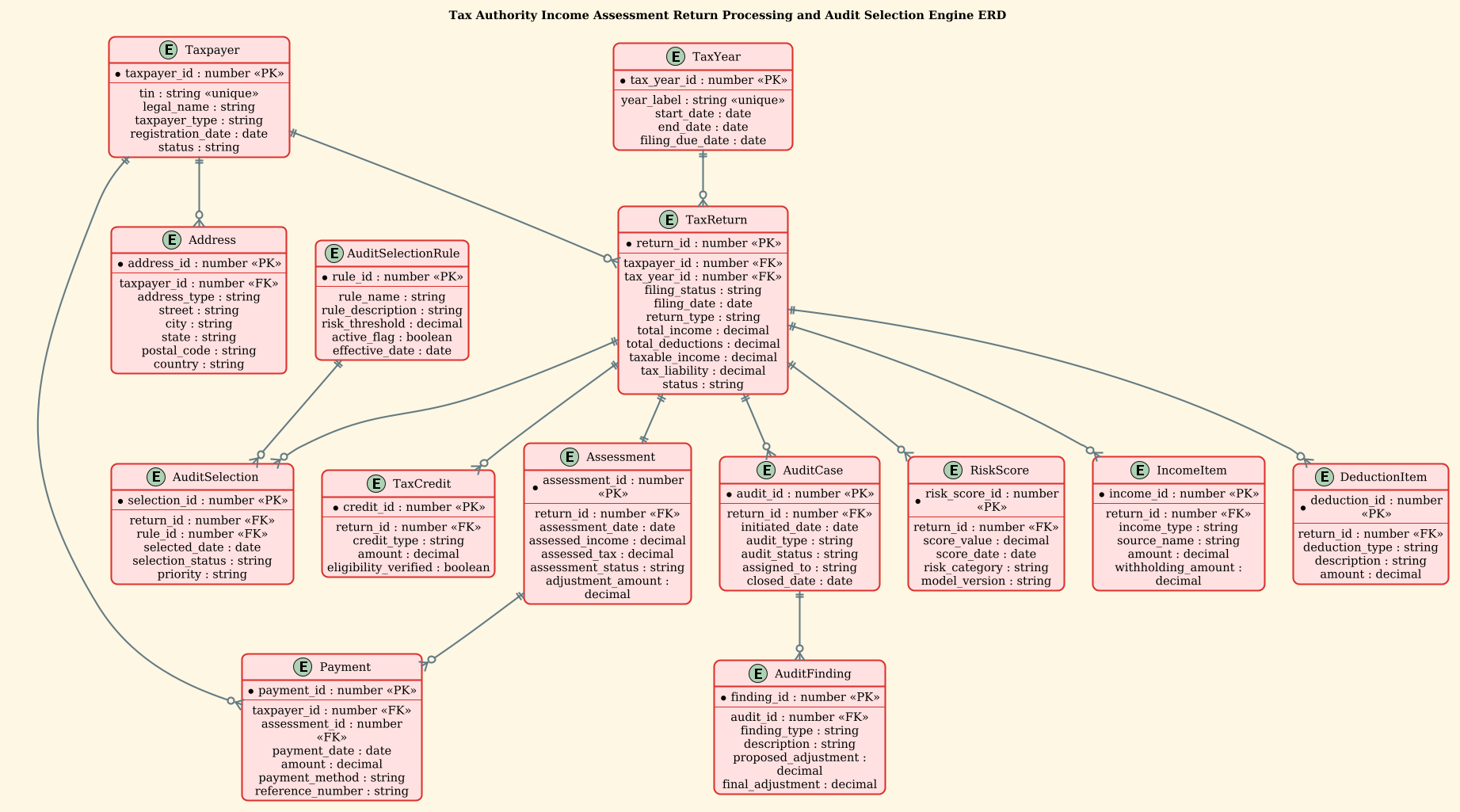
The diagram utilizes standard Entity-Relationship notation to map the static structure of the system. Entities represent the core nouns of the domain: the Taxpayer (the subject), the TaxReturn (the transactional event), and the Assessment (the legal determination). Attributes define the specific data points required for compliance, such as TIN (Taxpayer Identification Number), Withholding Amount, and Risk Score. Relationships (lines) define the cardinality, illustrating how one taxpayer can have many returns, or how a single assessment triggers multiple payment records.
Target Domain Scope & Scenario
The scope of this model covers the entire lifecycle of a tax filing within a government context. It begins with Taxpayer registration and Address management, moves through the submission of TaxReturns containing detailed IncomeItems and DeductionItems. It then models the downstream processes: the generation of an Assessment, the tracking of Payments, and the critical Audit Selection mechanism driven by RiskScores and Rules. Finally, it details the AuditCase and AuditFinding entities that manage the enforcement workflow.
Key Takeaways & Educational Insights
By constructing this diagram, you will gain insights into how to model one-to-many relationships (e.g., one return having many income items), how to handle temporal data (tax years), and how to structure audit trails (audit findings linked to cases). You will learn to separate static data (Taxpayer) from transactional data (TaxReturn) and derived data (Assessment), ensuring a normalized and scalable database design.
Complete Diagram & Full Source Code
Below is the complete blueprint for the Tax Authority ERD. This model defines the schema for processing income returns and selecting high-risk cases for audit, utilizing the sunlust theme for a professional, high-contrast visual style.
@startuml
!theme sunlust
title Tax Authority Income Assessment Return Processing and Audit Selection Engine ERD

/'
Diagram Context:
This ERD models the core data structures used by a tax authority to process income tax returns,
compute assessments, and select returns for audit. It covers taxpayer registration, filing,
income and deduction reporting, tax calculation, payment tracking, audit case management,
and risk-based audit selection. The diagram shows how a taxpayer's submitted return flows
through assessment and into potential audit workflows, supporting compliance and enforcement.
'/

entity "Taxpayer" as taxpayer {
  * taxpayer_id : number <<PK>>
  --
  tin : string <<unique>>
  legal_name : string
  taxpayer_type : string
  registration_date : date
  status : string
}

entity "Address" as address {
  * address_id : number <<PK>>
  --
  taxpayer_id : number <<FK>>
  address_type : string
  street : string
  city : string
  state : string
  postal_code : string
  country : string
}

entity "TaxYear" as tax_year {
  * tax_year_id : number <<PK>>
  --
  year_label : string <<unique>>
  start_date : date
  end_date : date
  filing_due_date : date
}

entity "TaxReturn" as tax_return {
  * return_id : number <<PK>>
  --
  taxpayer_id : number <<FK>>
  tax_year_id : number <<FK>>
  filing_status : string
  filing_date : date
  return_type : string
  total_income : decimal
  total_deductions : decimal
  taxable_income : decimal
  tax_liability : decimal
  status : string
}

entity "IncomeItem" as income_item {
  * income_id : number <<PK>>
  --
  return_id : number <<FK>>
  income_type : string
  source_name : string
  amount : decimal
  withholding_amount : decimal
}

entity "DeductionItem" as deduction_item {
  * deduction_id : number <<PK>>
  --
  return_id : number <<FK>>
  deduction_type : string
  description : string
  amount : decimal
}

entity "TaxCredit" as tax_credit {
  * credit_id : number <<PK>>
  --
  return_id : number <<FK>>
  credit_type : string
  amount : decimal
  eligibility_verified : boolean
}

entity "Assessment" as assessment {
  * assessment_id : number <<PK>>
  --
  return_id : number <<FK>>
  assessment_date : date
  assessed_income : decimal
  assessed_tax : decimal
  assessment_status : string
  adjustment_amount : decimal
}

entity "Payment" as payment {
  * payment_id : number <<PK>>
  --
  taxpayer_id : number <<FK>>
  assessment_id : number <<FK>>
  payment_date : date
  amount : decimal
  payment_method : string
  reference_number : string
}

entity "AuditCase" as audit_case {
  * audit_id : number <<PK>>
  --
  return_id : number <<FK>>
  initiated_date : date
  audit_type : string
  audit_status : string
  assigned_to : string
  closed_date : date
}

entity "AuditFinding" as audit_finding {
  * finding_id : number <<PK>>
  --
  audit_id : number <<FK>>
  finding_type : string
  description : string
  proposed_adjustment : decimal
  final_adjustment : decimal
}

entity "RiskScore" as risk_score {
  * risk_score_id : number <<PK>>
  --
  return_id : number <<FK>>
  score_value : decimal
  score_date : date
  risk_category : string
  model_version : string
}

entity "AuditSelectionRule" as audit_selection_rule {
  * rule_id : number <<PK>>
  --
  rule_name : string
  rule_description : string
  risk_threshold : decimal
  active_flag : boolean
  effective_date : date
}

entity "AuditSelection" as audit_selection {
  * selection_id : number <<PK>>
  --
  return_id : number <<FK>>
  rule_id : number <<FK>>
  selected_date : date
  selection_status : string
  priority : string
}

taxpayer ||--o{ address
taxpayer ||--o{ tax_return
taxpayer ||--o{ payment
tax_year ||--o{ tax_return
tax_return ||--o{ income_item
tax_return ||--o{ deduction_item
tax_return ||--o{ tax_credit
tax_return ||--|| assessment
tax_return ||--o{ audit_case
tax_return ||--o{ risk_score
tax_return ||--o{ audit_selection
assessment ||--o{ payment
audit_case ||--o{ audit_finding
audit_selection_rule ||--o{ audit_selection

@endumlStep-by-Step Architectural Walkthrough
Phase 1: Canvas Configuration & Layout Directives
Before defining any entities, we set the stage for the diagram’s visual identity. In PlantUML, the @startuml directive initializes the diagram, while the title provides the main heading. Crucially, we apply the !theme sunlust directive. This theme is selected for government and enterprise diagrams because it offers high contrast, professional colors, and clear typography, making it easy to read on various screens.
Additionally, we include a comment block using /' ... '/. This is a powerful feature for documentation; it allows us to embed a detailed context description directly within the code file without affecting the rendered diagram. This ensures the diagram remains self-documenting.
Phase 2: Declaring Core Entities, Actors, and Boundaries
The heart of the ERD lies in the entity definitions. We start with the foundational Taxpayer entity. This is the primary actor in the system. We define its attributes using a specific syntax: attribute_name : data_type. We use number for IDs, string for names, date for timestamps, and decimal for financial figures to ensure precision.
Notice the use of stereotypes like < (Primary Key) and < (Foreign Key). These are not just visual decorations; they communicate the database integrity constraints. For instance, tin is marked as <, indicating that every Taxpayer must have a distinct Taxpayer Identification Number, a critical requirement for government compliance.
We also define the TaxYear entity. This acts as a reference table, defining the fiscal periods. By linking TaxReturn to TaxYear, we ensure that returns are correctly categorized by the period they cover, allowing for historical analysis and due date management.
Phase 3: Mapping Data Flows & Key Interactions
Once entities are declared, we define their relationships using the ||--o{ and ||--|| syntax. These lines represent the cardinality of the relationships.
- One-to-Many (||–o{): The relationship
taxpayer ||--o{ tax_returnmeans one taxpayer can have zero or many tax returns. This is standard for a citizen filing returns over multiple years. - One-to-One (||–||): The relationship
tax_return ||--|| assessmentindicates a strict one-to-one link in this specific model. Each return generates exactly one final assessment (or a specific state of assessment). This reflects the legal principle that a filed return results in a single official determination of tax liability. - One-to-Many (||–o{): The
tax_return ||--o{ income_itemrelationship allows a single return to contain multiple sources of income (salary, dividends, interest), each stored as a distinct row in the IncomeItem table.
Phase 4: Grouping, Annotations & Visual Polish
The final phase involves the specialized entities for the Audit Selection Engine. We introduce RiskScore and AuditSelectionRule. The RiskScore entity is linked directly to the TaxReturn, capturing the output of the risk analysis algorithm (score value, category, model version). The AuditSelection entity acts as a bridge, linking a specific return to the specific rule that triggered its selection for an audit. This separation allows the system to change rules without altering the core return data, ensuring flexibility in enforcement policies.
Syntax & Keyword Deep Dive
To master this diagram, you must understand the specific PlantUML keywords and conventions used to enforce data integrity and visual clarity.
entity: The keyword used to define a database table or class. It takes a display name (e.g., “Taxpayer”) and an alias (e.g.,as taxpayer) which is used for referencing in relationships.attribute : type: Defines a column within the entity. The type (string, number, decimal, date) dictates the data storage requirements.<(Primary Key): A stereotype that marks a unique identifier for each record. In the diagram, it is often visually represented with an asterisk (*).> <(Foreign Key): A stereotype indicating a link to a primary key in another entity. This establishes the relational integrity.> ||--o{(Cardinality): The line style||means “one and only one” (mandatory one), whileo{means “zero or many” (optional many). This specific combination (||--o{) is used for relationships like a Taxpayer having multiple Addresses./' ... '/(Comment Block): A multi-line comment syntax that is ignored by the renderer but visible in the source code, perfect for embedding documentation.
Best Practices & Pitfalls to Avoid
When building complex government data models, adherence to best practices ensures the diagram remains maintainable and accurate.
- Normalize Your Data: Avoid repeating data. For example, do not put the taxpayer’s name inside the TaxReturn entity. Instead, store the taxpayer_id as a Foreign Key. This ensures that if a taxpayer’s name changes, you only update it in one place.
- Use Descriptive Aliases: While the display name might be “Tax Return”, the alias used for coding (e.g.,
as tax_return) should be concise and consistent. This makes the relationship lines cleaner and easier to read. - Explicit Cardinality: Always define the cardinality (one-to-many, one-to-one) explicitly. Ambiguity in relationships can lead to database design errors, such as orphaned records or data duplication.
- Separate Configuration from Data: Notice how AuditSelectionRule is a separate entity. This allows the government to change audit criteria (thresholds, rules) without modifying the core data schema or the code that processes returns.
Start Building Tax Authority ERDs Faster with VPasCode
Instantly visualize and edit your government data models in your browser with VPasCode, the free PlantUML editor for architects and developers.