


In the realm of modern governance, the integrity of a nation’s demographic data is paramount. Government agencies rely on robust Civil Registry systems to manage the lifecycle of citizens—from birth registration to identity verification, marriage licensing, and death certification. These systems must not only store data but also maintain strict relational integrity to ensure that a citizen’s history is accurately tracked, linked, and reported for vital statistics. A well-structured database schema is the backbone of these operations, ensuring that data regarding births, deaths, and marriages can be seamlessly queried to support public health initiatives, legal identity verification, and resource allocation.
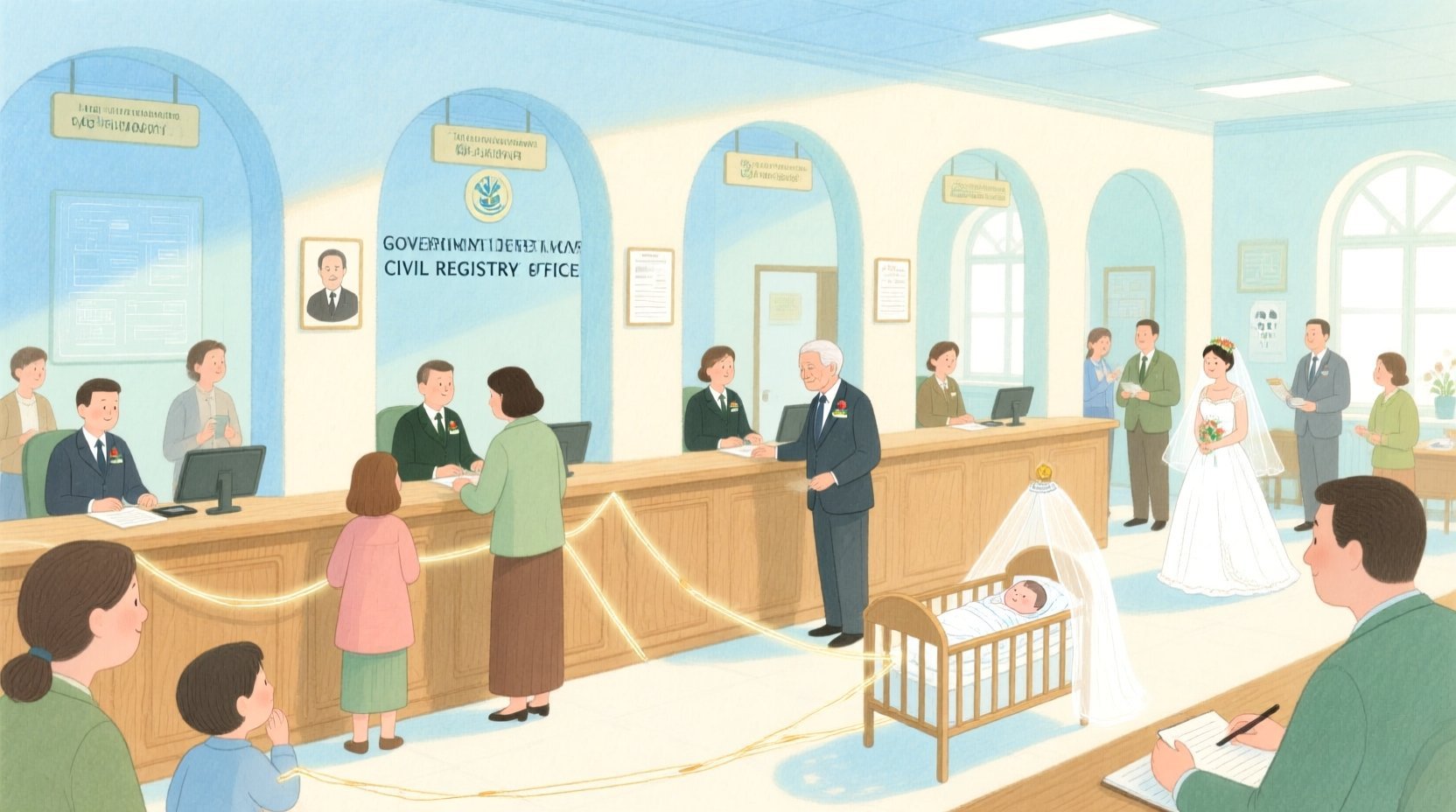
However, designing a database schema for such a complex domain is challenging. It requires balancing the need for detailed historical tracking with the constraints of normalized data structures. Developers and architects often struggle to visualize how a single “Person” entity relates to multiple event records (births, deaths, marriages) and how these events feed into broader statistical reporting. This is where diagram-as-code becomes a transformative tool. By using PlantUML to define the Entity Relationship Diagram (ERD), architects can treat their database design as living documentation, versioned alongside their application code, ensuring that the visual model always matches the physical database structure.
Understanding the Model: Purpose, Scope & Problem Framing
This tutorial focuses on constructing a comprehensive ERD for a Civic Identity Management system. The primary goal is to model the data structures required to support a government registry that handles vital events. Unlike simple application databases, this schema must account for the complexity of family relationships, legal statuses, and the historical audit trails required for government accountability.
Diagram Abstraction & Representation
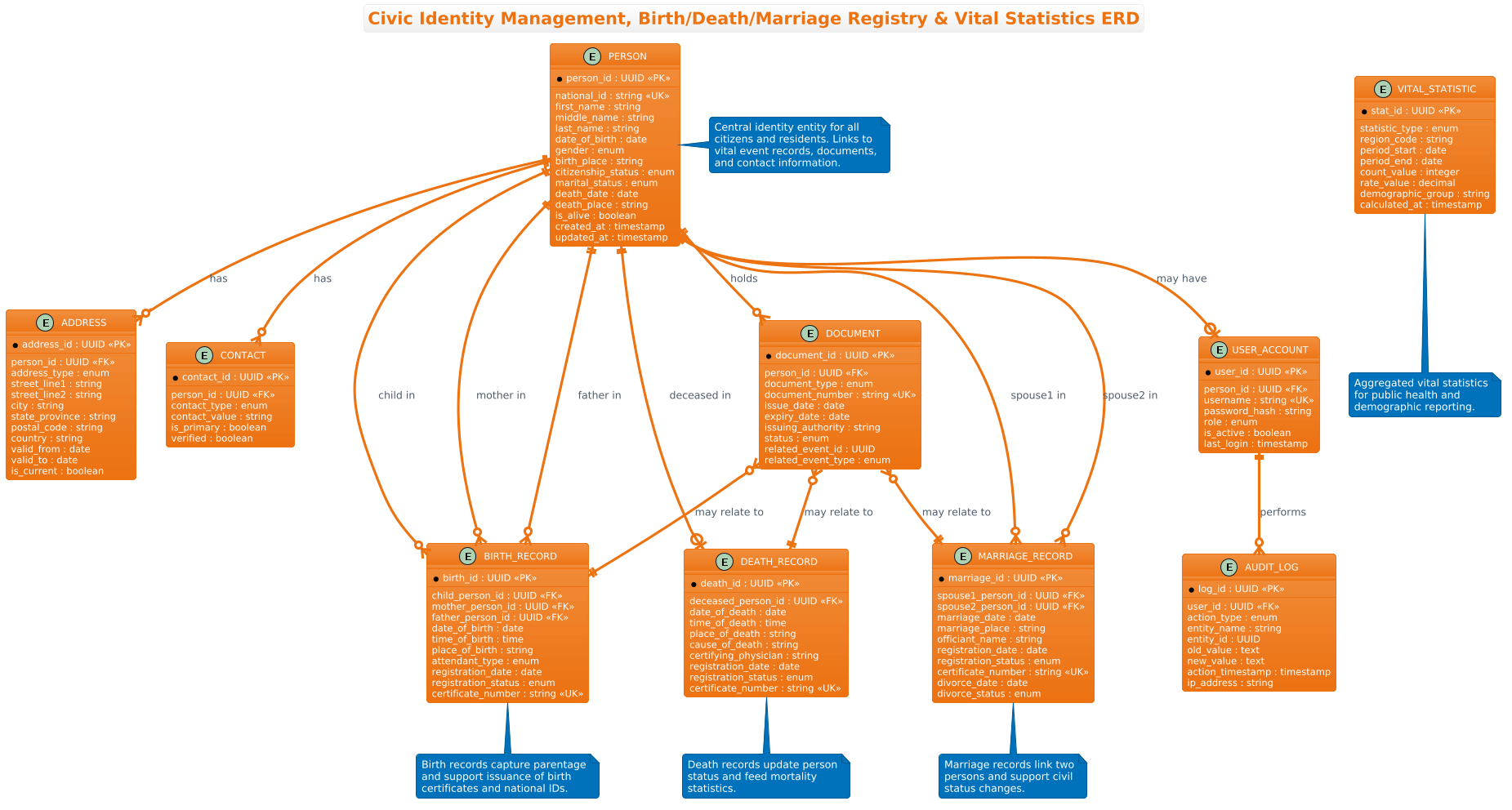
The ERD (Entity Relationship Diagram) is the ideal abstraction for this problem. It allows us to define Entities (tables) such as Person, BirthRecord, and DeathRecord, and explicitly map the Relationships between them. For instance, a single person can be a child in a birth record, a spouse in a marriage record, or the subject of a death record. The ERD visually clarifies these many-to-many or one-to-many cardinalities, which are critical for database normalization.
Target Domain Scope & Scenario
The scope of this model covers the core operational data for a civil registry. It includes the central Person entity, which serves as the anchor for all citizen data. It extends to Address and Contact management for communication, Document issuance for identity proofing (like birth certificates), and VitalStatistic aggregation for government reporting. Crucially, it also includes AuditLog and UserAccount entities to ensure that every change to the registry is tracked, satisfying strict government compliance and security requirements.
Key Takeaways & Educational Insights
By building this diagram, you will learn how to model complex real-world scenarios where one entity participates in multiple distinct roles (e.g., a person being both a mother and a child). You will also gain insights into handling optional relationships (like a deceased person not having a current address) and the importance of linking documents to specific events for legal traceability.
Complete Diagram & Full Source Code
Below is the complete, rendered ERD for the Civic Identity Management system. This diagram utilizes the aws-orange theme to provide a clean, professional aesthetic suitable for official documentation.
@startuml
!theme aws-orange
title Civic Identity Management, Birth/Death/Marriage Registry & Vital Statistics ERD

/'
Context:
This ERD models the core data structures for a government civil registry system.
It supports identity management for citizens and residents, registration of vital events
(births, deaths, marriages), and the generation of vital statistics. The diagram shows
the central person entity, event records linked to persons, address and contact details,
official document issuance, and the relationships that allow tracking of life events,
family links, and demographic reporting.
'/

' Entities
entity "PERSON" as person {
  * person_id : UUID <<PK>>
  --
  national_id : string <<UK>>
  first_name : string
  middle_name : string
  last_name : string
  date_of_birth : date
  gender : enum
  birth_place : string
  citizenship_status : enum
  marital_status : enum
  death_date : date
  death_place : string
  is_alive : boolean
  created_at : timestamp
  updated_at : timestamp
}

entity "ADDRESS" as address {
  * address_id : UUID <<PK>>
  --
  person_id : UUID <<FK>>
  address_type : enum
  street_line1 : string
  street_line2 : string
  city : string
  state_province : string
  postal_code : string
  country : string
  valid_from : date
  valid_to : date
  is_current : boolean
}

entity "CONTACT" as contact {
  * contact_id : UUID <<PK>>
  --
  person_id : UUID <<FK>>
  contact_type : enum
  contact_value : string
  is_primary : boolean
  verified : boolean
}

entity "BIRTH_RECORD" as birth {
  * birth_id : UUID <<PK>>
  --
  child_person_id : UUID <<FK>>
  mother_person_id : UUID <<FK>>
  father_person_id : UUID <<FK>>
  date_of_birth : date
  time_of_birth : time
  place_of_birth : string
  attendant_type : enum
  registration_date : date
  registration_status : enum
  certificate_number : string <<UK>>
}

entity "DEATH_RECORD" as death {
  * death_id : UUID <<PK>>
  --
  deceased_person_id : UUID <<FK>>
  date_of_death : date
  time_of_death : time
  place_of_death : string
  cause_of_death : string
  certifying_physician : string
  registration_date : date
  registration_status : enum
  certificate_number : string <<UK>>
}

entity "MARRIAGE_RECORD" as marriage {
  * marriage_id : UUID <<PK>>
  --
  spouse1_person_id : UUID <<FK>>
  spouse2_person_id : UUID <<FK>>
  marriage_date : date
  marriage_place : string
  officiant_name : string
  registration_date : date
  registration_status : enum
  certificate_number : string <<UK>>
  divorce_date : date
  divorce_status : enum
}

entity "DOCUMENT" as document {
  * document_id : UUID <<PK>>
  --
  person_id : UUID <<FK>>
  document_type : enum
  document_number : string <<UK>>
  issue_date : date
  expiry_date : date
  issuing_authority : string
  status : enum
  related_event_id : UUID
  related_event_type : enum
}

entity "VITAL_STATISTIC" as stats {
  * stat_id : UUID <<PK>>
  --
  statistic_type : enum
  region_code : string
  period_start : date
  period_end : date
  count_value : integer
  rate_value : decimal
  demographic_group : string
  calculated_at : timestamp
}

entity "USER_ACCOUNT" as user {
  * user_id : UUID <<PK>>
  --
  person_id : UUID <<FK>>
  username : string <<UK>>
  password_hash : string
  role : enum
  is_active : boolean
  last_login : timestamp
}

entity "AUDIT_LOG" as audit {
  * log_id : UUID <<PK>>
  --
  user_id : UUID <<FK>>
  action_type : enum
  entity_name : string
  entity_id : UUID
  old_value : text
  new_value : text
  action_timestamp : timestamp
  ip_address : string
}

' Relationships
person ||--o{ address : "has"
person ||--o{ contact : "has"
person ||--o{ document : "holds"
person ||--o| user : "may have"

person ||--o{ birth : "child in"
person ||--o{ birth : "mother in"
person ||--o{ birth : "father in"

person ||--o| death : "deceased in"
person ||--o{ marriage : "spouse1 in"
person ||--o{ marriage : "spouse2 in"

document }o--|| birth : "may relate to"
document }o--|| death : "may relate to"
document }o--|| marriage : "may relate to"

user ||--o{ audit : "performs"

' Notes
note right of person
  Central identity entity for all
  citizens and residents. Links to
  vital event records, documents,
  and contact information.
end note

note bottom of birth
  Birth records capture parentage
  and support issuance of birth
  certificates and national IDs.
end note

note bottom of death
  Death records update person
  status and feed mortality
  statistics.
end note

note bottom of marriage
  Marriage records link two
  persons and support civil
  status changes.
end note

note bottom of stats
  Aggregated vital statistics
  for public health and
  demographic reporting.
end note

@endumlStep-by-Step Architectural Walkthrough
Phase 1: Canvas Configuration & Layout Directives
Every PlantUML diagram begins with configuration directives that set the stage for the visual output. In this government-grade ERD, we prioritize clarity and professional aesthetics.
We start by declaring the theme using !theme aws-orange. This applies a specific color palette (shades of orange and grey) that aligns with enterprise standards, making the diagram visually distinct and ready for official reports. We also add a title directive to ensure the diagram is self-documenting. Finally, we include a comment block using /' ... '/ to provide a textual context for the diagram’s purpose, which is crucial for maintaining documentation alongside the code.
!theme aws-orange
title Civic Identity Management, Birth/Death/Marriage Registry & Vital Statistics ERD

/'
Context: [Description of the registry system]
'/
Phase 2: Declaring Core Entities, Actors, and Boundaries
The foundation of the ERD is the Person entity. In a civil registry, the individual is the central anchor. We define it using the entity keyword, followed by a unique alias (e.g., as person). Inside the entity block, we list attributes. We use * to denote Primary Keys (PK) and -- to separate keys from regular attributes.
For government systems, data types are critical. We use UUID for unique identifiers to avoid collisions across different jurisdictions. We also explicitly define national_id as a Unique Key (<) to ensure no two citizens share the same national ID. Other attributes like date_of_birth and is_alive (boolean) are essential for demographic tracking.
entity "PERSON" as person {
  * person_id : UUID <>
  --
  national_id : string <>
  first_name : string
  is_alive : boolean
}
Phase 3: Mapping Data Flows & Key Interactions
Once the core entities are defined, we establish the relationships. This is where the complexity of the registry system is modeled. We use the ||--o{ syntax to define cardinality. The || represents a mandatory one-to-one relationship, while o{ represents an optional one-to-many relationship.
For example, a Person can have zero or many Birth Records (if we consider historical anomalies or adoption scenarios, though typically one, the schema allows flexibility). However, a Birth Record must have exactly one Child. We use specific relationship labels like "child in", "mother in", and "father in" to clarify the role the person plays in that specific event. This distinction is vital for understanding the data model: a person is not just linked to a birth record; they are the child, the mother, or the father.
person ||--o{ birth : "child in"
person ||--o{ birth : "mother in"
person ||--o{ birth : "father in"
Phase 4: Grouping, Annotations & Visual Polish
To make the diagram readable and informative, we add Notes. These are not just decorative; they explain the business logic behind the data. For instance, a note attached to the Birth Record explains that it captures parentage and supports certificate issuance. We use the note directive with position modifiers like right of or bottom of to place these explanations strategically around the entities.
We also include Audit and User Account entities. In government systems, compliance is non-negotiable. The AUDIT_LOG entity tracks every change made to the registry, linking back to the USER_ACCOUNT that performed the action. This ensures a complete chain of custody for all data modifications.
note right of person
  Central identity entity for all
  citizens and residents.
end note

user ||--o{ audit : "performs"
Syntax & Keyword Deep Dive
PlantUML’s ERD notation is powerful and concise. Here is a breakdown of the specific syntax elements used in this government registry model:
entity "NAME" as alias: Defines a new table. Theas aliaspart is crucial for creating shorter references in relationship definitions (e.g., usingpersoninstead ofPERSONin lines).* attribute : type <: The asterisk> *and the<stereotype explicitly mark a column as the Primary Key. This is standard ERD notation for database design.> --: This separator line visually divides the Primary Key and Unique Keys from the rest of the attributes in the entity box, improving readability.||--o{: This is the cardinality notation.||means “one and only one” (mandatory), ando{means “zero or many” (optional). This combination defines the “One-to-Many” relationship where the “One” side is mandatory.note right of [entity]: Creates a text box attached to a specific entity. This is used for adding context without cluttering the main entity definitions.!theme [name]: A directive to apply a pre-defined color theme to the entire diagram, ensuring consistency across all documentation.
Best Practices & Pitfalls to Avoid
When designing ERDs for complex government systems, follow these best practices to ensure your model remains maintainable and clear:
- Use Descriptive Aliases: Always define an alias for your entities (e.g.,
as birth). This prevents the diagram from becoming a wall of text and makes relationship lines easier to read. - Separate Concerns: Keep audit trails (
AUDIT_LOG) and user management (USER_ACCOUNT) distinct from the core business entities (PERSON,BIRTH_RECORD). This separation makes the diagram easier to understand for domain experts who might not care about system logs. - Be Explicit with Cardinality: Don’t assume the reader knows the business rules. Use specific relationship labels like
"spouse1 in"rather than generic terms like"related to". This removes ambiguity about how the data connects. - Leverage Comments: Use the
/' ... '/comment block at the top to provide a high-level summary of the system’s purpose. This is invaluable for new developers or auditors reviewing the schema.
Start Building Government ERDs Faster with VPasCode
Design complex civic registry schemas instantly in your browser with VPasCode, the free PlantUML editor that offers live rendering and zero setup.