


In the realm of public administration and electoral integrity, data modeling is not merely a technical exercise; it is the bedrock of democratic trust. For election commissions, the ability to accurately track voter registration, manage electoral districts, and assign polling stations is critical for ensuring that every eligible citizen is counted and that the voting process remains secure and transparent. A poorly designed database schema can lead to duplicate records, misassigned polling locations, and logistical nightmares on election day. Therefore, visualizing these complex data relationships before implementation is a non-negotiable best practice for government architects.

Diagram-as-code tools like PlantUML, when used within the VPasCode editor, offer a unique advantage for these high-stakes projects. By defining the data structure in code, architects can version the schema logic, automate documentation updates, and instantly visualize the impact of changes. This tutorial serves as a masterclass in constructing a robust Entity-Relationship Diagram (ERD) for an Election Commission system. We will explore how to model the lifecycle of a voter from registration to casting a ballot, ensuring that the relationships between voters, districts, polling stations, and elections are logically sound and visually clear.
Understanding the Model: Purpose, Scope & Problem Framing
This tutorial focuses on the Entity-Relationship Diagram (ERD) notation, which is the industry standard for defining the logical structure of relational databases. Unlike flowcharts that depict processes or UML class diagrams that focus on software implementation, an ERD specifically models the data entities and the relationships between them.
Diagram Abstraction & Representation
In this specific context, the diagram abstracts the physical world of an election into a logical data model. The Voter entity represents the citizen, the ElectoralDistrict represents the geographic jurisdiction, and the PollingStation represents the physical voting location. The Vote entity acts as a transactional record linking a specific citizen to a specific election and location. This abstraction allows system designers to validate cardinality (e.g., “One voter casts one vote per election”) without getting bogged down in SQL syntax or programming languages.
Target Domain Scope & Scenario
The scope of this model covers the core operational workflow of a national election commission. It intentionally excludes peripheral systems like campaign finance tracking or voter education portals to maintain focus on the critical path: Registration → Assignment → Voting. The diagram defines the boundaries for the voter roll database, ensuring that every voter is uniquely identified by a national ID and linked to a specific district and polling station.
Key Takeaways & Educational Insights
By following this guide, you will learn how to:
- Define entities with primary keys (PK) and foreign keys (FK) to enforce data integrity.
- Model one-to-many relationships, such as how one district contains many polling stations.
- Implement a junction table (the Vote entity) to resolve the many-to-many relationship between voters and elections.
- Apply professional styling using the VPasCode theme to ensure the diagram is publication-ready.
Complete Diagram & Full Source Code
Before diving into the step-by-step construction, here is the complete, finalized diagram that we will be building. This ERD illustrates the complete data flow for the voter registration and polling assignment system.
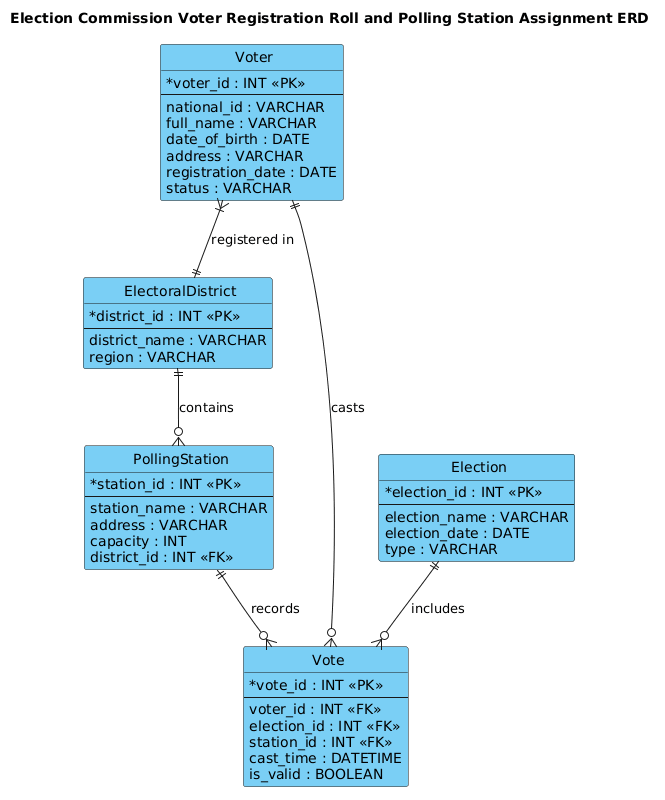
@startuml
!include https://static.visual-paradigm.com/web/resources/plantuml-stdlib/themes/vp.puml

title Election Commission Voter Registration Roll and Polling Station Assignment ERD

/'
Diagram Context:
This ERD models the core data structures for a system that manages voter registration
and assigns registered voters to polling stations. The central entity is Voter, which
holds personal and registration details. Each voter belongs to an Electoral District
and is assigned to a specific Polling Station for casting their vote. Polling Stations
are located within a district and have a defined capacity. A Voter may cast a Vote
in an Election; each vote is linked to one voter, one election, and one polling station.
This supports maintaining an accurate voter roll, ensuring each voter is assigned to
the correct polling station, and recording votes cast per election.
'/

entity "Voter" as voter {
  * voter_id : INT <<PK>>
  --
  national_id : VARCHAR
  full_name : VARCHAR
  date_of_birth : DATE
  address : VARCHAR
  registration_date : DATE
  status : VARCHAR
}

entity "ElectoralDistrict" as district {
  * district_id : INT <<PK>>
  --
  district_name : VARCHAR
  region : VARCHAR
}

entity "PollingStation" as station {
  * station_id : INT <<PK>>
  --
  station_name : VARCHAR
  address : VARCHAR
  capacity : INT
  district_id : INT <<FK>>
}

entity "Election" as election {
  * election_id : INT <<PK>>
  --
  election_name : VARCHAR
  election_date : DATE
  type : VARCHAR
}

entity "Vote" as vote {
  * vote_id : INT <<PK>>
  --
  voter_id : INT <<FK>>
  election_id : INT <<FK>>
  station_id : INT <<FK>>
  cast_time : DATETIME
  is_valid : BOOLEAN
}

voter }|--|| district : "registered in"
district ||--o{ station : "contains"
voter ||--o{ vote : "casts"
election ||--o{ vote : "includes"
station ||--o{ vote : "records"

@endumlStep-by-Step Architectural Walkthrough
Building a professional ERD requires a methodical approach. We will construct this diagram in four distinct phases, moving from global configuration to specific entity definitions and finally to relationship mapping.
Phase 1: Canvas Configuration & Layout Directives
Every high-quality PlantUML diagram starts with proper configuration. In the first block of code, we import a professional theme to ensure the diagram looks polished immediately. We also define a title to provide context for anyone viewing the documentation.
@startuml
!include https://static.visual-paradigm.com/web/resources/plantuml-stdlib/themes/vp.puml

title Election Commission Voter Registration Roll and Polling Station Assignment ERD
The !include directive pulls in the VPasCode standard library, which provides modern styling for entities and relationships. The title command sets the header for the diagram. We also add a comment block using /' ... '/ to document the business logic directly within the code file, ensuring that the diagram remains self-explanatory for future developers.
Phase 2: Declaring Core Entities, Actors, and Boundaries
The next phase involves defining the entities. In our government context, these are the tables that will exist in the database. We use the entity keyword followed by the table name and an alias for brevity in relationships.
entity "Voter" as voter {
  * voter_id : INT <>
  --
  national_id : VARCHAR
  full_name : VARCHAR
  date_of_birth : DATE
  address : VARCHAR
  registration_date : DATE
  status : VARCHAR
}
Notice the use of PK (Primary Key) and FK (Foreign Key) stereotypes. The PK ensures every voter has a unique identifier. The -- separator line visually divides the key column from the descriptive attributes. We repeat this pattern for ElectoralDistrict, PollingStation, Election, and Vote, ensuring each has a unique ID and relevant attributes like capacity or is_valid.
Phase 3: Mapping Data Flows & Key Interactions
Once the entities are defined, we must establish how they relate to one another. This is the core of the ERD. We use PlantUML’s relationship syntax to define cardinality.
voter }|--|| district : "registered in"
district ||--o{ station : "contains"
voter ||--o{ vote : "casts"
election ||--o{ vote : "includes"
station ||--o{ vote : "records"
Let’s break down the syntax:
}|--||(One-to-One Mandatory): A voter must be registered in exactly one district.||--o{(One-to-Many Optional): One district can contain zero or many polling stations.||--o{(One-to-Many Optional): One voter can cast zero or many votes (across different elections).
The Vote entity is crucial here. It acts as a bridge (or junction table) linking the Voter, Election, and PollingStation entities. Without this specific entity, we could not track which specific vote was cast at which location.
Phase 4: Grouping, Annotations & Visual Polish
In this final phase, we ensure the diagram is readable. While the VPasCode theme handles most styling, we rely on the title and the /' ... '/ comment block to provide a narrative context. The relationships are labeled with verbs like “registered in” and “contains” to make the diagram readable even to non-technical stakeholders, such as government officials or policy makers.
Syntax & Keyword Deep Dive
To master PlantUML ERD modeling, you must understand the specific keywords and symbols used to define data integrity and relationships.
- entity: The keyword used to define a database table or entity. It is followed by the display name and an alias.
- entity_name { … }: The block syntax used to list attributes (columns) within an entity.
- * attribute : TYPE <
>: The asterisk *indicates the primary key. TheTYPEdefines the data type (e.g., INT, VARCHAR), andPKis the stereotype marking it as a Primary Key. - attribute : TYPE <
>: The FKstereotype marks a column as a Foreign Key, indicating it references the primary key of another entity. - —: A separator line used inside an entity block to visually group attributes, often separating keys from other fields.
- relationship syntax (e.g., ||–o{): Defines the cardinality.
|represents “one” (mandatory),|{represents “many” (mandatory),|o{represents “many” (optional), ando{represents “zero or many”. - /’ … ‘/: The comment syntax for PlantUML. This allows you to embed text documentation that is not rendered as a diagram element but is visible in the source code.
Best Practices & Pitfalls to Avoid
When modeling complex government systems, adherence to best practices ensures the diagram remains maintainable and accurate.
- Normalize Your Entities: Avoid putting all voter data in one giant table. Separating PollingStation from Voter allows you to update station capacities or locations without altering voter records. This separation of concerns is critical for scalability.
- Use Meaningful Aliases: While defining an entity as
entity "Voter" as voter, always use the alias (voter) in your relationship definitions. This keeps the code clean and prevents syntax errors when entity names change. - Define Cardinality Explicitly: Never leave relationships ambiguous. Clearly mark whether a relationship is mandatory (
|) or optional (o). For example, a voter must belong to a district, but a polling station might be empty (optional). - Document the Logic: Always include the
/' ... '/comment block. In government projects, audit trails and documentation are as important as the code itself. This block serves as a living definition of the system’s business rules.
Start Building Government ERDs Faster with VPasCode
Instantly prototype, preview, and customize your voter registration ERD online in VPasCode without installing any database tools or plugins.