


In the highly regulated dairy manufacturing sector, ensuring the safety of pasteurized milk is not merely a quality control step but a legal imperative. High-Temperature Short-Time (HTST) pasteurization relies on a precise balance of temperature and flow rate to eliminate pathogens while preserving nutritional value. The core challenge for data architects and compliance engineers is capturing the complex interplay between production batches, physical equipment constraints, and real-time sensor data to prove that every gallon of milk met the required holding time. Without a robust data model, traceability becomes fragmented, making regulatory audits and recall investigations nearly impossible.
This tutorial demonstrates how to translate these critical operational requirements into a structured Entity Relationship Diagram (ERD) using PlantUML. By modeling the relationships between product batches, process runs, holding tubes, and flow meter readings, we create a “living” blueprint of the validation logic. Using VPasCode, a free web-based diagram-as-code editor, we can instantly visualize how data flows from the production floor to the compliance ledger, ensuring that the connection between a specific batch and its validation result is mathematically unbreakable.
Understanding the Model: Purpose, Scope & Problem Framing
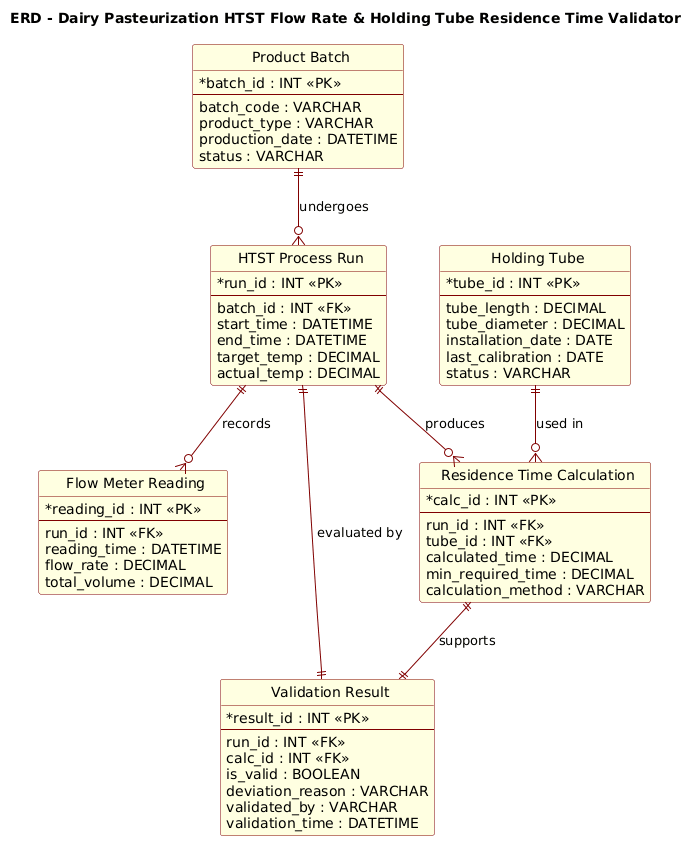
The diagram we are about to build serves as the foundational data schema for a Dairy HTST Validation System. Unlike a simple inventory list, this ERD must capture temporal dynamics and physical constraints. It models the lifecycle of a single production batch as it moves through the pasteurization unit, ensuring that the residence time (the duration milk stays in the holding tube) is calculated correctly based on the flow rate and the tube dimensions.
Diagram Abstraction & Representation
In this context, the ERD acts as the logical backbone for audit trails. The Product Batch entity represents the physical unit of production. The HTST Process Run entity captures the specific event where that batch was processed. Crucially, the model separates equipment state (the Holding Tube dimensions and calibration) from operational data (the Flow Meter Reading). This separation is vital because the physical tube doesn’t change, but the flow rate and validation status do for every single run. The relationships define the cardinality: one batch undergoes many runs (historical tracking), and one run produces one validation result.
Target Domain Scope & Scenario
The scope is strictly limited to the validation logic of the HTST system. We are not modeling the entire dairy supply chain (e.g., milking, storage tanks, or distribution trucks). Instead, we focus on the boundary where raw milk becomes safe, pasteurized product. The diagram explicitly links the calculated residence time to the actual flow meter data and the physical tube geometry. This ensures that if a flow meter drifts or a tube is replaced, the system can recalculate the residence time and flag the batch for re-evaluation.
Key Takeaways & Educational Insights
By constructing this diagram, you will learn how to model one-to-many relationships for sensor data, how to link physical asset metadata to operational events, and how to structure a validation outcome that depends on multiple upstream data points. You will see how to use PlantUML to enforce referential integrity visually, ensuring that no validation result exists without a corresponding run and calculation.
Complete Diagram & Full Source Code
Below is the final, rendered Entity Relationship Diagram for the Dairy HTST validation system. This blueprint encapsulates the logic required to track batches, calculate residence times, and certify compliance.
@startuml
!include https://static.visual-paradigm.com/web/resources/plantuml-stdlib/themes/rose.puml

title ERD - Dairy Pasteurization HTST Flow Rate & Holding Tube Residence Time Validator

/'
Diagram Context:
This entity relationship diagram models the data required to validate a High-Temperature Short-Time (HTST)
pasteurization process in a dairy plant. The system tracks product batches as they flow through the HTST
system, recording critical process parameters such as flow rate and holding tube residence time.
The ERD supports regulatory compliance by linking each batch to its process run, the physical holding
tube used, and the flow meter readings captured during production. It also stores validation results
that determine whether each batch met the required time-temperature and flow conditions for safe
pasteurization. The relationships show how batches, equipment, sensor readings, and validation outcomes
are connected to enable traceability and audit reporting.
'/

entity "Product Batch" as batch {
  * batch_id : INT <<PK>>
  --
  batch_code : VARCHAR
  product_type : VARCHAR
  production_date : DATETIME
  status : VARCHAR
}

entity "HTST Process Run" as run {
  * run_id : INT <<PK>>
  --
  batch_id : INT <<FK>>
  start_time : DATETIME
  end_time : DATETIME
  target_temp : DECIMAL
  actual_temp : DECIMAL
}

entity "Holding Tube" as tube {
  * tube_id : INT <<PK>>
  --
  tube_length : DECIMAL
  tube_diameter : DECIMAL
  installation_date : DATE
  last_calibration : DATE
  status : VARCHAR
}

entity "Flow Meter Reading" as flow {
  * reading_id : INT <<PK>>
  --
  run_id : INT <<FK>>
  reading_time : DATETIME
  flow_rate : DECIMAL
  total_volume : DECIMAL
}

entity "Residence Time Calculation" as residence {
  * calc_id : INT <<PK>>
  --
  run_id : INT <<FK>>
  tube_id : INT <<FK>>
  calculated_time : DECIMAL
  min_required_time : DECIMAL
  calculation_method : VARCHAR
}

entity "Validation Result" as validation {
  * result_id : INT <<PK>>
  --
  run_id : INT <<FK>>
  calc_id : INT <<FK>>
  is_valid : BOOLEAN
  deviation_reason : VARCHAR
  validated_by : VARCHAR
  validation_time : DATETIME
}

batch ||--o{ run : "undergoes"
run ||--o{ flow : "records"
run ||--o{ residence : "produces"
tube ||--o{ residence : "used in"
run ||--|| validation : "evaluated by"
residence ||--|| validation : "supports"

@endumlStep-by-Step Architectural Walkthrough
Phase 1: Canvas Configuration & Layout Directives
Before defining entities, we must set the visual theme and the diagram title to establish context. In PlantUML, we use the @startuml directive to begin the code block. We immediately include the rose.puml theme to give the diagram a professional, rose-colored aesthetic that is standard for enterprise documentation.
@startuml
!include https://static.visual-paradigm.com/web/resources/plantuml-stdlib/themes/rose.puml

title ERD - Dairy Pasteurization HTST Flow Rate & Holding Tube Residence Time Validator
We also include a comment block using /' ... '/ syntax. This is crucial for documentation; it allows us to embed a human-readable description of the diagram’s purpose directly within the code, ensuring that anyone reading the source file understands the manufacturing context without needing to render the image first.
Phase 2: Declaring Core Entities, Actors, and Boundaries
The foundation of any ERD is the entity definition. We define the Product Batch and HTST Process Run as our primary actors. The entity keyword is used to declare a table, and we assign an alias (e.g., as batch) for easier relationship mapping later.
entity "Product Batch" as batch {
  * batch_id : INT <>
  --
  batch_code : VARCHAR
  product_type : VARCHAR
  production_date : DATETIME
  status : VARCHAR
}
Notice the use of * before the primary key (batch_id) to visually denote it as the unique identifier. The -- separator separates keys from attributes. We repeat this pattern for the Holding Tube entity, which stores static physical properties like tube_length and tube_diameter. These dimensions are critical because they are constants used in the residence time calculation, distinct from the dynamic flow data.
Phase 3: Mapping Data Flows & Key Interactions
The most complex part of this model is the Residence Time Calculation and Flow Meter Reading entities. These represent the dynamic data generated during the process. The Flow Meter Reading is linked to a specific run via a foreign key (run_id), indicating that multiple readings occur during a single process run.
entity "Residence Time Calculation" as residence {
* calc_id : INT <>
--
run_id : INT <>
tube_id : INT < >
calculated_time : DECIMAL
min_required_time : DECIMAL
calculation_method : VARCHAR
} This entity acts as a bridge. It takes the run_id (the event) and the tube_id (the physical constraint) to compute the calculated_time. This separation allows the system to recalculate the residence time if the tube calibration changes without altering the historical flow data.
Phase 4: Grouping, Annotations & Visual Polish
Finally, we define the relationships using PlantUML’s ERD syntax. The ||--o{ notation indicates a one-to-many relationship (one batch undergoes many runs). The ||--|| notation indicates a mandatory one-to-one relationship, ensuring that every validation result is tied to exactly one run and one calculation.
batch ||--o{ run : "undergoes"
run ||--o{ flow : "records"
run ||--o{ residence : "produces"
tube ||--o{ residence : "used in"
run ||--|| validation : "evaluated by"
residence ||--|| validation : "supports"
These relationship lines visually connect the entities, making the data flow intuitive. The labels like “undergoes” and “evaluated by” add semantic meaning, turning a technical schema into a readable business process map.
Syntax & Keyword Deep Dive
PlantUML provides a rich set of keywords for Entity Relationship Diagrams that allow for precise modeling of database schemas. Here are the key elements used in this tutorial:
entity: Defines a new table or entity. The syntax isentity "Name" as alias { ... }.*(Asterisk): Preceding an attribute (e.g.,* batch_id) marks it as the Primary Key (PK) in the visual representation.<and> <: Stereotypes used to explicitly label Primary Keys and Foreign Keys within the entity definition.> --(Double Dash): A separator line used to divide primary keys from regular attributes within an entity block.||--o{: Represents a one-to-many relationship. The||means “one” (mandatory) ando{means “zero or many” (optional) on the other side.||--||: Represents a mandatory one-to-one relationship, ensuring strict referential integrity between two entities./' ... '/: The syntax for multi-line comments in PlantUML, allowing for rich documentation embedded directly in the code.
Best Practices & Pitfalls to Avoid
When modeling complex manufacturing data like HTST validation, adhering to best practices ensures your diagram remains maintainable and accurate.
- Separate Static from Dynamic Data: As seen in this model, keep physical equipment properties (tube dimensions) in a separate entity from operational data (flow readings). This prevents data redundancy and allows for easier updates when equipment is replaced.
- Use Descriptive Aliases: While the entity name might be “HTST Process Run”, using a short alias like
runin relationships makes the code cleaner and easier to read. - Explicit Cardinality: Always define the cardinality (one-to-many, one-to-one) clearly. In safety-critical systems, knowing that a validation result must exist for a run (mandatory one-to-one) is as important as the data itself.
- Embed Context: Never rely solely on the visual diagram. Use the
/' ... '/comment block to explain the business logic, ensuring the diagram remains self-documenting for future engineers.
Start Building Dairy HTST ERDs Faster with VPasCode
Instantly render, customize, and share your manufacturing data models online with VPasCode’s free PlantUML editor—no installation required.